
About REDA AI
AI funding and usage
AI included uses REDA credits. Bring your own AI uses your organisation’s provider account, billed directly by that provider. The licence selects one funding model for the organisation. In either model, REDA AI governs configured tools and actions in Salesforce. Set up your licence and AI accounts.
![The REDA AI chat panel open over a Salesforce Inquiry record page. Its header carries the REDA mark, the agent name Mira - Consul with a green online dot, and the record it is working on, Test1 REDA1 [ Leasing ]. Below the greeting “Ask me anything about your data” and a Context label, twelve suggestion chips are stacked: Score and summarise this inquiry, Summarize this record, Draft outreach message, Show my open tasks, Find matching properties, Create a follow-up task, Show available tour slots, Show related records, Check application status, What can you help me with, Prepare conversion checklist, View full activity timeline and Escalate to leasing agent. A message box sits at the bottom with a voice button and an attachment button.](/assets/kb/ai/01-getting-started/chat-on-record-page.png)
What is REDA AI?
REDA AI is an AI-powered assistant that lives directly inside your Salesforce org. It brings conversational AI to your team — allowing users to ask questions, retrieve information, and take actions in Salesforce using plain language, without needing to navigate complex menus or run reports.
REDA AI is installed as a managed package from the Salesforce AppExchange. Once installed, your administrator configures one or more AI Agents, each tailored to a specific role or use case in your business. Users interact with the agent through a familiar chat interface that appears on the pages they already work in.
REDA AI is the AI layer of the REDA platform — the real-estate CRM, property management, and financials suite built natively on Salesforce. Because agents can work with any standard or custom Salesforce object, the same assistant that answers a quick question can also work directly with the properties, leases, bookings, and financial records your team manages in REDA One and REDA Financials AI — one platform, one data model, one AI.
What Can REDA AI Do?
REDA AI agents can handle a wide range of tasks depending on how they are configured. Here are the core capabilities:
- Answer questions about your Salesforce data — Ask the agent about any record, and it retrieves the relevant information from your org in real time.
- Summarise records and conversations — Get a quick summary of a case, opportunity, contact, or any custom record without scrolling through fields.
- Take actions on your behalf — With the right tools configured, agents can create or update records, send emails, or run processes — always with your confirmation before any changes are made.
- Follow your business rules — Agents are guided by custom instructions and guardrails you define, so they stay focused on the tasks that matter to your team.
- Suggest next steps — Configurable suggestion chips appear in the chat to prompt users with common questions and actions relevant to the record they are viewing.
- Automate background tasks — Agents can be triggered by Salesforce Flows to run automated AI tasks in the background, without any user interaction required.
- Work in your users' language — Agents can converse in multiple languages, so international teams and customers interact in the language they prefer. See Multi-Language Agents.
- Think deeper when it matters — Deep Reasoning gives an agent extended thinking time for complex, multi-step analysis. See Deep Reasoning.
- Delegate between specialist agents — One agent can hand a task to another agent that specialises in it, so each stays focused on what it does best. See Agent-to-Agent Delegation.
Where Does REDA AI Appear?
REDA AI supports four deployment channels, so you can meet your users wherever they work:
| Channel | Who is it for? | How users access it |
|---|---|---|
| Internal | Your Salesforce users (internal staff) | Embedded chat panel on record pages, home page, or utility bar |
| External Widget | Website visitors (anonymous public users) | Chat widget embedded on your website with a JavaScript snippet |
| Community | Experience Cloud portal users (authenticated partners, customers) | Chat component added to your Experience Cloud site pages |
| API / Flow | Automated processes (Salesforce Flows, scheduled jobs) | Invocable action called programmatically — no user interface required |
Beyond these four channels, an agent can also be reached by email: REDA AI ships an email service that routes inbound email — including attachments — to the agent mapped to that address, and agents can compose and send outbound email through standard Salesforce messaging. See Email Channel — Inbound and Email Channel — Outbound.
How REDA AI Works
When a user sends a message, REDA AI follows a straightforward process:
- The user types a message in the chat window and presses Send (or clicks a suggestion chip).
- REDA AI gathers context — if the user is on a record page, it automatically reads the relevant fields from that record to give the AI the right background information.
- The AI processes the request — using the agent's persona, instructions, and any relevant tools, the AI formulates a response or takes the requested action.
- Actions require confirmation — if the agent needs to create or update a record, it presents the details to the user and waits for confirmation before making any changes.
- The response appears in the chat — the user reads the answer, follows up with a new question, or navigates to the suggested record.
Key Concepts to Know
Before diving into configuration, it helps to understand these core building blocks of REDA AI:
| Concept | What it is |
|---|---|
| Agent | The AI persona that users interact with. An agent has a name, a personality, a channel, and a set of tools and instructions. You can have multiple agents in your org — one per use case or department. |
| Prompts | The written instructions that tell the agent how to behave — what it knows, what it should focus on, and what it should not do. Think of them as the agent's operating manual. |
| Tools | Capabilities that let the agent interact with Salesforce — for example, searching for records, reading case details, or creating a new task. Tools marked as Actions require user confirmation before executing. |
| Context Fields | A configuration that tells the agent which fields to read from the current record when a user is viewing it. This ensures the agent always has the most relevant data in front of it. |
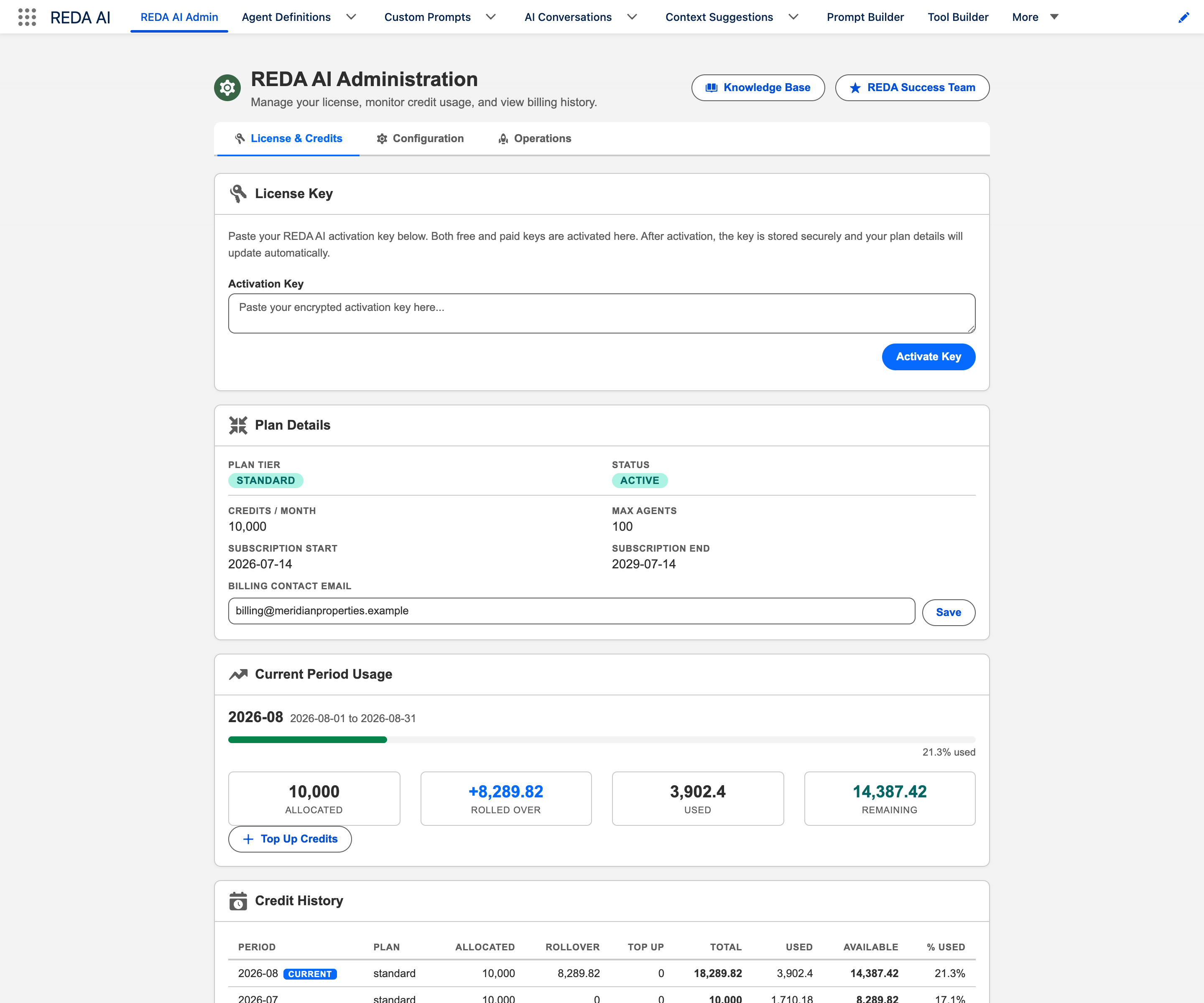
| Credits | The usage currency for REDA AI. Each AI interaction consumes credits based on the amount of text processed. Credits are allocated monthly as part of your plan. |
| Credit Period | A monthly billing period that tracks your credit allocation, any top-up credits, and how many credits have been consumed. |
Data Privacy & Security
Conversation records, messages, usage records and logs are held in your Salesforce organisation under its access and retention settings. AI requests go directly to the provider; REDA does not operate an intermediary store for those requests. Provider retention, training use and residency depend on the applicable provider agreement and account configuration. In Bring your own AI, those are your direct provider terms; do not assume REDA’s AI-included arrangements extend to that account.
Who Manages REDA AI?
REDA AI has two distinct roles:
- REDA AI Admin — a Salesforce user assigned the REDA AI Admin permission set. Admins can configure agents, prompts, tools, credits, and all platform settings. This role is typically held by a Salesforce Administrator or a system-level power user.
- REDA AI User — a Salesforce user assigned the REDA AI User permission set. Users can interact with active agents through the chat interface. They cannot modify agent configuration or access the Admin tab.
For External Widget and Community channels, there are additional permission sets for guest and portal users. See App Access & Permissions for full details.
Connect selected agents through MCP
MCP connects an approved AI assistant to selected active Internal agents. Each person signs in with their Salesforce identity. The host receives agent entry points; individual REDA tool and prompt definitions are not exposed as separate MCP tools. Configure a Salesforce Site, an External Client App, both REDA AI User and REDA AI MCP User assignments, and agent opt-in. See the administrator setup guide and user guide. Interaction data can reach the connected host and configured AI providers as well as Salesforce. Review the intended data and agreements; this is not a promise that data never leaves Salesforce.
Frequently Asked Questions
No coding is required for most of the setup. Installing the package, configuring agents, writing prompts, and managing credits are all done through the standard Salesforce interface. If you want to deploy the external widget on a website, your web team will need to add a short JavaScript snippet to your site.
Yes. You can have multiple active agents in your org simultaneously — for example, one agent for your internal sales team on record pages, and a separate agent embedded on your public website. Each agent is configured independently with its own persona, tools, and channel settings.
No. For the Internal channel, any action that creates, updates, or deletes a Salesforce record is presented to the user as a confirmation card before it is executed. The user must explicitly approve the action. Automated (scheduled) actions triggered by Flows are configured in advance by your admin.
REDA AI is built on Salesforce Lightning and works on any device that supports the Salesforce Lightning Experience, including the Salesforce mobile app. The chat interface is responsive and adapts to smaller screens.
Yes. REDA AI can be configured to work with any standard or custom Salesforce object. You control which objects and fields the agent has access to through Context Field configuration and the tools assigned to the agent.
With AI included, select the agent’s Processing Tier. With Bring your own AI, select AI Connection and Model in the agent’s AI Account section, or inherit the organisation default. Different agents can use different supported providers and models. Prompts, tools, record context and channel permissions still define each agent’s job. Configure the agent’s AI account.
The allowance, balance, top-up and rollover instructions below apply to AI included. With Bring your own AI, REDA measures usage but does not deduct a REDA allowance. Your configured per-user and per-channel limits still apply. Provider quotas and invoices are managed with your provider. Understand metering in both models.