
Managing Credit Periods
AI funding and usage
AI included uses REDA credits. Bring your own AI uses your organisation’s provider account, billed directly by that provider. The licence selects one funding model for the organisation. In either model, REDA AI governs configured tools and actions in Salesforce. Set up your licence and AI accounts.
The allowance, balance, top-up and rollover instructions below apply to AI included. With Bring your own AI, REDA measures usage but does not deduct a REDA allowance. Your configured per-user and per-channel limits still apply. Provider quotas and invoices are managed with your provider. Understand metering in both models.
For current plans, prices, evaluation terms and top-up options, see REDA AI pricing. Plan examples and usage figures in this guide explain operation; they are not a commercial quotation.
REDA AI organizes credit allocation and usage into monthly Credit Periods. Understanding how credit periods work — and how to monitor them — is essential for managing your REDA AI budget and ensuring your users have uninterrupted access to the platform. This article explains what credit periods are, how to view them, and how to manage them effectively.
What Is a Credit Period?
A Credit Period is a month-long window during which REDA AI allocates credits and tracks their usage. Each period spans from the first day of the month to the last day (e.g., January 1–31, February 1–28).
Key characteristics of credit periods:
- Monthly cadence: A new period begins on the first of each month and automatically resets usage counters to zero.
- Auto-created: REDA AI automatically creates a credit period record at the start of each month. You don't need to manually create them.
- One per month: There is one active credit period at any given time (the current month).
- Historical records: Past periods remain in your org so you can review credit history and usage trends.
Understanding Credit Period Fields
When you view a Credit Period record, you'll see the following key fields:
| Field | Description |
|---|---|
| Period Key | The month and year (e.g., "March 2026"). Automatically generated. |
| From Date | The first day of the month (e.g., March 1, 2026). |
| To Date | The last day of the month (e.g., March 31, 2026). |
| Allocated Credits | The number of credits your plan provides this month, based on your subscription tier. Set by your licence plan. |
| Rolled Over Credits | The carried balance combines eligible included credits, subject to their cap, with unused, unexpired purchased top-ups, which are outside that cap. |
| Total Top Up Credits | This field records top-ups redeemed during the current month. Unused purchased credits remain available in later periods until their original expiry, with an active paid subscription. |
| Available Credits | The sum of allocated, rolled-over, and top-up credits — the total pool you have this month. |
| Credits Used | The number of credits used so far this month across all agents and channels. Updates in real time as conversations happen. |
| Available Credits (remaining) | Total Available minus Credits Consumed. When this reaches zero, the AI stops responding. |
These are the field labels exactly as they appear on the record, in every language — the Credit Period object ships no translations, so a Spanish or Portuguese admin sees the English names too. Note two that read backwards from what you might expect: consumption is Credits Used, not “Credits Consumed”, and the remaining balance is Available Credits, which is the same field as the total pool after consumption — there is no separate “remaining” field.
Viewing the Current Credit Period
To see your current month's credit usage, open the REDA AI app's Admin tab:
- Open the REDA AI app — Click the App Launcher and select REDA AI.
- Click the "Admin" tab — Only users with the REDA AI Admin permission set see this tab.
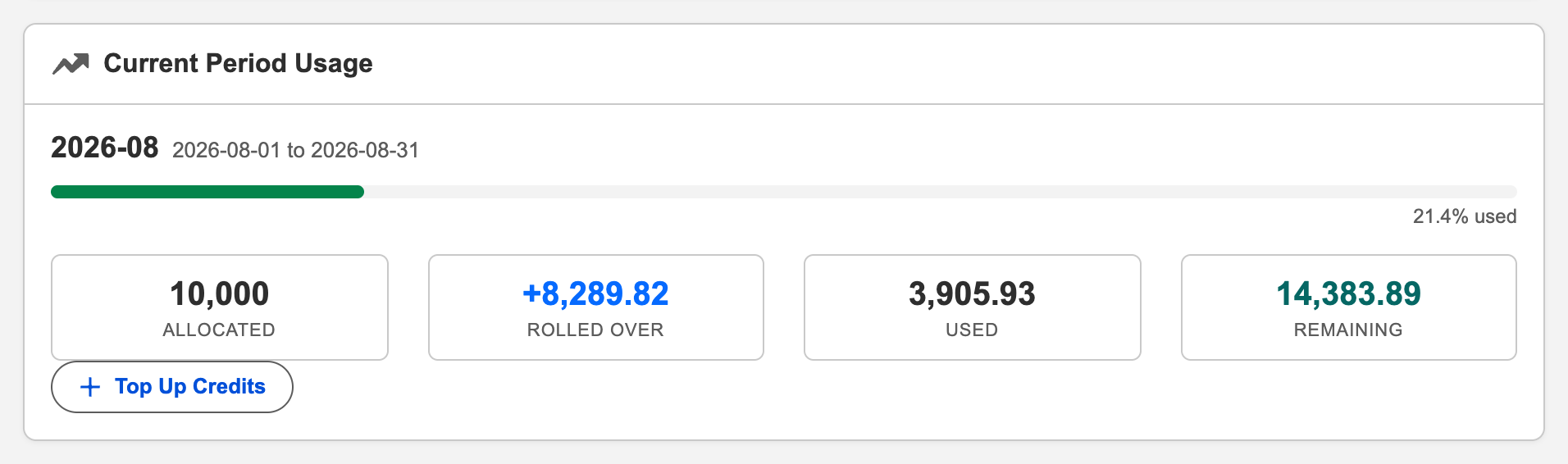
- Scroll to "Usage & Credits" — This section displays your current period's details in an easy-to-read format.
-
Review the numbers — You'll see:
- Credits allocated this month (by your plan)
- Credits rolled over from last month (if any)
- Credits added via top-ups (if any)
- Total credits consumed to date
- Credits remaining
Viewing Credit History
To review credit usage from previous months:
- In the Admin tab, scroll to "Credit History" — Below Usage & Credits, you'll see a table of the last 12 months.
-
Review past periods — The table shows, for each month:
- Month/Year
- Credits allocated
- Credits rolled over
- Top-up credits
- Total consumed
- Remaining
-
Identify patterns — Look across months to spot trends:
- Are you consistently running out of credits before month-end?
- Do certain months use more credits (e.g., end of quarter)?
- How much rollover do you typically accumulate?
Understanding Credit Rollover
Rollover is the ability for unused credits from one month to carry forward to the next month. Whether you have rollover depends on your subscription plan:
Plans With Rollover
Unused included credits can carry forward on a paid plan, capped at twice the monthly allowance of the next period. Purchased top-ups are accounted for separately and are not subject to that cap. An ordinary subscription renewal preserves unused, unexpired top-ups and their original expiry date: renewal neither shortens the validity period nor starts it again. An active paid subscription is required to spend top-up credits.
- February 2026: Allocated 10,000 credits, consumed 8,000, leaving 2,000 unused.
- March 2026: Allocated 10,000 credits, PLUS 2,000 rolled over from February, for a total of 12,000.
Rollover acts as a buffer, allowing you to weather months with higher-than-average usage without running out of credits.
Trial Plan: No Rollover
Unused evaluation credits do not roll over or transfer to a paid subscription. When the evaluation licence expires, renew or change the licence before continuing. See current evaluation terms.
Monitoring Credit Consumption
To avoid running out of credits mid-month, monitor consumption regularly:
Weekly Check-In
Once a week, check the Admin tab's Usage & Credits section. Ask yourself:
- What percentage of my monthly allocation have I used so far?
- Based on consumption rate, will I run out before month-end?
- Do I need to top up credits proactively?
Usage Forecast
Use a simple calculation to forecast if you'll run out:
Daily burn rate = Credits consumed / Days elapsed in month
Projected month-end usage = Daily burn rate × Days in month
Shortfall = (Projected usage) − (Total available)
Example: If it's March 15, you've consumed 4,000 credits (half the month), your daily rate is 4000÷15 = 267 credits/day. For a 31-day month, you'd project 267×31 = 8,277 credits consumed. If you have 10,000 total available, you're fine. If you only had 7,000 available, you'd need to top up 1,277 credits.
Real-Time Breakdown by Agent
To see which agents are consuming the most credits:
- Open the Admin tab — Scroll to the Usage & Credits section.
- Look for "Usage by Agent" — This shows a breakdown of credits consumed by each agent this month.
-
Identify high-usage agents — If one agent is consuming the majority of credits, investigate why:
- Is it a popular agent with many users?
- Is the agent's system prompt or tools inefficient?
- Are conversations running longer than expected?
Creating a Missing Current Period (Rare)
Normally, REDA AI automatically creates a credit period record on the first of each month. However, in rare circumstances (e.g., after a system reset or data corruption), the current period may be missing.
Symptoms
- The Admin tab's Usage & Credits section shows no data
- You see an error message: "No current period found"
- Credit history shows data for past months but nothing for the current month
Recovery Steps
- In the Admin tab, look for "Create Current Period" button — If the current period is missing, an admin-only button appears. Click it.
- Confirm creation — A confirmation dialog appears asking if you want to create the period for the current month. Click OK.
-
Verify success — The period is created with:
- Period Start Date = first of the current month
- Period End Date = last day of the current month
- Credits Allocated = your plan's monthly allocation
- Credits Consumed = 0 (since the period was just created)
Top-Up Credits During a Period
If you run low on credits mid-month, you can purchase and redeem top-up credits:
- Contact REDA AI — Reach out to REDA AI's sales team to purchase top-up credits. You'll receive a top-up key.
- In the Admin tab, find "Top-Up Credits" — Scroll to this section.
- Enter your top-up key — Paste the key you received into the text field.
- Click "Redeem" — The credits are added immediately to your current period's available balance.
- Verify in Usage & Credits — The Credits Remaining figure should increase by the top-up amount.
Redeemed top-up credits remain available until the end of the redemption month in the following year, unless used sooner. For example, credits redeemed on 19 September 2026 are valid through 30 September 2027. An ordinary subscription renewal preserves unused, unexpired top-ups and their original expiry date: renewal neither shortens the validity period nor starts it again. An active paid subscription is required to spend top-up credits.
Period Transitions and Month-End
What Happens on the Last Day of the Month
- Any conversations or messages created before the day ends are charged to the current period.
- At midnight (or during your org's batch window), a final usage tally is calculated.
- If you have remaining credits and rollover is enabled, those credits carry to the next month.
What Happens on the First Day of the Next Month
- A new Credit Period record is automatically created.
- The new period starts with its allocated credits (from your plan).
- If you had rollover enabled and unused credits from last month, those are added to the new period's available balance.
- Redeemed top-up credits remain available until the end of the redemption month in the following year, unless used sooner. For example, credits redeemed on 19 September 2026 are valid through 30 September 2027.
- The Consumed counter resets to zero.
Frequently Asked Questions
When your available credits reach zero, REDA AI stops responding to new conversations and messages. Users will see an error message: "Credit limit exceeded for this agent." Existing conversations are preserved in your conversation history, but no new responses are generated until you top up credits or the next month begins (when your period resets). To restore access immediately, purchase and redeem top-up credits via the Admin tab.
Your monthly credit allocation is fixed by your subscription plan. You cannot reduce it directly. However, you can downgrade to a lower plan tier (which has fewer monthly credits) by contacting REDA AI's sales team. Downgrades typically take effect at your next renewal date, not immediately. If you're consistently under-using credits, consider a plan downgrade to reduce your subscription cost.
The Credit History table in the Admin tab shows the last 12 months of credit periods. If you need to review periods older than 12 months, you can pull historical credit period data directly from Salesforce using the Data Loader or API.
We do not recommend manually editing credit period records. These records are managed by REDA AI's system and edited manually can cause data inconsistencies. If you need to adjust credits due to an error or dispute, contact REDA AI Support. They can review usage and make appropriate adjustments on your behalf.