
How Credits Work
AI funding and usage
AI included uses REDA credits. Bring your own AI uses your organisation’s provider account, billed directly by that provider. The licence selects one funding model for the organisation. In either model, REDA AI governs configured tools and actions in Salesforce. Set up your licence and AI accounts.
The allowance, balance, top-up and rollover instructions below apply to AI included. With Bring your own AI, REDA measures usage but does not deduct a REDA allowance. Your configured per-user and per-channel limits still apply. Provider quotas and invoices are managed with your provider. Understand metering in both models.
For current plans, prices, evaluation terms and top-up options, see REDA AI pricing. Plan examples and usage figures in this guide explain operation; they are not a commercial quotation.
REDA AI uses a credit-based system to measure and manage AI usage across your organisation. Understanding how credits work helps you plan your usage, keep costs predictable, and make the most of your plan allocation.
What is a Credit?
A credit is the unit of measure for AI usage in REDA AI. Every time a user sends a message to an agent — or an automated action invokes the AI — a small number of credits is consumed based on the amount of text processed.
The amount of text processed includes everything the AI receives and sends in a single interaction: the user's message, the agent's instructions and persona, any record context fields loaded for that page, conversation history, tool results, and the AI's response.
The processing tier changes the rate
With AI included, select the agent’s Processing Tier. With Bring your own AI, select AI Connection and Model in the agent’s AI Account section, or inherit the organisation default. Different agents can use different supported providers and models. Prompts, tools, record context and channel permissions still define each agent’s job. Configure the agent’s AI account.
Processing Tier applies to AI included. Actual consumption depends on tokens, tool use, documents and the effective tier used for the call. Review the usage transaction rather than assuming a fixed saving.
The Credit Period
Credits are allocated in monthly Credit Periods. Each period covers one calendar month and tracks:
| Item | What it means |
|---|---|
| Allocated Credits | The base credits assigned to this period as part of your subscription plan. |
| Rolled-Over Credits | Unused credits carried forward from the previous period (if your plan supports rollover). |
| Top-Up Credits | Additional credits added via a REDA-issued top-up key during this period. |
| Consumed Credits | The total credits used so far in this period across all agents and users. |
| Available Credits | The remaining balance (Allocated + Rolled-Over + Top-Up − Consumed). |
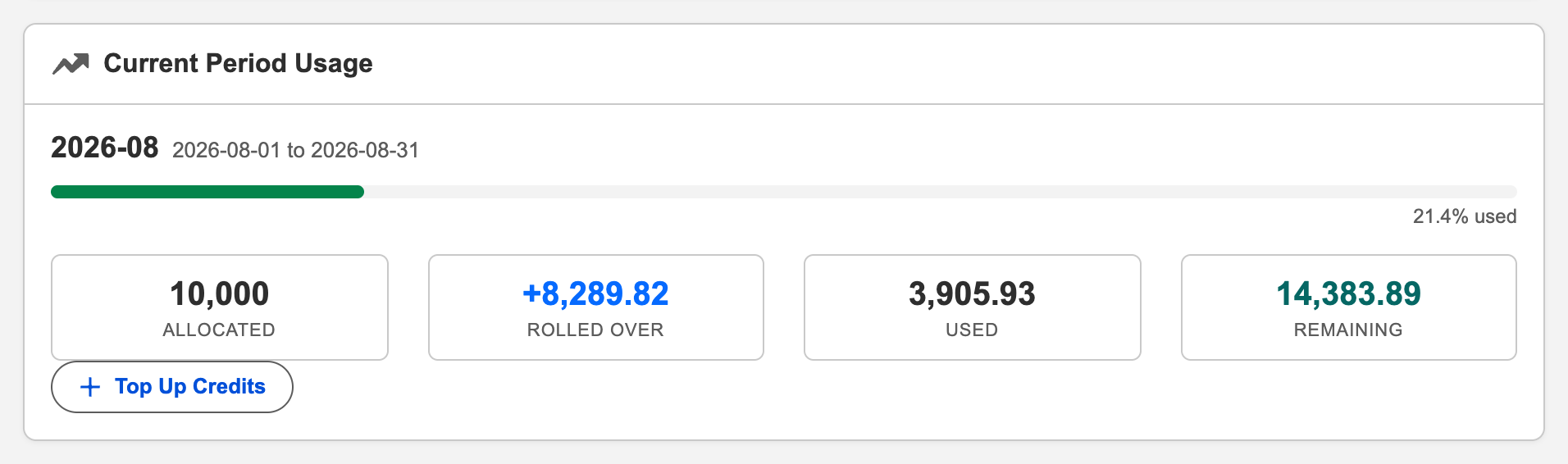
Where to Monitor Credit Usage
Your REDA AI Admin can monitor credit usage from the Admin tab in the REDA AI app. The Admin tab shows:
- A visual progress bar showing how many credits have been used in the current period.
- The exact figures for allocated, rolled-over, top-up, consumed, and available credits.
- A credit history table showing the last 12 months of periods — letting you spot trends and anticipate future needs.
You Are Warned Before You Run Out
REDA AI emails your billing contact automatically as the balance falls, so running out is never a surprise. Alerts fire when the remaining balance crosses 400, 300, 200, 100 and 0 credits — each one sent at most once per period, so a busy month produces at most five alerts plus one summary when the new period opens. Set the address in Billing Contact Email; if it is blank, nobody is warned.
Per-User Credit Limits
If your organisation wants to prevent individual users from consuming a disproportionate share of the credit pool, you can set a monthly credit limit per user. This is configured on the Salesforce User record, in the field REDA AI Monthly Credit Limit that the package adds (leave it blank for no personal limit). When a user reaches their individual limit, the AI will notify them and pause their access until the next period begins — without affecting other users.
Premium Feature Surcharges
Certain features incur additional credit costs beyond the standard token-based calculation:
| Feature | Additional Cost | Details |
|---|---|---|
| Web Search | Fixed surcharge per search | Each time the agent searches the web during a conversation, a small fixed credit surcharge is added on top of the normal token cost. Tracked in the Tool Surcharge Credits field on credit transactions. See Web Search. |
| File Upload | Higher token usage | Uploaded files (PDFs, images, CSVs) are sent as content to the AI, increasing input tokens. Larger files use more credits. The File Processing Credit Multiplier setting also expands the output token budget for file-related responses. See File Upload. |
What Happens When Credits Run Out?
When the Available Credits balance reaches zero for the current period, the AI will stop responding to new messages until credits are replenished. Users will see a message indicating that credits have been exhausted. Admins can resolve this by:
- Adding a top-up — using a REDA-issued top-up key to add credits immediately. See Topping Up Credits.
- Waiting for the next period — a new period begins at the start of the next calendar month with a fresh allocation.
Understand the Economy credit change
Economy ordinary usage now applies a 0.40 multiplier to the base credit rate. For unchanged token quantities and base rates, an example costing 100 base credits costs 40 Economy credits. At the previous 0.10 multiplier it cost 10: the new debit is four times the previous Economy debit, and 60% below base. This changes credit consumption, not the subscription price. File pre-extraction is charged separately at full rate. A provider fallback can use a different effective tier; inspect the actual transaction rather than applying 0.40 to every mixed operation. New credit transactions record Processing Tier; historical rows are not backfilled. Economy still requires consent and compatible licence/provider configuration; a missing consent is refused, not silently processed at another tier.
Frequently Asked Questions
Unused included credits can carry forward on a paid plan, capped at twice the monthly allowance of the next period. Purchased top-ups are accounted for separately and are not subject to that cap. Redeemed top-up credits remain available until the end of the redemption month in the following year, unless used sooner. For example, credits redeemed on 19 September 2026 are valid through 30 September 2027. An ordinary subscription renewal preserves unused, unexpired top-ups and their original expiry date: renewal neither shortens the validity period nor starts it again. An active paid subscription is required to spend top-up credits.
Usage that reaches the AI provider can be recorded even if the overall workflow later fails. A successful consultation with another agent is recorded even if the calling agent subsequently fails. Check the usage records for the completed work. In Bring your own AI, this is metering rather than a deduction from a REDA allowance.
The Admin tab shows the overall credit usage for your organisation. For more granular breakdowns by agent or user, you can run reports against the credit transaction records stored in your Salesforce org. Contact the REDA Success Team for reporting templates.
Yes. All AI interactions — whether from internal users, external website visitors, or community portal users — consume credits from the same organisation credit pool. External Widget and Community conversations are charged at a more favourable rate than internal usage to support high-volume customer-facing deployments. You can also configure a separate daily credit cap specifically for those channels to keep external traffic from exhausting the shared budget.