
Topping Up Credits
AI funding and usage
AI included uses REDA credits. Bring your own AI uses your organisation’s provider account, billed directly by that provider. The licence selects one funding model for the organisation. In either model, REDA AI governs configured tools and actions in Salesforce. Set up your licence and AI accounts.
The allowance, balance, top-up and rollover instructions below apply to AI included. With Bring your own AI, REDA measures usage but does not deduct a REDA allowance. Your configured per-user and per-channel limits still apply. Provider quotas and invoices are managed with your provider. Understand metering in both models.
For current plans, prices, evaluation terms and top-up options, see REDA AI pricing. Plan examples and usage figures in this guide explain operation; they are not a commercial quotation.
Your REDA AI subscription includes a fixed monthly credit allocation based on your plan. If you approach or exceed that allocation during a month, or if usage spikes unexpectedly, you can purchase additional credits to keep your agents responsive. This article explains how to purchase top-up credits, redeem them, and manage them strategically.
What Are Top-Up Credits?
Top-up credits are additional credits purchased separately from your subscription’s included monthly allowance. After successful redemption, they are added to the current credit period.
Redeemed top-up credits remain available until the end of the redemption month in the following year, unless used sooner. For example, credits redeemed on 19 September 2026 are valid through 30 September 2027.
An ordinary subscription renewal preserves unused, unexpired top-ups and their original expiry date: renewal neither shortens the validity period nor starts it again. An active paid subscription is required to spend top-up credits.
Unused included credits can carry forward on a paid plan, capped at twice the monthly allowance of the next period. Purchased top-ups are accounted for separately and are not subject to that cap.
Included credits are consumed first. Additional usage consumes unexpired top-ups, oldest first.
Purchasing Top-Up Credits
Step 1: Contact REDA AI
Top-up credits are purchased through REDA AI's sales or support team, not self-service. To purchase:
-
Email REDA AI Support — Send an email to support@redaai.com requesting top-up credits. Include:
- Your organization name
- Your Salesforce org ID
- Number of credits desired (e.g., 5,000 credits)
- Or contact your account manager — If you have a dedicated account manager, reach out directly.
- Or use your customer portal — Some REDA AI subscription tiers include access to a self-service portal where you can request top-ups directly.
Step 2: Receive Your Top-Up Key
REDA AI processes your request and sends you a confirmation email with:
- Number of credits purchased: The amount of credits in your top-up.
- Top-up key: A unique key that activates the credits (e.g.,
REDA_TOPUP_XYZ789ABC123). - Expiration date: The redemption deadline supplied with the key. This is separate from the expiry of redeemed credits.
- Invoice/receipt: Billing documentation for your records.
Save the top-up key securely. It's the only way to add the credits to your org.
Step 3: Redeem the Top-Up Key
Once you have your top-up key, redeem it in your REDA AI app:
- Open the REDA AI app — Click the App Launcher and select REDA AI.
- Click the "Admin" tab — Only users with the REDA AI Admin permission set see this tab.
- Scroll to "Top-Up Credits" — Find the Top-Up Credits section on the Admin tab.
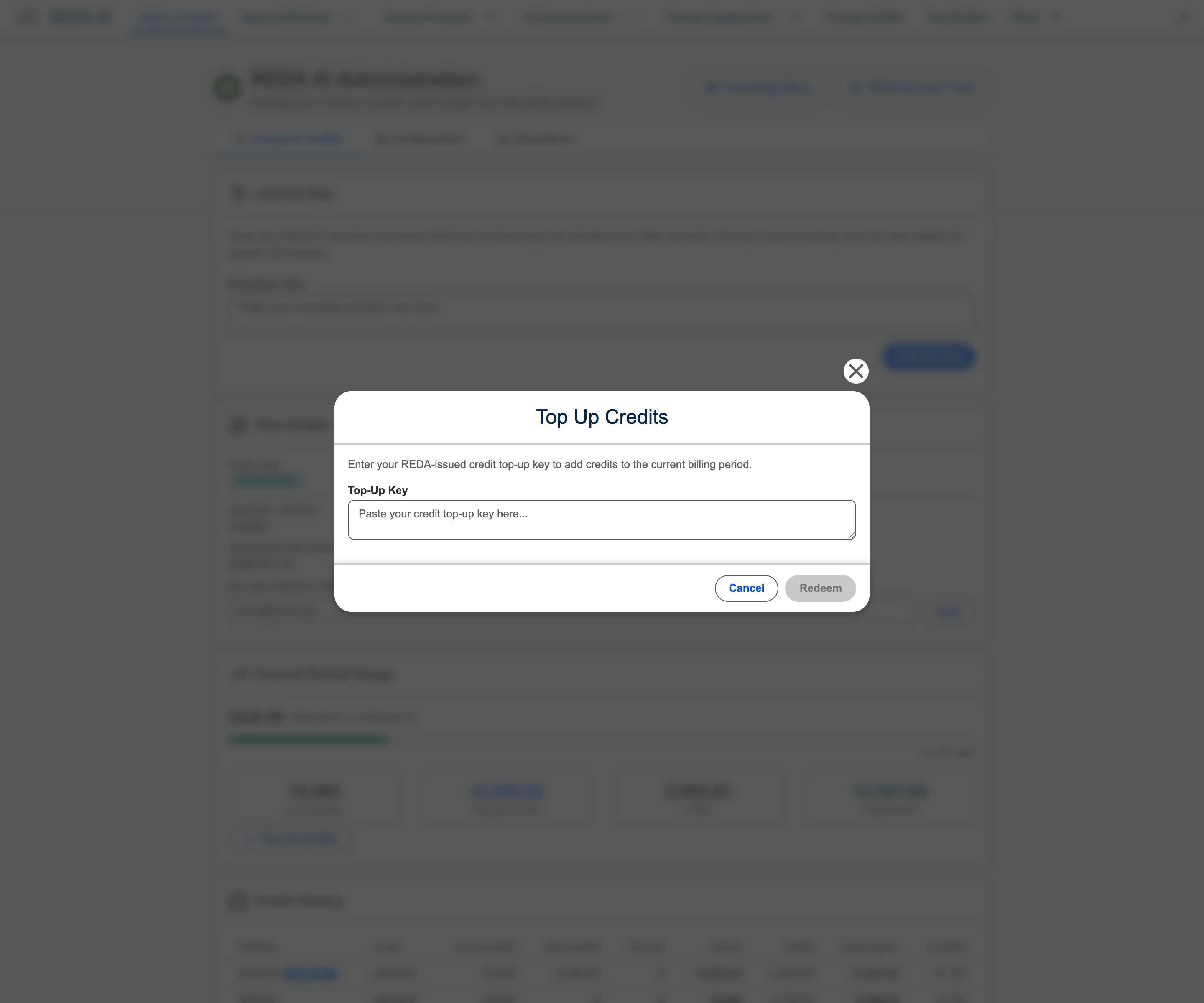
- Paste your top-up key — In the text field, paste the key you received from REDA AI.
- Click "Redeem" — The system validates the key and adds the credits to your current period immediately.
- Verify success — A confirmation message appears, and your Credits Remaining balance in the Usage & Credits section increases by the top-up amount.
How Top-Up Credits Appear in Your Usage
| Credit source | What carries forward |
|---|---|
| Included credits | Unused included credits can carry forward on a paid plan, capped at twice the monthly allowance of the next period. Purchased top-ups are accounted for separately and are not subject to that cap. |
| Purchased top-ups | Redeemed top-up credits remain available until the end of the redemption month in the following year, unless used sooner. For example, credits redeemed on 19 September 2026 are valid through 30 September 2027. |
The carried balance combines eligible included credits, subject to their cap, with unused, unexpired purchased top-ups, which are outside that cap.
Illustrative example: 25,000 included credits plus 5,000 carried included credits and a 25,000-credit top-up provide 55,000 credits. After 40,000 credits of usage, the 30,000 included credits have been used and 15,000 top-up credits remain. With a continuing paid subscription and a fresh 25,000-credit allowance, the next month opens with 40,000 credits, provided the top-up has not expired.
When to Top Up
Proactive Top-Ups (Recommended)
Top up before you run out. Watch your Admin tab's Usage & Credits section and top up when:
- You've consumed 75% of your available credits with time remaining in the month
- You're expecting a spike in usage (e.g., a marketing campaign launching)
- Your forecast shows you'll run short by month-end
Benefit: Proactive top-ups keep your agents responsive and users happy. You avoid mid-conversation errors.
Emergency Top-Ups (Last Resort)
Top up immediately if:
- You've already run out of credits and agents are returning "credit limit exceeded" errors
- Users are complaining that agents aren't responding
Drawback: Emergency top-ups interrupt user experience and may require waiting for REDA AI to process your request.
Protecting Against Runaway Credit Usage
Top-up credits can be expensive if usage explodes due to a misconfigured agent or buggy tool. Use the following strategies to prevent credit waste:
Daily Credit Caps by Channel
Set limits on how many credits specific channels can consume per day:
- External Widget daily cap: For External Widget agents deployed on your website, set a daily cap (e.g., 500 credits/day). If the cap is exceeded, the widget stops responding.
- Community daily cap: For agents deployed in Salesforce Community, set a daily cap similarly.
These caps prevent a single channel from consuming your entire monthly allocation in a single day due to unexpected traffic spikes or bugs.
Per-Session Message Limits
On the Agent Definition, set the per-session message limit to cap the number of messages a single user can send in one conversation session. For example, limit each session to 50 messages. This prevents a single user from running up thousands of credits in one conversation.
Monitor High-Usage Agents
In the Admin tab's Usage & Credits section, check which agents are consuming the most credits. If one agent is using an unexpectedly high amount, investigate:
- Is the system prompt or tool configuration causing verbose responses?
- Are many users using this agent simultaneously?
- Is a tool running repeatedly or in an infinite loop?
Adjust the agent's configuration if needed to reduce credit consumption.
Top-Up Key Management
Key Expiration
The deadline for redeeming a top-up key is separate from the expiry of the redeemed credits. Follow the deadline supplied with your key; do not assume a standard 30-day deadline. If the key expires before redemption:
- The key becomes invalid and cannot be redeemed
- Contact REDA AI Support with proof of purchase to request a replacement key
- Do not lose the original email with your key — keep it safe
Using One-Time Keys
Each top-up key can be redeemed only once. Once redeemed in your org, the key is spent and cannot be used again. If you accidentally redeem a key in the wrong org, contact REDA AI Support immediately — they may be able to invalidate the redemption and re-issue the key for use elsewhere.
Lost or Forgotten Keys
If you lose the email containing your top-up key:
- Contact REDA AI Support and provide your purchase date and order/receipt number.
- REDA AI will verify the purchase and re-send the top-up key.
Troubleshooting Top-Up Issues
Error: "Invalid Top-Up Key"
Possible causes:
- The key is mistyped — copy and paste carefully from the email
- The key is expired (past its expiration date)
- The key has already been redeemed in another org
- The key format is wrong (e.g., you only pasted part of the key)
Resolution: Verify the key is correct and not expired. If the issue persists, contact REDA AI Support.
Error: "Redemption Failed — Please Try Again"
Possible causes:
- Network connectivity issue — your org cannot reach REDA AI's redemption service
- REDA AI's service is temporarily unavailable
- Your Salesforce org is in maintenance mode
Resolution: Wait a few minutes and try again. If the issue persists, contact REDA AI Support.
Top-Up Credits Not Appearing in Usage & Credits
Possible causes:
- The page hasn't refreshed — try refreshing your browser (Ctrl+R or Cmd+R)
- The redemption is still processing (rare, typically takes <1 second)
- The top-up was applied to a different period (e.g., you redeemed it in March but viewed February's usage)
Resolution: Refresh the page and navigate back to the Admin tab. Verify you're viewing the current month's usage. If credits still don't appear, contact REDA AI Support.
Frequently Asked Questions
Yes. You can redeem multiple valid keys in a month. Each top-up retains the expiry associated with its own redemption month. Redeemed top-up credits remain available until the end of the redemption month in the following year, unless used sooner. For example, credits redeemed on 19 September 2026 are valid through 30 September 2027.
Unused included credits can carry forward on a paid plan, capped at twice the monthly allowance of the next period. Purchased top-ups are accounted for separately and are not subject to that cap. Included credits are consumed first. Additional usage consumes unexpired top-ups, oldest first.
Unused top-ups are not lost simply because a month ends. Refunds are governed by your subscription and purchase terms; contact REDA about an incorrect purchase rather than assuming an automatic refund. An ordinary subscription renewal preserves unused, unexpired top-ups and their original expiry date: renewal neither shortens the validity period nor starts it again. An active paid subscription is required to spend top-up credits.
If you've set a daily credit cap (like the External Widget daily cap) and reach it, REDA AI stops processing new requests from that channel for the remainder of the day. Users will see an error: "Daily credit limit exceeded." The cap resets the next day at midnight. Top-up credits do not increase daily caps — caps are hard limits to prevent runaway costs. To increase a cap, modify the Agent Definition record or contact REDA AI Support.