
Reports and dashboards
Every payment, method, customer, deposit and error in REDA Pay is a Salesforce record, so the standard report builder works on all of them. To save you starting from nothing, the package ships a folder of reports and two dashboards, and a custom report type that joins transactions to their orders and methods. This article lists them and shows how to build your own.
The packaged reports
Open the Reports tab in the REDA Pay app and look in the REDA Pay folder.
| Report | What it shows | Built on |
|---|---|---|
| Receipts By Status | Payments by transaction status — processed, declined, rejected, refunded… | Transactions with order and method details |
| Receipts By Source | Payments by where they were made — staff, portal or payment link (the order's Processed User Type) | Same |
| Receipts By Order Type | Payments by Immediate, Schedule or Link | Same |
| Direct Payment Processed | Immediate payments processed, excluding those generated by schedules, over time | Same |
| Link Payments Processed | Payments made through links | Same |
| Schedule Payments Processed | Payments generated by schedules | Same |
| Disbursements By Processing Account | Payouts grouped by account | Same |
| Disbursements - Trend | Payouts over time | Same |
| Pending Disputed Transactions | Transactions awaiting dispute resolution | Same |
| New Customers - Trend (Current FQ) | Pay Customers created this fiscal quarter | Pay Customers |
| Total Customers - Trend | Pay Customers over time | Pay Customers |
| New Pay Methods Added (Current FQ) | Methods saved this fiscal quarter | Pay Methods |
| Deposits Trend - 90 Days | Bank deposits over the last 90 days | Statement Activities |
| Payouts Trend - 90 Days | Bank payouts over the last 90 days | Statement Activities |
| Monthly Trend - Net Income | Deposits and payouts by month for the current year | Statement Activities |
| Unreconciled Deposits | Deposits that are not yet good to reconcile — unmatched lines or amounts that differ | Statement Activities |
| Unreconciled Payouts | Payouts that are not yet good to reconcile | Statement Activities |
| Pay Logs - Attention Needed | Logs with unresolved failures | REDA Pay Logs |
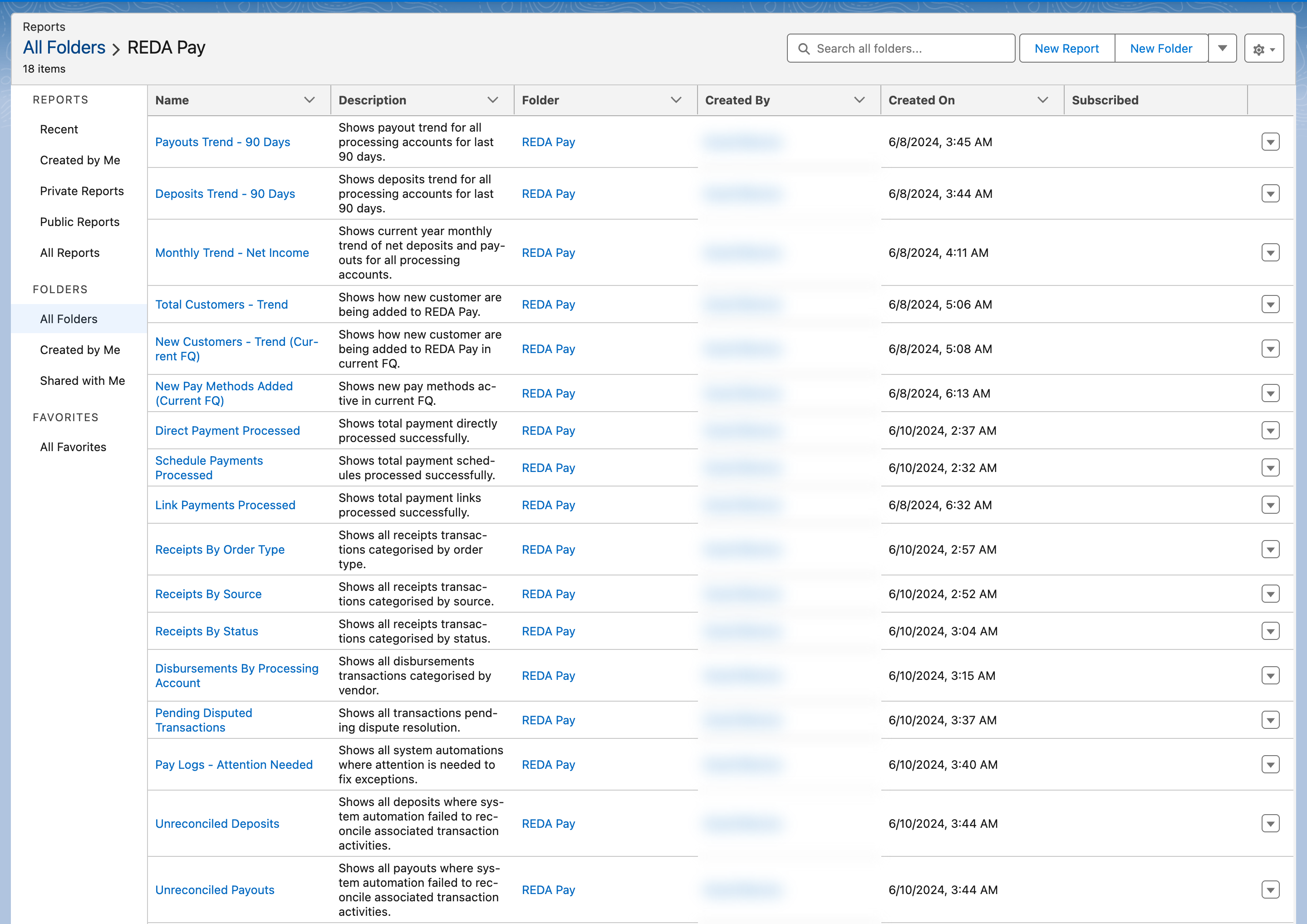
The packaged reports. Clone one to change it; the originals are replaced on upgrade.
The two dashboards
| Dashboard | For | Tiles |
|---|---|---|
| REDA Pay - Admin | Administrators (shown on the REDA Pay Admin tab) | Pending Disputed Transactions · Pay Logs - Attention Needed · Unreconciled Deposits · Unreconciled Payouts |
| Banking Transactions - Overview | Everyday users | Receipts, disbursements, customers and methods from the reports above |
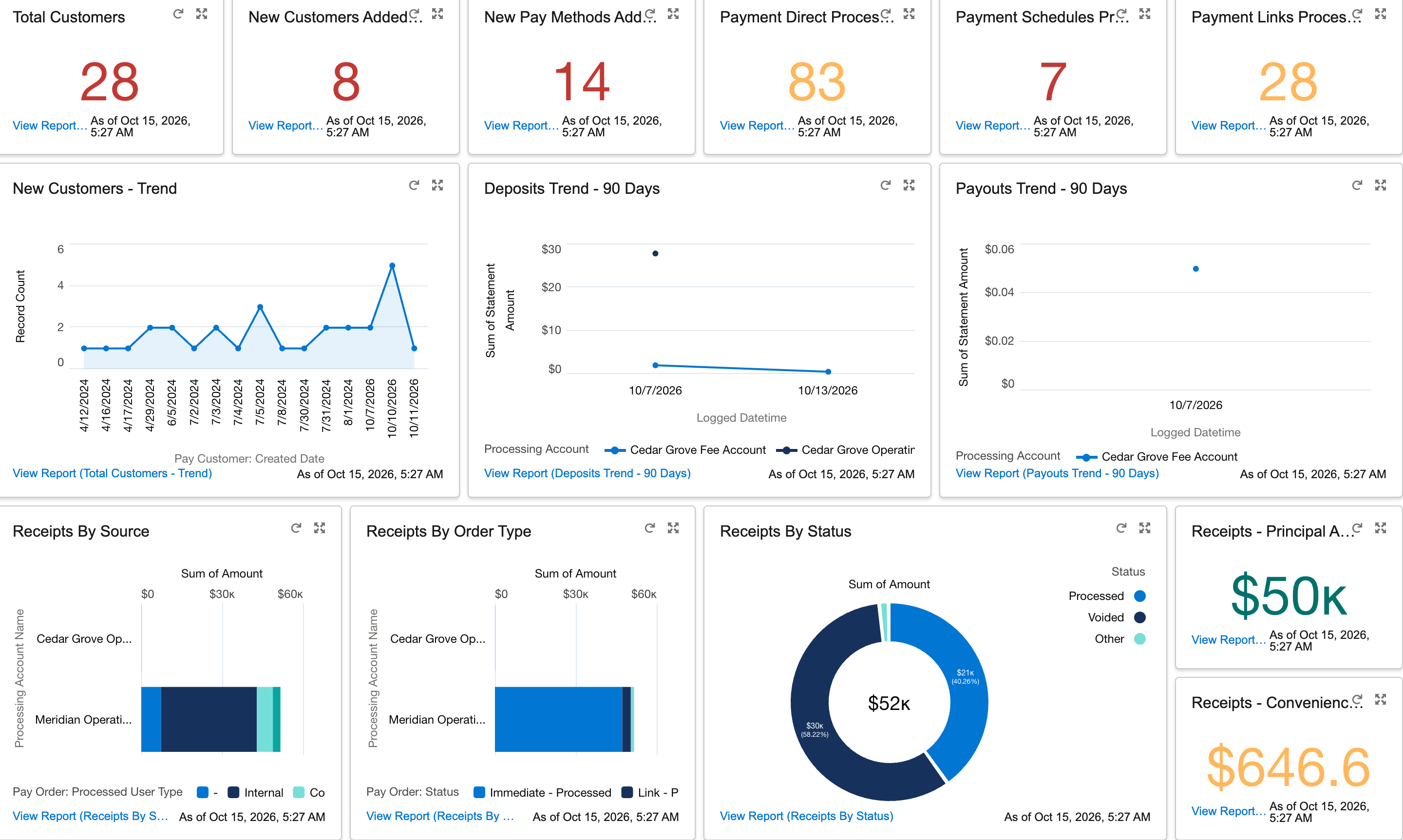
The user dashboard. Refresh it, or schedule a refresh, so the tiles are current.
How the packaged reports count
Knowing the filters behind each report avoids mismatches with your own figures.
| Report | Counts |
|---|---|
| Receipts By Status / By Source / By Order Type | Transactions on processed receipt orders (orders with a Processed Datetime, transfer type Receipt), excluding schedule templates themselves — the payments generated from schedules are included through their child orders |
| Direct Payment Processed | Processed Immediate orders that have no Parent Pay Order — payments taken on screen, not generated by a schedule |
| Link Payments Processed | Processed orders of type Link |
| Schedule Payments Processed | Processed orders whose Parent Pay Order is a Schedule |
| Disbursements By Processing Account / Disbursements - Trend | Transactions on processed disbursement orders, grouped by account and payee Account |
| Deposits Trend - 90 Days / Payouts Trend - 90 Days | Statement Activities of type Deposit or Payout, Completed or Reconciled, logged in the last 90 days |
| Monthly Trend - Net Income | Deposits and payouts, Completed or Reconciled, by month, this year |
| Unreconciled Deposits / Payouts | Statement Activities whose Good To Reconcile is false |
| New Customers / New Pay Methods (Current FQ) | Records created this fiscal quarter; methods only if registered with Payload |
| Pending Disputed Transactions | Transactions with Pending Dispute Resolution true |
| Pay Logs - Attention Needed | Logs with Attention Needed true, by process |
A month-end routine
- Receipts By Status for last month: the processed total is what was collected; rejected and declined are the follow-up list.
- Disbursements By Processing Account for last month: what went out, by payee.
- Monthly Trend - Net Income: deposits versus payouts for the year to date.
- Unreconciled Deposits and Unreconciled Payouts: both should be empty before the books close.
- Export what accounting needs with the report's Export action; the Pay Order's Attribute fields and the related Account, Contact and Opportunity carry your own references.
The custom report type
Pay Transactions with Order and Method Details joins each Pay Transaction to its Pay Order and the order's Pay Method, Pay Customer and Processing Account, so one report can show who paid, how, into which account, for what order, with what result. Most packaged receipt and disbursement reports use it. Choose it under New Report → REDA Pay (or search its name) when you need transaction-level detail with order context.
Building your own
Useful fields and groupings:
| Question | Report on | Group or filter by |
|---|---|---|
| How much did we collect last month, by method? | Pay Transactions with Order and Method Details | Type = payment, Status = processed; group by Pay Method Type; sum Amount |
| How much in fees did we charge? | Pay Orders | Status = Immediate - Processed or Schedule - Processed; sum Calculated Convenience Fee |
| Which customers pay in the portal? | Pay Orders | Processed User Type = Community |
| Which schedules are inactive and why? | Pay Orders | Order Type = Schedule, Schedule Active = false; show Pay Method, End Date, Pay Customer |
| Which links are unpaid? | Pay Orders | Status = Link - Active; show Link Expiration Date Time |
| What was rejected this week? | Pay Transactions | Status = rejected, Rejected Date = this week |
| What is in a given deposit? | Statement Activities with Transaction Activities | Activity # |
| Which methods expire soon? | Pay Methods | Pay Method Type = card, Expiry Year and Expiry Month |
Remember the fields on standard objects too: Default Pay Method (Disbursement) on Account, Contact and Lead shows which payees are ready for electronic payouts, and the Pay Order's Lead, Contact, Account and Opportunity lookups let you report payments against your own records.
Mistakes to avoid
| Mistake | What happens | Fix |
|---|---|---|
| Summing Principal Amount to get money received | Fees are left out | Use Net Order Amount on orders, or Amount on transactions |
| Reporting on orders instead of transactions for collections | Orders do not change when a payment is rejected | Report on transaction status |
| Editing a packaged report | Your changes are lost on upgrade | Clone it to your own folder |
| Reading the old Convenience Fee column on Pay Orders | It is empty | Use Calculated Convenience Fee |
FAQ
Reports can be exposed in Experience Cloud with the right licences; the sharing set limits what they see to their own records.
Yes, with Salesforce's report subscriptions.