
Turn on failed-payment recovery
Occasionally the connection between Salesforce and Payload fails while a payment is being sent. Payload may have taken the money, but Salesforce never received the answer. REDA Pay records such an attempt as a Pay Transaction with status failed and the flag Process Callout Exception ticked, and shows the payer the message beginning "Ooops.. we have experienced an unexpected exception. Your payment method may have been debited. Do not try to pay again…" with a code.
The Sync Failed Pay Order Transactions job finds those attempts and asks Payload what really happened. Turning it on is a one-click step on the REDA Pay Admin tab, and every production org should have it on.
Turn the job on
- Open the REDA Pay app → REDA Pay Admin tab.
- On the card Sync Failed Pay Order Transactions ("System job to sync failed transactions againts a pay order in case of any runtime exceptions."), switch Job Scheduled to Yes.
- The message "Batch job scheduled successfully." confirms it. From now on the job runs every 15 minutes.
Switching it to No stops it ("Batch job revoked successfully."). The job appears in Setup → Scheduled Jobs as Sync Failed Pay Order Transactions; do not delete it there — use the toggle.

One toggle. The job then checks every 15 minutes for payments whose outcome is unknown.
What the job does
Every 15 minutes it:
- Finds Pay Transactions created in the last hour that carry Process Callout Exception.
- For each, asks Payload for every transaction tagged with that Pay Order.
- Saves what Payload returns: updates the transactions Salesforce has and creates the ones it lacks, with their real status — processed, declined and so on.
- Clears the flag. Attempts older than an hour are left alone; use Sync Transaction on the order for those.
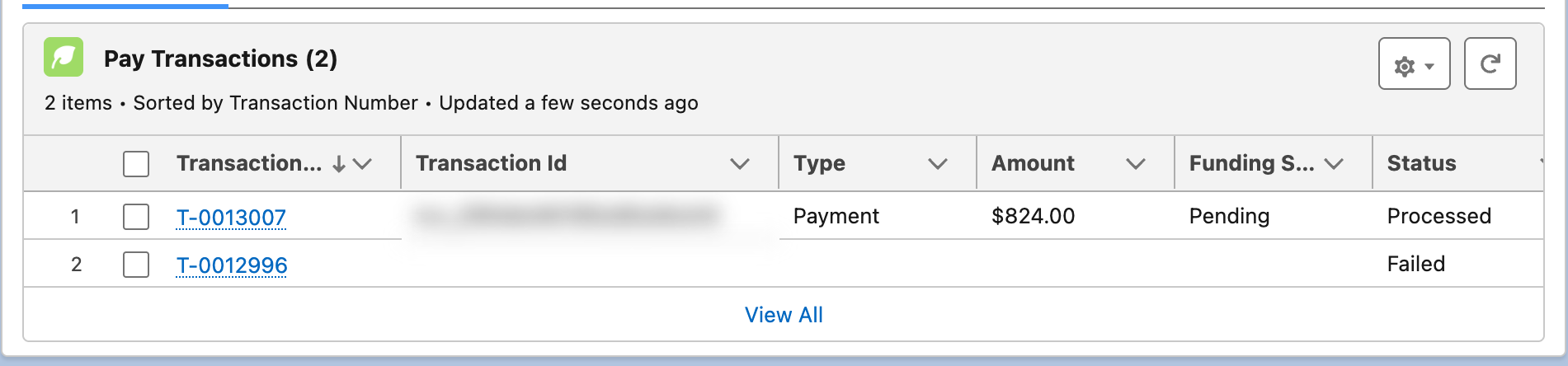
A recovered payment: the failed attempt stays for the record; the real result sits beside it.
Worked example
| Time | What happens |
|---|---|
| 10:02 | A staff member presses Process Order on P-052010 for $1,251.75. Payload receives the request, but the reply never arrives in Salesforce |
| 10:02 | The screen shows "Ooops.. we have experienced an unexpected exception. Your payment method may have been debited. Do not try to pay again and quote following code to the support team…" followed by a code. The staff member writes the code down and does not retry |
| 10:02 | Under P-052010 a Pay Transaction T-0014500 is saved with Status failed and Process Callout Exception ticked; the order stays Immediate - Not Processed |
| 10:15 | The recovery job runs. It finds T-0014500, asks Payload for every transaction tagged with P-052010, and gets one: processed, $1,251.75 |
| 10:15 | REDA Pay creates T-0014501 with Status processed under P-052010 and clears the flag on T-0014500 |
| 10:20 | The administrator checks the Not Processed list view, sees P-052010 with a processed transaction, and sets its Processed Datetime to 10:02 so the order reads Immediate - Processed |
The code in the message is Payload's identifier for the transaction when Payload returned one before the failure. Support can find the payment at Payload from it even before the job runs.
Where to see the job
| Where | What you see |
|---|---|
| Setup → Scheduled Jobs | Sync Failed Pay Order Transactions, with a Next Scheduled Run within 15 minutes |
| Setup → Apex Jobs | A completed batch entry for each run |
| REDA Pay Logs → Attention Needed | A log only when a run hit an error — for example Payload unreachable |
| Pay Transactions | Recovered transactions appear with their real status beside the failed attempt |
If the toggle refuses to switch, the user lacks REDA Pay - Admin User; the job can be scheduled only by an administrator, and it then runs as that administrator.
After a recovery — one thing to check
When the job (or Sync Transaction, or reconciliation) adds a processed transaction to an order after the event, the order's own Processed Datetime is not filled in and its Status still reads Immediate - Not Processed. The payment is real; the order just does not say so. Two consequences:
- Do not press Process Pay Order on such an order — it would send a second charge. The order has a processed transaction under it; treat it as paid.
- To make the order read correctly, an administrator can edit it and set Processed Datetime to the transaction's date. The order then locks like any processed order.
The list view Not Processed on Pay Orders is where these surface; check it after any recovery.
What staff should do when the message appears
- Do not press anything again, and do not open the payment screen for the same customer to "try once more".
- Copy the code from the message into the order's Internal Notes or a case.
- Tell the payer: "The payment may have gone through; we will confirm within the hour."
- Within 15 minutes, open the Pay Order's Pay Transactions: a new processed transaction confirms the payment; only a failed one with the flag cleared and nothing else means Payload never took it, and the payment can be taken again.
Mistakes to avoid
| Mistake | What happens | Fix |
|---|---|---|
| Leaving the job off | Customers debited with no record in Salesforce until someone syncs by hand | Turn it on |
| Pressing Process Pay Order on an order that has a processed transaction | A second charge | Check the Pay Transactions list first |
| Deleting the job from Scheduled Jobs | The toggle still reads Yes but nothing runs | Toggle No, then Yes |
| Expecting it to recover week-old attempts | It looks back one hour | Use Sync Transaction on the order |
FAQ
No. Only attempts flagged with Process Callout Exception.
The administrator who switched it on. If that user is deactivated, switch it off and on again as another administrator.
No. Webhooks are Payload telling Salesforce about later status changes. This job is Salesforce asking Payload about an attempt whose first answer was lost. Both belong in a production org.