
How Pay Customers are created from Accounts, Contacts and Leads
A Pay Customer is the person or company REDA Pay takes money from or pays, as known to one Pay Profile. Your team never fills in a Pay Customer form before taking a payment: the first time the payment screen opens from an Account, Contact or Lead — the parent record — REDA Pay creates the Pay Customer from it automatically, using a mapping you can read and change. This article explains that mapping, what happens on later payments, and how the customer is kept in step with Payload.
What happens the first time
- A staff member presses the Pay button on a Contact, or a customer opens the payment page in your portal.
- REDA Pay looks for a Pay Customer for that parent record on the chosen Pay Profile.
- If none exists, it reads the REDA Pay Process Config record for the parent object (Account, Contact or Lead), builds the Pay Customer from the fields that record maps, and saves it.
- From then on, every payment from that record uses the same Pay Customer. When the customer pays for the first time, REDA Pay also registers them with Payload and stores Payload's customer identifier (encrypted) on the record.
A Pay Customer carries a link back to its Account, Contact or Lead, and Parent Record Id holds the Id of the record it came from.
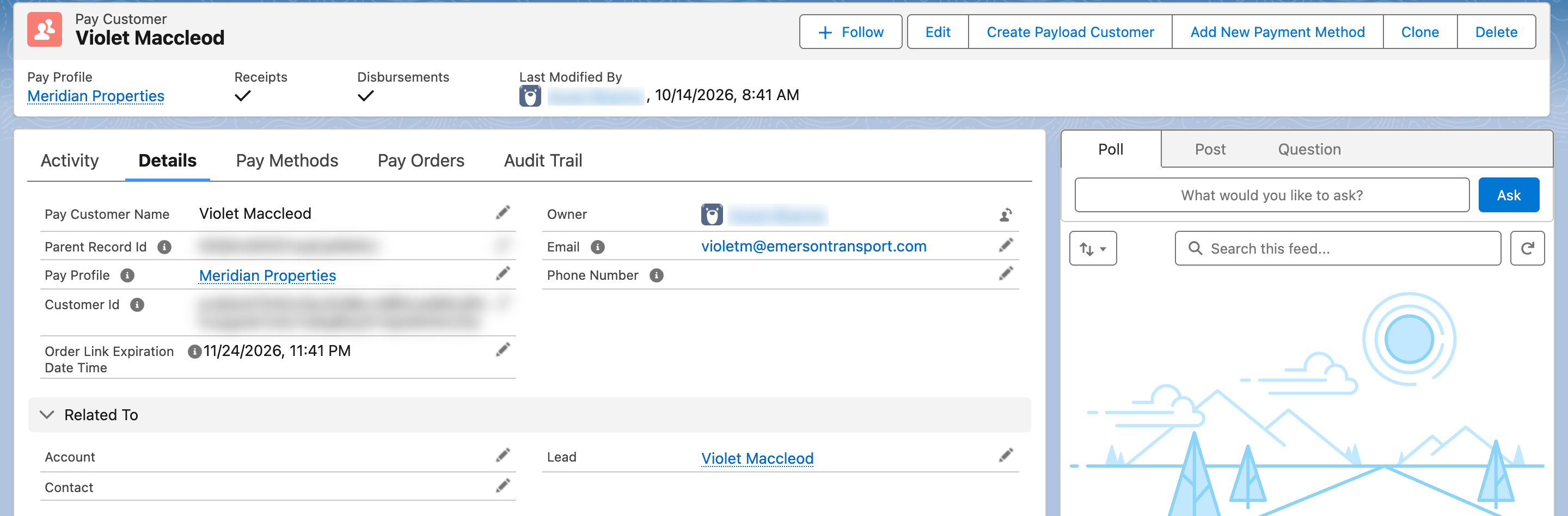
A Pay Customer created from a Lead. Allowed Transfer Type and Allowed Payment Methods came from the mapping.
The mapping records
Open Setup → Custom Metadata Types → REDA Pay Process Config → Manage Records. Three records ship with the package, one per parent object:
| Record | Source Object API Name | Mapping |
|---|---|---|
| Account - Config - Payload | Account | Name from the Account name; Allowed Transfer Type Receipt and Disbursement; Allowed Payment Methods Card and Bank Account; the Account link |
| Contact - Config - Payload | Contact | Name, Email and Phone (from the Contact's Mobile phone); the same transfer type and methods; the Contact link |
| Lead - Config - Payload | Lead | Name, Email and Phone (from the Lead's Mobile phone); the same; the Lead link |
Each record has these fields:
| Field | Meaning |
|---|---|
| Source Object API Name | The parent object the record applies to, for example Contact |
| Is Active | Only active records are used. If no active record exists for an object, payments from that object stop with "Transaction not allowed for SObject: …" |
| Applicable To User Profiles | Optional, comma-separated Salesforce profile names. When filled, the record applies only to users with those profiles, and is preferred over a record with the field blank. Lets a portal profile map differently from staff |
| Customer Record Mapping | One line per Pay Customer field, in the form FieldApiName=value. A value written as {{FieldName}} is copied from the parent record (a path such as {{Account.Name}} is allowed); any other value is used as written |
| Pay Profiles | Shown as required in the help text, but not used by the payment screens — leave it as shipped |
| Description | Internal notes |
The shipped Contact mapping reads:
Name={{Name}}
rpay__Email__c={{Email}}
rpay__Phone__c={{MobilePhone}}
rpay__Allowed_Transfer_Type__c=two-way
rpay__Allowed_Payment_Methods__c=card;bank_account
rpay__Contact__c={{Id}}
two-way is the stored value for Receipt and Disbursement; send-only is Receipt and receive-only is Disbursement. card and bank_account are the stored values for the two payment methods.
Changing the mapping
Common changes, each made by editing the record and its Customer Record Mapping lines:
| Goal | Change |
|---|---|
| Customers created from Contacts may only pay, never be paid | rpay__Allowed_Transfer_Type__c=send-only in the Contact record |
| Residents in the portal may pay by bank account only | Create a second Contact record, set Applicable To User Profiles to the portal profile's name, and map rpay__Allowed_Payment_Methods__c=bank_account |
| Use the Contact's business phone instead of mobile | rpay__Phone__c={{Phone}} |
| Carry your own reference onto the customer | rpay__Attribute_1__c={{Your_Field__c}} |
Save, then test by taking a payment from a record that has no Pay Customer yet. A mapping to a field that does not exist on the Pay Customer, or a value the field cannot accept, fails at that step with the error shown on screen.

The three shipped mapping records. Edit them in place; add a second record for an object only when a profile needs different rules.
One customer per record, profile and email
REDA Pay ships a duplicate rule on Pay Customer that blocks a second record with the same Parent Record Id, Pay Profile and Email. So a Contact has one Pay Customer per Pay Profile. Two different Contacts with the same email are different customers, because their parent records differ. If you need to merge two Contacts, do so before payments are taken, or expect two Pay Customers.
Lead conversion
When a Lead with Pay Customers is converted, REDA Pay moves its Pay Customers to the new Account and Contact and its Pay Orders to the new Opportunity, so payment history follows the person. The Pay Customer's Lead link is replaced by the Contact and Account links.
Keeping the customer in step with Payload
Payload keeps its own copy of the customer's name, email and phone. REDA Pay pushes changes:
- On first payment — the customer is registered with Payload automatically.
- On the record — the Create Payload Customer button on a Pay Customer registers it (or re-sends its details) without taking a payment.
- On edit — changing the Pay Customer's name, email or phone sends the change to Payload in the background. If that fails, the reason appears in Sync Error Message on the record; fix the data and press Create Payload Customer.
A customer with no Email can still pay: the payment screen asks for an email address and stores it on the order.
Mistakes to avoid
| Mistake | What happens | Fix |
|---|---|---|
| Deactivating the Lead record because leads should not pay | Every payment from a Lead stops with "Transaction not allowed for SObject: Lead" | Deactivate deliberately only if no Lead page carries a Pay button |
| Mapping a field that does not exist | Customer creation fails with an "Invalid field" error on screen | Check the field's API name on the Pay Customer object |
| Mapping Allowed Payment Methods to nothing | The customer can neither pay nor be paid | Map at least one method |
| Editing the Pay Customer's email to one already used for the same record and profile | The duplicate rule blocks the save | Correct the email on one record |
| Expecting the parent record's address to appear on the customer | Only mapped fields are copied | Add the address lines to the mapping if you need them |
FAQ
The screens create them one at a time. For a migration, your Salesforce administrator or REDA can create them with a data load or script following the same mapping, then register them with Payload.
Two active Pay Profiles were used. Each profile keeps its own customers.
No. The mapping is used only when the Pay Customer is created. Update the Pay Customer's email too; that change is sent to Payload.