
Per-customer rules: methods, transfer types and accounts
The Processing Account sets the outer limits for a payment — which methods and directions are possible at all. A Pay Customer can narrow those limits for one payer: a vendor who may only be paid, never charged; a resident who may pay by bank account only; a company that must always use a particular merchant account. These rules live in the Transaction Setup section of the Pay Customer and are checked every time an order is saved.
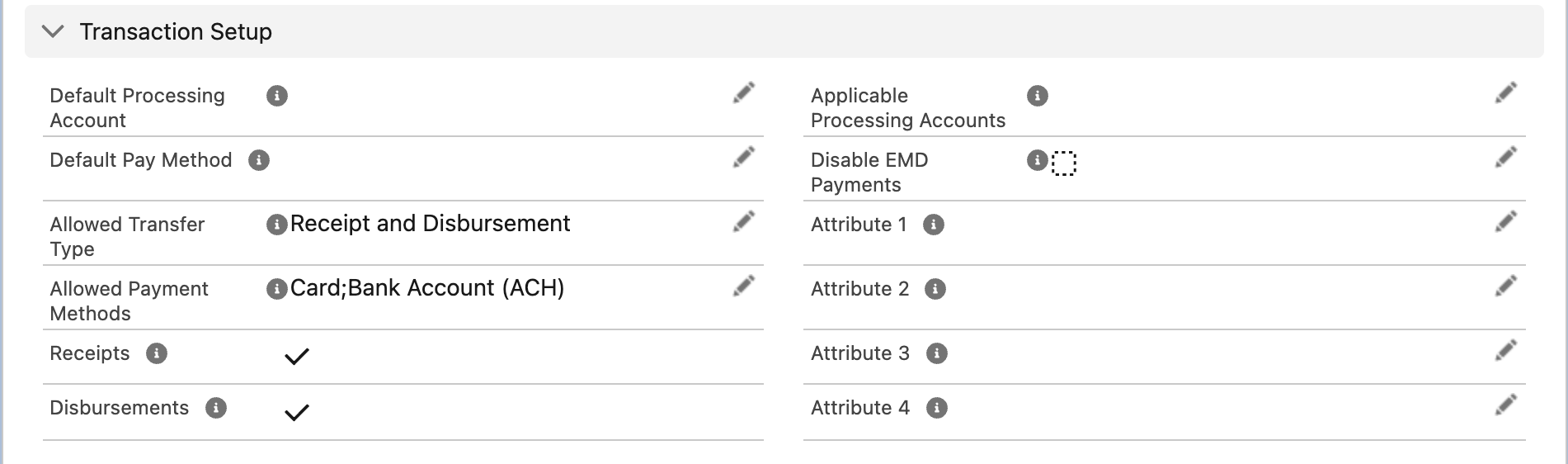
Everything that limits one customer is in this section.
The fields
| Field | What it does | When blank |
|---|---|---|
| Allowed Payment Methods | The methods this customer may use: Card, Bank Account (ACH), or both. The payment screen shows only these tabs, within what the account allows | Nothing is allowed — the customer can neither pay nor be paid |
| Allowed Transfer Type | Receipt (the customer pays you), Disbursement (you pay the customer), or Receipt and Disbursement. The read-only Receipts and Disbursements boxes reflect it, provided the profile is active and at least one method is allowed | No direction is allowed |
| Applicable Processing Accounts | Comma-separated record Ids of the Processing Accounts this customer may use. The screen offers only these | All active accounts on the profile |
| Default Processing Account | Pre-selected when several accounts are possible. Must belong to the customer's profile | The profile's default, or a choice screen |
| Default Pay Method | The saved card or bank account selected first on the screen, and the one used by orders created without choosing a method. Set automatically when a method is saved as default | The screen opens with no method selected |
| Disable EMD Payments | Hides the earnest money deposit switch for this customer | EMD follows the account's rules |
| Attribute 1–4 | Free text copied onto nothing by default; available for your own automation and reports | — |
| Interface Label, Interface Label Description | Customer-facing name and description used on screens and in notifications | The customer's name |
What the payer sees when a rule blocks them
| Situation | Message |
|---|---|
| Allowed Payment Methods blank | "Payments are not allowed at this time for this customer. [Pay Methods]" |
| Customer not allowed receipts, but a receipt is attempted | "Initiating new payment is not allowed for the customer." |
| Customer not allowed disbursements, but a disbursement is attempted | "Initiating new credit is not allowed for the customer." |
| Method type not in the customer's allowed list | "The pay method type is not allowed for the provided customer." |
| Transfer type not allowed on the customer, the account or the method | "The transfer type is not allowed on either Customer, Processing Account or Pay Method." |
These appear on the payment screen or when the order is saved, before any money moves.
Worked examples
A vendor you pay but never charge. Set Allowed Transfer Type to Disbursement and Allowed Payment Methods to Bank Account (ACH). Staff opening the payment screen from this vendor's Account see only the disbursement form and the Bank tab. A receipt cannot be created by mistake.
A resident who must pay by bank account. Allowed Payment Methods = Bank Account (ACH). In the portal the Card tab is gone for this resident even though the account allows cards for staff.
A company that pays into a dedicated merchant account. Put that account's record Id in Applicable Processing Accounts and set it as Default Processing Account. Staff are never asked to choose.
How the screen picks the processing account
When a payment screen opens, REDA Pay builds the list of processing accounts the payment may use: the profile's active accounts that allow the direction, narrowed by the account codes on the component, by an account passed in the address, and by the customer's Applicable Processing Accounts. Then:
- one account left — it is used without asking;
- several, and the customer's Default Processing Account or the profile's Default Processing Account is among them — the default is used;
- several and no default among them — the user is asked under "Select Processing Account".
So a customer who must always use a particular account needs that account in Applicable Processing Accounts; a customer who should merely start on it needs it as Default Processing Account.
Worked example: three kinds of customer
| Customer | Allowed Transfer Type | Allowed Payment Methods | Applicable Processing Accounts | Default Pay Method | Effect |
|---|---|---|---|---|---|
| Resident paying rent | Receipt | Bank Account (ACH) | blank | their checking account | Pays by bank only; staff and portal screens show the Bank tab; their account is pre-selected |
| Vendor you pay | Disbursement | Bank Account (ACH) | blank | their business account | Cannot be charged; payouts go to the business account by default |
| Corporate client with its own merchant account | Receipt and Disbursement | Card; Bank Account (ACH) | the dedicated account's Id | blank | Every payment, in or out, uses the dedicated account; the screen never asks |
These are set on the Pay Customer after it is created, or in the mapping that creates it — see How Pay Customers are created.
How the limits combine
A payment is allowed only when every level agrees:
Processing Account ∩ Pay Customer ∩ Pay Method ∩ payment component / URL ∩ the user's own switchesEach level can remove options; none can add one back. A customer allowed cards cannot pay by card on an account that forbids them, and a page limited to bank accounts hides cards from everyone who opens it.
Mistakes to avoid
| Mistake | What happens | Fix |
|---|---|---|
| Allowed Payment Methods cleared while editing | Every payment is refused | Restore at least one method |
| Applicable Processing Accounts holds an Id from another profile | The screen offers no account | Use Ids of accounts under the customer's Pay Profile |
| Default Processing Account on another profile | The save is refused | Choose an account under the same profile |
| Setting the customer's default account different from the profile's default while both are possible | Which one is pre-selected is not guaranteed | Limit the customer with Applicable Processing Accounts, or align the two defaults |
FAQ
No. Portal users can add and remove their own payment methods; the rules are set by your team.
Yes. A scheduled order stops running if its customer, account or method no longer allows it; the order's Schedule Active box turns off.
They are empty unless your mapping fills them when the customer is created, or you fill them by hand. Orders have their own Attribute 1–4, set by the payment component or URL.