
Reconcile deposits and payouts
Every day or so, Payload sends the money it has collected to your bank account as one deposit, and takes money for payouts and refunds as one payout. Each deposit or payout appears in your bank statement as a single line that may cover dozens of payments. REDA Pay turns each of those lines into a Statement Activity that lists the individual payments inside it, so finance can tick off the bank statement against Salesforce without opening Payload.
- Webhooks are set up: deposits and payouts arrive only through them — see Set up webhooks.
- You hold REDA Pay - Reconciliation Manager and REDA Pay - Read Only User — see Who can do what.
The records
| Record | What it is |
|---|---|
Statement Activity (S-0000000:YYYY-MM) | One deposit to, or payout from, your bank account, as Payload reports it. Type Deposit (credit in your statement, against receipts) or Payout (debit, against disbursements and refunds). Statement Amount is the amount on the bank statement |
Transaction Activity (TA-00000) | One line inside it: a payment, refund or credit that the deposit or payout contains, with its amount and a link to the matching Pay Transaction when Salesforce has it |
Two roll-ups on the Statement Activity do the arithmetic: Reconciled Amount sums the lines, and Unreconciled Activities counts the lines that have no Pay Transaction linked.
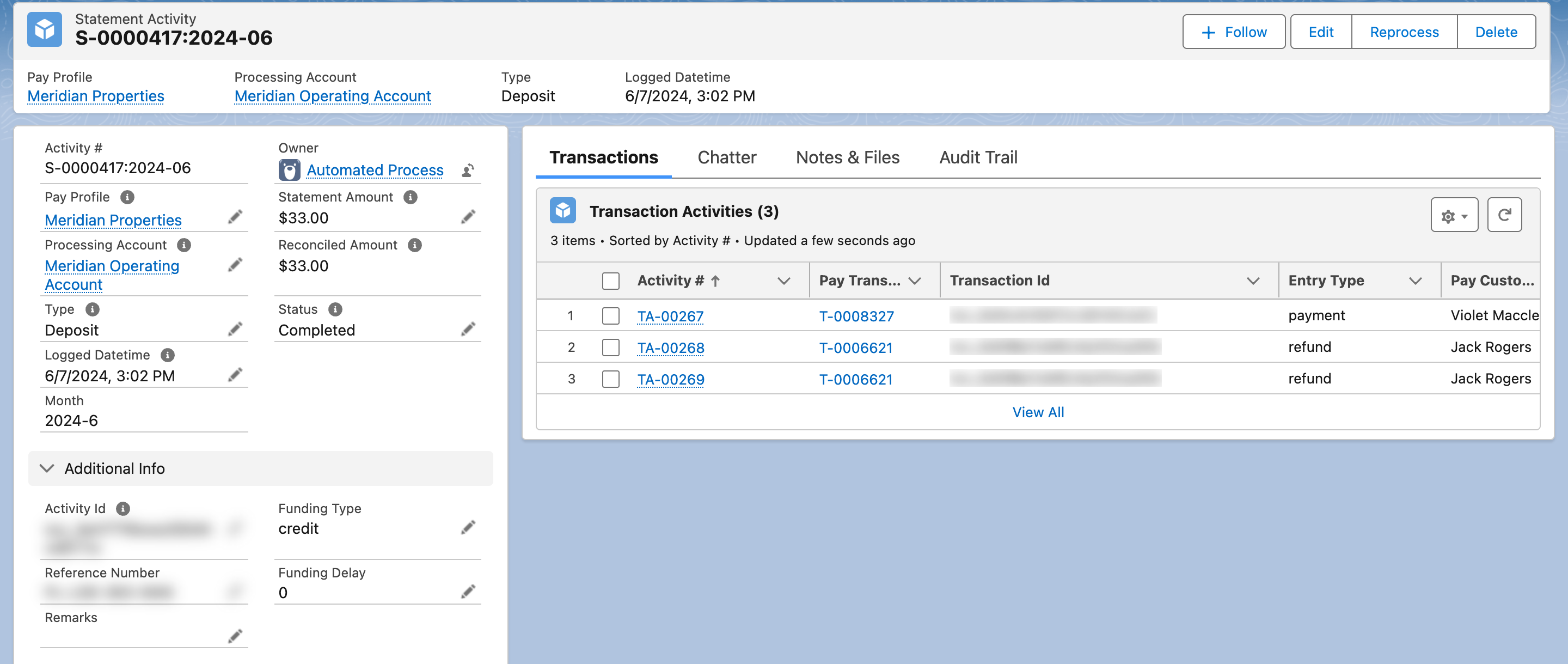
One bank deposit, three payments. Every line is matched, the amounts agree: good to reconcile.
How a statement activity is built
- Payload reports a deposit or a payout through a webhook. REDA Pay creates the Statement Activity with Status In Process and reads the details from Payload: amount, type, funding type and delay, reference number, the date it was logged, and the processing account.
- REDA Pay creates one Transaction Activity per line, linking each to the Pay Transaction with the same Payload identifier. Lines for payments Salesforce does not know stay unlinked.
- Status becomes Completed.
- If the org switch CREATE_MISSING_TRANSACTIONS is on (see Org switches and error messages), REDA Pay fetches each unknown payment from Payload and creates it as a Pay Transaction under the order it belongs to, then links the line. With the switch off, unknown lines wait for you.
All of this happens in the background within minutes of the webhook.
The finance routine
Work from the Statement Activities tab's list views:
| List view | What is in it | What to do |
|---|---|---|
| In Process | Activities still being built | Wait; if one stays here for long, see Reprocess below |
| Pending Reconciliation | Completed and Good To Reconcile: no unlinked lines, and Reconciled Amount equals Statement Amount | Match to the bank statement line, then set Status to Reconciled |
| Reconciliation Errors | Completed but not good to reconcile: unlinked lines, or amounts that differ | Investigate (below) |
| Reconciled | Done | — |
To mark one reconciled: open it, click Edit, set Status to Reconciled, Save. REDA Pay refuses if the amounts differ: "Statement and Reconciled amount must be the same for reconciled activities." — and the record, once reconciled, cannot be reprocessed.
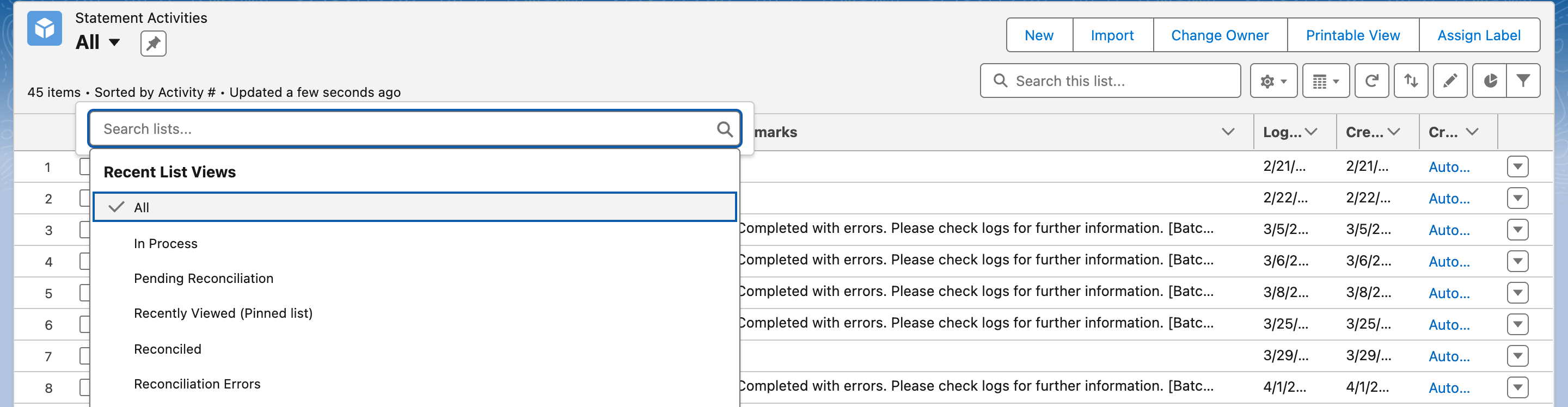
The four views are the whole routine: pending ones get reconciled, error ones get investigated.
When a statement is in Reconciliation Errors
| Finding | Cause | Fix |
|---|---|---|
| A line with no Pay Transaction | The payment was made outside REDA Pay (in Payload's dashboard or another system), or it is a REDA Pay payment whose transaction was lost | Reprocess with Create Missing Transactions on (below). A payment made outside REDA Pay is then created under the order it carries, or reported in the log if it carries none |
| Reconciled Amount differs from Statement Amount | Lines missing, or a refund or fee line Payload reported differently | Reprocess; if it persists, compare with the Payload dashboard and contact support@reda.one with the Activity number |
| Stuck In Process | The background job failed; a REDA Pay Log explains | Read the log, then Reprocess |
Reprocess
- On the Statement Activity, click Reprocess.
- Read the warning: the activity's lines are rebuilt from Payload, which "includes removing the reference on existing reconciled transactions under this statement activity. This process may be irreversible."
- Create Missing Transactions is on by default in this dialog, whatever the org switch says. Leave it on to have unknown payments created as Pay Transactions; switch it off to rebuild the lines only.
- Click Reprocess. "Statement Activity reprocess is initiated. You will receive a notification, when the processing is complete." When it finishes you get an in-app notification "Your request to reprocess Statement Activity S-… is complete." and the record returns to Completed.
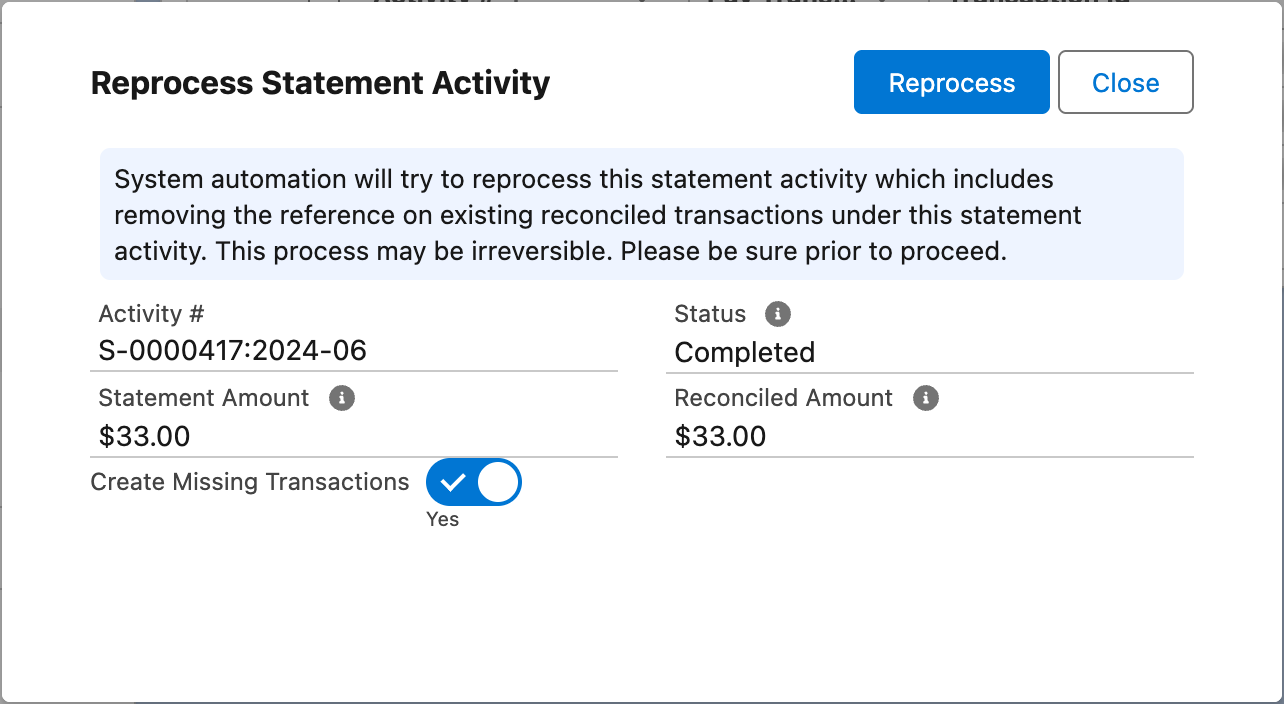
Reprocess rebuilds the lines. Note the toggle: it defaults to Yes here.
A Reconciled statement cannot be reprocessed: ""Reconciled" statement activity can not be reprocessed."
Worked example
Payload deposits $3,753.50 on 3 November. The Statement Activity S-0000930:2026-11 shows Statement Amount $3,753.50 and two lines: a $1,251.75 rent payment and a $2,501.75 rent payment, each including its $1.75 bank fee because the operating account does not route fees elsewhere. Reconciled Amount $3,753.50, Unreconciled Activities 0, Good To Reconcile ticked. Finance finds the $3,753.50 line on the bank statement dated 3 November, sets the status to Reconciled, and the day is done.
Mistakes to avoid
| Mistake | What happens | Fix |
|---|---|---|
| Marking a statement reconciled from the Reconciliation Errors view | Unlinked lines are hidden behind a reconciled status | Reconcile only from Pending Reconciliation |
| Reprocessing a statement that was already matched | Its lines are rebuilt and links to transactions are reset | Reprocess only statements with errors |
| Deleting a Pay Transaction that a line links to | The line becomes unreconciled | Transactions with activity lines should not be deleted |
| Expecting payouts to match disbursements one for one | A payout may combine disbursements and refunds | Read the lines |
FAQ
When fees are routed to a separate processing account, that account has its own deposits. When they are not, the deposit contains the net amounts and Payload's own charges appear in its billing, not in REDA Pay.
Statement Activities and Transaction Activities are ordinary records: build a report with Statement Activity as the primary object and its lines, or use the packaged Unreconciled Deposits and Unreconciled Payouts reports.
Check webhooks (the profile's Webhook Setup tab lists deposit and reversal), then the REDA Pay Logs. A deposit can also be created by hand with its Payload Activity Id and then reprocessed, but that is unusual; contact support first.