
Void or refund a payment
Money can go back to a payer in two ways. A void cancels a payment before Payload has funded it — the charge simply never settles. A refund returns money for a payment that has already settled, in full or in part, as a new transaction. Which one applies is decided by the payment's Funding Status: pending can be voided; anything later must be refunded.
- You hold REDA Pay - Transaction Manager (or Admin User) — see Who can do what.
- You have the Pay Transaction open: REDA Pay app → Pay Transactions, or the transaction under the Pay Order.
- Both actions send an instruction to Payload and may be irreversible. Check the amount and the payer first.
Void or refund?
| Void | Refund | |
|---|---|---|
| Allowed when | Status processed and Funding Status pending, for a payment or a disbursement | Type payment, Status processed |
| What happens at Payload | The transaction is marked voided; it is dropped from funding | A refund transaction is created and the money is returned |
| Amount | Always the whole payment | Full, or partial unless the processing account has Disable Partial Refund ticked |
| Record afterwards | The same transaction, status voided, Voided Date set | A new Pay Transaction of type refund under the same order, linked by Parent Transaction; the original becomes refunded when fully refunded |
| Cost | Usually none | Payload's refund terms apply |
REDA Pay checks the funding status first. A transaction whose funding status is no longer pending is refused with "Failed to void Transaction. Transaction is already processed." — refund it instead. The same message appears for a failed attempt, which has no funding status because it never reached Payload; there is nothing to void. A pending transaction whose status is not processed, for example a rejected one, is refused with "Transaction is not eligible for Voiding."
Void a payment
- On the Pay Transaction, click Void Transaction.
- The dialog warns "Prior to voiding the transaction, provide the required details. Please note that this action may be irreversible." and shows the Amount, Convenience Fee, Reference Number and Status.
- Voided Date defaults to today; keep or change it. Enter Internal Comments — why the payment is cancelled. Both are required.
- Click Void. "Transaction voided successfully." appears and the record refreshes with Status voided and Voided Date set.
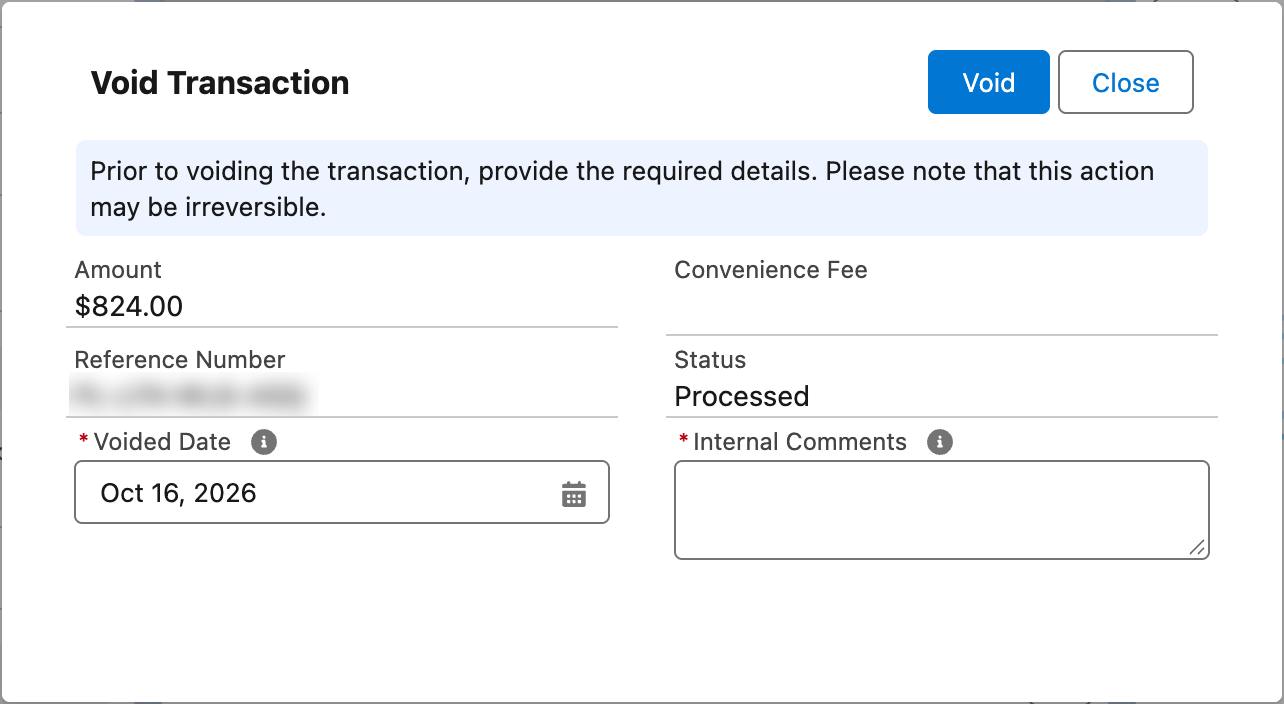
Void: the whole payment, before funding. The comment is kept on the transaction.
Refund a payment
- On the Pay Transaction, click Refund Transaction.
- The dialog warns "Prior to refunding the transaction, provide the required details. Please note that this action may be irreversible." and shows the Amount and Reference Number.
- For a partial refund, tick Partial Refund and enter the Refund Amount. If the processing account has Disable Partial Refund ticked, the checkbox is absent and the full amount is refunded.
- Refund Date defaults to today. Enter a Refund Description — the reason. Both are required ("Required information missing." otherwise).
- Click Refund. "Transaction refunded successfully." appears. A new Pay Transaction of type refund now sits under the same Pay Order with the refund amount and Parent Transaction pointing at the original.
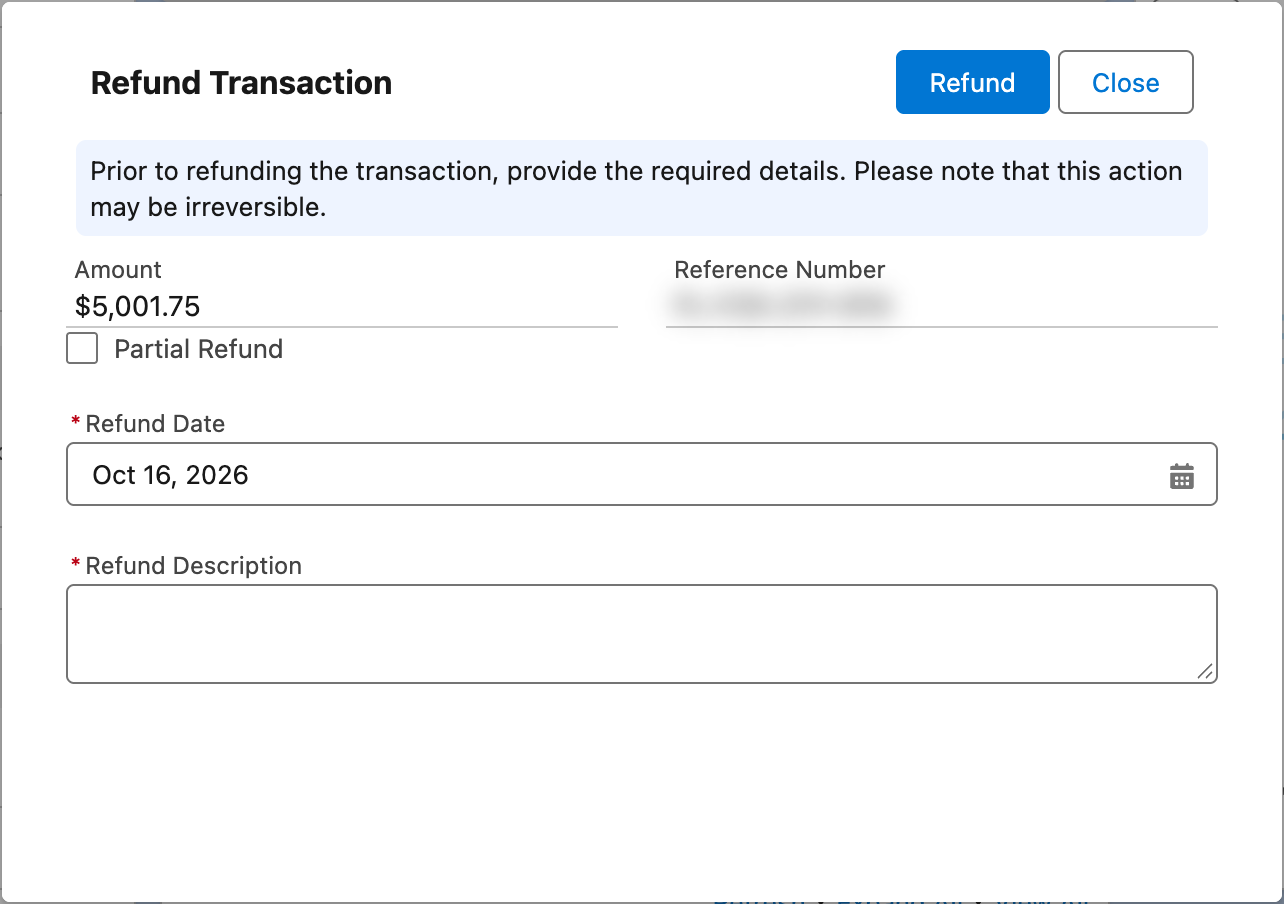
Refund: full by default; tick Partial Refund to enter an amount.
Refunds can only be made against a payment that is processed: a refund of a refund, of a credit, or of a declined payment is refused with "Only transaction of type "Payment" can be refunded." or "Only transaction in status "Processed" can be refunded."
Convenience fees on refunds
The amount shown in the dialog is the transaction amount — the net amount, principal plus fee. A full refund returns all of it. When the fee was routed to a separate fee account, REDA Pay instructs Payload to reverse both parts — principal from the main account and fee from the fee account. For a partial refund you choose the amount; decide yourself whether the fee is included.
Which action, by funding status
| Funding Status of the payment | Action available | Notes |
|---|---|---|
| pending | Void (whole amount) or Refund | Void is cheaper and faster: the charge never settles. Prefer it for same-day mistakes |
| batched, captured | Refund only | A void is refused: "Failed to void Transaction. Transaction is already processed." |
| refunded | Nothing | Already returned in full |
| reversed | Nothing | Money was pulled back by Payload or the bank |
Worked example: a partial refund
A resident paid $1,251.75 ($1,250.00 rent plus the $1.75 bank fee) by bank account on 1 November, then proved $200 had been credited twice. On 5 November the funding status is batched, so a void is impossible.
- The refunds desk opens T-0014610, clicks Refund Transaction, ticks Partial Refund, enters Refund Amount
200, leaves Refund Date as today, writes "Duplicate credit on the November ledger" in Refund Description, and clicks Refund. - "Transaction refunded successfully." A new transaction T-0014650, Type refund, Amount $200.00, Parent Transaction T-0014610, appears under the same Pay Order P-052010. T-0014610 stays processed.
- The fee is left with the organisation, because the refund was for the rent, not the service. Had the whole payment been wrong, a full refund of $1,251.75 would have reversed both the rent and the fee.
- Two days later a Statement Activity of type Payout lists the $200.00 refund.
Who should hold the Transaction Manager permission set
Voids and refunds move money out, so give REDA Pay - Transaction Manager to the few people whose job it is — a refunds desk or finance — rather than to everyone who takes payments. Both actions record who did them (the transaction's modified-by and the refund transaction's created-by) and require a written reason.
What the records look like afterwards
| Record | After a void | After a full refund | After a partial refund |
|---|---|---|---|
| Original Pay Transaction | Status voided, Voided Date, Internal Comments | Status refunded | Status unchanged (processed) |
| New Pay Transaction | — | Type refund, amount = original, Parent Transaction set | Type refund, amount = refund, Parent Transaction set |
| Pay Order | Unchanged (still Immediate - Processed) | Unchanged | Unchanged |
| Bank | Never funded | A payout of the refund appears as a Statement Activity of type Payout | Same |
A transaction that has refunds under it cannot be deleted.
Mistakes to avoid
| Mistake | What happens | Fix |
|---|---|---|
| Trying to void a batched payment | "Failed to void Transaction. Transaction is already processed." | Refund |
| Refunding twice | A second refund transaction and a second return of money | Check the order's transactions before refunding |
| Reading the dialog's Amount as the principal | It is the net amount including fee | Decide the fee treatment for partial refunds |
| Refunding a disbursement | Not possible; a credit cannot be refunded | Ask the payee to return the money, or net it off the next payout |
| Expecting a receipt email to the payer | REDA Pay sends none | Use your own template from the refund transaction |
FAQ
That is between Payload and the payer's bank or card issuer — typically days for cards and bank payments.
A credit with funding status pending can be voided with the same action, stopping the payout.
No. Voids and refunds are staff actions.