
Controls: geolocation, session and link expiry
REDA Pay has a small set of controls that decide whether a payment attempt is allowed to proceed, as opposed to the settings that decide what the screen shows. They live on the Processing Account, on the User record and, for links, on the Pay Order. This article explains each control, the message a payer sees when it stops them, and how to tune it.
Summary
| Control | Where | What it stops | Message the payer sees |
|---|---|---|---|
| Payment session expiry | Processing Account → Payment Session Duration (Minutes) | Finishing a payment screen opened too long ago, or reusing a bookmarked one | "Invalid request. Payment session is expired." |
| Guest session expiry | Pay Profile → Guest Session Duration (Minutes) | Finishing a save-a-method screen opened too long ago | "Invalid request. New method session is expired." |
| Link expiry | Processing Account → Link Expiration (Minutes); per link on the Pay Order | Paying a link after it has expired | "Invalid request: Order link has expired." |
| Geolocation | Processing Account → Enforce Geolocation and Enforce Geolocation For | Paying without sharing the device's location | "You must share geo-location access on browser or device to process the payment." |
| Duplicate request | Built in | Pressing the pay button twice in one session | "Our systems have detected a duplicate payment request. We will only consider the first payment request." |
| Per-user direction | User → REDA Pay - Disable Receipts, REDA Pay - Enable Disbursements | A user taking receipts or sending payouts they are not allowed to | "No transfers are allowed. [Transfer Type]" on the screen; "You are not authorized to process disbursements." if an order is saved another way |
Payment session expiry
Every payment screen runs inside an encrypted session created when the screen opens. The session carries who is paying, which profile and account, and expires after the account's Payment Session Duration (Minutes) — 15 minutes when the field is blank. A payer who takes longer, or who reopens a bookmarked or copied screen address, sees "Invalid request. Payment session is expired." and must start again from the record, portal page or link.
Raise the duration for channels where payers are slow — residents on phones typing a new bank account — and keep it short for staff screens. Thirty minutes is a common choice for portals.
The equivalent for the save-a-payment-method screen is Guest Session Duration (Minutes) on the Pay Profile, also 15 minutes when blank. It governs the "request your bank details" links sent to vendors — see Request bank details from a vendor.
Link expiry
A payment link is valid from the moment the Link order is created until Link Expiration (Minutes) on the Processing Account have passed; the deadline is stored on the order as Link Expiration Date Time and the order's Has Active Link turns off at expiry, on payment, or on revocation. A link created while the minutes are blank is never active: the customer sees "Invalid request" and nothing can be paid. Set the minutes before anyone creates links. Typical values are 1440 (one day) to 10080 (one week).
To end a link early, open the Pay Order and use Revoke Order — see Revoke a payment link.
Geolocation
REDA Pay can record where a payment was made from. When the payer confirms, the browser asks permission to share the device's location, and the coordinates are stored on the Pay Order as Geo Latitude and Geo Longitude (for logged-in users the IP Address is stored too). You decide whether sharing is optional or mandatory:
- Enforce Geolocation — the order types for which location is mandatory: Immediate, Schedule, Link.
- Enforce Geolocation For — the user types it applies to: Internal, Community, Guest.
Enforcement applies only where both lists match: for example Link and Guest makes location mandatory for anyone paying a link without logging in, and optional everywhere else. A payer who declines the browser's prompt sees "You must share geo-location access on browser or device to process the payment." and cannot continue until they allow it.
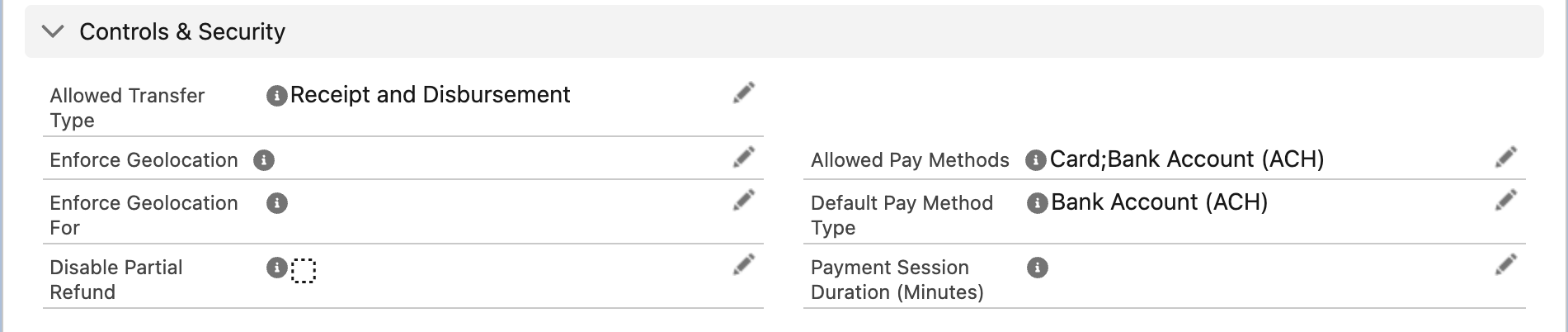
Where geolocation and session length are set. Both lists must match for location to be mandatory.
Capture can be switched off for a page with the component setting Skip Geo-Location Capture, or for a URL with rpay__geoskip=1. Skipping capture on a page where location is enforced blocks every payment on that page, so use one or the other.
Duplicate-payment protection
Within one payment session the pay button works once. A second press — a double-click, or pressing again while the first request is still running — is refused with "Our systems have detected a duplicate payment request. We will only consider the first payment request." The first request continues normally. Payload applies its own duplicate rules as well; questions about those go to Payload.
Per-user direction switches
Two checkboxes on the User record decide the direction of payments a person may make:
| Field | Default | Meaning |
|---|---|---|
| REDA Pay - Enable Disbursements | off | Tick to let this user send disbursements. Nobody can send payouts until it is ticked |
| REDA Pay - Disable Receipts | off | Tick to stop this user taking receipts |
When a user opens a payment screen and neither direction is allowed for them, REDA Pay shows "No transfers are allowed. [Transfer Type]". When both are allowed and the account allows both, the user is asked "Select Transfer Type" first. See Who can do what for the Setup path.
Other limits worth knowing
| Limit | Where |
|---|---|
| Which payment methods and directions an account accepts | Processing Account → Allowed Pay Methods, Allowed Transfer Type |
| Which methods, directions and accounts one customer may use | Pay Customer → Allowed Payment Methods, Allowed Transfer Type, Applicable Processing Accounts — see Per-customer rules |
| Which methods a particular link accepts | Chosen when the link is created: Do Not Accept Card, Do Not Accept ACH |
| Which buttons and methods a page offers | Component settings and URL parameters — see Component settings reference |
Mistakes to avoid
| Mistake | What happens | Fix |
|---|---|---|
| Blank Link Expiration (Minutes) | Every link is dead on arrival | Set the minutes on each account that creates links |
| Enforcing geolocation for Internal users on shared office computers | Staff must allow location on every browser | Enforce it for Guest or Community only, unless policy requires more |
| Skip Geo-Location Capture on a page where it is enforced | No payment can complete on that page | Remove one of the two |
| Session too short for the portal | "Payment session is expired." complaints | Raise Payment Session Duration on the account |
| Enabling disbursements for everyone | Any staff member can pay money out | Enable it only for the users whose job it is |
FAQ
No. It is recorded on the order for your records and reports; REDA Pay does not block payments by location.
The clock starts when the screen opens. If a payer opens the screen and walks away, it expires; they simply reopen it.
No. A link always has an expiry, taken from the account's minutes when it is created. Choose a long value instead.