
Set up convenience fees
A convenience fee is an amount added to a payment to cover the cost of processing it. REDA Pay calculates it from Fee Setup records under the Processing Account, shows it to the payer before they confirm, and charges the total — the Net Order Amount — in one transaction. If you charge no fees, skip this article: an account with no Fee Setup records adds nothing.
- The Processing Account exists and is active — see Configure a processing account.
- You hold REDA Pay - Admin User.
- Check what fees your card agreement and local rules allow. REDA Pay applies whatever you configure.
How a fee is calculated
When a payer confirms a payment, REDA Pay looks for the Fee Setup that matches the payment method:
- Bank account: the account's Fee Setup for Bank Account.
- Card: the Fee Setup for that card's brand (Visa, Master Card, American Express, Discover) if one exists; otherwise the Fee Setup for All cards.
It then applies the setup's Calculation Type:
| Calculation Type | Fee |
|---|---|
| Percentage | Fee Percentage × amount |
| Fixed | Fee Fixed |
| Percentage + Fixed | Fee Percentage × amount, plus Fee Fixed |
The result is rounded to cents, then raised to Minimum Fee if it is below it and cut to Maximum Fee if it is above it (each only when set). Disbursements never carry a fee.
The payer sees the fee before confirming, on the Confirm Pay Order Summary: Order Amount, Convenience Fees and Net Amount. The net amount is what is charged.
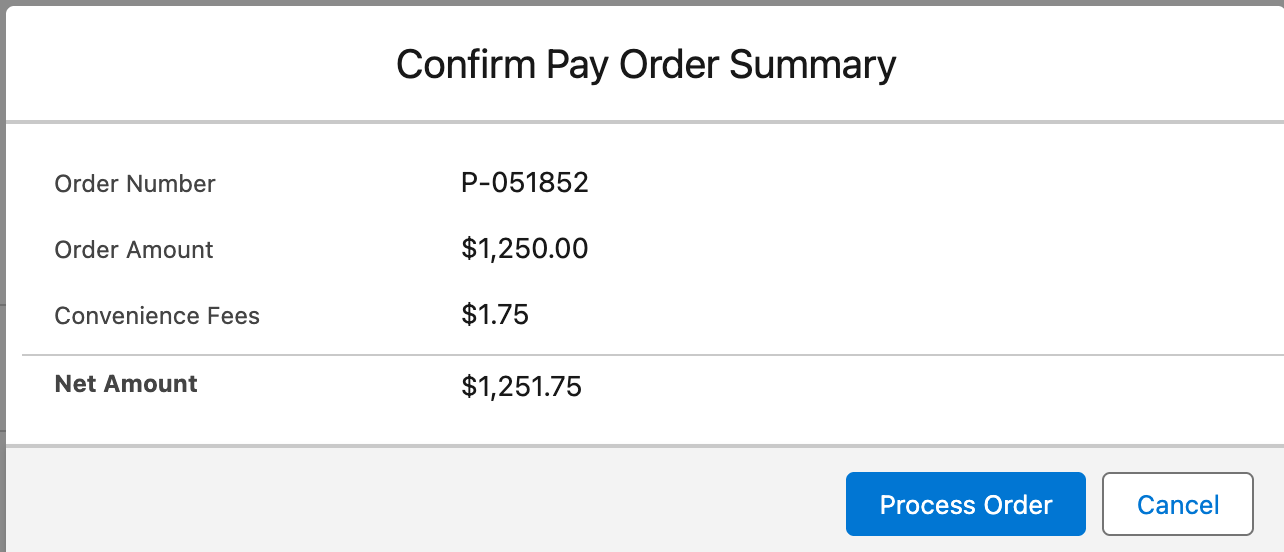
What the payer confirms. The fee comes from the Fee Setup that matches the chosen payment method.
Create a Fee Setup
- Open the REDA Pay app → Processing Accounts → the account → Fee Setup tab → New.
- Fill in the fields:
| Field | What to enter |
|---|---|
| Setup Name | A name that says what it covers, for example All cards 3% or ACH $1.75 |
| Processing Account - Primary | The account this rule belongs to (pre-filled) |
| Pay Method Type | Card or Bank Account |
| Card Type | For cards: All, Visa, Master Card, American Express or Discover. Leave as All unless a brand costs you more |
| Calculation Type | Percentage, Fixed or Percentage + Fixed |
| Fee Percentage | For example 3 for 3% |
| Fee Fixed | For example 0.25 for 25 cents |
| Minimum Fee, Maximum Fee | Optional floor and ceiling in currency |
| Processing Account - Fee | Optional: a second account on the same Pay Profile that receives the fee (see below) |
| Description | Stored on each order as its Fee Description |
- Save. The rule applies to new orders from now on; existing orders keep the fee they were created with.
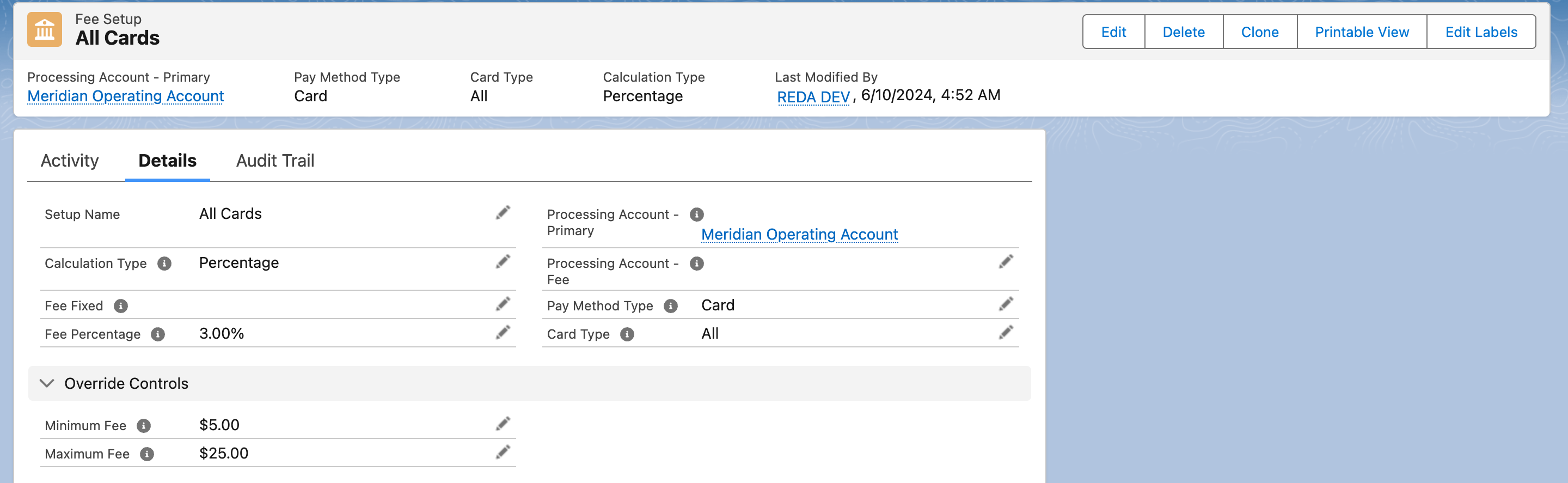
A percentage fee for all cards. Brand-specific setups on the same account take precedence for that brand.
Worked examples
All on Meridian Properties' operating account, which has three Fee Setups: All cards (Percentage 3), American Express (Percentage 5) and Bank Account (Fixed 1.75).
| Payment | Setup used | Fee | Charged |
|---|---|---|---|
| $1,250.00 by saved bank account | Bank Account, fixed | $1.75 | $1,251.75 |
| $1,250.00 by a saved Visa | All cards, 3% | $37.50 | $1,287.50 |
| $1,250.00 by a saved American Express | American Express, 5% | $62.50 | $1,312.50 |
| $20.00 by Visa with Minimum Fee $1.00 on the All-cards setup | All cards, 3% = $0.60, raised to minimum | $1.00 | $21.00 |
| $5,000.00 by Visa with Maximum Fee $35.00 | All cards, 3% = $150.00, cut to maximum | $35.00 | $5,035.00 |
A Percentage + Fixed setup of 2.55% + $0.25 on a $100.00 card payment gives $2.55 + $0.25 = $2.80.
Routing the fee to a second account
Some organisations keep fees separate from operating funds. Set Processing Account - Fee on the Fee Setup to a second Processing Account on the same Pay Profile. When such an order is processed, Payload splits the charge: the principal goes to the primary account and the fee to the fee account, in one transaction. A full refund of such a payment reverses both parts.
Switching the fee off, or overriding it, per order
| Control | Where | Effect |
|---|---|---|
| Do NOT Charge Convenience Fee | Setting on the payment component, so a whole page charges no fee | Orders from that page carry no fee |
| Do Not Charge Convenience Fees | Checkbox on the summary when creating a payment link | That link's payment carries no fee |
| Zero Convenience Fee | Field on the Pay Order (also set by the URL parameter rpay__nofee=1) | No fee on that order |
| Convenience Fee Override | Field on the Pay Order (also set by rpay__cfee=<amount>) | Replaces the calculated fee with the given amount |
See URL parameters reference for the parameters.
A first-time card gets the "All" rate
The brand of a card is known only after Payload has registered it. When a payer types a new card and pays in the same step, the fee is calculated before registration, so the All cards setup applies even if a brand-specific setup exists. From the card's second use the brand is known and the brand setup applies. If every card should pay the same, this makes no difference; if you charge American Express more, tell your team that the first payment with a new Amex is charged at the All-cards rate.
Where the fee is recorded
Each Pay Order stores the fee rule it used — Fee Setup, Fee Calculation Type, Fee Percentage, Fee Fixed, Minimum Fee, Maximum Fee, Fee Description, Processing Account - Fee — and the result in Calculated Convenience Fee and Net Order Amount. Reports on fees should use Calculated Convenience Fee.
Mistakes to avoid
| Mistake | What happens | Fix |
|---|---|---|
| A card setup with Card Type blank | The rule may not match | Choose All or a brand |
| Two setups for the same method and brand | The most recently changed one wins, which is hard to predict | Keep one setup per method and brand |
| Fee account on a different Pay Profile | The order is refused: the fee account must be on the same profile | Choose an account under the same profile |
| Expecting fees on disbursements | None are charged | By design |
| Reading the Convenience Fee column in old list views | It is empty | Use Calculated Convenience Fee |
FAQ
Yes. Create only a Bank Account setup.
The summary shows the fee amount. The description is stored on the order for your own reporting and documents.
Only if the other method has no setup or a lower one. The payer sees the fee for the method they chose before confirming, and can switch methods.
Where to go next
- Take a payment — where the summary appears.
- Void or refund a payment — how fees are handled on refunds.