
How payment statuses stay current
Taking a payment is the start of its life, not the end. A bank payment accepted today can be rejected in three days; a card payment can be refunded from the Payload dashboard; money reaches your bank account in a batch. REDA Pay learns about all of this through webhooks — messages Payload sends to your org when something happens — and updates the records without anyone pressing a button. This article explains what arrives, what it changes, and what to do when it does not.
The ten events
| Payload event | What it means | What REDA Pay does |
|---|---|---|
| payment | A payment transaction was created | Re-reads the transaction and updates the Pay Transaction |
| processed | A transaction was processed | Same |
| authorized | A card amount was authorised | Same |
| credit | A payout (disbursement) transaction was created | Same |
| refund | A refund was made — on screen or in the Payload dashboard | Same; a refund made outside Salesforce appears as a transaction update |
| void | A transaction was voided | Same |
| decline | A transaction was declined | Same |
| reject | A bank payment was returned after acceptance | Same — the Pay Transaction becomes rejected with a Rejected Date |
| deposit | Payload deposited funds to your bank account | Creates or refreshes a Statement Activity of type Deposit and lists the payments in it |
| reversal | Payload withdrew funds from your bank account (payouts, refunds) | Creates or refreshes a Statement Activity of type Payout |
For every event except deposit and reversal, REDA Pay does one thing: it takes the transaction identifier from the message and re-reads the whole transaction from Payload, then saves what Payload returns — status, status code, funding status, amounts, dates. The message's contents are never written to a record directly, so a status in Salesforce always reflects what Payload holds. A message about a transaction Salesforce has never seen is ignored.
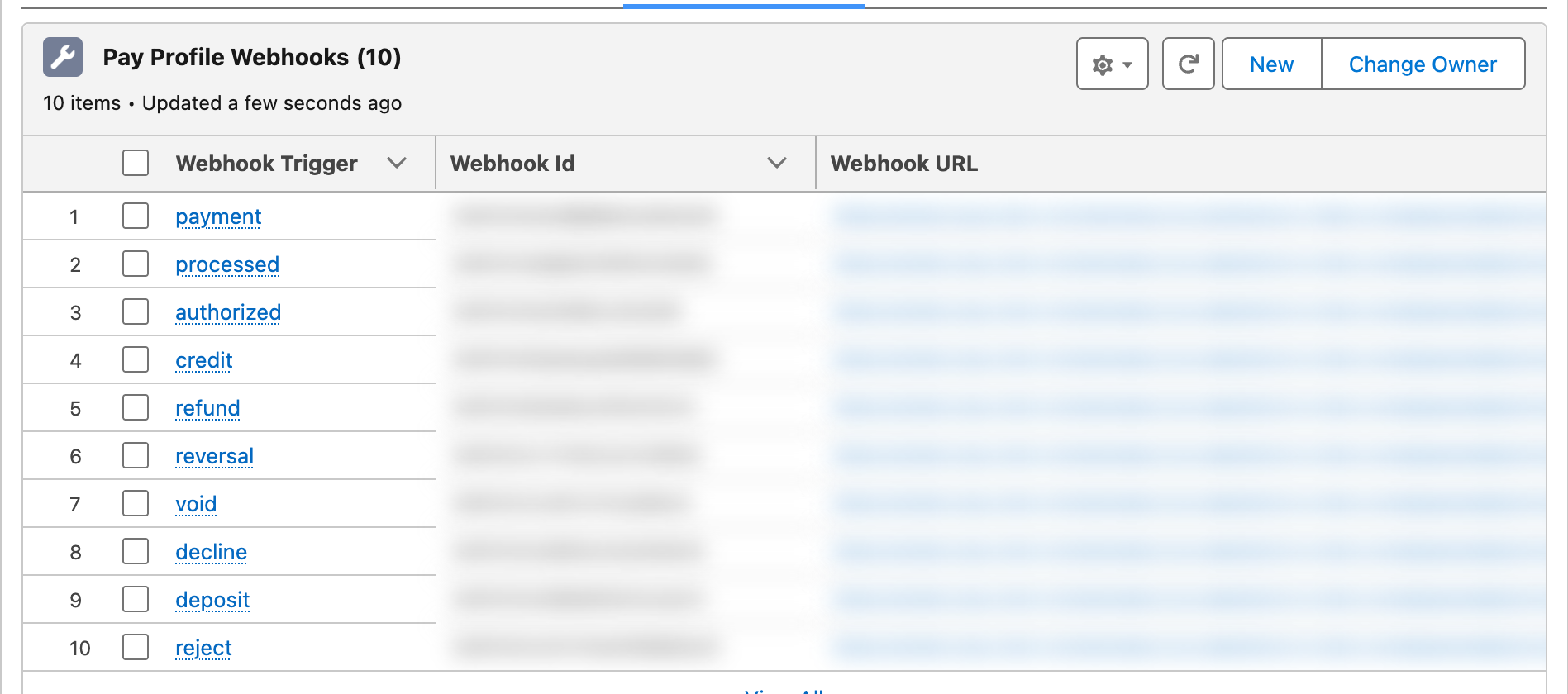
Ten events, one per row. If the tab shows fewer, run Setup Webhooks again.
What changes on the records
| Record | Fields that change | Driven by |
|---|---|---|
| Pay Transaction | Status, Status Code, Status Message, Funding Status, Processed Date, Rejected Date, Voided Date, amounts | payment, processed, authorized, credit, refund, void, decline, reject |
| Statement Activity and its Transaction Activities | Created with Statement Amount, Type, Reference Number, Logged Datetime; lines linked to Pay Transactions | deposit, reversal |
| Pay Order | Nothing. The order's own status reflects the processing done on screen or by the job; later changes live on the transaction | — |
Webhook processing runs in the background, in small batches, within a few minutes of the event. Errors are written to a REDA Pay Log.
Worked example: the life of one bank payment
| Day | Event | What changes in Salesforce |
|---|---|---|
| Mon 10:00 | A resident pays $1,251.75 in the portal | Pay Order P-052010 Immediate - Processed; T-0014610 processed, Funding Status pending |
| Mon 10:01 | Payload sends payment and processed | REDA Pay re-reads T-0014610 — no visible change, it was already current |
| Tue 02:00 | Payload batches the day's bank payments for funding | On the next event or sync, Funding Status reads batched |
| Wed 09:00 | Payload sends deposit for Tuesday's batch | Statement Activity S-0000931:2026-11 created, type Deposit, with a Transaction Activity line linked to T-0014610; Status Completed, Good To Reconcile |
| Thu 15:00 | The resident's bank returns the payment: Payload sends reject | T-0014610 becomes rejected, Rejected Date Thursday; P-052010 is unchanged |
| Fri 09:00 | Payload sends reversal for the returned funds | A Statement Activity of type Payout records the money leaving your account |
Without webhooks, Salesforce would still show the payment as processed and the deposit would never appear.
What a webhook never does
| It never… | Because |
|---|---|
| Changes a Pay Order | Orders record your instruction; outcomes live on transactions and statements |
| Creates a payment for an order Salesforce does not know | Unknown transactions are ignored; reconciliation can create missing ones deliberately |
| Writes the message's own data to a record | REDA Pay always re-reads from Payload, so a malformed or stale message cannot corrupt a record |
| Sends anything to your customers | Notifications are internal, to order owners |
How to see that it is working
| Check | Where |
|---|---|
| Transactions change status without manual syncs | Open a recent bank payment a few days later: Funding Status batched, and later a Statement Activity naming it |
| Deposits arrive | Statement Activities → In Process / Pending Reconciliation fill up after each Payload deposit |
| Errors | REDA Pay Logs → Attention Needed |
| The registration still exists | Pay Profile → Webhook Setup tab, ten rows; Webhook Setup Datetime [Payload] on the profile |
The manual fallback: Sync Transaction
Any transaction can be refreshed on demand:
- On a Pay Transaction: Sync Transaction → Sync re-reads that transaction.
- On a Pay Order: Sync Transaction → Sync asks Payload for every transaction tagged with the order, updates the ones Salesforce has and creates those it lacks.
Use it when a status looks stale, when a customer says they paid but no transaction shows, or during the first days before webhooks are verified. It does exactly what a webhook would have done.
Mistakes to avoid
| Mistake | What happens | Fix |
|---|---|---|
| Running without webhooks in production | Rejections, refunds made in Payload and deposits never reach Salesforce | Set them up before go-live |
| Replacing the API key and not re-registering | Webhooks stay registered under the old key and stop arriving | Run Setup Webhooks again |
| Expecting the order status to change on a rejection | The transaction changes; the order keeps Processed | Report on transaction status for collections |
| Editing a transaction's status by hand | The next webhook or sync overwrites it with Payload's truth | Leave statuses to REDA Pay; use Internal Comments for notes |
FAQ
Payload sends the message when the event happens; REDA Pay processes it within minutes.
Build a flow on Pay Transaction that fires when Status changes to rejected — see Automate payments with flows.
Yes, through the refund event: the original transaction is re-read and a refund transaction is created or updated under the order.