
Global settings — the REDA Connect Config records
REDA Connect's org-wide defaults live in a Setup area called REDA Connect Config. It is a Custom Metadata Type — a Salesforce mechanism for configuration records that install with an app and can be edited by an administrator in Setup. This article lists every record, its shipped value, and what it actually controls — including, honestly, the settings that only affect the previous (deprecated) Connect Feed and do nothing for the current one.
Every value here is org-wide. A change applies to all users at once; there are no per-user or per-profile overrides in this area.
- You need permission to manage Setup (the System Administrator profile, or the Customize Application permission).
- Changes take effect immediately — there is nothing to deploy or restart.
Opening the settings
- Click the gear icon (top right) and choose Setup.
- In the Quick Find box, type
Custom Metadata Typesand click Custom Metadata Types. - Click Manage Records next to REDA Connect Config.
Expected result: a list of ten records. The record labels are short codes — the setting each one controls is identified by its Key field, so open a record (or use the list's Key column) to find the one you want.
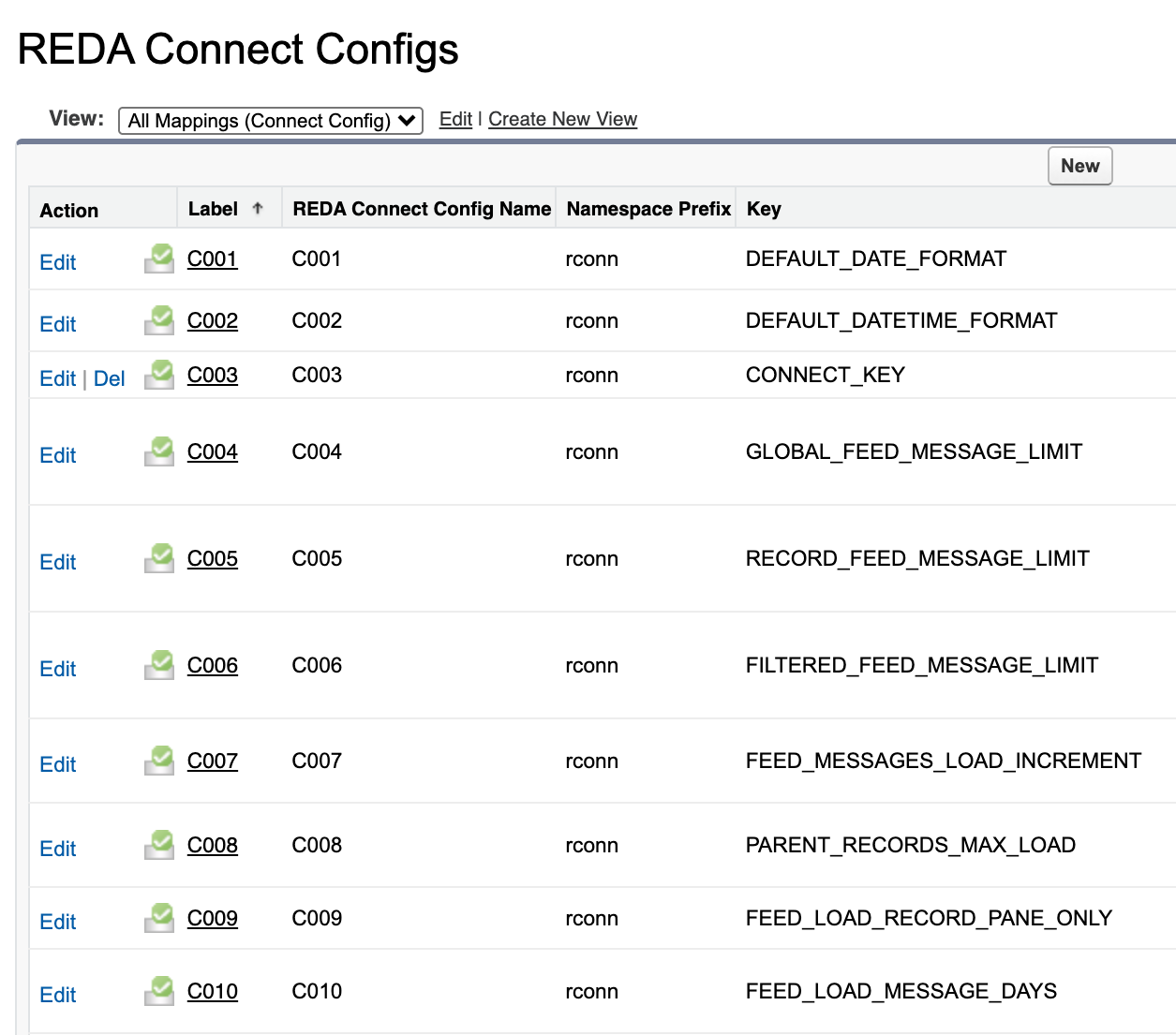
To change a value: click the record, click Edit, change only the Value field, and click Save. Never change the Key — REDA Connect looks settings up by their key.
Date and time formats
Two records control how dates and date-times are rendered — in message templates when a merge field is a Date or Date/Time value, and (for the date-time format) in the Connect Feed's message details. Both use Java-style date patterns (the "SimpleDateFormat" notation, where for example d is the day, MMM the short month name, yy the two-digit year and h:mm aaa the time with AM/PM).
| Key | Shipped value | What it controls |
|---|---|---|
DEFAULT_DATE_FORMAT | EEE, d MMM,yy | How Date values are written when a template merge field inserts a date and the template does not set its own Date Format. Renders like Tue, 4 Aug,26. |
DEFAULT_DATETIME_FORMAT | d MMM,yy h:mm aaa | How Date/Time values are written — in template merge fields, and in the Connect Feed's message Details panel. Renders like 4 Aug,26 2:30 PM, in each viewer's own time zone. |
Both are only the fallback. More specific settings win when present:
- Per template: a Connect Template's own Date Format and DateTime Format fields override these for that template's merge fields — see Merge fields.
- Per account: a Connect Account's Default Date Time Format field overrides
DEFAULT_DATETIME_FORMATfor timestamps shown in the feed for that account's messages.
Feed behaviour settings
These records tune the Connect Feed. Not all of them affect the current feed. REDA Connect 1.93 introduced a rebuilt Connect Feed; the earlier one still ships, relabelled "Connect Feed (Deprecated)". Three of the settings below only ever applied to that previous feed — with the current Connect Feed they have no effect, so don't spend time tuning them.
Read by the current Connect Feed
| Key | Shipped value | What it controls |
|---|---|---|
FEED_LOAD_MESSAGE_DAYS | 100 | How many days back the feed looks when building the conversation list. Conversations whose latest message is older drop off the list (the messages themselves remain reachable from the record's page). |
FEED_MESSAGES_LOAD_INCREMENT | 10 | How many messages load per batch as a user scrolls back through a conversation. Minimum 10. |
PARENT_RECORDS_MAX_LOAD | 100 | How many conversations load per batch in the conversation list. |
DEFAULT_DATETIME_FORMAT | d MMM,yy h:mm aaa | (Listed above under formats.) The timestamp format in the message Details panel when the Connect Account sets none. |
What each of these means in practice, and recommended values by messaging volume, are covered in Feed performance settings.
Apply only to the previous (deprecated) Connect Feed
| Key | Shipped value | What it did |
|---|---|---|
GLOBAL_FEED_MESSAGE_LIMIT | 0 | Initial message count on the previous feed's global view. No effect on the current Connect Feed. |
RECORD_FEED_MESSAGE_LIMIT | 0 | Initial message count on the previous feed's record view. No effect on the current Connect Feed. |
FILTERED_FEED_MESSAGE_LIMIT | 1000 | Message cap on the previous feed's filtered view. No effect on the current Connect Feed. |
FEED_LOAD_RECORD_PANE_ONLY | 0 | Whether the previous feed's global view loaded only its record pane at first (0 or 1). No effect on the current Connect Feed. |
If your org has fully moved to the current Connect Feed, you can leave all four exactly as they are — changing them changes nothing users see.
One internal record
The list also contains one internal record that supports REDA Connect's secure credential storage. Do not modify or delete it. It is the one record whose key is not listed above; leave it exactly as installed.
Worked example — a European date style
Your team wants dates like 04.08.2026 and times like 14:30 everywhere, instead of the shipped Tue, 4 Aug,26 / 4 Aug,26 2:30 PM:
- Open REDA Connect Config → Manage Records, open the record whose Key is
DEFAULT_DATE_FORMAT, click Edit, set Value todd.MM.yyyy, and Save. - Open the record whose Key is
DEFAULT_DATETIME_FORMAT, click Edit, set Value todd.MM.yyyy HH:mm, and Save.
Expected result: the next template merge and the next feed load render dates the new way, for every user. Any template or Connect Account with its own format keeps its own format.
Troubleshooting
| Symptom | Cause | Fix |
|---|---|---|
| I changed a "Feed Message Limit" setting and nothing happened | Those three settings only affect the previous (deprecated) Connect Feed | Tune FEED_LOAD_MESSAGE_DAYS, FEED_MESSAGES_LOAD_INCREMENT or PARENT_RECORDS_MAX_LOAD instead — see Feed performance settings |
| Dates render as odd text after a format change | The Value is not a valid Java-style date pattern | Re-check the pattern letters (e.g. MM is month, mm is minutes) and correct the Value |
| A template still shows the old format | The template has its own Date Format / DateTime Format value | Clear or update the format fields on that template — see Merge fields |
| A conversation vanished from the feed's list | Its latest message is older than FEED_LOAD_MESSAGE_DAYS | Raise the value, or open the conversation from the record's own page |
FAQ
Neither — every record here is org-wide. The only per-user settings in REDA Connect are the four fields described in User preferences.
No. These records are designed so your edited values survive package upgrades — your changes are kept.
You can create records, but REDA Connect only reads the keys documented here — a record with any other key is ignored. Stick to editing the Value of the shipped records.
Numeric feed settings have built-in fallback values, but invalid input may not produce the result you intended. Keep numeric settings numeric and date formats valid, then verify the result after changing a setting.
Where to go next
- Feed performance settings — what the four current-feed settings do in practice, with recommended values for busy orgs.
- Emoji categories and incoming file types — the other two settings areas.
- User preferences — the per-user counterparts to these org-wide defaults.