
What is a Connect Account?
A Connect Account holds your business messaging connections and settings. It can serve WhatsApp, SMS, Facebook Messenger and Instagram. Meta channels on one account share a Meta app; Messenger uses one Facebook Page and Instagram its linked professional account. Use separate Connect Accounts for different Meta apps or Pages. Connect Account Configs connect these channels to your standard and custom Salesforce objects.
One account, selected channels
Select the required channels in Messaging Channels. You may save the account with no channels selected while preparing credentials. The WhatsApp/SMS combinations below remain available; add Messenger and/or Instagram through the Meta account setup guide.
- WhatsApp only — the account carries a WhatsApp Business number and its Meta connection details.
- SMS only — the account carries an SMS number and its Twilio connection details.
- Both — one account record serves a WhatsApp number and an SMS number side by side. The two numbers do not have to be the same; each channel has its own set of fields on the record.
Which channels you select also decides which fields Salesforce requires before the record will save — the channel setup walkthroughs cover this in detail (see Creating a Connect Account).
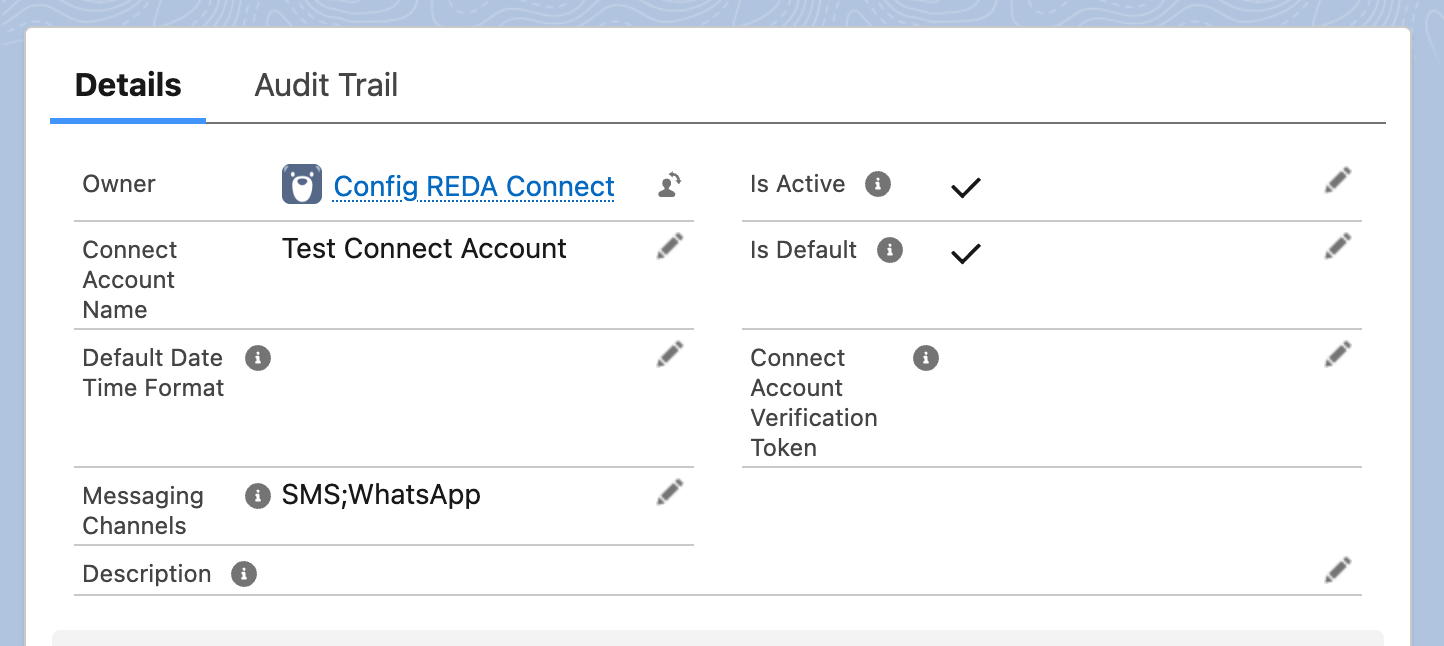
SMS;WhatsApp, so this single record powers WhatsApp and SMS sends alike.What lives on the account
The Connect Account record groups into four kinds of information:
| Group | Fields (on-screen labels) | What they do |
|---|---|---|
| Identity | Connect Account Name, Description, Messaging Channels | Who this account is and which channels it serves |
| The numbers | WhatsApp Number, SMS From Number | The phone numbers messages are sent from and received on — always entered as country code + number, digits only (see How to enter phone numbers) |
| Provider connection details | WhatsApp: Meta App Id, WhatsApp Account Id, WhatsApp Number Id, WhatsApp API Endpoint, WhatsApp Token, Connect Account Verification Token. SMS: SMS Provider, SMS Account Id, SMS API Key, SMS API Secret, SMS Production API Endpoint, SMS Status Callback URL, SMS Messaging Service Id, SMS Setup Description | How REDA Connect talks to Meta and Twilio for this number. The two token fields (WhatsApp Token, and the SMS API Key / SMS API Secret pair) are never typed by hand — they are set through dedicated actions and stored in encrypted form (see Updating your API tokens safely) |
| Behaviour | Is Active, Is Default, Allow Document Sharing, Default Date Time Format, Opt In Keywords, Opt Out Keywords | How the account behaves when sending and receiving — explained field by field in Creating a Connect Account |
The two switches: Active and Default
Two checkboxes on the account matter more than any other setting:
- Is Active — the master switch. Its help text says it plainly: "Only active accounts can be used to send and receive messages." An account you are still setting up should stay unticked; tick it after the channel and credentials are configured, before running your controlled send-and-receive test.
- Is Default — makes this account the org-wide fallback for its channels. When a user sends a message and nothing more specific decides which account to use, the default account sends it. The full decision order — per-record setting, then the user's personal default, then this org default — has its own article: Default accounts and routing order.
What does NOT live on the account
The account holds provider connections. Its Connect Account Config rows map each channel to the object, channel identity field and display-name field, and control incoming record matching and creation. All custom objects can use this configuration; Lead and Contact simply have packaged convenience fields.
FAQ
Yes. Select both values in Messaging Channels and complete both channels' fields. Each channel keeps its own number, its own credentials, and its own webhook — they simply share one account record and its behaviour settings.
No. Accounts represent business messaging connections, not individual agents. Many users can work through the same account. Create separate accounts when your business identities and routing require them.
Not if it has messages: Salesforce blocks deleting a Connect Account referenced by Connect Messages. Clear Is Active to remove it from active use and the org-default choices while preserving history. Do not rely on this checkbox alone to stop every provider notification; review the inbound routing and webhook configuration too.
Nothing yet. Its help text reads "Not used currently." — leave it blank.
Where to go next
- Creating a Connect Account — create the record and understand every behaviour field.
- Default accounts and routing order — how REDA Connect picks an account when you have more than one.
- How to enter phone numbers — the one formatting rule that makes or breaks matching and sending.