
Assigning incoming messages to record owners
Matching an incoming message to the right record (how that works) is half the job — the other half is getting it in front of the right person. The OwnerId Field API Name field on an object configuration does exactly that: when it's set, an incoming message matched to an existing record through that configuration can be assigned to the owner of the matched record. The Contact's owner gets the Contact's replies, the Lead's owner gets the Lead's replies — and each agent can work from the My Messages view of the Connect Feed instead of scanning everything. Verify the first message that automatically creates a record separately; this path does not guarantee the same owner copy.
- Working configurations — Configuring Contacts and Leads.
- Meaningful record ownership: this feature routes to whoever owns the record, so it pays off when your Contacts/Leads are owned by the people who should answer them (not all by one admin or an integration user).
Step 1 — Set the owner field on each configuration
- Open your Connect Account → Connect Account Configs related list.
- Open a configuration — e.g. Contact - WhatsApp — and click Edit.
-
In OwnerId Field API Name, enter the API name of the record's Owner field. For standard ownership — the typical case on Contact, Lead, and most custom objects — that is:
OwnerIdThe product's help text: "API name of the record "Owner Id" field on the provided sObject. If provided inbound messages will get assigned to the record owner."
- Click Save, and repeat for each configuration whose incoming messages should be agent-assigned (each object, each channel).
Expected result: a new incoming message matched to an existing record uses the configured owner value if it is populated and valid for the message. Verify the first message that automatically creates a record separately.
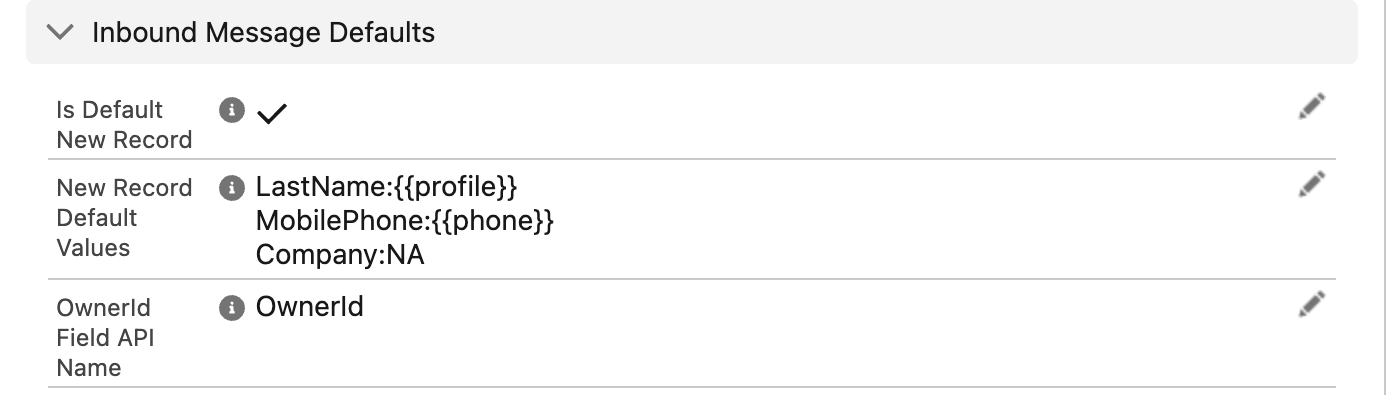
OwnerId entered in OwnerId Field API Name — with this set, inbound messages are stamped with the matched record's owner, which is what makes the My Messages filter meaningful.Step 2 — Verify
- Pick a Contact owned by a specific test user, with your phone number in its configured phone field (digits-only international).
- Send a WhatsApp/SMS to your business number from that phone.
- Open the incoming message record (from the record's Connect Feed or the All Inbound Messages list view).
- Expected result: the message's Owner is the Contact's owner — not an administrator, not a system user.
What agents see
With ownership flowing, each agent's slice of the conversation traffic is visible in two places:
- The Connect Feed's "My Messages" filter — shows the conversations whose messages the agent owns. Agents who live in the feed can even default to it: the user-level checkbox Connect Feed - My Messages (help text: "Check to default "My Messages" view on connect messaging feed. Applicable to global and record feed interface."). The full tour of feed filters is in Finding messages.
- The "My Messages" list view on messages — the packaged list view scoped to the running user's records, useful for working through unanswered items outside the feed.
What happens when the field is left blank
If OwnerId Field API Name is blank on the matching configuration, this mechanism does not copy the record owner. The message retains the ownership supplied by its processing context or other automation. That may be Automated Process in a background path, but it is not universal across channels and contexts. Messages not owned by an agent do not appear in that agent’s My Messages view. Arrange monitoring of the global feed and All Inbound Messages / All Not Responded Inbound Messages as appropriate.
Troubleshooting
| Symptom | Cause | Fix |
|---|---|---|
| Incoming messages aren't assigned to agents despite the field being set | The message matched through a different configuration (another object or channel) where the field is blank | Set OwnerId Field API Name on every configuration that should route — check which configuration actually matched via inbound record matching |
| Messages assigned to the wrong person | They're assigned to the record's owner — the record ownership itself is stale | Fix ownership on the Contact/Lead; assignment follows the record |
| "My Messages" looks empty for an agent | No messages they own, or the filter isn't active | Verify a test message routes to a record they own; see Finding messages |
| Outbound messages aren't owned by the record owner | This feature applies to incoming messages; a sent message belongs to whoever sent it | Working as designed |
FAQ
Ownership assignment itself is silent — it controls whose "My Messages" views the message appears in. Pair it with the inbound alert tone (the user-level Connect Inbound Messages Tone checkbox) or your own notification automation on message records if agents need an active ping.
The same rule applies — enter the owner field on that configuration, and the message is assigned to the owner of the matched record. See Messaging through related records for which record that is in the swap scenario.
The configured owner value is copied onto the message. If it is a queue, that same queue must support the message object; the existence of a different compatible queue is not enough. Otherwise saving can fail. Verify the queue and test the workflow. If you leave the owner field blank, explicitly monitor unassigned messages; that does not make them appear in every agent’s My Messages view.
Not with this field — it routes strictly to the record's owner. But that's composable: any assignment logic you already run on the record (assignment rules, flows, round-robin tools) automatically drives message routing too.
Where to go next
- Finding messages — the My Messages filter and the rest of the feed's navigation.
- How incoming messages find their record — which configuration's owner field applies to a given message.
- Auto-creating records from incoming messages — verify ownership separately for the first message that creates the record and for subsequent matched messages.