
Auto-creating records from incoming messages
When someone messages you from a number that matches nothing in your org, the default outcome is an orphaned message — saved, but attached to no record, where nobody will act on it (see How incoming messages find their record). For most teams the better outcome is a brand-new record — usually a Lead — created on the spot, with the message filed against it and the sender's phone number already in place. That's what the Is Default New Record option on an object configuration does, together with its companion field New Record Default Values.
This only applies to incoming messages, and you should enable it on exactly one configuration per account and channel.
- A working configuration set — Configuring Contacts and Leads.
- Decide which object new senders should become. Lead is the natural choice: it exists for exactly this, and REDA Connect links messages to Leads automatically.
Step 1 — Tick the option on exactly one configuration
- Open your Connect Account → Connect Account Configs related list.
- Open the configuration for the object new records should be created as — e.g. Lead - WhatsApp — and click Edit.
- Tick Is Default New Record.
The product's help on this field spells out both what it does and the one-only rule: "Check if this setup is to be used for creating a new record if no matching record is found. Only one of the setup records must be checked as default else system automation will pick based on the last modified date. Applicable for inbound messages only."
Nothing blocks you from ticking it on two configurations — but then which one creates the record is decided for you, unpredictably from your point of view. Tick it on exactly one.
Step 2 — Define the new record's field values
In New Record Default Values, enter one line per field to set on the created record, each line strictly formatted as:
FieldName:Value- FieldName is the field's API name on the target object (find it under Setup → Object Manager → Lead → Fields & Relationships).
- Value is plain text, or one of the two insertion tokens below.
- Only fields whose data type is Text or Phone may be set — the product's help is explicit: "Only provide fields where the data type is "Text,Phone" or else the process will fail." No picklists, checkboxes, numbers, dates, or lookups.
- Include everything the object requires. A Lead, for example, needs Last Name and Company. Additional fields, permissions and validation rules may apply. If creation fails, do not assume the inbound message was saved unattached; check the processing errors.
The two insertion tokens:
| Token | Inserts | Notes |
|---|---|---|
{{phone}} | The sender's phone number, digits-only international | Available on both channels |
{{profile}} | The sender's WhatsApp profile name | WhatsApp only. When no profile name is available, the literal text -NA- is inserted instead |
A working Lead setup — this is also the example the product's own help text gives:
LastName:{{profile}}
Company:TBD
MobilePhone:{{phone}}- Click Save.
Expected result: the configuration shows Is Default New Record ticked and your default values saved.
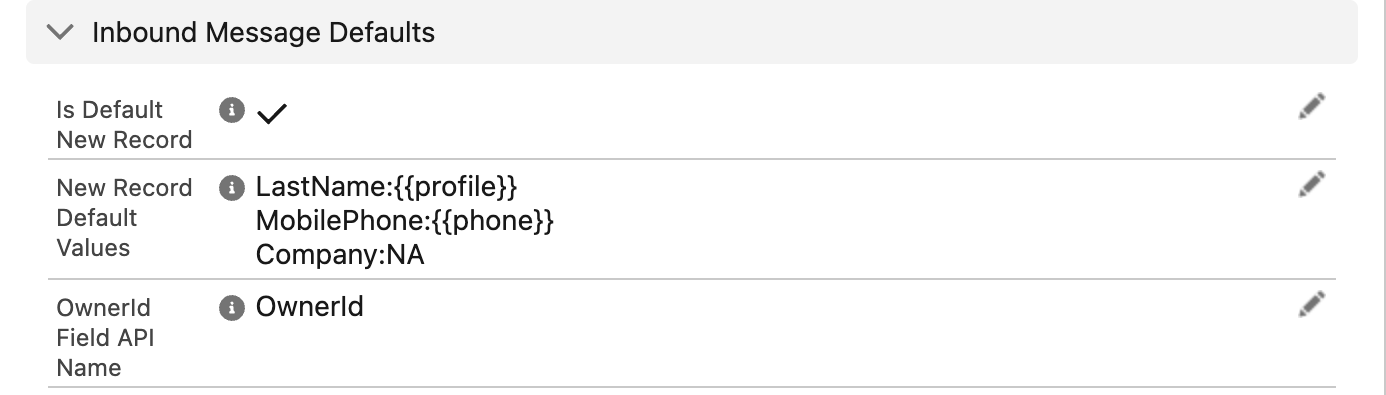
Field:Value pair per line, with {{profile}} and {{phone}} filled from the sender's WhatsApp profile name and number.: separating field from value. A value that itself contains a colon — a URL like https://…, or a note written Source: Web — breaks that line, and it is skipped silently. Keep values colon-free.
Step 3 — Test it
- From a phone whose number exists nowhere in your org, send a WhatsApp message to your business number.
- Expected result: a new Lead appears, and the message sits in its Connect Feed.
What the created record looks like
For the Lead setup above, a first-time WhatsApp message from Dana Reyes (971501234567) produces:
| Field on the new Lead | Value | Why |
|---|---|---|
| Last Name | Dana Reyes | {{profile}} — her WhatsApp profile name (on SMS, or if WhatsApp sends no profile name, this would be -NA-) |
| Company | TBD | Literal text from your default values |
| Mobile | 971501234567 | {{phone}} — stored digits-only, which means her next message matches this Lead directly through the normal matching walk |
The incoming message can be filed against the new Lead and shown in its feed after successful creation. Check ownership separately: configuring an owner field does not guarantee that the first message which creates the record copies its owner.
Limits and behaviour to know
- Inbound only. The product's help says it directly: "Applicable for inbound messages only." Sending never creates records.
- Last resort only. Auto-creation runs only after every active configuration has been tried and none matched. It never overrides a match.
- One configuration should have it per account and channel — see Step 1.
- Use Text and Phone fields for the documented default-values workflow. This field is not a general datatype-conversion facility; do not assume every other datatype is either guaranteed to fail or supported.
- Colon-containing values are skipped line by line, silently.
{{profile}}is WhatsApp-only, with-NA-as the fallback — so an SMS-channel setup usingLastName:{{profile}}creates Leads literally named-NA-. For SMS, prefer a literal likeLastName:SMS Inquiryplus{{phone}}on a phone field.
Troubleshooting
| Symptom | Cause | Fix |
|---|---|---|
| Unknown sender's message arrived but no record was created | A required field on the object isn't covered by your default values, or a line was skipped (extra colon), or the option isn't ticked on any active configuration | Cover every required field with Text/Phone-compatible lines; remove colons from values; confirm Is Default New Record is ticked |
Records created with Last Name -NA- | {{profile}} used where no profile name exists (SMS, or WhatsApp without a profile name) | Expected fallback — use literal text for the SMS configuration |
| Two different objects' records get created unpredictably | Is Default New Record ticked on more than one configuration | Untick all but one |
| New record created even though a matching record existed | The "match" you expected fails the exact-format rule — likely a + or separators in the stored number | Fix the stored number (formats); auto-create only fires when nothing matches |
FAQ
Yes — tick the option on that object's configuration and supply default values that satisfy the object's required fields, using Text/Phone-type fields only. Lead remains the most common choice because it's built for unqualified new names.
No. Record creation is invisible to the sender — they just sent a message. Your reply from the new record's feed is the first thing they see.
Not through default values — only Text and Phone fields are supported. Use your own automation (for example, a record-triggered flow on Lead creation) to stamp picklists based on the values the configuration wrote.
Record-creation failure can interrupt inbound processing before the message is saved. Check the logs and any records already created, correct the default values, permissions or validation issue, and test again. Do not assume an unattached message or successful automatic retry exists.
Where to go next
- How incoming messages find their record — the walk that runs before auto-creation is considered.
- Assigning incoming messages to record owners — make sure the new record's messages reach a human.
- Receiving and replying — the agent side of the story.