
Chat script steps
Steps are the messages of a chat script. Each Chat Script Step sends exactly one message, waits for the customer's reply, and hands over to the step named in its Next Step field. This article shows how to create steps, chain them, and read the answers they collect.
- You need a saved (still inactive) chat script template — see Building a chat script.
- Any templates you want steps to send should already be Active — see Testing and activating a template.
How the chain works
- Every step belongs to one script and is sent as one outbound message.
- Next Step points at the step that follows once the customer replies (and the session is still open).
- The last step is simply the one with no Next Step. There is no "end" flag to set — the read-only Is Last Step checkbox ticks itself on any step whose Next Step is blank. When the customer answers that step, the conversation is stamped complete.
- Create the steps in reverse (last first) if you want to fill Next Step as you go, or create them all and edit the links afterwards — either works.
Step 1 — Create a step
- On the chat script record, find the Chat Script Steps related list and click New.
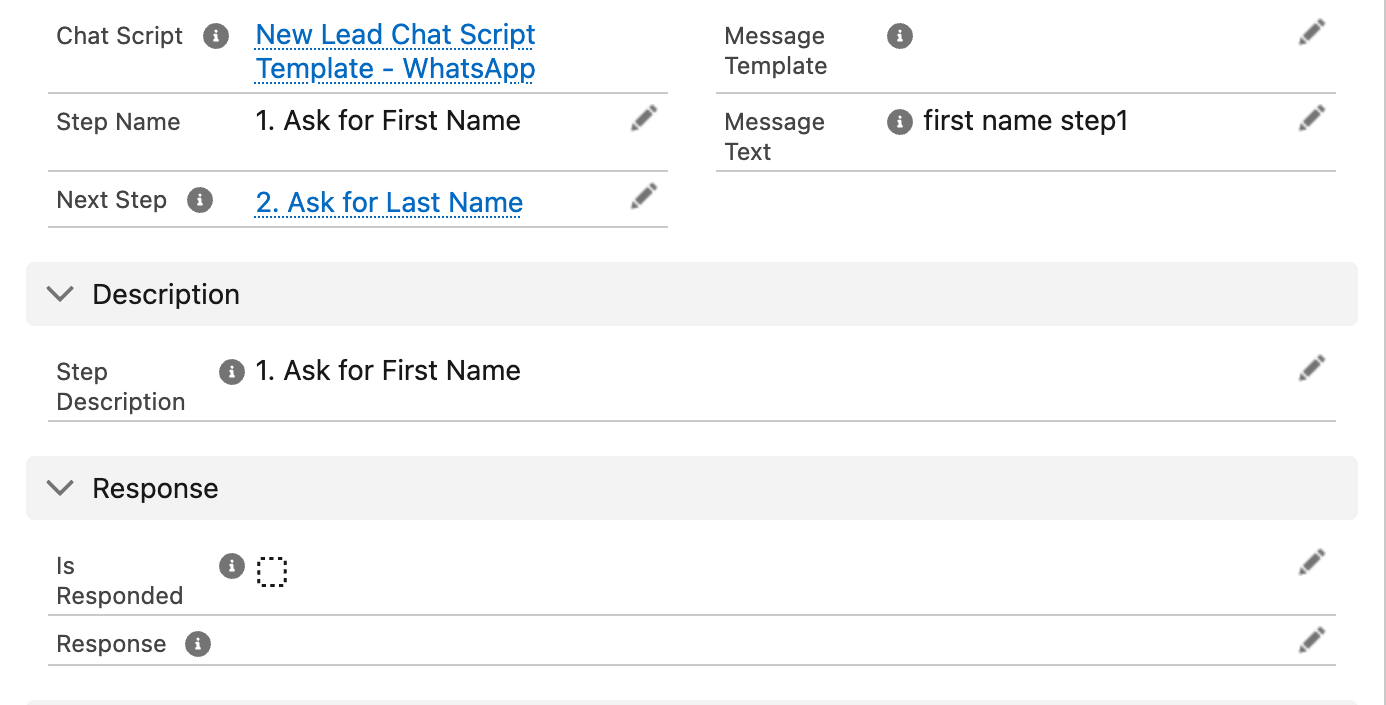
- Fill in the fields:
| Field | Required | What to enter |
|---|---|---|
| Step Name | Yes | Number your steps so the chain is readable at a glance — e.g. 01 - Ask rating, 02 - Ask comments. |
| Chat Script | Pre-filled | The parent script (already set when you create from the related list). |
| Message Template | Exactly one of these two | An active Connect Template to send for this step. On WhatsApp this is how a step sends media or interactive button/list messages. |
| Message Text | Exactly one of these two | Typed text to send for this step — for simple questions that don't warrant a template. |
| Next Step | Only if another step follows | The step to send after the customer answers this one. Leave blank on the final step. |
| Step Description | No | Notes for your team. |
Either the message template or message text must be provided.
- Click Save, and repeat for each step.
Expected result: each step saves; on steps where Next Step is blank, Is Last Step shows ticked.
SMS scripts: Text templates only
On a script whose Channel is SMS, a step's Message Template must be a Text-type template. Attaching any other type (Image, Document, Interactive, ...) fails with:
Only Text Message Templates can be provided for SMS Chat Scripts.
Typed Message Text is always fine on SMS. WhatsApp scripts may use any sendable template type — interactive button/list templates are particularly useful, because they give the customer fixed choices to tap instead of free text.
Where the answer lands
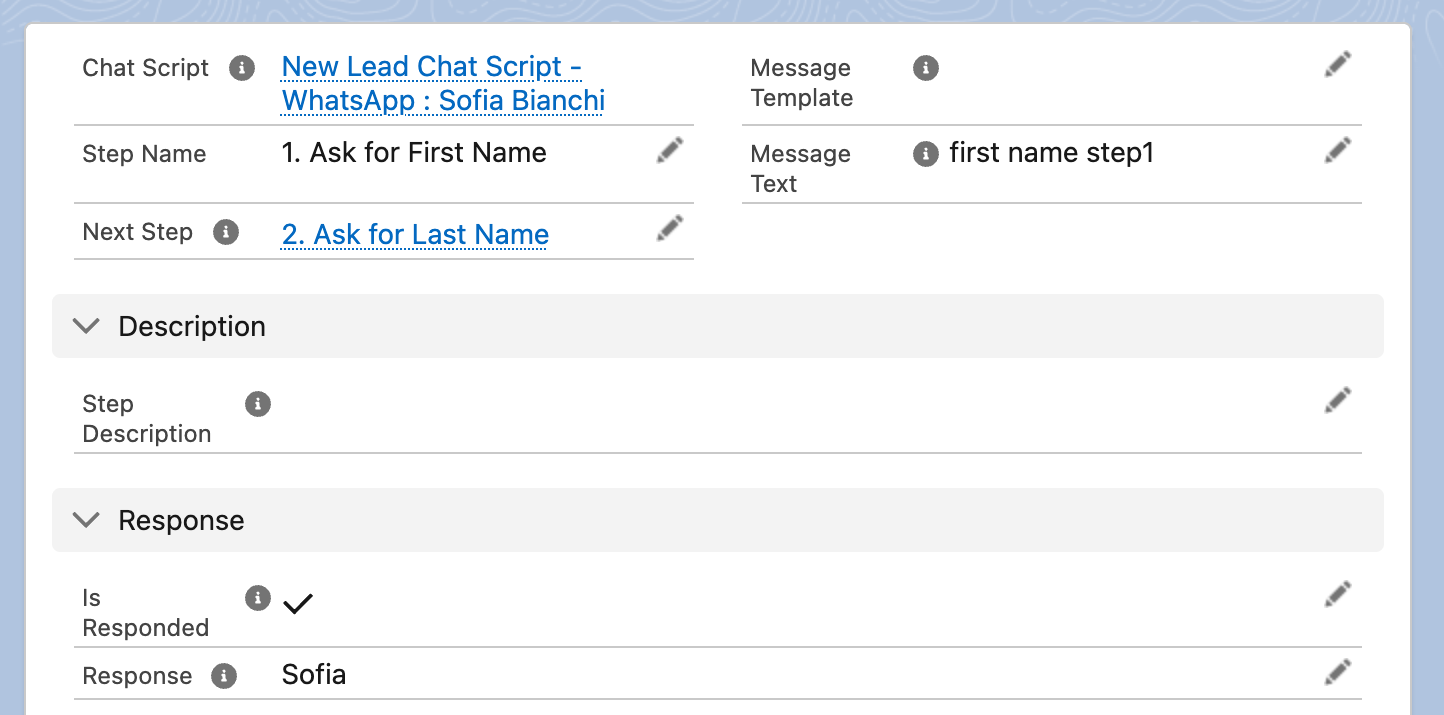
You never fill these fields — REDA Connect maintains them on the running conversation's copy of each step (the template's own steps stay untouched):
| Field | What appears there |
|---|---|
| Is Responded | Ticked the moment the customer answers this step |
| Response | The customer's reply text. For replies to interactive button/list messages, this holds the tapped option's id (its developer value), while the visible label is stored on the inbound message — so give your buttons ids that read well as stored values |
| Message Id | A reference to the inbound message record that answered this step |
| Is Last Step | Ticked when Next Step is blank |
The Response value is what chat script actions write into a field on your record.
Worked example — a three-step feedback survey
| Step | Message Text | Next Step |
|---|---|---|
01 - Ask rating | Thanks for visiting us! How would you rate your viewing from 1 to 5? | 02 - Ask comments |
02 - Ask comments | Thank you! Anything we could have done better? | 03 - Close |
03 - Close | Much appreciated. We'll be in touch shortly! | (blank — last step) |
The script's First Step points at 01 - Ask rating. Note that step 03 sends a closing message but no reply is required for the survey to be useful — when the customer answers step 02, step 03's message goes out; the conversation completes when (and if) the customer replies to it.
Troubleshooting
| Symptom | Cause | Fix |
|---|---|---|
Either the message template or message text must be provided. | Both content fields blank, or both filled | Fill exactly one of Message Template / Message Text |
Only Text Message Templates can be provided for SMS Chat Scripts. | Non-Text template on an SMS script step | Use a Text template or typed text |
| A template can't be deleted | It is referenced by a chat script step | Remove it from the step first — steps protect their templates from deletion |
| Customer answered but the next message never came | Session expired or blank on the template, or no Next Step | See Chat script sessions and check the chain |
FAQ
The data model allows it, but remember conversations are linear — there's no branching logic choosing between paths, so converging chains rarely make sense. Keep it a simple sequence.
Yes — the order is nothing but the Next Step links (and the script's First Step). Re-point those and the sequence changes for future conversations; running conversations keep the copy they were cloned with.
No — any reply advances the script (within the session window). If you need constrained answers, use WhatsApp interactive button/list templates for the step.
A reply is matched to the most recently sent, not-yet-answered step message of the conversation. A rapid second message therefore answers the next step only once that step's question has actually gone out — otherwise it lands in the feed as an ordinary inbound message.
Where to go next
- Chat script actions — write each step's Response into a field.
- Building a chat script — back to pass two: set First Step and activate.