
Messaging through related records
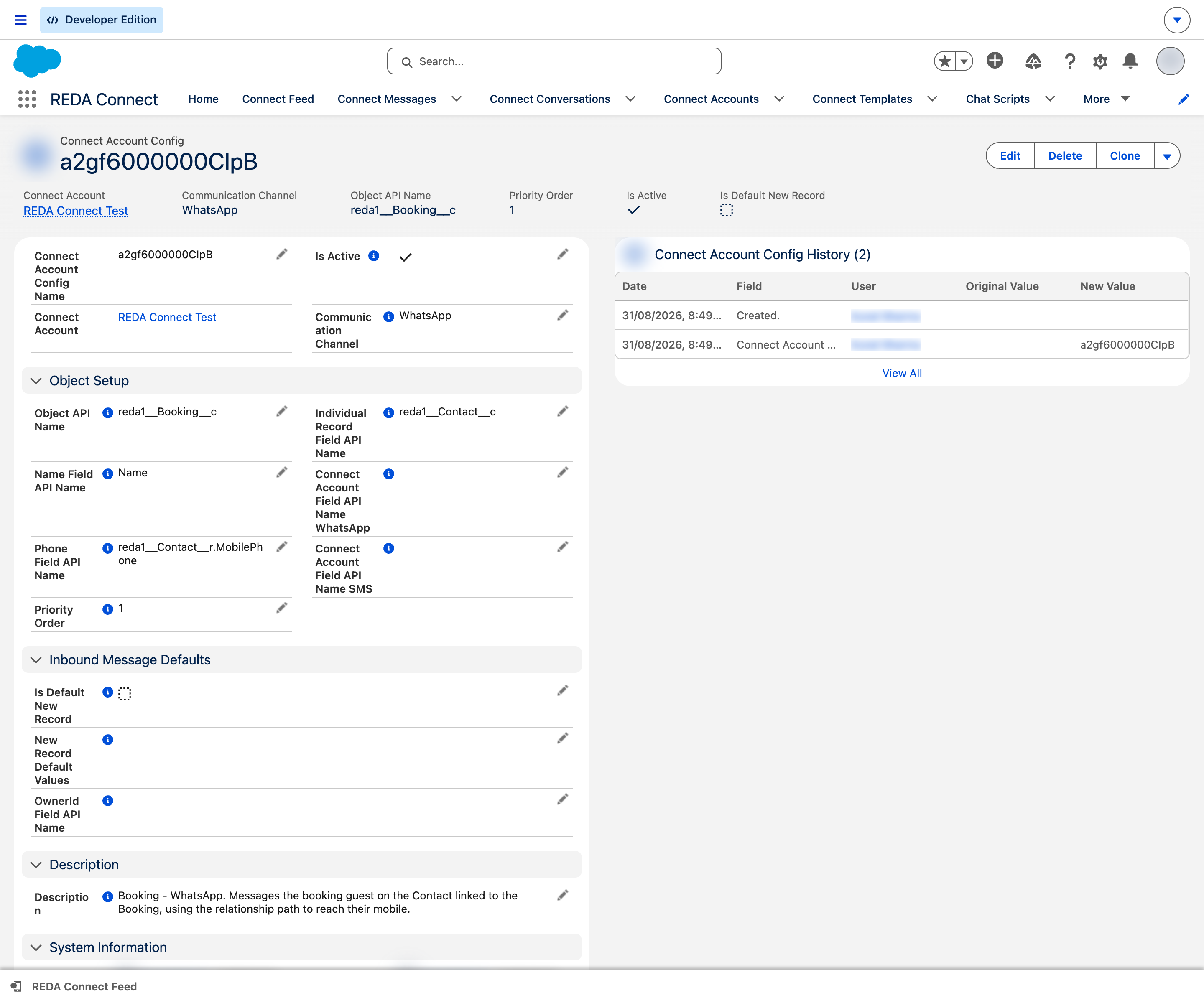
Plenty of objects you'd like to message from don't hold a phone number themselves. An Opportunity has no phone — but it has a lookup to the Contact who does. A Booking has no phone — the Tenant Contact does. REDA Connect handles this with two fields on the object configuration: one names the lookup field to the person's record, the other gives the path through that lookup to the phone number. You get a working Connect Feed on the Opportunity without ever copying phone numbers onto it.
There is one behaviour you must understand before you build this, because it looks surprising the first time: the message is filed against the record where the phone number lives (the Contact), with your original record (the Opportunity) attached as its parent — not the other way round. Both records show the conversation in their feeds. The full worked example below shows exactly where everything lands, and the behaviour is identical for sending and receiving.
- Read Configuring any object first — this article only adds the related-record twist to that recipe.
- Your object needs a lookup field to the record that holds the phone (e.g. a Primary Contact field on Opportunity looking up to Contact).
The two fields that make it work
Using the example straight from the product's own help text — an Opportunity whose phone lives on the Contact in its Primary Contact lookup field (API name Primary_Contact__c):
| Field on the configuration | Enter | Meaning |
|---|---|---|
| Object API Name | Opportunity | You're configuring the Opportunity — this is where agents work |
| Individual Record Field API Name | Primary_Contact__c | The lookup field on Opportunity that points to the person's record |
| Channel Identity Field | Primary_Contact__r.MobilePhone | The path through that lookup to the phone: the lookup's relationship name (the API name with __c swapped for __r), a dot, then the phone field on the Contact |
| Name Field API Name | Name | Use the Opportunity's own Name for this walkthrough. A path such as Primary_Contact__r.Name needs verification across every inbound and outbound path you use; support for a related phone path does not guarantee the same name-path support everywhere. |
The product's help on Individual Record Field API Name describes exactly this pattern: "Provide value if the message for this setup is sent where the phone details reside on a related object. For example, Opportunity has a field "Primary_Contact__c" lookup to Contact record. If you wish to send message against Opportunity provide value as "Primary_Contact__c" and the Phone field as "Primary_Contact__r.MobilePhone"."
Everything else on the configuration — channel, priority, description, active flag — works exactly as in Configuring any object.
Some_Field__c, the path prefix is Some_Field__r.; for a standard lookup like ContactId it's Contact.. The phone field at the end of the path must still follow the digits-only international format rule — How to enter phone numbers.
Where the message is filed — the rule
Whenever a configuration has Individual Record Field API Name set and the lookup on the record is populated, REDA Connect files every message on that conversation like this:
- The message's record = the related person's record (the Contact — where the phone lives).
- The message's parent record = the record you configured (the Opportunity).
The Connect Feed shows the conversation on both records. And because the message's record is a Contact, REDA Connect also makes its automatic Contact link — so opt-out protection and Contact-level reporting work, which is precisely why the product files it this way: the conversation belongs to the person, while the Opportunity provides the context.
The outbound message and reply retain record = Contact and parent = Opportunity only if the inbound search selects that same configuration and context. A higher-priority Contact configuration or several Opportunities sharing the number can attach the reply differently.
Worked example — before and after
Setup: Opportunity "Sunset Villa – Unit 12" has Primary Contact = Contact "Dana Reyes", whose Mobile is 971501234567. The configuration above is active for WhatsApp.
An agent sends from the Opportunity. They open the Opportunity, type "Hi Dana, your viewing is confirmed for Thursday 4pm" in the Connect Feed, and send.
| Where you look | What you see |
|---|---|
| The message record itself | Filed against Dana Reyes (Contact); parent record Sunset Villa – Unit 12 (Opportunity) |
| Connect Feed on the Opportunity | The message, in the conversation thread |
| Connect Feed on Dana's Contact | The same message, same thread |
| Dana's phone | The WhatsApp message |
Dana replies "Perfect, see you then."
| Where you look | What you see |
|---|---|
| The reply's message record | Filed against Dana Reyes (Contact); parent record Sunset Villa – Unit 12 (Opportunity) |
| Feed on the Opportunity and on the Contact | The reply appears in the same thread on both |
The counter-intuitive part: if you run a report or list view of messages by record, this conversation counts under the Contact, not the Opportunity — the Opportunity holds it as parent. If you expected "messages on the Opportunity" to mean record = Opportunity, adjust the report to look at the parent record side as well.
Troubleshooting
| Symptom | Cause | Fix |
|---|---|---|
| Feed on the Opportunity shows "No active connect account or phone number found for messaging channels." | The lookup (e.g. Primary Contact) is empty on this record, or the Contact's phone field is blank | Populate the lookup and the phone field |
| Sending fails or no record matches inbound | The relationship path is wrong (__c instead of __r, typo in the field name) | Re-check Channel Identity Field against Object Manager; the path is <lookup relationship name>.<phone field> |
| Conversation shows on the Contact but you can't find it "on" the Opportunity in reports | That's the filing rule working as designed — record = Contact, parent = Opportunity | Report on the parent record side, or read the section above |
| Reply landed on the Contact but without the Opportunity as parent | The reply matched a different configuration first (e.g. a plain Contact configuration at higher priority) | Review your priority order — the configuration that wins the match decides the filing |
FAQ
They serve different purposes and can coexist. But be aware they can both match the same phone number on incoming messages — whichever has the higher priority wins and decides how the message is filed. Order them deliberately: put this configuration above the plain Contact one if you want incoming replies attached to the Opportunity context.
Those records can't message — there is no phone to reach. The feed will tell the agent no phone number was found. Consider making the lookup required for records that need messaging.
Multi-level phone paths are supported when each relationship and field is valid and populated. Keep chains short and test both directions. Do not assume identical support for the name field in every processing path; some paths read it directly from the configured object. A missing relationship prevents the phone from being read through that path.
Yes — the mechanism is channel-independent. Create the SMS-channel configuration with the same two field values.
Where to go next
- How incoming messages find their record — how this configuration competes with others when a reply arrives.
- Assigning incoming messages to record owners — with related-record setups, decide whose owner (the matched record's) receives the message.
- Configuring any object — the base recipe this article extends.