
Chat script sessions — the reply window
Every scripted conversation has a session window: a span of minutes during which the customer's replies advance the script. Inside the window, a reply triggers the next step and runs the step's actions. After it closes, the conversation is effectively over — even if the customer replies a day later. This article explains exactly how the timer works, because it behaves differently from what most people first assume.
The timer rule
- It is one fixed window per instance, measured from its creation, not necessarily the exact first-message send or delivery time. It does not reset with replies. A 60-minute, three-question session requires eligible responses to be processed within 60 minutes of the initial instance creation, not 60 minutes per question.
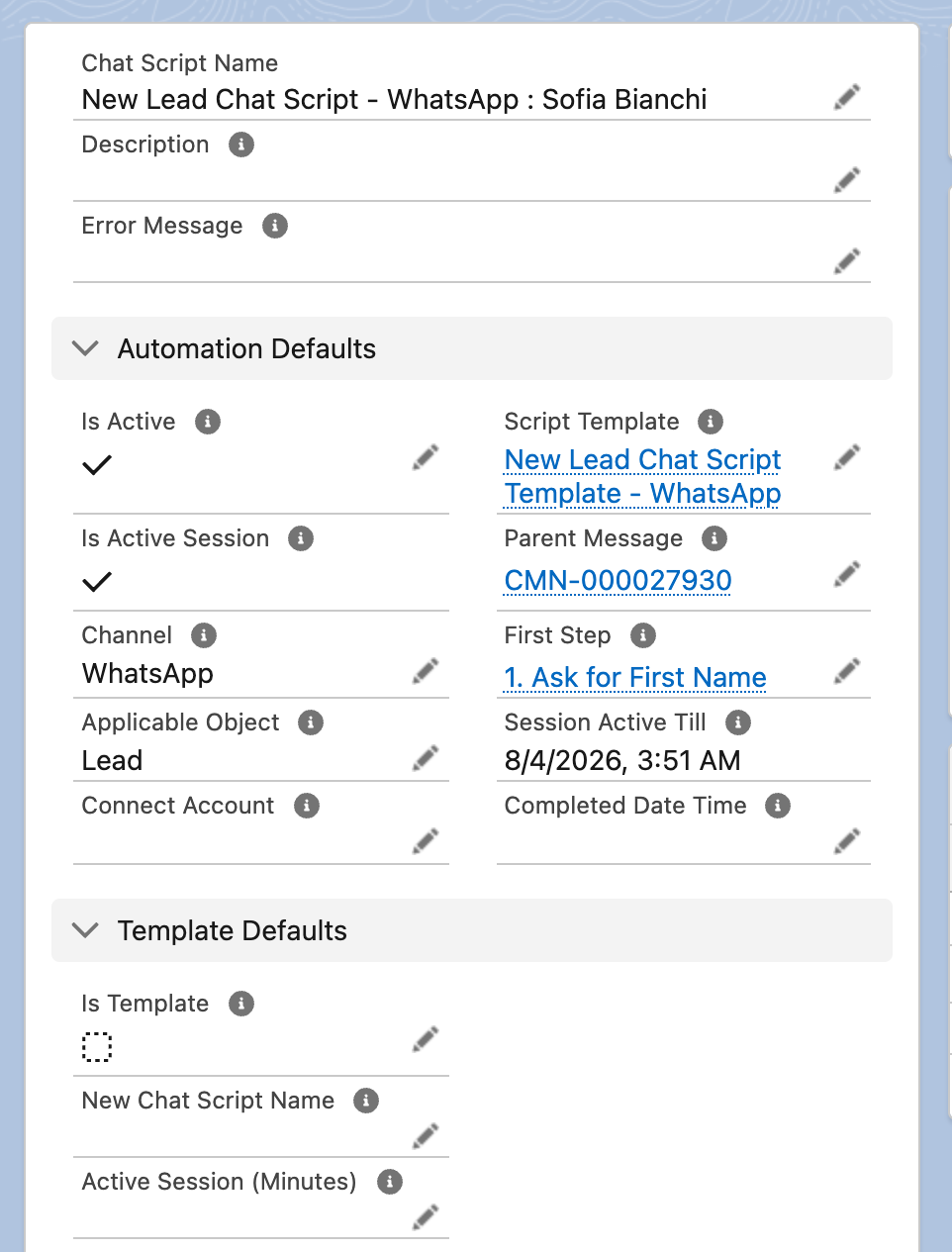
- Editing the number on a running conversation does nothing. The running record shows its own Active Session (Minutes) field, but the deadline is always computed from the template's value — changes to the copy are ignored.
- Editing the template changes the window of conversations already running. Raise the template's minutes and every in-flight conversation's deadline moves out; lower it and conversations can expire retroactively, mid-exchange. Edit the value with that in mind — ideally when nothing is in flight.
Two read-only fields on the running conversation show the state at a glance:
| Field | Meaning |
|---|---|
| Session Active Till | The computed deadline: conversation start + the template's Active Session (Minutes) |
| Is Active Session | Ticked while the deadline is in the future — the script still advances |
What expiry looks like
When a reply arrives after Session Active Till:
- The reply can still be recorded. It appears as an inbound message if reception succeeds. If matched to an unanswered step, Is Responded is ticked and Response holds the available text. Expiry alone does not erase a received message; diagnose reception or processing errors separately.
- It does not trigger further progression in the expired session: no next-step message or new action execution is scheduled by that reply. Actions already scheduled before the deadline can still execute later.
- The customer gets no notice that the window closed; from their side the conversation just stops responding. If the exchange still matters, an agent should pick it up manually in the feed. A reply matched to the final step can still mark the instance complete; the session clock is not a general completion status.
So an expired conversation is recognisable by: replies present on steps, Is Active Session unticked, later steps never sent, actions with Is Completed unticked and no error message anywhere.
Choosing a session length
| Scenario | Suggested window |
|---|---|
| WhatsApp survey or qualification flow | 1440 minutes (24 hours as an illustrative script duration; it does not synchronize the separate WhatsApp window) |
| Quick SMS confirmation ("reply 1 or 2") | 120–240 |
| Multi-day, considered answers | Long windows work (the field takes any number of minutes), but past a day or two, a human follow-up usually beats a waiting bot |
Size the window for the whole conversation, not one reply: a customer who answers the first question after 50 minutes of a 60-minute window has 10 minutes left for everything else.
Troubleshooting
| Symptom | Cause | Fix |
|---|---|---|
| Script never advances past the first question, no errors anywhere | Template's Active Session (Minutes) is blank | Set it on the template and verify the recalculated deadlines. This does not automatically replay a reply already marked responded or an action previously skipped; inspect the current step before arranging a restart. |
| Conversations expire mid-exchange | Window too short for the number of steps | Raise the template's minutes (takes effect immediately, including for running conversations) |
| Changed the minutes on a running conversation, nothing happened | The copy's value is ignored — the timer reads the template | Edit the template's value instead |
| Replies recorded but fields never update | The session may have expired before the reply was processed, preventing new action scheduling; already queued actions are separate | Widen the window; re-run the script with the customer if the data still matters |
FAQ
No. The window is always template-derived, so any change affects every running conversation from that template. For a one-off rescue, have an agent finish the exchange manually in the feed and update the record by hand.
No — it is anchored to the start of the conversation. Replies never extend it.
No — they have different anchors. WhatsApp governs what you may send relative to the customer’s last message, with approved templates required outside its service window. The script session governs whether the response workflow advances from instance creation. Choosing 1440 minutes does not synchronize the two clocks.
Nothing further — it stays on the record, incomplete, with no completed timestamp. It's useful history: you can report on scripts that never finished.
Where to go next
- Building a chat script — where the session length is set.
- Running a chat script — monitoring running conversations, including expired ones.