
Default accounts and routing order
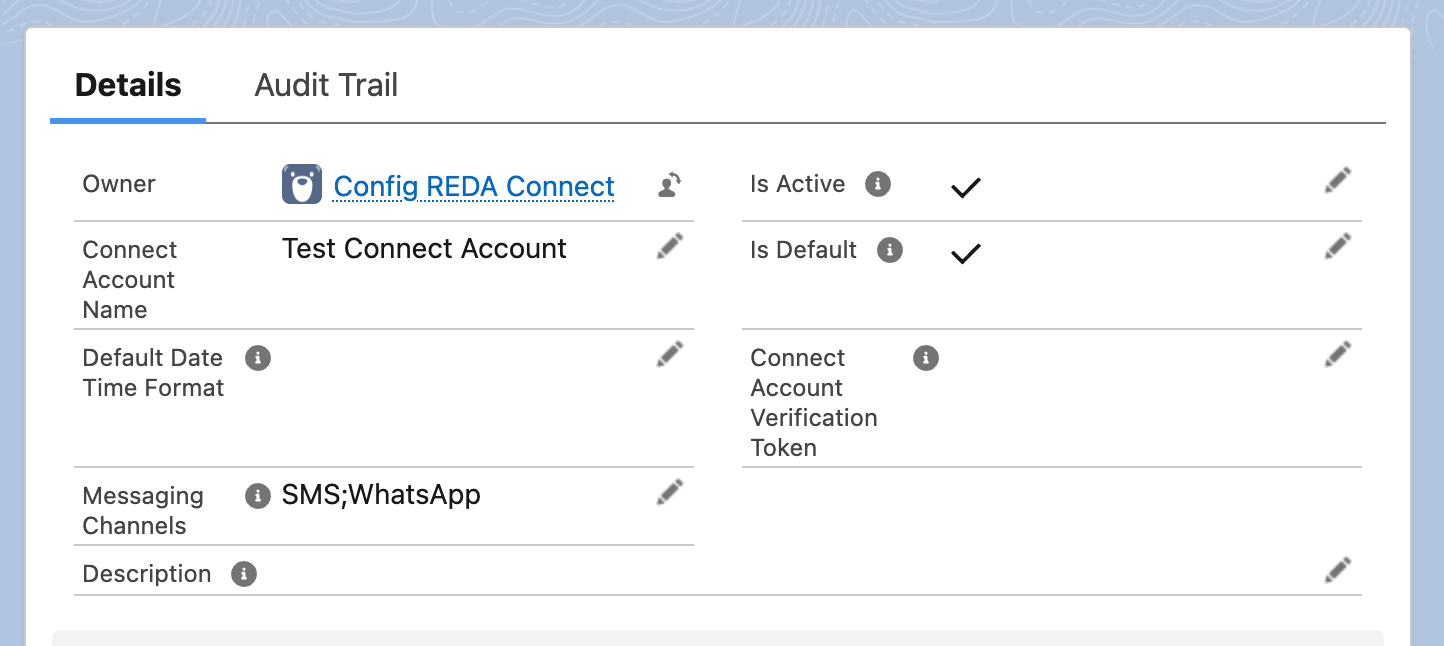
When several Connect Accounts support a channel, determine which account sends a message. For automatic record-based resolution, the Is Default help describes Object Configuration, User Default, and Default Connect Account. Each fallback fills a missing value. An invalid non-empty ID can fail rather than fall through. Explicit account selection or an account already assigned to a message also affects the sender.
- This article assumes you know what a Connect Account is — What is a Connect Account?
- Step 1 relies on object configuration; if you haven't met it yet, skim Object configuration overview first.
- The resolution runs per channel — WhatsApp and SMS each resolve their own account.
Step 1 — the record's own account (object configuration)
Each object configuration can name a field on your records that holds a Connect Account's record ID — via its Connect Account Field API Name WhatsApp and Connect Account Field API Name SMS settings. When a message is sent for a record and that field on the record contains an account ID, that ID is selected; the account must still be valid and usable for sending. This is the per-record level: two Bookings on the same object can message from two different numbers, purely by what their field contains.
The field's own help text spells out the fallback: "If not provided system automation will consider the default account for messaging." Setting this up belongs to the object configuration walkthrough — Configuring any object for messaging.
Step 2 — the sending user's personal default
If the record doesn't dictate an account, REDA Connect looks at the user doing the sending. Every user record carries two REDA Connect fields:
- Default Connect Account WhatsApp
- Default Connect Account SMS
Each is a plain text field that holds the record ID of a Connect Account — the help text asks for "an 18-character record ID of the default connect account" for that channel. To set one:
- Open the Connect Account you want as this user's default and copy its record ID — the 18-character code in your browser's address bar when viewing the record.
- In Setup, type
Usersin the Quick Find box, click Users, and open the user. - Click Edit, paste the ID into Default Connect Account WhatsApp and/or Default Connect Account SMS, and save.
Expected result: messages this user sends now go out from that account whenever Step 1 didn't decide. Because these are plain text fields, Salesforce does not check what you paste — copy the full 18-character ID exactly, with nothing extra. If the fields aren't visible on the user page, an administrator needs to add them to the User page layout.

This is how each salesperson or property manager can message from their own number: give each user their own Connect Account and paste its ID into their user record.
Step 3 — the org default account
Finally, if neither the record nor the user decided, the account with Is Default ticked (and the right channel in its Messaging Channels) sends the message. This is the org-wide fallback — the number "everything else" goes out from.
Keep exactly one default account per channel. Nothing in the product stops you ticking Is Default on two accounts that share a channel — but if you do, the most recently created of the two wins (each channel is judged independently), which is rarely the account you meant. Untick the extra one so the outcome is never a surprise.
Worked example — three scenarios, one org
Acme Rentals has two active WhatsApp Connect Accounts:
- Acme Leasing —
Is Defaultticked (the org default) - Acme Support —
Is Defaultunticked
Their Booking object's configuration names a field on Booking, Messaging Account, as the WhatsApp account field. Agent Dana's user record has Default Connect Account WhatsApp set to Acme Support's ID. Agent Sam's user record has both default fields blank.
| # | Scenario | Step 1: record field | Step 2: user default | Step 3: org default | Account that sends — and why |
|---|---|---|---|---|---|
| 1 | Dana messages from Booking B-1001, whose Messaging Account field contains Acme Leasing's ID | Acme Leasing | (not consulted) | (not consulted) | Acme Leasing — the record's own field wins over everything, including Dana's personal default |
| 2 | Dana messages from Booking B-1002, whose Messaging Account field is blank | — | Acme Support | (not consulted) | Acme Support — no record-level account, so Dana's user default decides |
| 3 | Sam messages from Booking B-1002 (field blank) | — | — | Acme Leasing | Acme Leasing — neither the record nor Sam's user record decides, so the org default sends |
Same object, same conversation surface — three different outcomes, each fully explained by the three-step order.
When nothing resolves
If no step produces a usable account — no record-level account, no user default, and no active default account for the channel — the send is blocked. In the Connect Feed this surfaces as the error:
No active connect account or phone number found for messaging channels.A related failure happens when an account is found but its setup is unusable — it is inactive, or a required channel field (endpoint, number, credential) is missing. Then the message is created but fails, with this text in its Error Message field:
Bad Connect Account Setup.Both have the same class of fix: make sure the intended account is Is Active, supports the channel in Messaging Channels, and is reachable through one of the three steps. For working through message-level errors, see A message won't send.
Troubleshooting
| Symptom | Cause | Fix |
|---|---|---|
| Messages go out from the wrong number | An earlier step is deciding before the one you configured — a record-level account field or a user default you forgot about | Check the record's account field first, then the sender's two user fields, then Is Default |
| One user's messages use a different account than everyone else's | That user has a personal default set on their user record | Clear or correct Default Connect Account WhatsApp/SMS on the user |
Sending blocked with No active connect account or phone number found for messaging channels. | No active account resolves for the channel — often the default account is inactive or lacks the channel | Tick Is Active on the intended account and confirm its Messaging Channels |
Message created but Failed with Bad Connect Account Setup. | The resolved account is inactive or missing a required channel field | Complete the account per Creating a Connect Account |
| A user default seems ignored | The pasted ID isn't the exact 18-character record ID (typo, spaces, wrong record) | Re-copy the Connect Account's ID from the address bar and paste it cleanly |
FAQ
Per channel in effect: each account's Is Default applies to the channels in its Messaging Channels. One account with both channels can be the default for both; or two accounts can each be the default for one channel.
For automatic record-based resolution, yes: object configuration, user default, then org default. Fallback fills a missing value; it does not guarantee recovery from an invalid non-empty ID. Explicit account selection and previously configured message accounts must also be checked when diagnosing the sender.
That's how the product ships — they hold a raw 18-character record ID as text. The practical consequence is yours to manage: nothing validates the value, so copy it carefully.
No. Only active accounts should be used for sending. The org-default lookup filters for active accounts, but an inactive or invalid non-empty ID selected earlier is not automatically skipped in favour of the next fallback. It can cause an error. Correct or clear that earlier value, and configure an active replacement before removing an org default.
Where to go next
- Configuring any object for messaging — set up the record-level account field (Step 1).
- Creating a Connect Account — the Is Default and Is Active switches in context.
- A message won't send — when a send fails despite the routing looking right.