
What you need before connecting SMS
REDA Connect sends and receives SMS through Twilio, a telecom service that gives your business a phone number and delivers text messages to and from it worldwide. Before you touch anything in Salesforce, you need three things on the Twilio side: an account, an SMS-capable phone number, and — in most countries — completed sender registration. This article walks you through all three and tells you honestly how long each takes. There are no Salesforce steps on this page.
- Nothing! This is the very first step of the SMS path. If you haven't yet, skim the Setup roadmap to see where SMS setup fits in the overall sequence.
- You will need a company credit card eventually — Twilio is a paid service — but you can start on a free trial.
1. A Twilio account — trial or paid?
Create the account at twilio.com/try-twilio. Signup asks you to verify your email address and a personal phone number, then a couple of questions about what you plan to build — the answers don't restrict anything later.
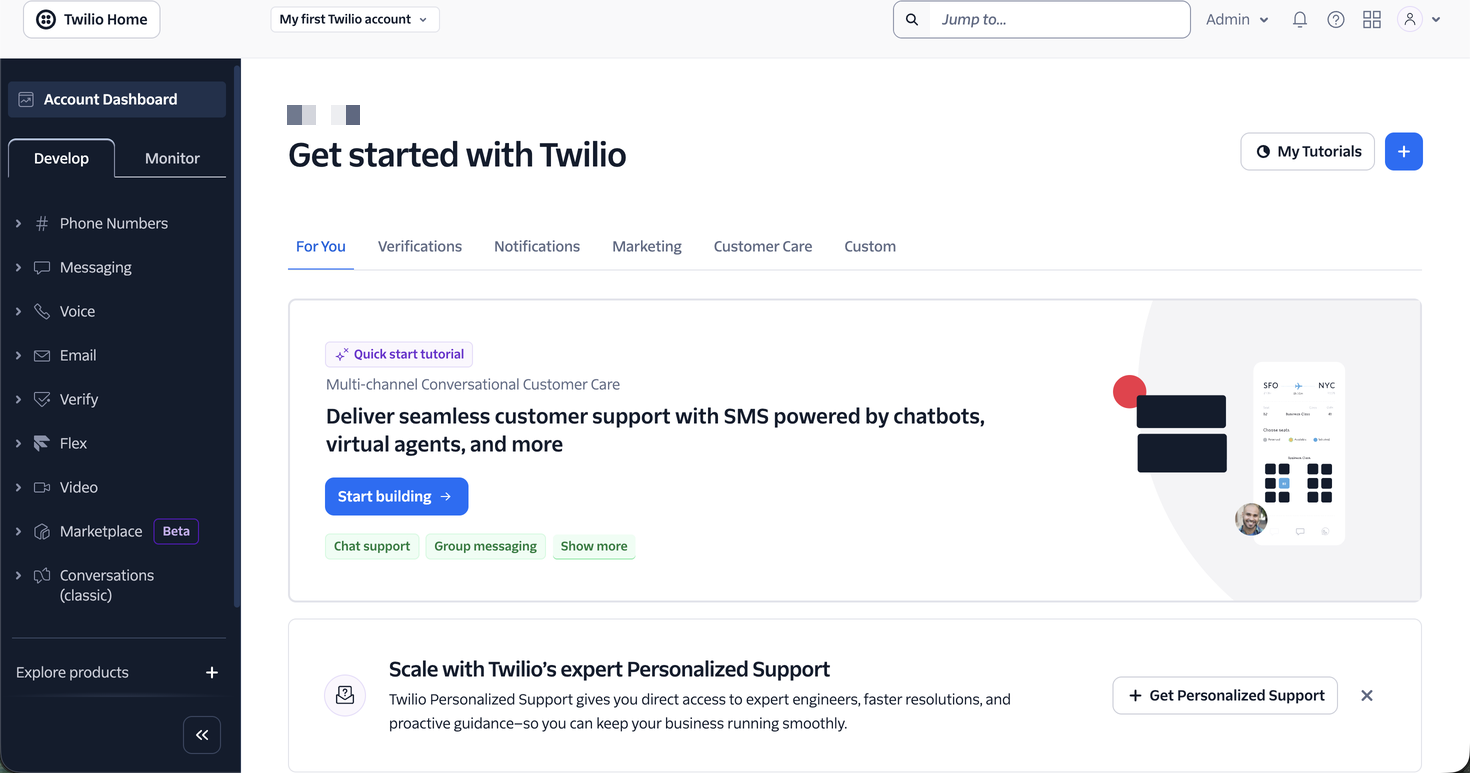
A brand-new account is a trial account. Check the API, sender, recipient, content and destination restrictions before planning a complete REDA Connect test. Restrictions include:
| Trial restriction | What it means for you |
|---|---|
| Only verified numbers can be messaged | A trial account can send SMS only to phone numbers you have individually verified in the Twilio console (your own phone, a colleague's). Any message to an unverified number fails. Real customers are unreachable until you upgrade. |
| A trial notice is added to every message | Twilio prepends wording like "Sent from your Twilio trial account" to each SMS. You cannot remove it on a trial. |
Trial SMS is also generally restricted to the country you signed up in.
Upgrade when you're ready to message real customers: click Upgrade at the top of the Twilio console home page (or Admin → Account billing → Upgrade account), add a payment method, and review the remaining sender-registration and geographic requirements. Upgrade removes trial-status restrictions, not carrier requirements.
2. An SMS-capable phone number for your country
Your Twilio number is the number your customers will see and reply to. Buy it inside Twilio:
- In the Twilio console, go to Twilio Console → Phone Numbers → Manage → Buy a number.
- Pick your country from the drop-down.
- Under capabilities, make sure SMS is ticked (untick capabilities you don't need — the search only returns numbers that have every ticked capability).
- Click Search, pick a number you like, and click Buy.
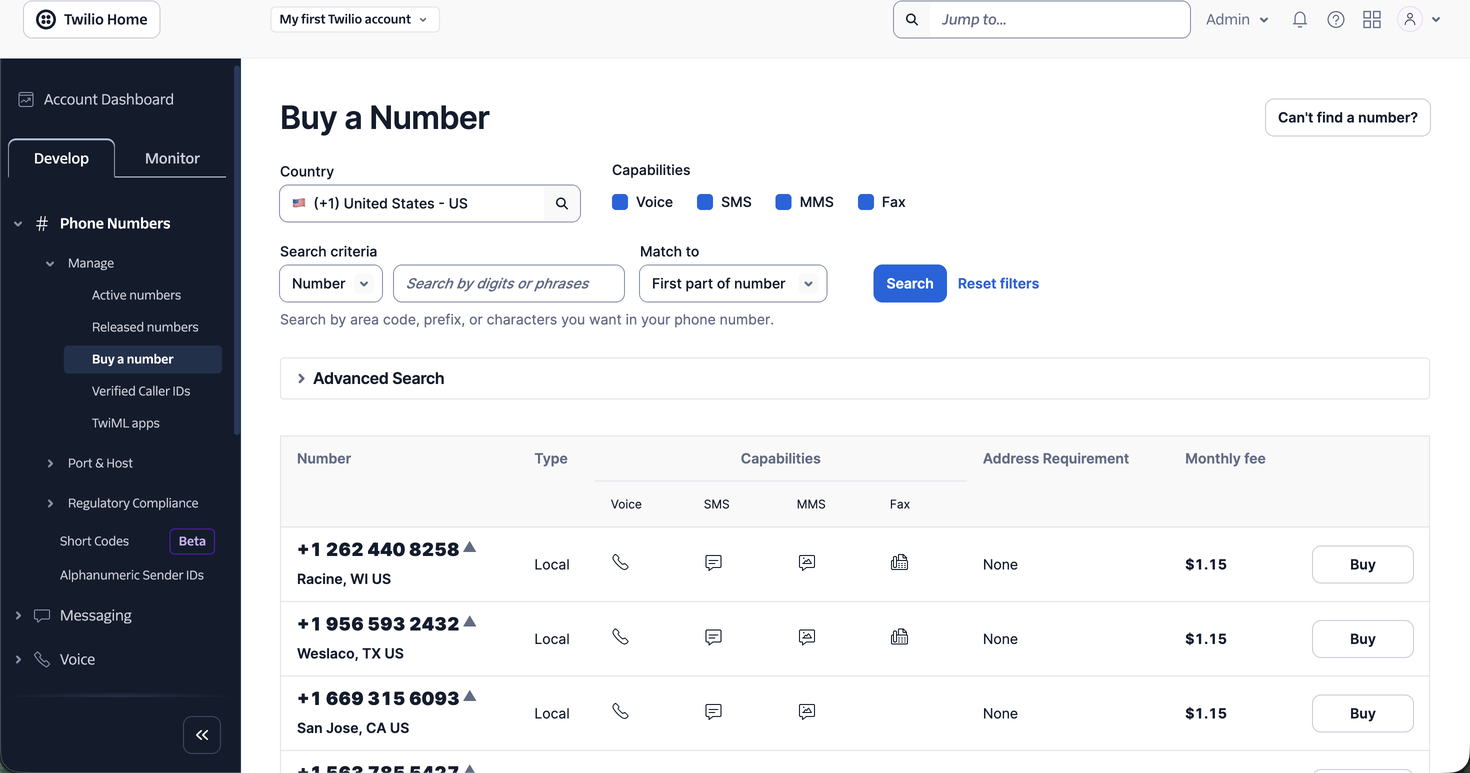
Expected result: the number appears under Phone Numbers → Manage → Active numbers. Note it down — you will enter it into REDA Connect later, in a specific digits-only format (see How to enter phone numbers).
Things to know when choosing:
- Number types differ by country. Local (national) numbers, toll-free numbers, and mobile numbers have different prices, capabilities, and registration requirements. Twilio's country pages list what's available where — see Twilio's phone number availability guide.
- Two-way SMS needs an SMS-capable number. Some countries offer only outbound sender IDs (no replies possible). REDA Connect's conversation feed is built for two-way messaging, so a real SMS-capable number is strongly recommended.
- Some countries require identity documents before Twilio will sell you a number (a "regulatory bundle" — proof of business address and identity). Twilio prompts you during purchase if your country needs one; approval can take days.
3. Sender registration — the honest picture
Almost everywhere, carriers now require businesses to register who they are and why they text people before granting full delivery. Skipping this is the single most common reason a technically perfect setup still shows failed or filtered messages. The rules are country-specific; these are the common patterns:
- United States — A2P 10DLC registration. Businesses sending SMS from ordinary 10-digit numbers must register a Brand (who you are, including tax ID) and a Campaign (what you send, how people opt in and out). Unregistered US-bound 10DLC traffic is blocked, including numbers still awaiting approval. Registration is done inside the Twilio console and typically takes days to a few weeks end-to-end. See Twilio's A2P 10DLC guide.
- US/Canada toll-free numbers — toll-free verification. Unverified and pending toll-free traffic to these destinations is blocked until approval. Check the actual verification state before testing customer sends.
- Elsewhere — sender ID and local registrations. Many countries (much of Asia, the Middle East, parts of Europe) require sender ID registration or pre-approval of message content, with timelines from days to months. Check your country in Twilio's international messaging guidelines before promising a go-live date.
Prepare registration while configuring the integration. Tests remain subject to the trial, sender and destination restrictions. A trial does not bypass a required approval that is still pending.
4. Budget basics
Twilio pricing has three components, all pay-as-you-go:
- The phone number — a small monthly rental fee that varies by country and number type.
- Per-message fees — each SMS segment sent or received is charged; prices vary by country.
- Carrier and registration fees — in some countries (notably the US), carriers add pass-through fees per message, and registrations carry one-time or monthly costs.
Exact prices change; check Twilio's SMS pricing page for your country. For a typical single-number, single-country setup, expect costs in the tens of dollars per month plus per-message fees.
Checklist — ready for the next article?
- [ ] Twilio account created (trial is fine for now)
- [ ] SMS-capable number purchased and visible under Active numbers
- [ ] Sender registration started (or confirmed not required for your country)
- [ ] You know which phone number you'll test with (verify it in Twilio if still on trial)
FAQ
Generally no — SMS through Twilio uses numbers Twilio hosts. In some countries you can port an existing number to Twilio, but that is a longer process; most teams simply buy a new number.
You can prepare configuration during a trial, but a full test depends on the API, sender, recipient, content and destination restrictions of your Twilio trial. If those restrictions prevent the scenario, use an appropriate account and approved sender before customer testing. A paid upgrade does not remove carrier-registration requirements.
REDA Connect 1.93's SMS Provider choice offers Twilio. The setup in this category is written for Twilio.
No — the trial notice is a Twilio SMS behaviour. WhatsApp goes through Meta and is covered in Setting up WhatsApp.
Where to go next
- Getting your Twilio credentials — collect the three values REDA Connect needs from your new account.
- Creating the public Site for incoming messages — if you haven't created the Site yet, do it now; you'll need its address twice in this category.