
Using a Twilio Messaging Service (optional)
A Messaging Service is an optional Twilio feature that groups one or more phone numbers into a managed pool with shared settings. REDA Connect works perfectly well without one — if you followed the previous articles, you already have two-way SMS on a plain phone number, and you can stop reading. This article is for teams that need what a Messaging Service adds: multiple numbers, US A2P 10DLC campaign linkage, or Twilio-side compliance tooling.
- A working SMS setup — through Verifying your SMS connection.
- Access to the Twilio console.
What a Messaging Service is
Think of it as a smart envelope around your senders:
- Sender pool — a service groups senders. Twilio can select a sender when the request allows it; this REDA Connect path includes an explicit From number.
- Sticky sender — a Twilio sender-selection feature intended to keep a consistent number for a recipient. It does not replace the explicit From number sent by REDA Connect.
- Compliance features — US A2P 10DLC campaigns are attached to a Messaging Service, and services offer Twilio-side tools like advanced opt-out handling and message validity periods.
Its identifier is the Messaging Service SID — MG followed by 32 characters.
When to use one (and when not)
| Use a Messaging Service when… | Skip it when… |
|---|---|
| US A2P 10DLC registration requires your numbers linked to a campaign via a service | You have one number outside the US registration regime |
| You need shared settings for multiple senders; verify the explicit From number used by REDA Connect separately. | One number, one country, straightforward volume |
| Your compliance team wants Twilio-side opt-out handling in addition to REDA Connect's | REDA Connect's own opt-out handling covers your needs |
It's fine to leave the REDA Connect field blank. With no Messaging Service, REDA Connect sends directly from your SMS From Number and everything in this category works as described.
Step 1 — Create the service in Twilio (brief)
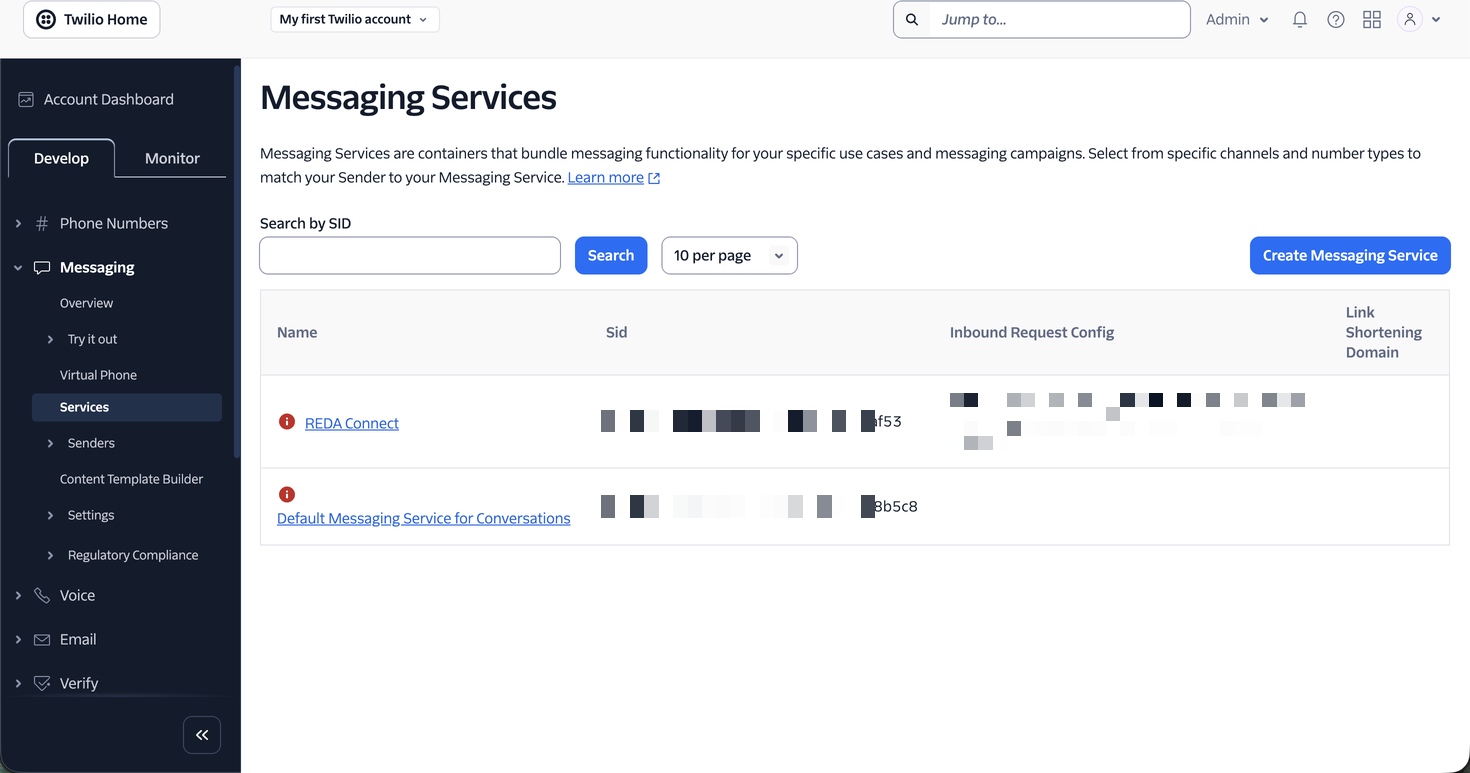
- In the Twilio console, go to Twilio Console → Messaging → Services and click Create Messaging Service.
- Give it a friendly name and pick the closest use case, then follow the wizard: add your phone number to the Sender Pool, keep the default integration settings for now, and complete the compliance step if prompted.
- On the service's overview page, copy the Messaging Service SID (starts with
MG).
Step 2 — Put the SID in the REDA Connect field
- Open your SMS Connect Account in Salesforce.
- Paste the
MG…value into the field labelled SMS Messaging Service Id, and save. The field's on-screen help: "Applicable for the following SMS service providers: Twilio. Messaging service ID created at Twilio to facilitate some automation. For more information visit: https://www.twilio.com/docs/messaging/services"
Expected result: REDA Connect includes the Messaging Service SID in subsequent sends, together with the explicit From number from the Connect Account. Twilio therefore uses that compatible sender rather than freely selecting another number from the pool.
What it means for incoming messages
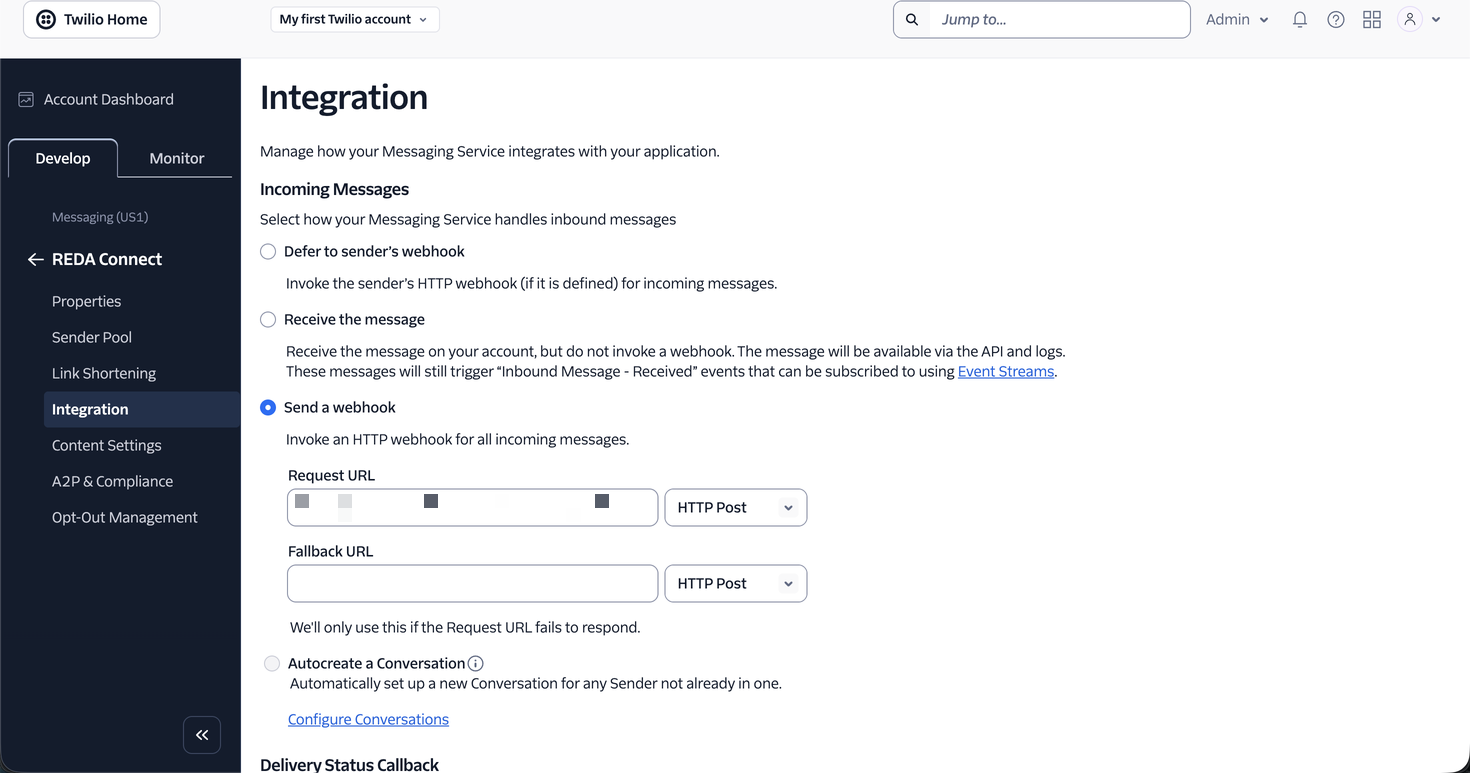
When a number belongs to a Messaging Service, Twilio includes the service's SID on the incoming messages it delivers to your webhook — and REDA Connect uses it as part of identifying which Connect Account the message belongs to. Practical consequences:
- Keep the field in sync with reality. If your number is in a Messaging Service, put that service's SID in SMS Messaging Service Id; if you later remove the number from the service, clear the field. A mismatch between what Twilio sends and what the account holds can stop inbound messages from matching your Connect Account.
- Several accounts, one Twilio account: the Messaging Service SID gives REDA Connect an extra way to tell Connect Accounts apart, on top of the receiving number.
Troubleshooting
| Symptom | Cause | Fix |
|---|---|---|
| Replies stopped arriving in Salesforce right after adding the number to a service | The service's incoming-message setting took over the number's webhook | Set it to defer to the sender's webhook (Step 1 note) |
| Inbound messages arrive but no longer match the Connect Account | SMS Messaging Service Id doesn't match the service the number is actually in | Sync or clear the field (Step 2) |
| Outbound messages now come from a different number than expected | The selected Connect Account, its explicit From number, or its membership in the service does not match the intended setup. | Check the From value actually sent and the service sender pool. This REDA Connect path does not enable automatic selection of a different pool number. |
FAQ
For US 10DLC registration, yes — campaigns are linked to numbers through a Messaging Service. Outside the US registration regime, a service is optional.
Yes. REDA Connect processes opt-out keywords on the inbound messages it receives, exactly as before. If you also enable Twilio's Advanced Opt-Out, Twilio may intercept STOP replies on its side first — decide which system owns opt-out and configure the other accordingly. See How opt-out works.
Not recommended. Twilio will tag inbound messages with the service SID, and the mismatch with a blank field can interfere with account matching. Either fill the field or keep the number out of the service.
Yes. REDA Connect sends it explicitly as From and uses the receiving number when matching inbound messages. Keep the authorised number in digits-only format and verify that it belongs to the service where required.
Where to go next
- Verifying your SMS connection — re-run the two-way test after any Messaging Service change; the incoming direction is the one that breaks silently.
- Default accounts and routing order — running multiple Connect Accounts side by side.