
Object configurations — how REDA Connect works with any object
REDA Connect supports standard and custom objects through Connect Account Config. Lead and Contact include packaged convenience fields; they are not the only supported objects. For each object and channel, configure the field holding the recipient’s channel identity and the field holding their display name.
A Connect Account holds the connection to your messaging provider. Its Connect Account Configs tell REDA Connect which Salesforce objects and fields to use. Follow the account and record-matching guide for Messenger/Instagram, including a custom-object example.
- You need at least one working Connect Account.
- No configuration records exist out of the box — until you create them, the feed on a record page shows a setup error instead of a conversation, and incoming messages attach to no record.
The one-sentence mental model
Create one configuration for each object/channel combination under each Connect Account you use. The channel identity is a phone number for WhatsApp/SMS, a Page-scoped sender ID for Messenger, or an Instagram-scoped sender ID for Instagram.
That single record then drives both directions:
How an outgoing message uses the configuration
When someone sends a message from a record's Connect Feed (say, a Contact):
- REDA Connect looks for the configuration matching that object and the chosen channel.
- It reads the identity from the field named in Channel Identity Field. For social channels, use the sender ID stored from an incoming message, not a phone number or profile username.
- It reads the person's display name from the field named in Name Field API Name (this is what appears in the feed's conversation header).
- The message goes out through the Connect Account the configuration belongs to.
If no configuration exists for the object, the feed cannot send — you'll see errors such as "Sobject setup is not found." or "No setup found for sending messages."
How an incoming message uses the configuration
When a customer's message arrives on a Connect Account:
- REDA Connect collects all active configurations for that account and that channel.
- It tries them in Priority Order — "1" is the highest priority and is searched first.
- It matches the configured identity field to the incoming identity. Use full international phone digits for WhatsApp/SMS; keep the exact sender ID for Messenger/Instagram. Do not transfer a Messenger sender ID between unrelated Pages.
- For Messenger/Instagram, the first priority that finds exactly one record wins. More than one distinct matching record at that priority is ambiguous and needs correction; do not rely on arbitrary selection. See the social-channel matching guide.
- If nothing matches anywhere, the message still exists — but on no record — unless one configuration is marked to create a new record automatically.
The full matching walk, including what happens when two records share a number, is in How incoming messages find their record.
One configuration per object per channel — the rule to follow
The product's own guidance on the Object API Name field says it plainly: "You must define only one setup for one type of sObject for a communication channel."
Follow that rule exactly: create exactly one configuration per object per channel. Nothing in the system physically blocks you from saving a second configuration for the same object and channel — but if you do, matching and sending behaviour becomes confusing and hard to troubleshoot, because different parts of the product may pick different configurations. Treat duplicates as a configuration error and delete them.
So a typical org messaging Contacts and Leads on both WhatsApp and SMS has four configurations: Contact/WhatsApp, Contact/SMS, Lead/WhatsApp, Lead/SMS.
Where the records live
Object configurations are child records of a Connect Account. To see or create them:
- Open the REDA Connect app and go to the Connect Accounts tab.
- Open your Connect Account record.
- Find the Connect Account Configs related list. Each row is one object configuration.
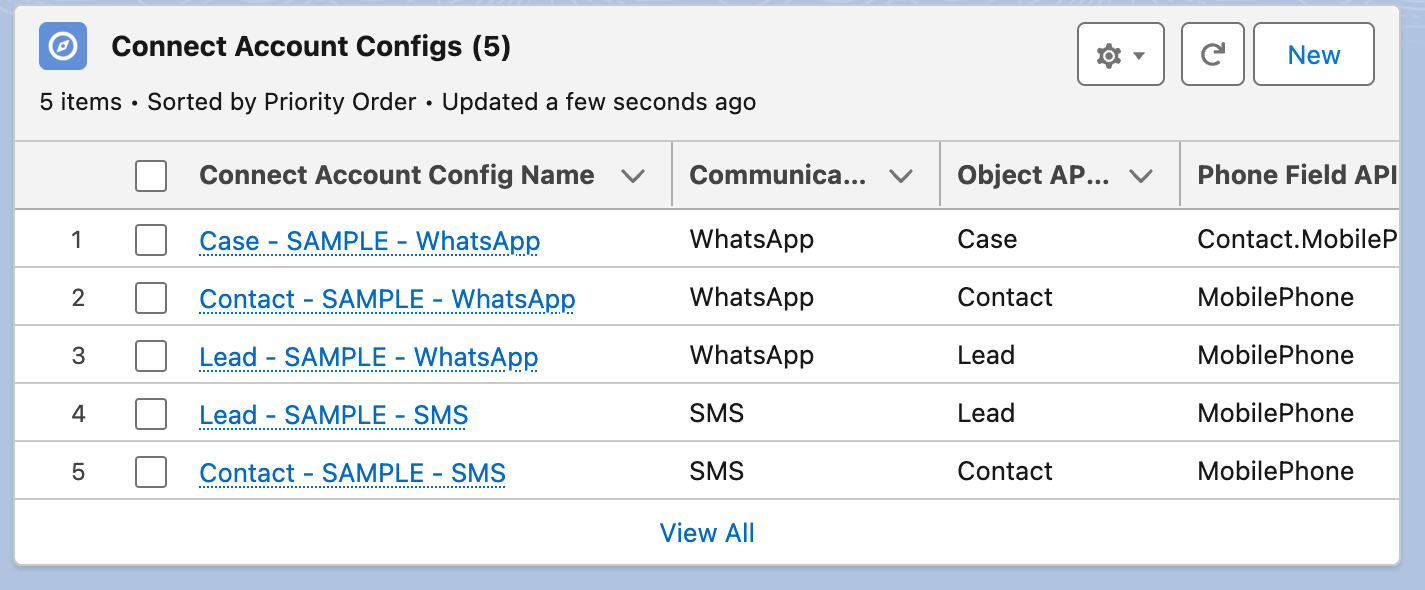
Because the configurations belong to the account, each Connect Account has its own set — if you run two accounts (say, two WhatsApp numbers), configure the objects under each account you want them to work with.
The fields at a glance
| Field | What it does | Covered in |
|---|---|---|
| Communication Channel | WhatsApp / SMS / Facebook Messenger / Instagram | every article here |
| Object API Name | The object this configuration is for | Configuring any object |
| Channel Identity Field | Phone number or scoped sender ID | Contacts and Leads |
| Name Field API Name | The field holding the display name | Contacts and Leads |
| Priority Order | Which configurations are searched first for incoming messages | Inbound record matching |
| Individual Record Field API Name | For phone numbers that live on a related record | Messaging through related records |
| Is Default New Record / New Record Default Values | Auto-create a record when nothing matches | Auto-creating records |
| OwnerId Field API Name | Assign incoming messages to the record's owner | Message ownership |
| Is Active | Only active configurations are used | every article here |
| Connect Account Field API Name — WhatsApp / SMS / Facebook / Instagram | Point a record at a specific Connect Account when you run several | Default accounts and routing order |
| Description | Required — your setup notes | every article here |
FAQ
Yes. The configuration is how REDA Connect finds the phone number and display name on a record — sending from a record's feed doesn't work without it.
No. Communication Channel holds a single channel, so an object that uses both channels needs two configurations — one per channel. They can point at the same phone field or different ones.
Untick Is Active and REDA Connect behaves as if the configuration doesn't exist: incoming messages skip it during matching, and the feed on that object can no longer send for that channel. It's the safe way to switch an object off without deleting your setup.
No. Configurations belong to one Connect Account. If both accounts should message Contacts, create a Contact configuration under each account.
Where to go next
- Configuring Contacts and Leads — the walkthrough almost every org starts with.
- Configuring any object — the same recipe for custom objects.
- Messaging through related records — when the phone number lives on a related record, such as an Opportunity's Contact.
- How incoming messages find their record — the matching walk in detail.
- Auto-creating records from incoming messages — turn unknown senders into new Leads.
- Assigning incoming messages to record owners — route messages to the right person on your team.