
Key concepts and terminology
REDA Connect uses a small set of terms consistently across the app and this documentation. This page defines each one in plain language, in the order you will meet them during setup. Skim it once now; come back whenever a term in another article isn't clear. Each definition links to the article that covers the concept in full.
The building blocks
Connect Account
A Connect Account is one messaging identity: a WhatsApp Business number and/or an SMS number, together with the credentials REDA Connect needs to send and receive through it. Every message in the system belongs to exactly one Connect Account. Most orgs start with one; you can run several — for example one number per country or per brand — and control which is used when. See What is a Connect Account?.
Object configuration
An object configuration (the Connect Account Config record) is how you tell REDA Connect where the phone number lives on each object — for example "on Contact, the number is in the Mobile field". One configuration covers one object on one channel, and it also controls how incoming messages are matched to your records and whether a new record is created when nothing matches. Without a configuration for an object, you cannot message from its records. See Object configuration overview.
Connect Message
A Connect Message is one message — sent or received — stored as a Salesforce record. It carries the message text, the channel, the phone numbers, the delivery status and timestamps, and a reference to the record the conversation is filed against. Because messages are ordinary records, they show up in reports, list views and automation.
Connect Feed
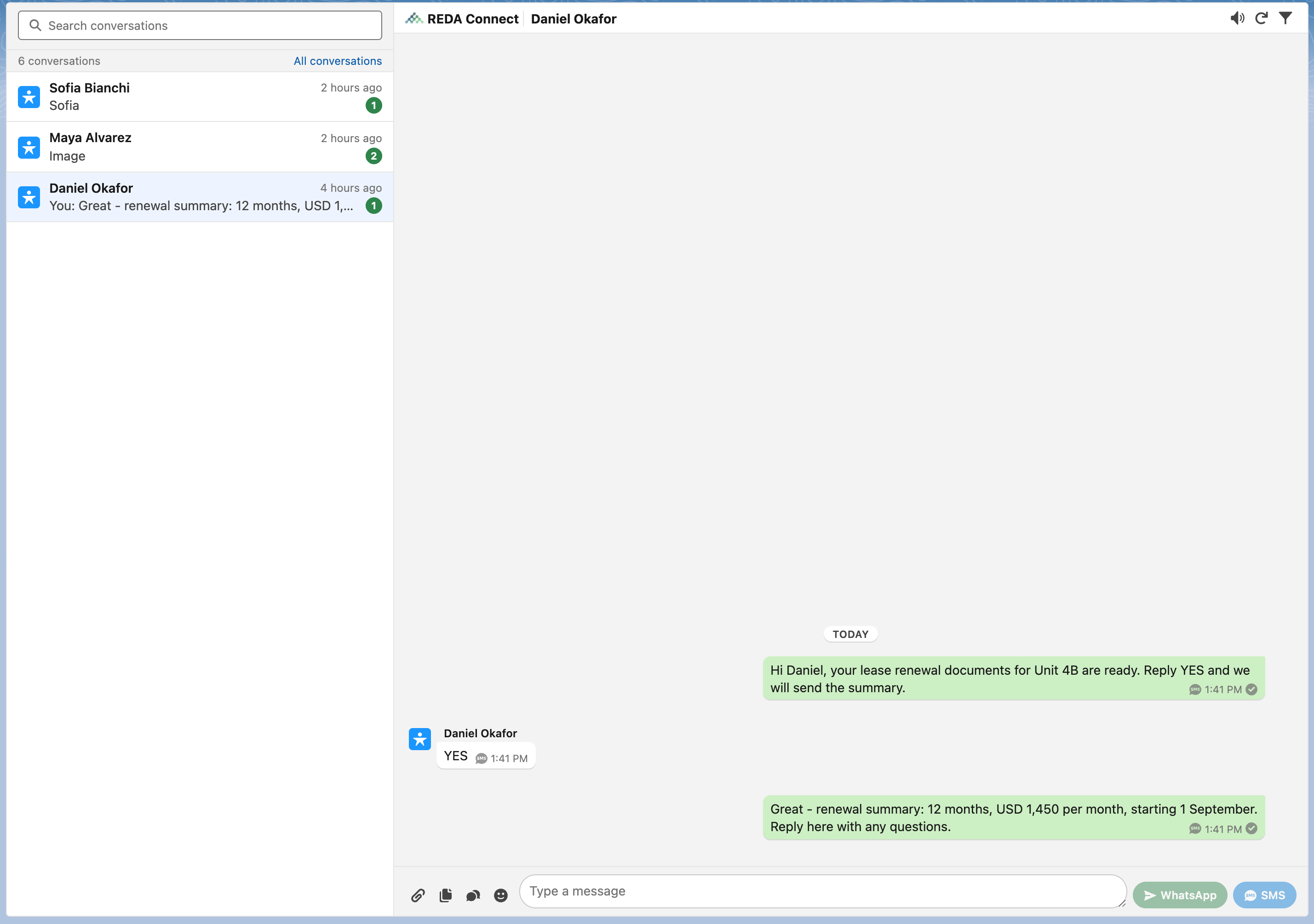
The Connect Feed is the messaging inbox: conversations on the left, the selected conversation's messages on the right, and a composer for replying. It runs as its own tab (the global inbox covering all conversations you can see), on any record page (scoped to that record), and in the utility bar. See Using the Connect Feed.
Messaging tools
Message template
A Connect Template is a reusable message body, optionally containing merge fields written as {{FieldName}} — for example Dear {{FirstName}}, your appointment is confirmed. on a Contact template (the field path resolves against the template's object). Templates have a strict lifecycle: they must be tested before they can be activated, and only active templates can be used for messaging. See What are templates?.
Chat script
A chat script is a guided, multi-step conversation: each step sends a message, waits for the customer's reply, records it, and moves to the next step. Replies can be written straight into fields on the record. You design a script once as a template; each customer conversation then runs its own copy. A script's replies are only acted on while its session is active — a time window you set on the script template. See What are chat scripts?.
Conversation
A Connect Conversation is a WhatsApp-specific record that tracks Meta's conversation window — the period after a customer's message during which WhatsApp treats the exchange as one conversation, with an expiry date-time. REDA Connect creates and links these automatically from WhatsApp's delivery callbacks; you don't manage them by hand.
Consent and delivery
Opt-in and opt-out keywords
Each Connect Account has fixed keyword lists: opt-out keywords STOP and BLOCK, opt-in keywords START and UNBLOCK. When a customer's whole reply is one of these keywords, REDA Connect flips the matching opt-out flag on their Lead or Contact record for that channel, and outbound messages to opted-out people are blocked with a clear error. See How opt-out works.
Delivery statuses
Every message carries a Status that REDA Connect updates as the providers report progress. The full set of values is Queued, Sending, Accepted, Sent, Delivered, Read, Failed, Undelivered, Receiving, Received. Outbound WhatsApp messages typically move Sent → Delivered → Read; outbound SMS moves Queued or Accepted → Sent → Delivered; incoming messages arrive as Received. See Understanding delivery statuses.
The plumbing (set up once, then forget)
Webhook
A webhook is a web address that an outside service calls to push information to you. Meta and Twilio deliver incoming messages and delivery receipts to two REDA Connect webhook addresses in your org. You paste these addresses into the Meta and Twilio consoles during channel setup. See Connecting the WhatsApp webhook and Connecting the Twilio webhooks.
Public Site
A Salesforce Site is a public web endpoint attached to your org — a way for the outside world to reach it without logging in. REDA Connect's webhook addresses live on a Site that you create once, by hand, during setup. Without it, outgoing messages work but nothing your customers send ever arrives. See Creating the public Site.
Guest user
The guest user is the automatic, unlicensed user Salesforce creates for every Site — it is who "receives" the webhook calls. REDA Connect's design keeps this user powerless: it gets access to exactly two endpoints and no data at all, and simply hands each incoming message over for processing. The details are covered in Creating the public Site.
FAQ
No. A Connect Account is a REDA Connect record inside your org that stores the connection to your WhatsApp number and/or Twilio number. You still create the provider accounts at Meta and Twilio; the Connect Account holds their credentials and settings.
No. One Connect Account can serve any number of objects. Object configurations — not accounts — are per object: each object you message from needs its own configuration per channel.
A template is a single reusable message body. A chat script is a whole scripted conversation made of several steps, each of which can itself use a template or plain text.
A Connect Template is REDA Connect's own reusable message. A WhatsApp template is a message format that Meta itself reviews and approves, required for starting WhatsApp conversations in some situations — see WhatsApp message templates and Meta approval.
Where to go next
- Setup roadmap — install to first message — see how these pieces come together, in order.
- What is a Connect Account? — the first building block you'll create.
- Object configuration overview — how records and phone numbers get wired up.