
AP Aging Reports & Snapshots
Aging answers accounts payable’s most practical question: what do we owe, and how late are we? REDA Financials gives you two complementary answers — live aging, recalculated on every invoice every day, and aging snapshots, frozen photographs of your payables for period-end reporting and trend analysis. This article covers both, plus the DPO metric that tells you how fast you actually pay.
Access you'll need. Any REDA Financials permission set can view aging fields, snapshots, and snapshot lines. Creating and calculating snapshots requires the Accounts Payable v2 permission set or Accounting Admin v2 (the scheduled batch belongs to administrators); the Accounting Controller v2, Accounts Receivable v2, and Read Only v2 sets can review them but not create or calculate them.
Live aging: every invoice knows its age
Every posted Purchase Invoice carries self-updating aging fields — no report to run:
| Field | What it shows |
|---|---|
| Days Outstanding | How long the invoice has been on the books. |
| Days Past Due | Days beyond the due date — zero while the invoice isn’t yet due. |
| Is Overdue | The flag that turns on the moment the due date passes. |
| Aging Bucket | The classification everyone reports by: Current · 1-30 · 31-60 · 61-90 · Over 90 (days past due). |
Because these are live fields, list views filter on them directly — the shipped Overdue view is simply "Is Overdue = true" — and the Account Ledger and Invoice Summary panels read from the same truth. Yesterday’s "1-30" invoice can be today’s "31-60"; live aging never lets a bill hide.
Snapshots: the photograph your reporting needs
Live numbers move constantly, which is exactly wrong for period-end reporting — the auditor wants payables as they stood at June 30, and your trend chart needs comparable monthly points. An Aging Snapshot freezes the picture: one record per entity, per type (AP or AR), per accounting period, with every outstanding invoice captured as a line.
Creating one
Close the books first
Snapshots demand a settled foundation: your entity’s AP Closed Through date must cover the snapshot date, or creation is refused — "The AP books must be closed through the snapshot date before creating an aging snapshot." That’s deliberate: a snapshot of moving numbers would be worthless. (Period closing is your accounting team’s month-end step.)
Create the snapshot record
On the Aging Snapshots tab, click New: pick the Entity, set Type to AP, choose the Accounting Period, and save. One snapshot exists per entity + type + period — a duplicate attempt points you to the existing one.
Click Calculate
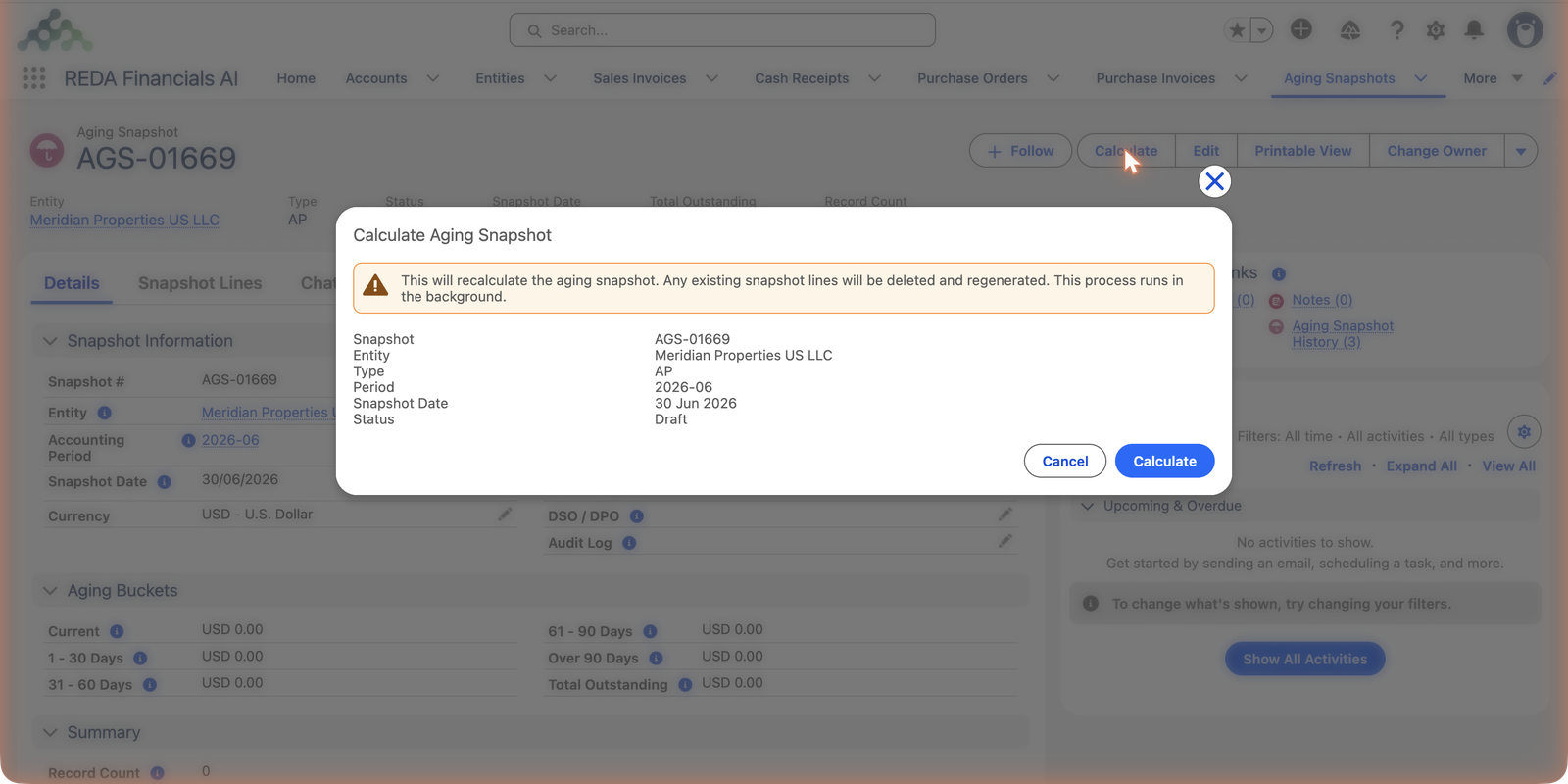
The Calculate action fills the snapshot in the background — and warns you before recalculating an existing one:
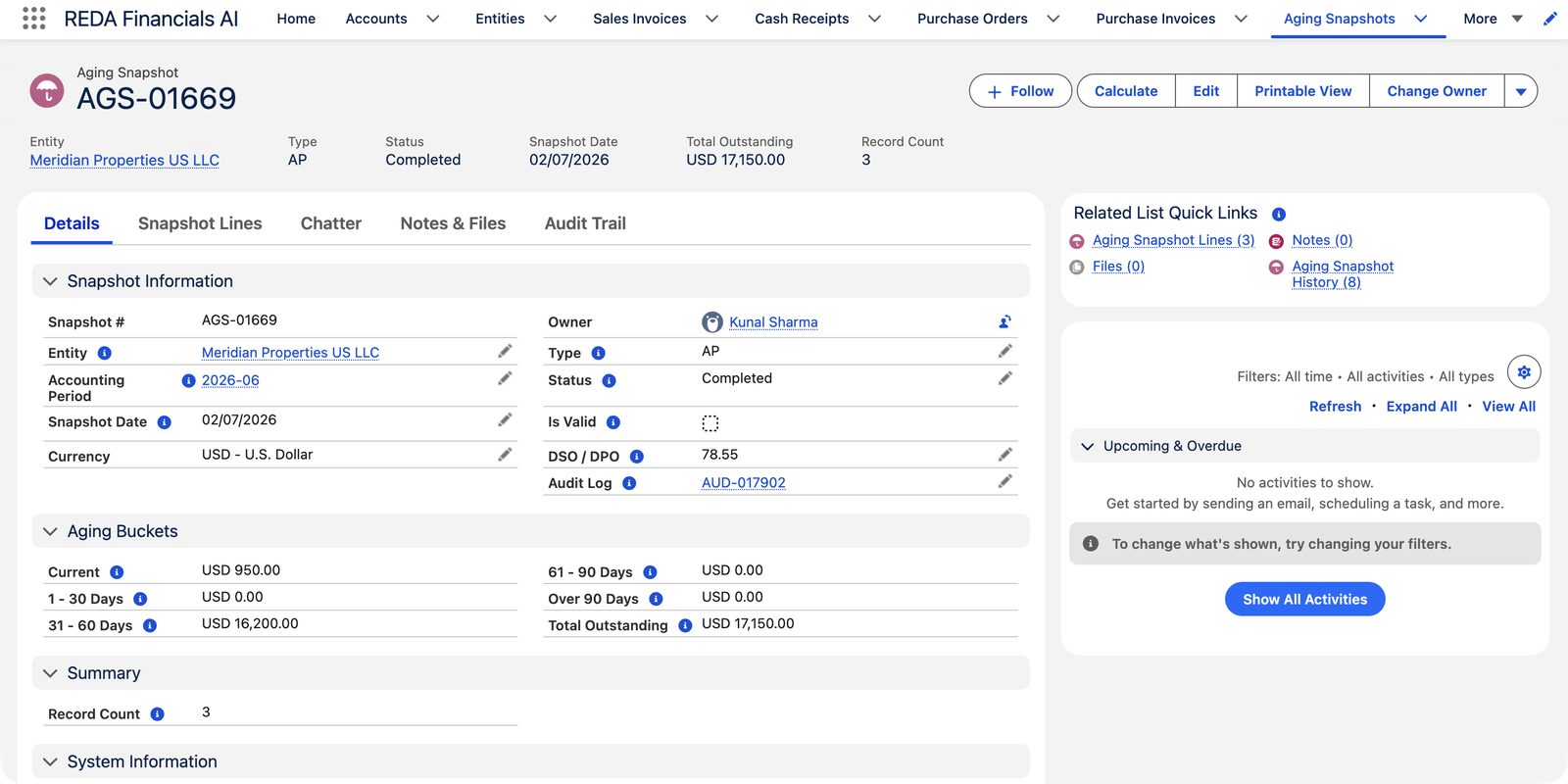
Moments later, the snapshot completes:
What’s inside
Each Snapshot Line is one outstanding invoice, captured with its vendor, dates, original and outstanding amounts, days outstanding and bucket — plus your cost dimensions. The header rolls the lines up into the bucket totals, Total Outstanding and Record Count, and stamps an Audit Log reference for the calculation run. Once captured, the lines don’t drift: pay the invoice tomorrow and the June snapshot still shows June’s truth. (The Is Valid flag guards the foundation — if someone reopens the closed books behind a snapshot, it flags itself.)
The snapshot record, field by field
| Field | What it holds |
|---|---|
| Entity / Type / Accounting Period | The photograph's subject: whose payables (Type AP; the same feature serves AR), for which period. Together they're unique — one snapshot each. |
| Snapshot Date | The as-of date the capture ages everything against — 30 Jun 2026 in the example. |
| Status | Draft (created, not calculated) → In Process (the background run is working) → Completed — or Completed with Errors when the run finished but flagged problems worth reading the audit log for. |
| Aging Buckets / Total Outstanding / Record Count | The rollups: one amount per bucket, the grand total, and how many invoices were captured. |
| DSO / DPO | The speed metric — DPO for payables (see below). |
| Is Valid | The trust flag: it self-invalidates if the closed books behind the snapshot are reopened, so a stale photograph can never masquerade as evidence. |
The duplicate guard is verbatim: "An aging snapshot already exists for this Entity, Type, and Accounting Period. Delete the existing snapshot or use the Calculate button to recalculate." — recalculate the existing record instead of creating a rival.
DPO: how fast do we actually pay?
Days Payable Outstanding = outstanding payables ÷ period purchases × days in the period. It’s the single number that summarizes payment behavior — rising DPO means you’re holding cash longer (good for cash flow, hard on vendor goodwill); falling DPO means the opposite. Meridian’s 78.55 is dominated by the part-paid construction bill; the snapshot lines say exactly where to look. Tracked snapshot-over-snapshot, DPO becomes a trend line your CFO will actually use.
Automating month-end
Administrators can schedule the snapshot batch to run daily — it finds every entity marked Include In Aging, creates or refreshes the snapshot for the latest closed period, and reports its outcome. Set it once in the Operations console and month-end aging becomes a non-event. See Aging Snapshot Batch.
Common mistakes to avoid
| Mistake | Why it hurts | Do this instead |
|---|---|---|
| Paying vendors off the snapshot | The photograph is deliberately frozen — invoices paid since the capture still show outstanding on it | Decide payments from live aging (list views, the payment run's own filters); report from snapshots |
| Ignoring an invalidated snapshot | Someone reopened the closed books behind it — its numbers no longer describe anything real, and Is Valid says so | Re-close the period, then Calculate again for a fresh, valid capture |
| Filing a Completed with Errors snapshot as done | The run finished, but some of its lines carry problems the audit log names | Read the audit log, fix the cause, recalculate |
| Chasing the "difference" between snapshot and live views | Hours lost reconciling two numbers that are both right — for different moments | Expect them to differ by exactly the activity since the capture |
| Judging vendors by bucket totals alone | One part-paid big bill (like Meridian's construction balance) can dominate a bucket and hide everything else | Drill into the Snapshot Lines — every total is the sum of named invoices |
Where to go next
- Vendor Account Ledger — one vendor’s history behind the bucket.
- Batch Payment Run — acting on what aging shows.
- AR Aging Reports & Snapshots — the receivables mirror.
- Closing the Books — the books-closed prerequisite.
Frequently asked questions
Almost always the books: the entity’s AP Closed Through date must reach the snapshot date. Close the period first — that’s what makes the photograph trustworthy. The other cause is a duplicate: one snapshot per entity, type and period; recalculate the existing one instead.
Both — for their own moment. The snapshot holds the period-end capture; live views show now. Payments made since the capture explain the difference. That permanence is precisely the snapshot’s job.
No — memos are credit you hold, not bills you owe, so they carry no aging bucket. Their unapplied credit shows on the Account Ledger and nets against the vendor’s position.
Yes — Calculate again; lines are deleted and regenerated (that’s what the warning dialog is about). The audit log records each run.
Reopening the closed books behind the snapshot. The flag exists so nobody quietly quotes a photograph whose foundation moved. Once the period is closed again, run Calculate — the fresh capture is valid again.
The AP-side permission sets — Accounts Payable and Accounting Admin — create and calculate them; the scheduled batch belongs to administrators. Accounting Controller and Read Only read every snapshot and line, which is usually exactly what a reviewer needs.
Was this article helpful?