
Auto-Apply Batches
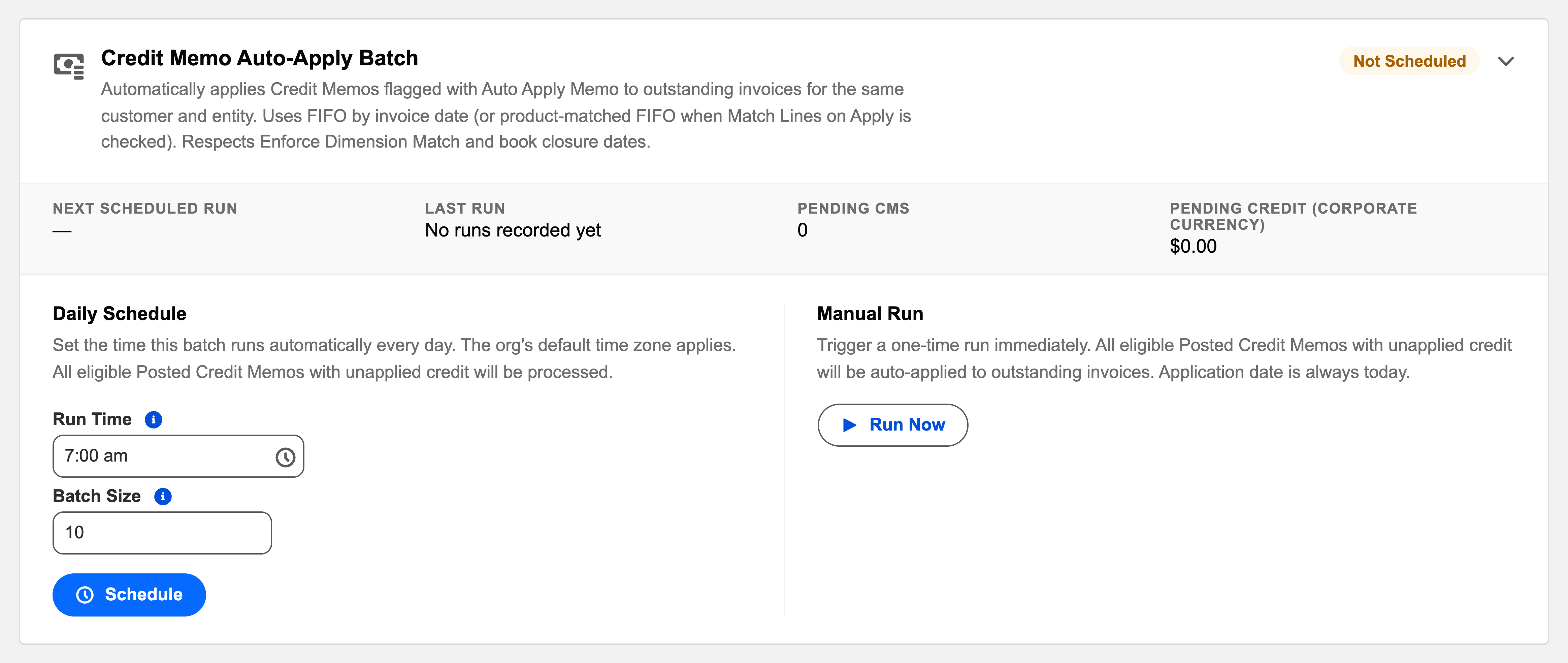
Four sibling cards — Cash Receipt, Credit Memo, Cash Disbursement and Vendor Memo auto-apply — that match flagged settlement documents to open invoices overnight. One runbook covers them all.
Access you'll need. Scheduling and running these batches requires the Accounting Admin v2 permission set; the Accounting Controller v2 can reach the console too. The Accounts Payable v2 and Accounts Receivable v2 sets cannot see it — everyone else meets only the applications it creates.
The four cards side by side
| Card | Applies | To | Opt-in flag on the document |
|---|---|---|---|
| Cash Receipt Auto-Apply Batch | Cash Receipts | Outstanding invoices for the same customer and entity | Auto Apply Receipt |
| Credit Memo Auto-Apply Batch | Credit Memos | The customer's outstanding invoices, oldest first | Auto Apply Memo |
| Cash Disbursement Auto-Apply Batch | Cash Disbursements with unapplied amounts | Outstanding Purchase Invoices for the same vendor and entity | Unapplied amounts qualify on the disbursement side |
| Vendor Memo Auto-Apply Batch | Vendor Memos | Outstanding Purchase Invoices for the same vendor and entity | Auto Apply Memo |
The shared matching rules, decoded
| Rule | What it means in practice |
|---|---|
| Opt-in per document | Only flagged documents (or payments with unapplied amounts) are touched — manual matching stays yours wherever you want it. |
| Same party, same entity | Money never wanders across customers, vendors or companies. |
| Oldest first (FIFO) | Open invoices settle in invoice-date order — the accounting norm. Invoices carrying an Application Priority jump the queue. |
| Dimension-aware | With Enforce Dimension Match on Apply checked, only invoices with matching cost dimensions qualify. |
| Closed books respected | No application ever lands in a closed period. |
Scheduling it
All four daily, overnight, after document generation. Sequence among the four rarely matters; give each its own slot for cleaner logs. Run Now shines after bulk imports (a day’s receipts loaded at 4 pm shouldn’t wait for midnight).
A worked night — Meridian's receipts
During the day, Meridian's AR team records the day's customer payments, each receipt flagged Auto Apply Receipt at creation (the form defaults sensibly). Overnight, the Cash Receipt batch takes each flagged receipt and walks its customer's open invoices for the same entity, oldest invoice date first, applying until the receipt's money runs out. A receipt whose customer has an invoice carrying Application Priority settles that one ahead of the queue. One receipt stays unapplied: its entity's books are closed through the relevant date, so the batch leaves it safely in its unapplied bucket and writes the reason in the run's audit entry. Next morning the card reads green, the pending count is near zero, and the one exception is a deliberate, documented wait — not a mystery.
Common mistakes to avoid
| Mistake | Why it hurts | Do this instead |
|---|---|---|
| Expecting the batch to match documents nobody flagged | Auto-apply is opt-in per document; unflagged receipts and memos wait forever | Flag at creation — and check the pending count trend, not just run outcomes |
| Calling FIFO's choice "the wrong invoice" | Oldest-first is the accounting norm and the documented behaviour | Set Application Priority on invoices that genuinely deserve the front of the queue |
| Correcting a mismatch by deleting the payment | The money was real; only its matching was wrong | Delete the application, apply manually, and adjust priorities for next time |
| Running the four before documents generate | The pass finds nothing; matching waits another day | Slot them after the Recurring Transactions batch in the overnight order |
| Ignoring dimension matching when it's enforced | Perfectly good invoices look "skipped" — their dimensions simply didn't match | Read the run's reasons; align dimensions or apply manually where intended |
Monitoring it
Green means: the card shows Scheduled, the last-run timestamp is from the expected window, and the outcome icon is informational. Anything else, click View Audit Log — the run’s record lists processed / succeeded / failed with a reason per failure. Each card shows its pending count — a rising pending number with green runs means documents aren’t flagged, not that the batch is failing. That’s a user-training signal, not an ops one.
Troubleshooting
| Symptom | Likely cause → action |
|---|---|
| Flagged document stayed unapplied | No eligible open invoice for that party/entity, dimensions didn’t match, the only open invoice is future-dated (no balance yet), or the period is closed — the log says which. |
| “Wrong” invoice matched first | FIFO worked as designed. Teach Application Priority for invoices that should jump the queue. |
Where to go next
- Auto-Apply Batches (CR/CM/CD/VM) — what the batch does, in depth.
- Operations Tab — the console.
- Audit Logging — reading run history.
Frequently asked questions
Only the ones your books use. Each card schedules independently — an org that never issues vendor memos can leave that card Not Scheduled without affecting the others.
It matched the oldest — right by default, wrong when a specific invoice should come first. Delete the application, apply manually, and set Application Priority on invoices that deserve the front of the queue.
No eligible target: nothing open for that party in that entity, dimensions didn't match, the only open invoice is dated in the future (its balance doesn't exist yet), or the period was closed. The run's audit entry says which — and the money stays safely in its unapplied bucket meanwhile.
Never — same party, same entity is a hard rule on all four cards. A customer's receipt only ever meets that customer's invoices in that entity.
On the documents themselves: Auto Apply Receipt on cash receipts, Auto Apply Memo on credit and vendor memos; disbursements qualify by having unapplied amounts. Tick them at creation and the nightly batches do the rest.
Yes — it's the recommended move after a bulk import. The batch only touches flagged documents with unapplied amounts and only creates applications that would be legal manually, closed books included.
Was this article helpful?