
Tax Seeding Wizard
The Tax Seeding Wizard loads a country’s entire tax rulebook in one click. Instead of hand-building jurisdictions, tax types, rules, GL accounts, and mappings, you pick a country, review the pack, and run it — and the foundation you’ve read about across this category appears, ready to use.
Access you'll need. Running the wizard requires the Accounting Admin v2 permission set; the Accounting Controller v2 can reach the console too. The Accounts Payable v2 and Accounts Receivable v2 sets cannot see it — this is administrator-only.
What one run creates
A country pack builds the whole rulebook, in dependency order, in a single operation:
| It creates… | So that… |
|---|---|
| Jurisdictions (country + sub-national) | the geography exists, country before children |
| Tax Types & Party/Tax Profiles | the vocabulary is defined |
| Fiscal Operations (where needed) | interstate/export logic works |
| Tax Rules | the right rates fire under the right conditions |
| GL accounts & Tax GL Mappings | tax has somewhere to post |
| WHT rules & rates | withholding (TDS, IRRF…) is ready |
It runs all-or-nothing: if anything fails, the whole run rolls back, so you never end up with half a rulebook.
Using the wizard
The wizard is the Financial Setup Wizard component — your administrator places it on an App Page once. Its screen is titled CoA & Tax Seeding, with countries grouped under continent tabs (All · Americas · Europe · Asia-Pacific · Middle East & Africa) and a status chip on each: Seeded, Partial, or Not Seeded.
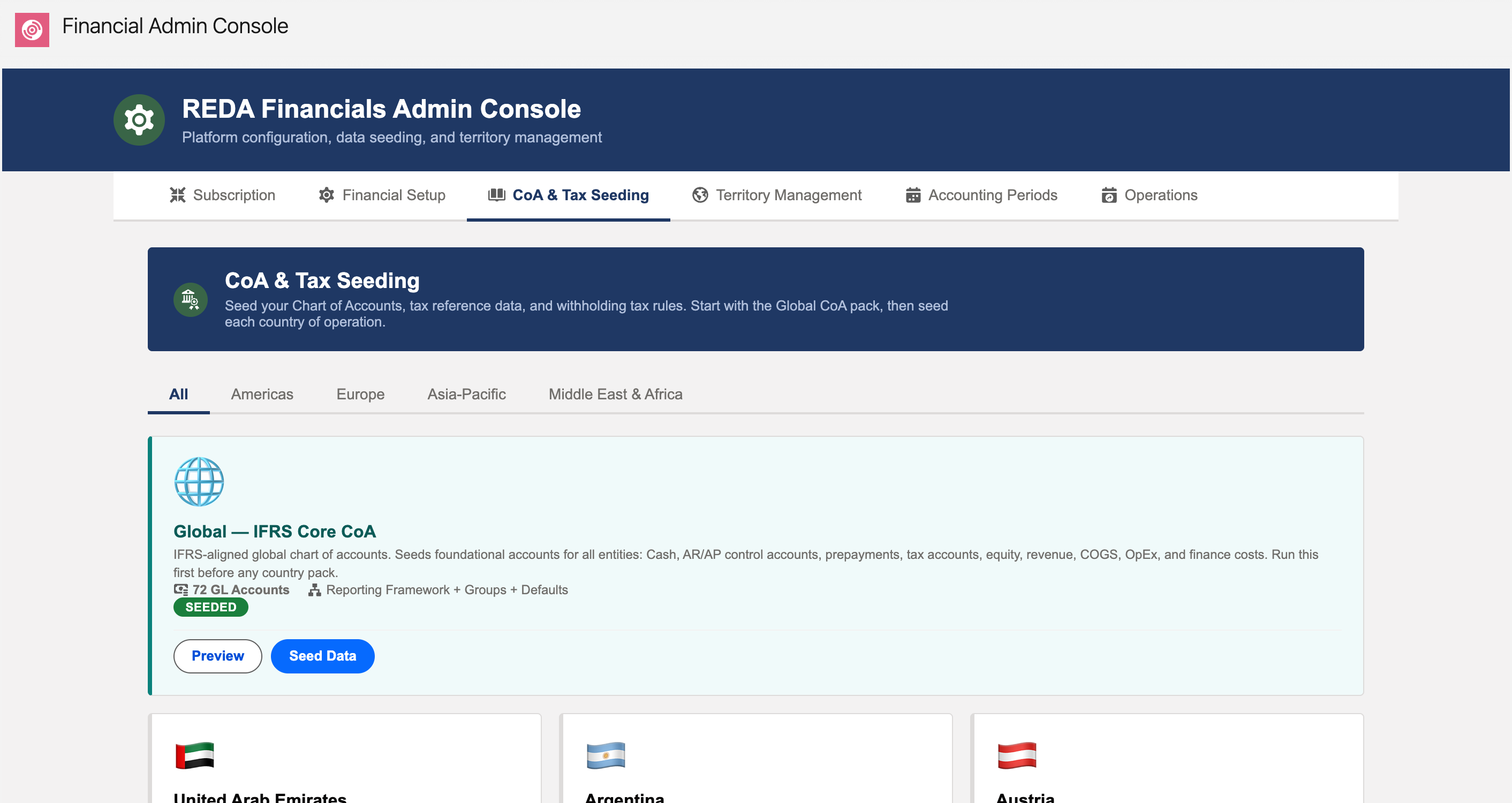
Seed modes — safe to re-run
Because every seeded record has a stable code (an external ID), the wizard can run repeatedly without creating duplicates. Three modes control how a re-run behaves:
| Mode (as the wizard describes it) | Use when |
|---|---|
| Insert Only — “add new records, skip existing (safe, idempotent)” | First load, or topping up a pack without touching anything already in place — the cautious default |
| Upsert — “update existing records by Code if found, insert new” | Applying a pack update: matched records refresh to the pack’s values, your own additions are untouched |
| Replace — “DELETE all existing country data, then re-seed (destructive)” | Only for a deliberate reset of a country’s rulebook — it deletes the country’s seeded data first, including records you edited |
Handling a tax-regime change
Tax law changes — rates move, taxes are introduced or retired, whole regimes are reformed (Brazil’s 2026–2033 shift to CBS/IBS is a live example). REDA handles this with effective dates, not by deleting data:
- A retiring rule is given an effective end-date (e.g. PIS/COFINS to 31 Dec 2026). The engine simply stops applying it after that date.
- A new rule carries an effective start-date (e.g. CBS from 1 Jan 2027). The engine starts applying it on that date.
Both versions live in the data at once, and the engine picks the right one by the document’s date — so a 2026 invoice keeps computing with 2026 rules and a 2027 invoice uses 2027 rules. History is preserved automatically, which matters for audits, amendments, and credit memos against older invoices. When the change lands, you simply re-run the wizard in Upsert mode with the updated pack.
What ships — coverage
| Region | Packs |
|---|---|
| Europe | 25 |
| Asia-Pacific | 17 |
| Middle East & Africa | 17 |
| Americas | 11 |
| Global (IFRS Core CoA) | 1 |
The Seeded Countries Reference lists what each pack contains. Need a country that isn’t shipped? You can build its rulebook by hand using the objects in this category — or ask us; packs are added over time.
After seeding — four things to do
- Point the GL mappings at your chart of accounts. The pack creates default tax accounts and mappings; re-point them at your own accounts (or keep the seeded ones).
- Register your entities. Add Entity Tax Registrations for the jurisdictions where you collect tax — without these, no tax is charged.
- Classify your products and parties. Set Tax Jurisdiction and Party Tax Profile on your entities and accounts, and classify products via fiscal profiles (or the Apply Default Tax flag).
- In multi-currency setups, check the withholding rules’ currency. Seeded WHT rules take your organisation’s default currency, and thresholds compare in the rule’s currency — a ₹30,000 threshold on a dollar-denominated rule is a $30,000 threshold. Correct the currency before relying on the rules.
The country walkthroughs show this end to end.
Where to go next
- Seeded Countries Reference — the full catalogue of packs.
- Tax Jurisdictions — records the wizard creates.
- Tax Rules — rules the wizard loads for you.
- UK VAT — a seeded country in practice.
Frequently asked questions
Yes. Records are matched by their codes, so re-running (in Upsert mode) updates existing records and adds new ones without duplicating anything. It’s the intended way to apply pack updates.
In Upsert mode, only records that match a pack code are touched — your own added rules, entity-specific GL mappings, and registrations are left alone. Replace is different: it deletes the country’s seeded data (including your edits to those records) before re-seeding, so use it only for a deliberate reset.
It can’t leave a half-built rulebook — the run is all-or-nothing and rolls back entirely on any error, reporting the error so you can fix it and re-run.
No — seed only the countries you operate in, one at a time. You can always add another later; each pack is independent.
Was this article helpful?