
Expense Allocation Batch
The admin runbook for hands-free cost sharing: posted purchase invoices flagged for auto-allocation get their intercompany journal entries built overnight.
Access you'll need. Scheduling and running this batch requires the Accounting Admin v2 permission set; the Accounting Controller v2 can reach the console too. The Accounts Payable v2 and Accounts Receivable v2 sets cannot see it — everyone else meets only the allocations it produces.
What's in scope — and what a run creates
| Question | Answer |
|---|---|
| Which invoices qualify? | Posted purchase invoices flagged Auto Allocate Expenses with an Expense Allocation List assigned. Everything else is ignored — the batch is strictly opt-in. |
| What gets created? | A posted allocation batch per invoice, plus the intercompany journal entry that moves the cost between entities — identical to what a manual Allocate Expenses run would produce. |
| Can it run twice on the same bill? | No — each processed invoice is stamped, so it's never auto-allocated twice. |
| What if one bill fails? | Nothing else notices: one purchase invoice per batch scope means the failure is isolated and the queue continues. |
| Where do results show? | The run's audit entry (processed / succeeded / failed with reasons) and the invoice's own Allocations tab. |
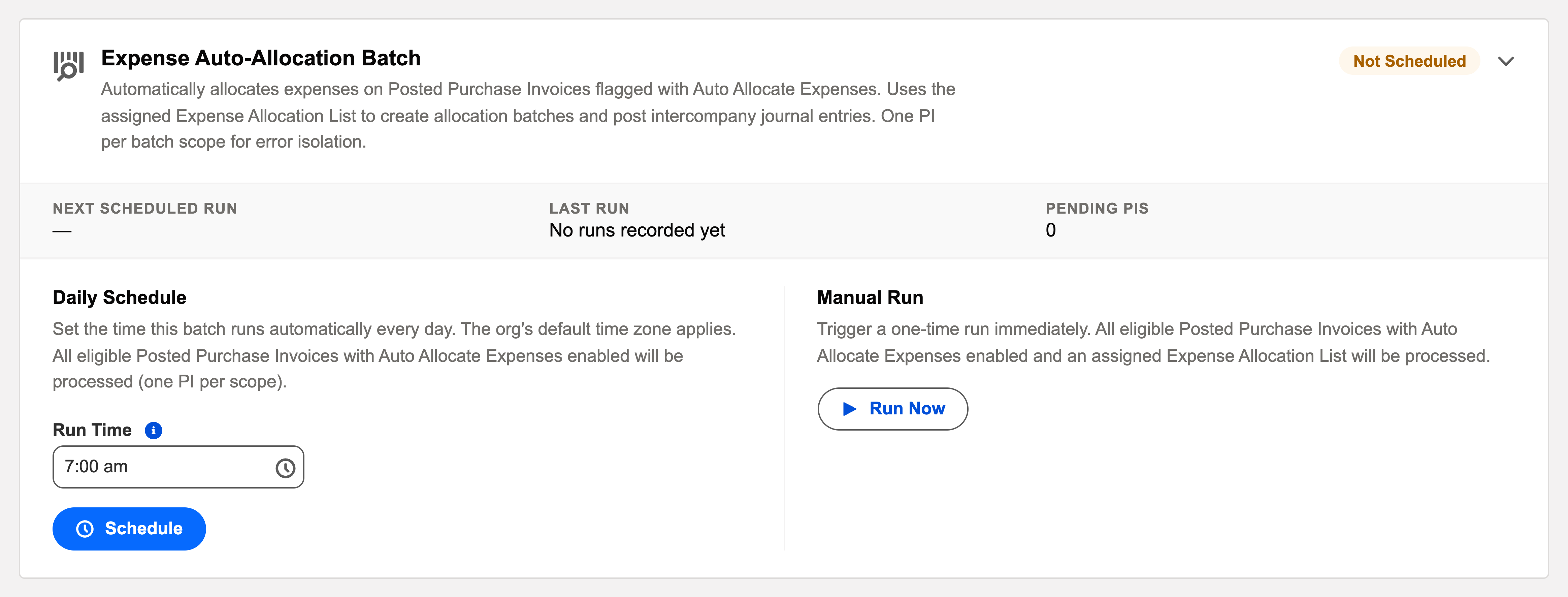
Scheduling it
Daily, after the recurring batch (the shared bills it processes are usually template-generated) and before aging. One-invoice-per-scope isolation means a single bad bill never stalls the queue.
A worked night — Meridian's shared bill
Meridian Properties Group's group entity receives a recurring shared-services bill that all four country entities should carry a slice of. The setup was done once, on the recurring template: the right Expense Allocation List attached, the Auto Allocate Expenses flag ticked. From then on, each month tells the same story — the recurring batch generates and posts the purchase invoice early in the night; a little later this batch picks it up, creates the allocation batch, and posts the intercompany journal entry that moves each entity's share onto its own books using the intercompany receivable and payable accounts. The invoice gets its completion stamp; the Allocations tab shows what was built. If Brazil's entity were missing its intercompany accounts, only that bill's allocation would fail — named, with its reason, in the audit entry — while every other invoice in the queue processed normally.
Common mistakes to avoid
| Mistake | Why it hurts | Do this instead |
|---|---|---|
| Flagging invoices but assigning no allocation list | The batch has no recipe — the invoice is skipped night after night | Both halves, always: the flag and the Expense Allocation List |
| Expecting draft invoices to allocate | Only posted purchase invoices are in scope | Post first (or let Auto Post templates do it); allocation follows |
| Leaving receiving entities without intercompany accounts | The intercompany journal can't post; the bill fails with an account error | Set each entity's intercompany receivable/payable accounts up front — the global template on Financial Setup is where new entities inherit them |
| Re-flagging a processed invoice to "run it again" | The completion stamp protects against double allocation — by design | Adjust via the allocation records themselves, not by forcing a rerun |
| Scheduling it before the recurring batch | The night's shared bills don't exist yet; allocation waits a full day | Recurring first, allocation after — generation before distribution |
Monitoring it
Green means: the card shows Scheduled, the last-run timestamp is from the expected window, and the outcome icon is informational. Anything else, click View Audit Log — the run’s record lists processed / succeeded / failed with a reason per failure. Failures name their invoice; the classic causes are an allocation list whose percentages no longer total properly or a receiving entity misconfigured for intercompany.
Troubleshooting
| Symptom | Likely cause → action |
|---|---|
| Invoice skipped every night | It isn’t flagged Auto Allocate, has no list assigned, or already carries its completion stamp. All three are on the invoice. |
| IC account errors in the log | A receiving entity lacks its Default IC Payable/Receivable accounts — set them on the entity, Run Now. |
Where to go next
- Expense Allocation Batch — what the batch does, in depth.
- Operations Tab — the console.
- Audit Logging — reading run history.
Frequently asked questions
It's deliberate error isolation: a failure on one shared bill never touches the next. The card's own description names it — "One PI per batch scope for error isolation." Reliability beats raw throughput for intercompany postings.
Three candidates, all visible on the invoice itself: it isn't actually flagged Auto Allocate Expenses, it has no Expense Allocation List assigned, or it already carries its completion stamp from a previous run.
A receiving entity lacks its default intercompany payable/receivable accounts, so its slice of the journal can't post. Set them on the entity and click Run Now — only the failed bill needs the catch-up.
No — it creates the same posted allocation batch and intercompany journal entry a manual run would. Check the invoice's Allocations tab either way.
In the Expense Allocation Lists — the recipes the batch applies. See Configuring Allocation Rules for building them and Running Auto-Allocation for the full behaviour.
Was this article helpful?