
OCR Processing Batch
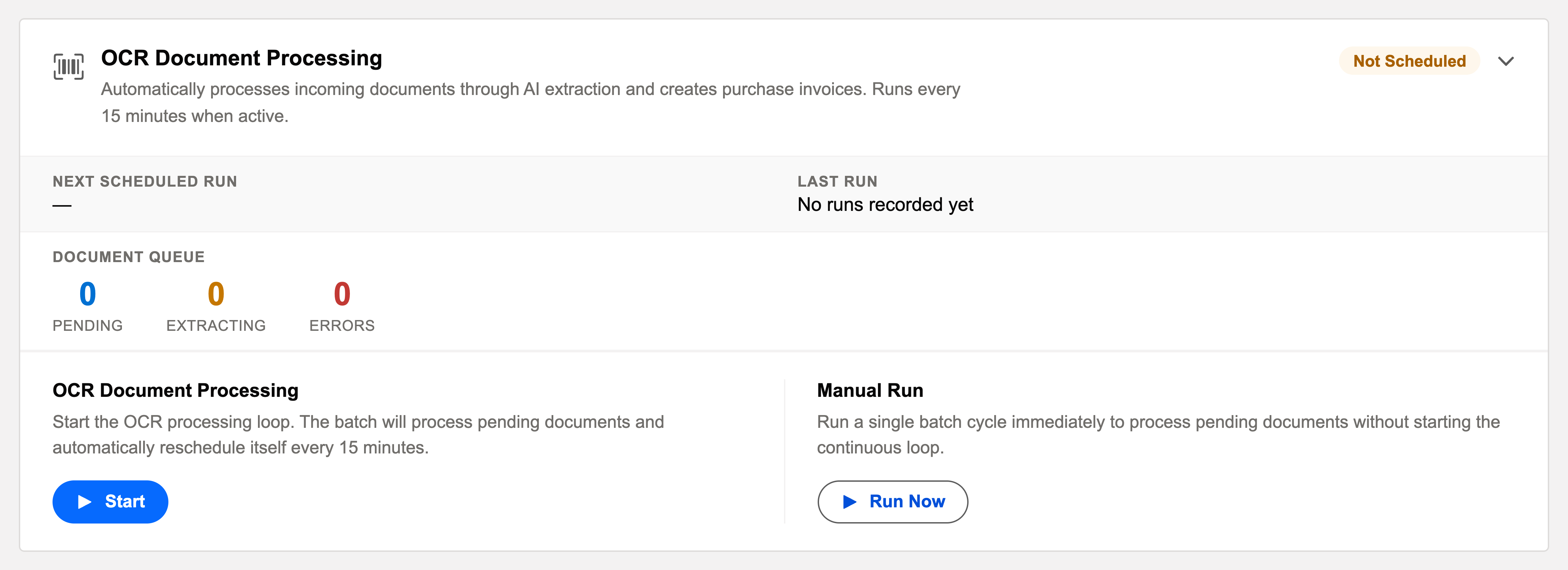
The admin runbook for document intake. Unlike its daily siblings, this is a queue processor: started once, cycling every 15 minutes, turning inbox documents into draft invoices.
Access you'll need. Starting and stopping this processor requires the Accounting Admin v2 permission set; the Accounting Controller v2 can reach the console too. The Accounts Payable v2 and Accounts Receivable v2 sets cannot see it — everyone else meets only the draft invoices it creates.
How this card differs from the others
| The other ten cards | This card |
|---|---|
| Pick a daily run time with Schedule | Start / Stop — a switch, not a time picker |
| One pass per day | Cycles every 15 minutes while active |
| Show Next Scheduled Run / Last Run | Shows live queue counts — pending | extracting | errored |
| Run Now for a one-off pass | Run Now forces an immediate cycle without waiting for the next quarter-hour |
| Consume nothing but time | Each processed document draws on the plan's monthly AI document allowance |
What each 15-minute cycle does
Takes pending documents from the OCR Inbox
Everything that arrived since the last cycle — emailed invoices, uploads — waits there as pending.
Runs AI extraction
Vendor, dates, amounts, line items — read off the document and matched to your master data.
Creates draft purchase invoices
Ready for a human reviewer — extraction never posts anything by itself. Errored documents stay in the inbox with their reasons, ready for reprocessing after fixes.
Scheduling it
Not a time picker — Start it and leave it running; Stop pauses new cycles (in-flight work completes). Most orgs run it permanently: 15-minute intake latency is the feature.
A worked quarter-hour — Meridian's inbox
A vendor emails a PDF invoice to Meridian's intake address at 9:03. It lands in the OCR Inbox as pending — the card's counter ticks up by one. At the next cycle the document moves to extracting; the AI reads the vendor, dates, amounts and lines, matches them against Meridian's master data, and a draft purchase invoice appears for the AP team to review — before the coffee's done, as the deep-dive puts it. One month-end, every document suddenly errors at once: the monthly AI document allowance is exhausted, which the Subscription tab's Document Consumption card confirms in one glance. The queue holds safely until the new month's allowance opens, then drains on its own.
Common mistakes to avoid
| Mistake | Why it hurts | Do this instead |
|---|---|---|
| Looking for a daily time picker on this card | There isn't one — it's the console's one queue processor | Start it once; it cycles every 15 minutes while active |
| Stopping the processor to "save credits" | Documents pile up as pending; the credits get spent anyway when you restart, just later and all at once | Manage the allowance on the Subscription tab; leave intake flowing |
| Treating errored documents as lost | They're waiting, visibly, in the OCR Inbox with reasons | Fix the cause (master data, document quality) and reprocess from the inbox |
| Ignoring the monthly allowance until everything errors | Intake halts at the busiest moment — month-end | Glance at Document Consumption on the Subscription tab as part of the morning check |
| Expecting the batch to post invoices | It creates drafts — review is a human step by design | Build the reviewer workflow around the OCR review screen |
Monitoring it
Green means: the card shows Scheduled, the last-run timestamp is from the expected window, and the outcome icon is informational. Anything else, click View Audit Log — the run’s record lists processed / succeeded / failed with a reason per failure. The card’s queue counters are the health check: pending / extracting / errored. Pending steadily draining is healthy; errored documents wait in the OCR Inbox with reasons, ready for reprocessing. Remember each processed document draws on the plan’s AI document allowance — the Subscription tab shows the month’s meter.
Troubleshooting
| Symptom | Likely cause → action |
|---|---|
| Queue growing, nothing processing | The processor is stopped — Start it. If started and stuck, check the last audit entry for the error. |
| Everything erroring at once | Usually the document cap: the monthly AI allowance is exhausted. Confirm on the Subscription tab. |
Where to go next
- OCR Processing Batch — what the batch does, in depth.
- Operations Tab — the console.
- Audit Logging — reading run history.
Frequently asked questions
Because intake is continuous — vendors email invoices all day, and 15-minute freshness is the point. A nightly pass would turn same-day drafts into next-day drafts. It is one of two cards on the Operations tab that run as Start/Stop loops rather than at a set time; the other is E-Invoice Status Poll, for the same reason on the outbound side.
Check the processor is started — that's the cause almost every time. Started and still stuck: read the last audit entry for the error.
Usually the document cap — the monthly AI allowance is exhausted. Confirm on the Subscription tab; the queue holds until the allowance renews or the plan grows.
Consumption is per processed document, drawing on the plan's monthly allowance — an idle cycle with nothing pending processes nothing.
No — it creates draft purchase invoices for human review. The reviewer confirms the extraction and posts; see Creating an Invoice from OCR.
Was this article helpful?