
Applying Receipts to Invoices
A posted Cash Receipt says "$9,000 arrived from Corvus." An application says "…and it pays the June rent invoice." Until that second step happens, the invoice still shows a balance due and the receipt still shows Unapplied Cash — this article is about connecting the two, one screen, no accounting knowledge required.
Access you'll need. Applying receipts to invoices requires the Accounts Receivable v2 permission set (AR clerks & managers) or Accounting Admin v2 (system administrators). The Accounting Controller v2, Accounts Payable v2, and Read Only v2 sets can view receipts and their applications but not apply them.
Open the Apply screen
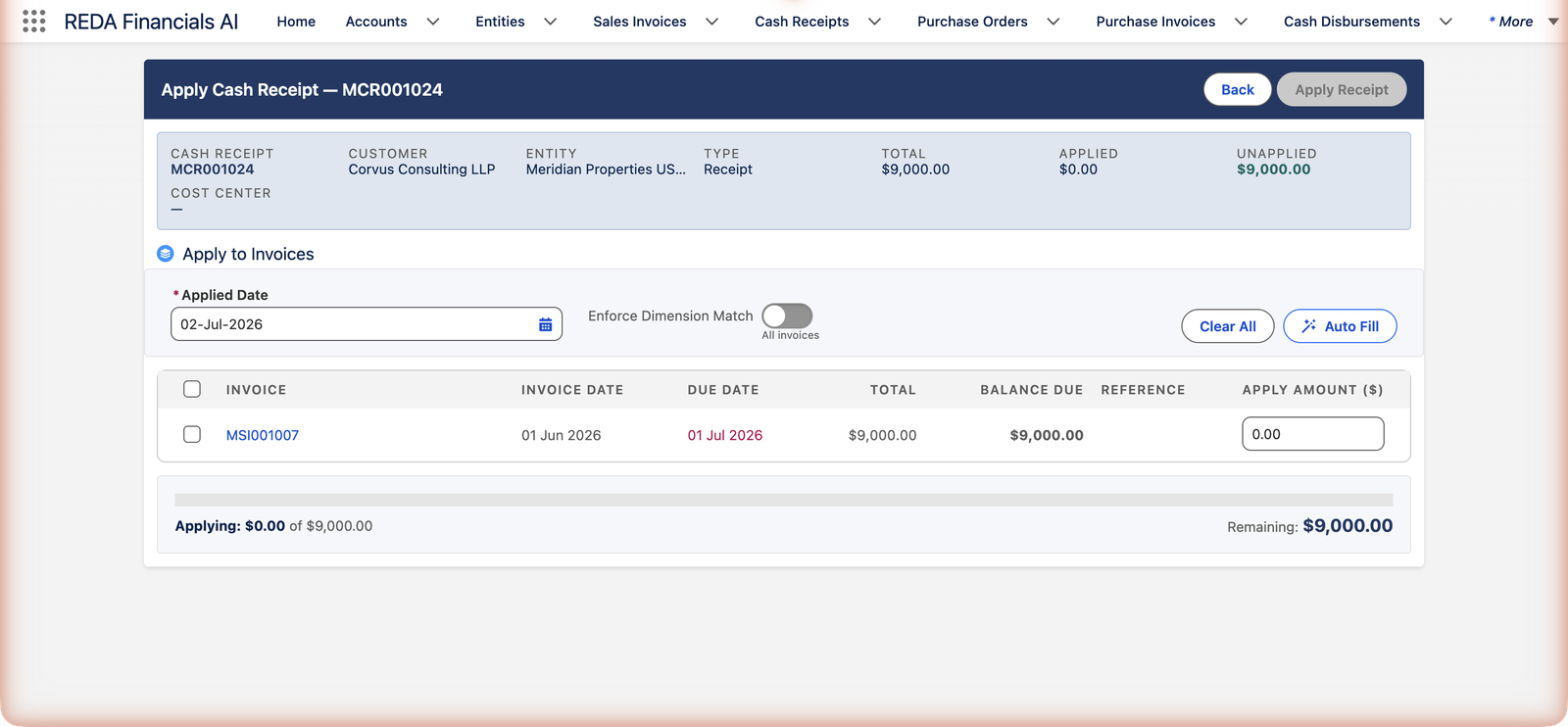
On any posted Cash Receipt, click Apply Cash Receipt. The screen shows the receipt's vital signs across the top — Total, Applied so far, and Unapplied — and below them, every posted invoice of this customer (in this entity) that still has a balance due and whose invoice date has already arrived:
Fill the amounts — by hand or by button
You have three ways to say how much of the receipt goes where:
- Type into Apply Amount on each invoice row — full control, ideal for partial payments and disputes.
- Tick the row's checkbox — fills that invoice's full open balance (or whatever remains of the receipt).
- Auto Fill — spreads the whole receipt across the open invoices for you; Clear All resets to zero and you start over.
The progress bar keeps score: Applying $X of $Y — Remaining $Z. You can never apply more than the receipt holds or more than an invoice is owed; the guards are hard stops, not warnings.
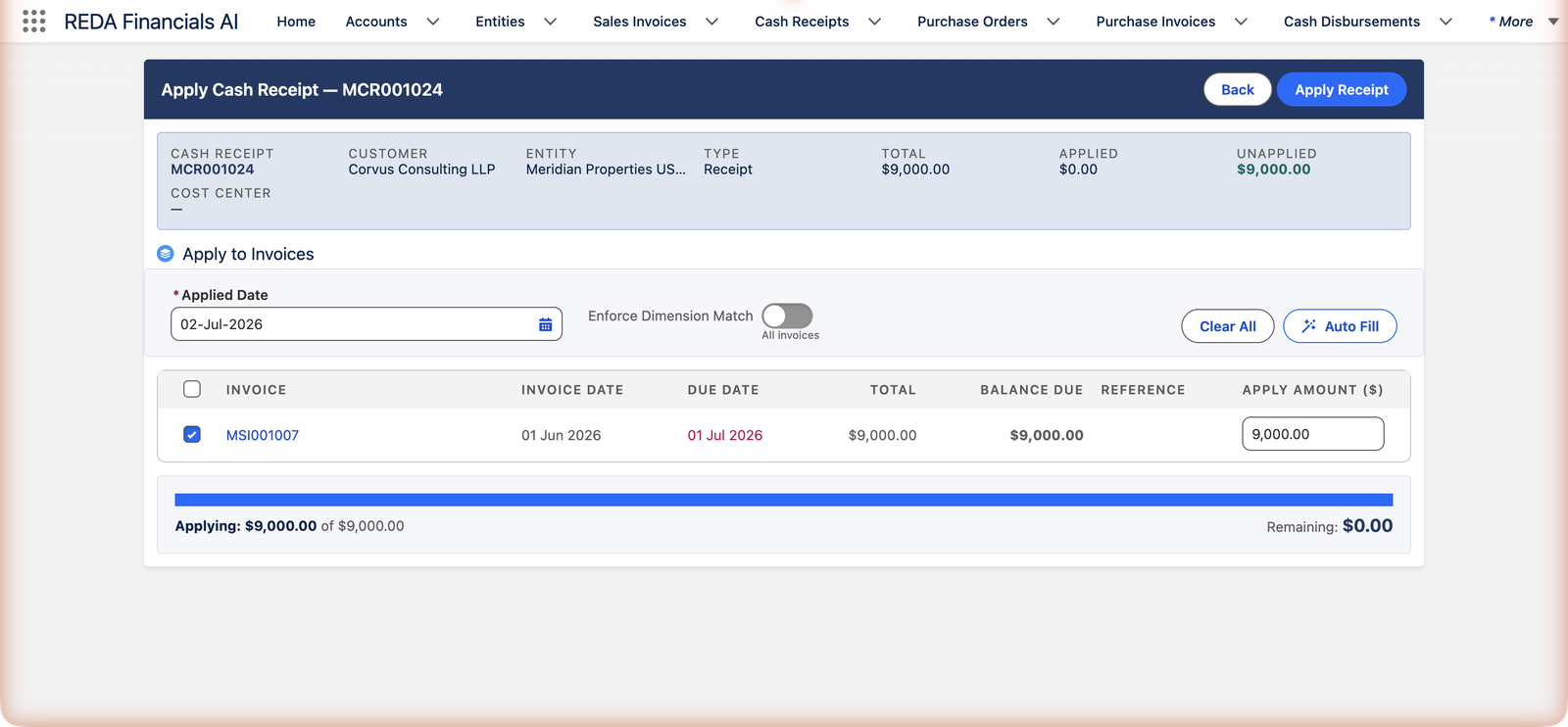
Commit it
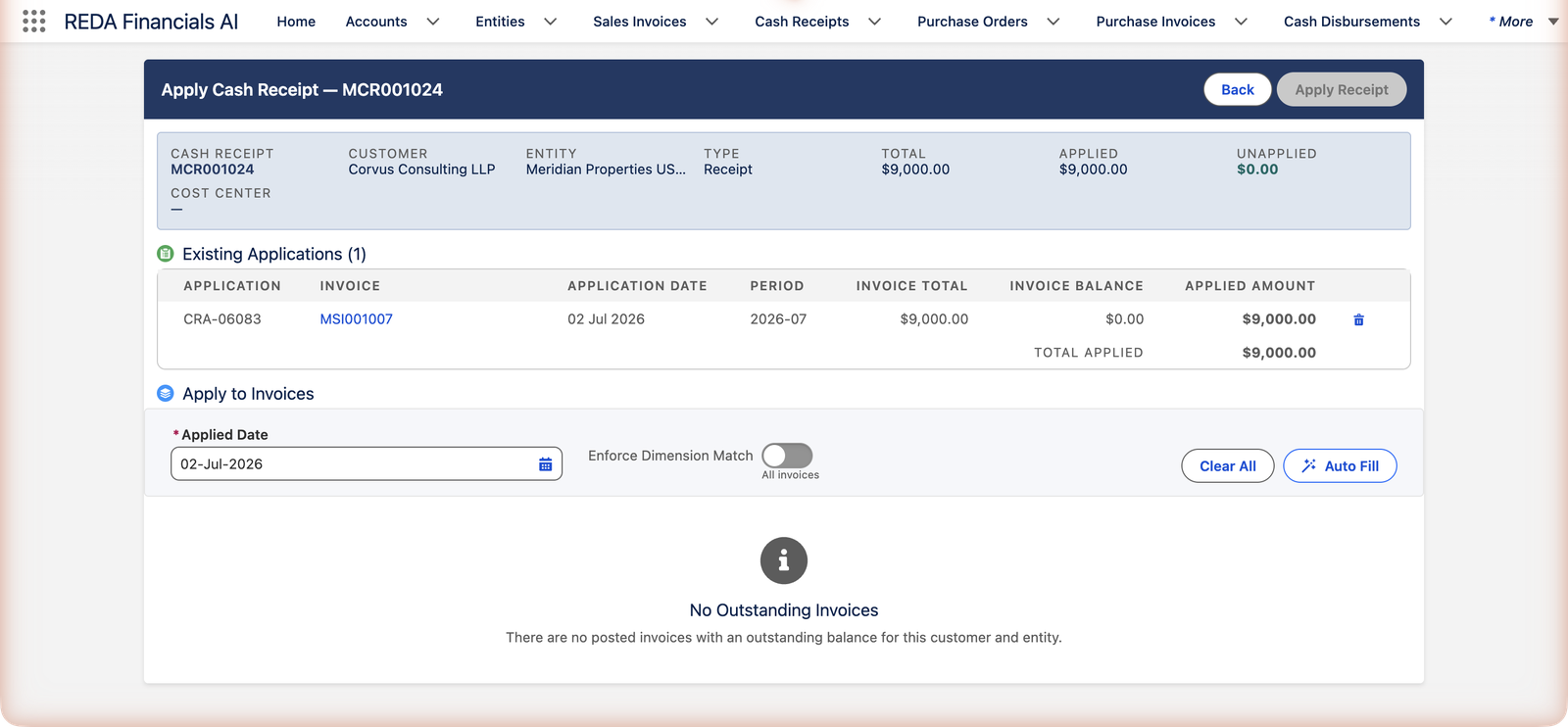
Click Apply Receipt. Each allocation becomes an application record — visible immediately in the Existing Applications list, on the receipt's Applications tab, and on the invoice's Applications tab:
In the books, each application moves the customer's money from the deposits holding account onto their receivable:
| Account | Debit | Credit |
|---|---|---|
| Customer Deposits and Prepayments Received | $9,000.00 | |
| Accounts Receivable — Trade | $9,000.00 |
(Organizations that balance their ledger by cost center will see an additional pair of Dimension Clearing lines keeping each dimension's receivable in balance — automatic, and requiring only that the entity has a Dimension Clearing account configured.)
The matching rules — with the exact messages
The Apply screen only offers what the rules allow, so you rarely meet these — but they explain a missing invoice, and they guard API and import paths identically:
| The message | What it means |
|---|---|
| "Cash Receipt must be posted before applications can be created." | Drafts hold no money yet — post first. |
| "The Sales Invoice must be Posted before a receipt can be applied to it." | Draft invoices have no balance to settle. |
| "Cash Receipt and Sales Invoice must have the same Customer." | Corvus's money can never pay a Brightline bill. |
| "The Cash Receipt and Sales Invoice must belong to the same Entity." | The standard screen is same-entity; group settlement is its own feature — Cross-Entity AR Settlement. |
| "Cash Receipt and Sales Invoice must be on the same Ledger. Receipt Ledger and Invoice Ledger do not match." | Both documents must live in the same set of books. |
| "Currency mismatch: both documents must use the same currency…" | Dollars settle dollar invoices; route foreign collections through a matching-currency account. |
| "Applied Amount must be greater than zero." | Zero applications explain nothing. |
| "Applied Amount exceeds the Cash Receipt unapplied balance." | You can't spend more of the receipt than remains. |
| "Applied Amount exceeds the Sales Invoice outstanding balance." | An invoice can't be over-settled. |
| "An Accounting Period is required for the Cash Receipt application." | Derived from the Applied Date automatically — the date must land in an existing period. |
| "Application Date {0} is before the invoice date {1}. A receipt cannot settle an invoice before the invoice exists…" | You can't relieve a receivable before the invoice that creates it — the books would show a negative receivable on every date in between. A future-dated invoice won't appear in the list at all; hold the money as an unapplied deposit and apply it on or after the invoice date. |
| "Application Date {0} is before the cash receipt date {1}. An application cannot be dated before the receipt it draws from…" | The settlement can't predate the money it moves. Use an Applied Date on or after the receipt date. |
| "Application Date {0} falls on or before the AR book closure date ({1})." | Closed books accept no new settlements — use a current open date. |
| "Cash Receipt Applications cannot be modified. Remove and re-create instead." | Applications are insert-and-delete only — the audit trail stays simple. |
| "Cannot remove application dated {0} — the AR books are closed through {1}." | Un-applying is also a books event; closed periods protect both directions. |
Common mistakes to avoid
| Mistake | Why it hurts | Do this instead |
|---|---|---|
| Forcing a near-match ("only 40 cents off") | An application asserts same money; the 40 cents is usually a bank fee that now hides inside a wrong match | Apply nothing; book the difference via a reconciliation adjustment or correct the document |
| Applying on-account money without customer instruction | The customer meant it for a disputed invoice — now their statement starts an argument | Leave it as Unapplied Cash until the instruction arrives (that's what the field is for) |
| Backdating the Applied Date casually | The settlement lands in a prior period's books and distorts closed-period AR — and it can never sit before the invoice or the receipt itself, or the receivable goes negative on the dates in between | Default (today); backdate only to an earlier open period, and never before the invoice date or the receipt date |
| Deleting and re-creating applications to "edit" amounts repeatedly | Each churn writes and removes ledger entries — noisy audit trail | Plan the allocation on the staging screen (Clear All / Auto Fill) before Apply Receipt commits it |
| Skipping the receipt and marking invoices paid via journal | No application trail, no unapplied tracking, aging lies | Money always enters as a receipt; applications settle invoices |
Un-applying
Applied to the wrong invoice? Click the trash icon beside the application in the Existing Applications list (or delete it from the Applications related list). The invoice's balance due comes back, the receipt's Unapplied Cash comes back, and every accounting entry the application created is removed. Applications can't be edited — remove and re-create is the rule, which keeps the audit trail simple. Two protections: applications on a voided receipt are locked, and removals in closed periods are refused.
Where to go next
- Auto-Apply Cash Receipts — the same matching, automated oldest-first.
- Customer Account Ledger — see the running result of invoices and applications.
- Applying Credit Memos — settling invoices with credits instead of cash.
- Voiding & Refunding Receipts — when the receipt itself is wrong.
Frequently asked questions
Check the matching rules above in order: is the invoice posted, this customer's, this entity's, the same currency, and does it still have a balance due? The most common answer is that it's already paid — or still in Draft. One more: an invoice dated in the future is deliberately hidden until its invoice date arrives — until then its receivable doesn't exist yet, so there is nothing to settle. Hold the receipt as unapplied cash and apply it on or after that date.
Yes — enter amounts on as many rows as you need; each row becomes its own application record. That's the normal way to record a tenant's single transfer covering several months.
The accounting date of the application — which period the settlement lands in (the period is derived automatically from it). It defaults to today; backdate it only when the settlement genuinely belongs to an earlier open period, and never earlier than the invoice date or the receipt date — the settlement can't exist before the documents it connects.
For organizations that track receivables by dimension (cost center): switched on, the receipt only settles invoice balances in its own dimension. Leave it off ("All invoices") unless your controller has told you otherwise.
Currencies: never — both documents must match. Entities: not from this screen; when both entities have opted into cross-entity settlement, your accounting team can create the application deliberately — the workflow and the intercompany bookkeeping are covered in Cross-Entity AR Settlement.
Three places, always consistent: the receipt's Applications tab, the invoice's Applications tab, and the Apply screen's Existing Applications list. Each application names its amount, date and accounting period; the ledger entries it created sit on the Accounting Transactions lists.
Two hard stops protect the books: "Applied Amount exceeds the Cash Receipt unapplied balance." and "Applied Amount exceeds the Sales Invoice outstanding balance." Lower the amount to what's actually available on both sides.
Was this article helpful?