
AR Aging Reports & Snapshots
Aging answers the collections question: who owes us, how much, and how late? REDA Financials keeps the answer live on every invoice — and lets you freeze the whole picture into an Aging Snapshot: a dated, auditable record of exactly how your receivables stood at a moment in time, bucket by bucket, customer by customer.
Access you'll need. Any REDA Financials permission set can open these tabs and read aging — what you see is limited to the records your role can view. Working the underlying invoices and receipts is Accounts Receivable work; see the create and post articles for that.
The live layer: every invoice ages itself
Each posted invoice carries live aging fields, recalculated daily against its due date:
| Field | Values |
|---|---|
| Aging Bucket | Paid · Current (not yet due) · 1-30 · 31-60 · 61-90 · 90+ days past due (blank for credit memos — they don't age) |
| Days Past Due | How many days beyond the due date (0 until then) |
| Is Overdue | Checked when a balance remains after the due date |
Because these are ordinary fields, any list view can become a collections worklist — filter Sales Invoices by Is Overdue, group by customer, sort by Days Past Due. That's the day-to-day view. Snapshots add what list views can't: a frozen, dated total that won't change under you.
The math behind those fields is worth spelling out once, because every number in this article flows from it:
- Balance Due = Invoice Total − Cash Received − Credit Applied. Aging always works on this open amount — a part-paid invoice ages only for what remains.
- Days Past Due = days since the due date, never negative — an invoice due tomorrow shows 0, not −1.
- The bucket follows: balance zero → Paid; not yet due → Current; otherwise the Days Past Due range names it.
- Is Overdue is checked only when all three things are true: it's not a credit memo, a balance remains, and the due date has passed.
One tenant, three buckets — the GreenLeaf story
Meridian's café tenant GreenLeaf stopped paying in spring: April, May, and June invoices, $4,350 each, all open. On the July 2nd snapshot those three identical amounts land in three different buckets — because aging is about time, not size:
| Invoice | Balance due | Where it sits on 02-Jul | What that says |
|---|---|---|---|
| April rent | $4,350.00 | 31-60 — the snapshot's entire $4,350 in that bucket | Two months ignored; this is a phone call, not a reminder |
| May rent | $4,350.00 | Inside the 1-30 bucket's $20,150 | Recently overdue — the pattern is forming |
| June rent | $4,350.00 | Inside Current's $27,650 | Not yet due — nothing wrong on its own |
Read one bucket at a time and GreenLeaf looks like three small, unrelated numbers. Read across the buckets — the same customer marching rightward month by month — and you see the actual situation: $13,050 exposed to a tenant who has stopped paying. That cross-reading is the skill; the Customer Account Ledger gives you the per-customer view that makes it easy.
Taking a snapshot
Create the snapshot record
On the Aging Snapshots tab, click New: pick the Entity, set Type = AR (the same object handles AP aging for payables), and the Accounting Period it documents. It saves as a Draft shell — no numbers yet.
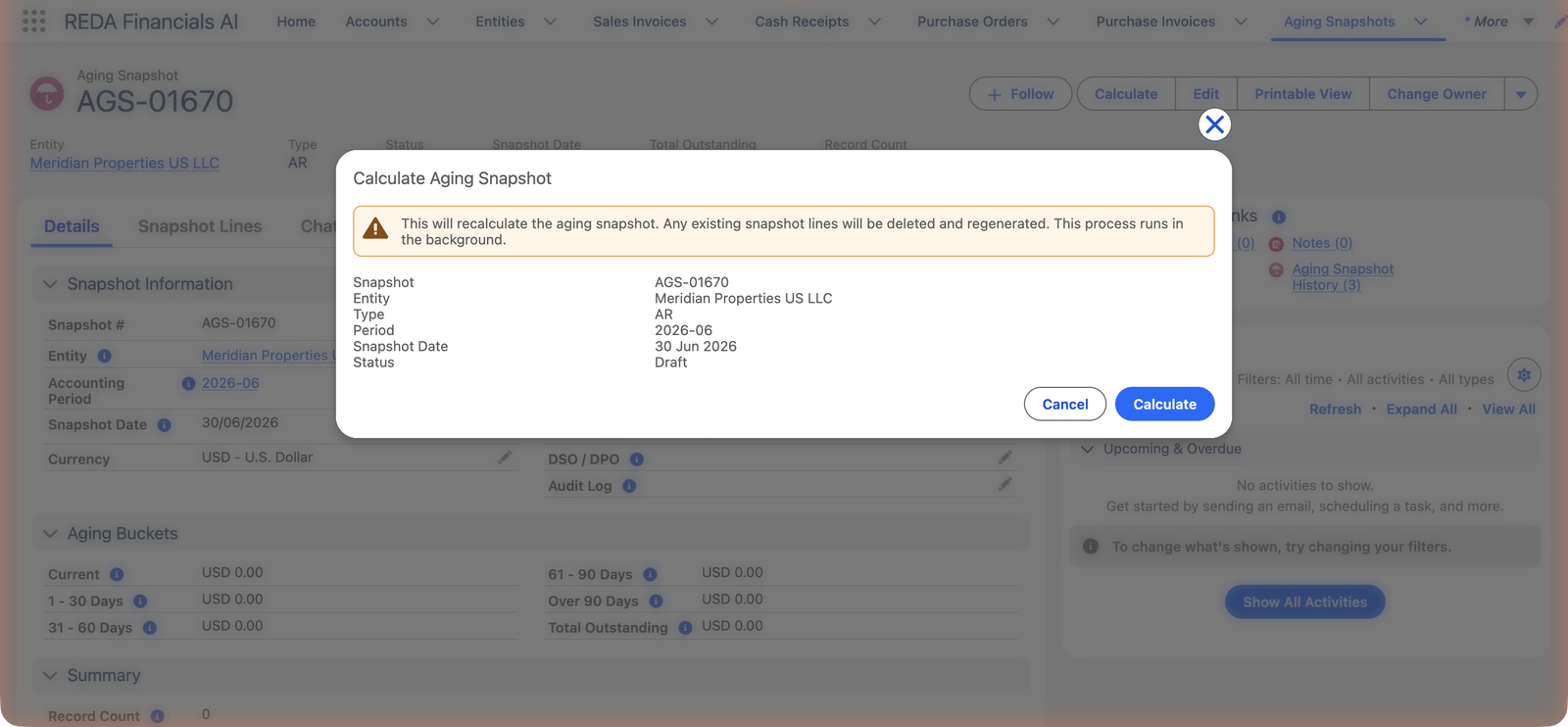
Click Calculate
The Calculate button on the record asks for confirmation — recalculating deletes and regenerates any existing lines — then runs in the background.
What a snapshot records
| Field | What it holds |
|---|---|
| Snapshot Date / Status | When it was calculated, and where the run stands (a completed snapshot is the reportable artifact). |
| Entity / Type / Accounting Period | Whose books, AR or AP, and which period the picture documents. |
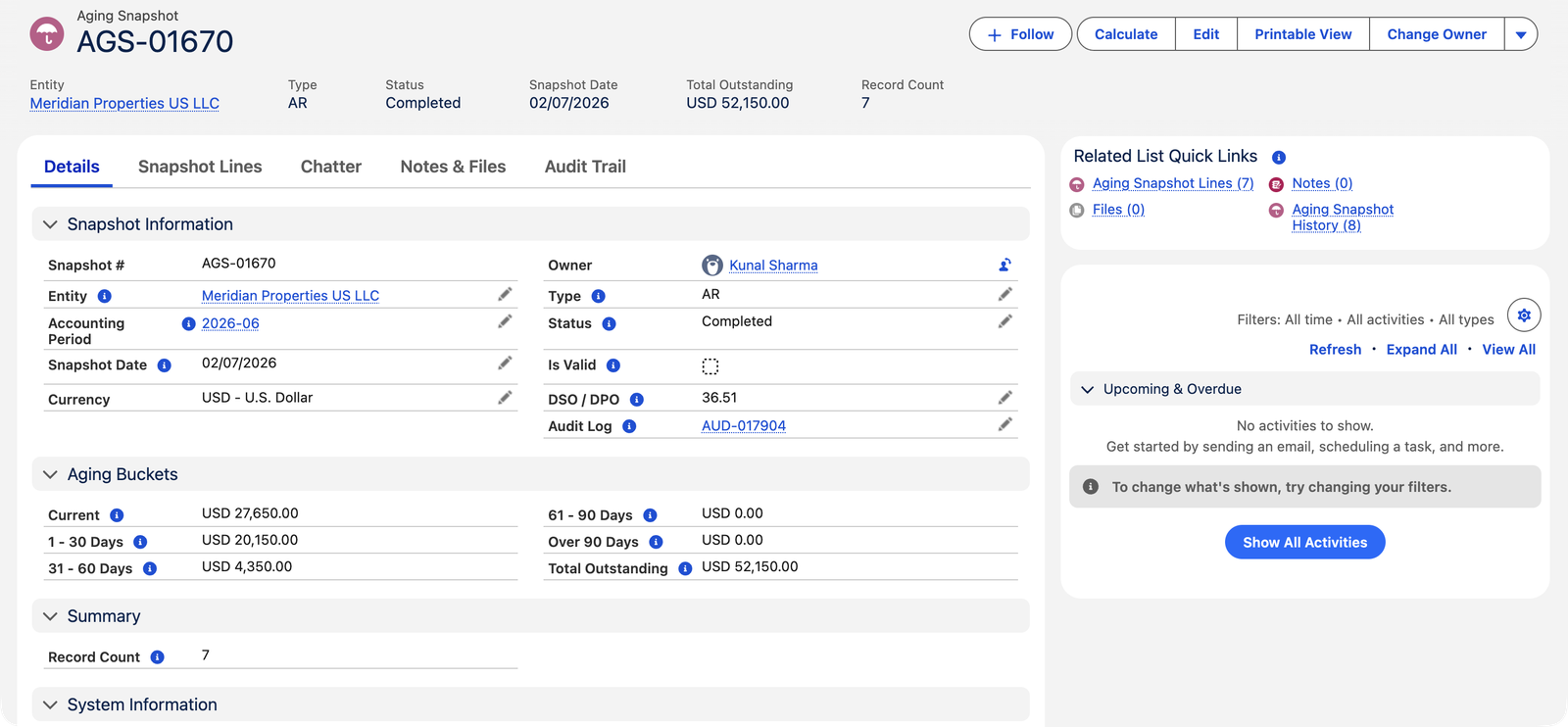
| Total Outstanding | The headline — every open invoice balance summed ($52,150 for Meridian's July run). |
| The five buckets | Current, 1-30, 31-60, 61-90, Over 90 — the Total Outstanding split by lateness. |
| DSO | Days Sales Outstanding — collection speed in one number (36.51 here); its power is in the trend across snapshots. |
| Record Count | How many open invoices are behind the totals (7 here) — a sanity check against the lines. |
| Aging Snapshot Lines | The per-invoice rows — who, what, how much, how late — for drill-down and export. |
| Audit Log | A link to the run's log entry — evidence of when and how the numbers were produced. |
Reading it like a collections manager
- The buckets tell you where to act. Current needs nothing. 1-30 gets a friendly reminder. 31-60 gets a call — Meridian's $4,350 there is GreenLeaf Café, whose unpaid spring months are this report's real story. 61-90 and 90+ are escalations.
- Snapshot Lines carry the detail — per-invoice rows behind the totals, for drill-down or export.
- DSO (Days Sales Outstanding) tracks trend: is our collection speed improving month over month? Compare snapshots to know.
- The snapshot date stamps the run. Calculation ages invoices as of the day it runs — take month-end snapshots promptly, and on a schedule if possible.
Common mistakes to avoid
| Mistake | Why it hurts | Do this instead |
|---|---|---|
| Chasing straight from the bucket totals | The "overdue" tenant may have $2,000 sitting as unapplied cash — the first call becomes an apology | Check the Customer Account Ledger before dialing; apply what's applied, then chase what's real |
| Taking the month-end snapshot a week late | Calculation ages invoices as of the run day — a July 8th run is not a June 30th picture | Snapshot promptly, or let the scheduler do it on the 1st, every time |
| Recalculating a reported snapshot | Calculate deletes and regenerates the lines — the numbers you already reported are gone | Recalculate only a snapshot taken in error; history should stay history |
| Reading buckets without reading customers | Three small numbers in three buckets hide one tenant in real trouble (see GreenLeaf above) | Scan the lines grouped by customer; the rightward march is the signal |
| Expecting credit memos in the report | They're not there — memos carry credit, not receivables, and never age | Review unapplied memos alongside the aging as their own list |
Live fields vs snapshots — when to use which
| Live aging fields | Aging snapshot | |
|---|---|---|
| Freshness | Now | As of its run date, forever |
| Best for | Today's collections worklist | Month-end reporting, trend analysis, audit evidence |
| Changes later? | Constantly — that's the point | Never (unless deliberately recalculated) |
Where to go next
- Customer Account Ledger — the per-customer story behind each bucket.
- AP Aging — the same tool pointed at what you owe.
- Aging Snapshot Batches — scheduling it all.
Frequently asked questions
Because the snapshot is frozen at its run date and the world moved on — payments arrived, new invoices posted. That permanence is the feature: it's the number you reported, defensible forever. Recalculate only if the snapshot itself was taken in error.
Aging tracks invoice balances, so an unapplied credit or on-account receipt doesn't reduce any bucket until it's applied to an invoice. That's deliberate — and it's why the ledger check before chasing matters.
Snapshots are a reporting object with broader reach than transactions: Accounting Admin and — unusually — Accounting Controller can create and calculate them, while AR, AP and Read Only users view the results.
Snapshots are per entity (each entity's receivables are its own books and currency). Group-level review is simply the set of entity snapshots — the scheduler can generate them all together.
Only the open balance. Brightline's $13,500 invoice, part-paid $7,500, ages for the remaining $6,000 — the paid portion is out of the picture. When the balance reaches zero, the bucket flips to Paid and the invoice leaves the report.
Buckets belong to invoices, not customers — each invoice ages by its own due date. A tenant with three unpaid months shows in three buckets (see the GreenLeaf story above); the pattern across buckets is exactly what a collections review should look for.
How many open invoices are behind the totals — Meridian's $52,150 across a Record Count of 7 means seven documents to work, not seventy. It's also the quick sanity check: the Aging Snapshot Lines list should carry exactly that many rows.
Was this article helpful?