
Product Fiscal Profiles
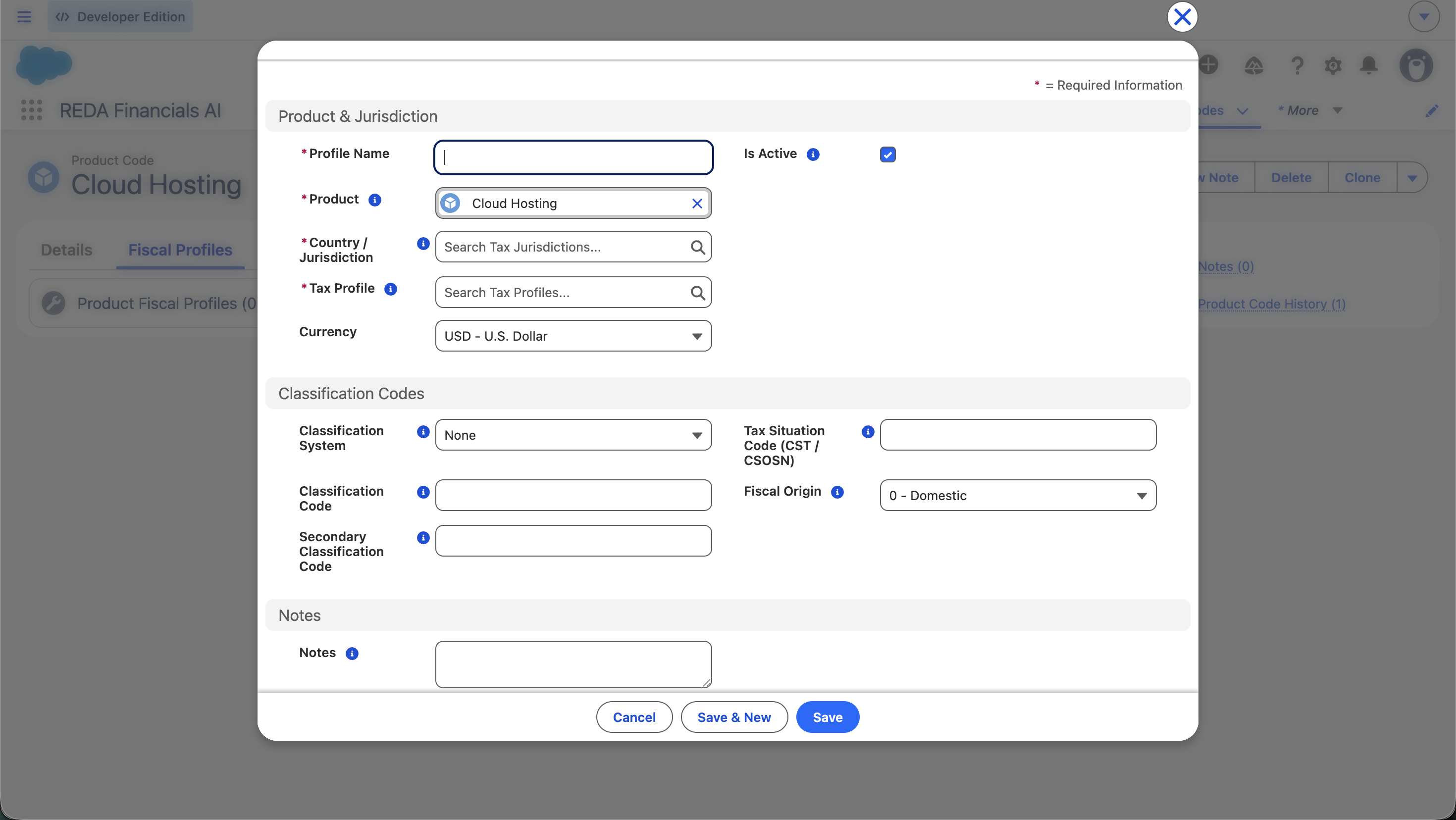
Every country guide in the Tax section ends with the same instruction: "classify your products." This is where you do it. A Product Fiscal Profile is the bridge between a product and the tax engine — it tells the engine how this product is taxed in this country, so the right rules fire automatically. Without it (and without "Apply Default Tax"), a line gets zero tax. With it, the engine knows a laptop is standard-rated and a book is zero-rated — and applies each correctly.
Access you'll need. Creating and editing Fiscal Profiles requires the Accounting Admin v2 or Accounting Controller v2 permission set. The Accounts Payable v2, Accounts Receivable v2, and Read Only v2 sets can view them but not change them.
How the engine picks a product's tax treatment
For each line, the tax engine resolves the product's Tax Profile in strict priority order:
Line override
If the line itself has a Tax Profile set, that wins.
Fiscal Profile
Otherwise the engine looks up the Fiscal Profile matching this product + the country of the entity on the document (your company's country) → uses its Tax Profile. This is the normal path. A profile saved with no Country / Jurisdiction acts as a global fallback for countries with no profile of their own — and one country's profile never leaks into another's transactions.
Apply Default Tax
No profile, but the product has Apply Default Tax on → catch-all (standard) rules fire.
Zero tax
No profile and Apply Default Tax off → the line is skipped. No tax.
So the Fiscal Profile's Tax Profile is the single most important field — it's the dimension Tax Rules match on.
The fields, one by one
The two that drive tax (required)
| Field | What to enter & why it matters |
|---|---|
| Tax Profile | The classification that Tax Rules match against — GB-STD-20, GB-ZERO, GB-EXEMPT. This decides which rules fire and therefore the rate. The most important field on the record. |
| Country / Jurisdiction | The country this classification applies to (GB, BR, US, IN). The engine matches the profile to the country of the entity on the document. Set at country level unless a product is genuinely classified differently by state. |
Fiscal-document codes (country-specific, optional)
These don't change the maths — they're the codes tax authorities require on fiscal documents. Fill them where the country mandates them; leave them blank where it doesn't (e.g. the UK).
| Field | For | Example |
|---|---|---|
| Classification System | Which coding scheme applies: NCM (Brazil), HSN (India), HS Code (customs), UNSPSC, or None | NCM |
| Classification Code | The code itself (required once a System is chosen) | 8471.30.19 (laptop, Brazil NCM) |
| Secondary Classification Code | Brazil CEST (for ICMS-ST products) or NBS (services) | 28.038.00 |
| Tax Situation Code | Brazil CST / CSOSN — the ICMS situation on the NF-e | 000 (fully taxable) |
| Fiscal Origin | Brazil origin indicator (drives the first CST digit) | 0 - Domestic |
| Is Active | Unchecked = the engine skips this profile (→ zero tax for the product in this country) | ✔ |
Classifying our UK catalogue
The same products from Creating Products, each given a UK Fiscal Profile:
| Product | Country | Tax Profile | Result on a sale |
|---|---|---|---|
| Management consulting | GB | GB-STD-20 | 20% VAT |
| Laptop | GB | GB-STD-20 | 20% VAT |
| Printed book | GB | GB-ZERO | 0% (zero-rated) |
| Company van | GB | GB-STD-20 | 20% VAT |
No classification codes needed — the UK doesn't mandate them. The Tax Profile alone does the job.
The same laptop, sold in Brazil
Add a second profile to the laptop for Brazil — now the document codes come into play:
| Field | Value |
|---|---|
| Country / Jurisdiction | BR |
| Tax Profile | BR-STD-GOODS (attracts ICMS, IPI, PIS, COFINS) |
| Classification System | NCM |
| Classification Code | 8471.30.19 |
| Tax Situation Code (CST) | 000 |
| Fiscal Origin | 0 - Domestic |
Same physical product, two profiles. In a UK transaction the engine matches the GB profile; in a Brazilian one it matches the BR profile and prints the NCM/CST on the NF-e. See the Brazil setup guide for the full picture.
What the system checks
- Tax Profile & Country are required — a profile without them can't classify anything.
- Classification Code required once a System is set — choose NCM/HSN/HS Code and you must supply the code (the rule won't let you save an empty code).
If a product isn't taxing correctly
- No profile for the transaction's country? The engine can't classify it → falls through to Apply Default Tax or zero. Add the country's profile.
- Profile inactive? An unchecked Is Active makes the engine skip it. Re-activate.
- Wrong Tax Profile? A book on
GB-STD-20instead ofGB-ZEROtaxes at 20%. Fix the Tax Profile. - Right rate, wrong code on the NF-e? The rate is fine — it's the Classification/CST codes that print. Correct those.
Where to go next
- Creating Products — create the products first.
- Product Catalogue Overview — how products fit together.
- Products & Assets — link products to assets.
- Tax on Sales Invoices — how fiscal profiles drive invoice tax.
Frequently asked questions
A Tax Profile is a reusable classification (e.g. "standard-rated goods") that Tax Rules match on. A Product Fiscal Profile is the per-product, per-country record that assigns a Tax Profile to a product and carries the country's fiscal codes.
One per country where you have an entity transacting the product — the engine matches on product + the entity's country. A missing country profile means no classification there (unless a jurisdiction-less fallback profile exists).
Only for a simple single-country, single-rate setup — switch on Apply Default Tax on the product and the catch-all rules apply. Any zero-rated, exempt, or multi-country product needs a profile.
Was this article helpful?