
Sales Invoice PDF
The invoice your tenant receives isn't a Salesforce record — it's a clean, branded PDF: your letterhead, their billing address, the lines, the taxes, the total. REDA Financials generates that document from the invoice with one click (or automatically at posting), stores it on the record, and can hand you a shareable link. No mail-merge, no template wrangling at invoice time.
Access you'll need. Generating an invoice PDF requires the Accounts Receivable v2 permission set (AR clerks & managers) or Accounting Admin v2 (system administrators) — the same access as working the invoice. The Accounting Controller v2, Accounts Payable v2, and Read Only v2 sets can view invoices and their saved PDFs. The PDF layout itself is set up separately by an administrator.
Generating on demand
Click Generate PDF on the invoice
The Generate PDF screen shows what it's about to do — the record, the entity whose branding applies, and the template (Default unless you've chosen another).
Review the preview
The finished document renders right there: letterhead, BILL TO block, lines, totals. Happy? Open in New Tab for the full-size PDF or Back to Record — the file is already saved either way.
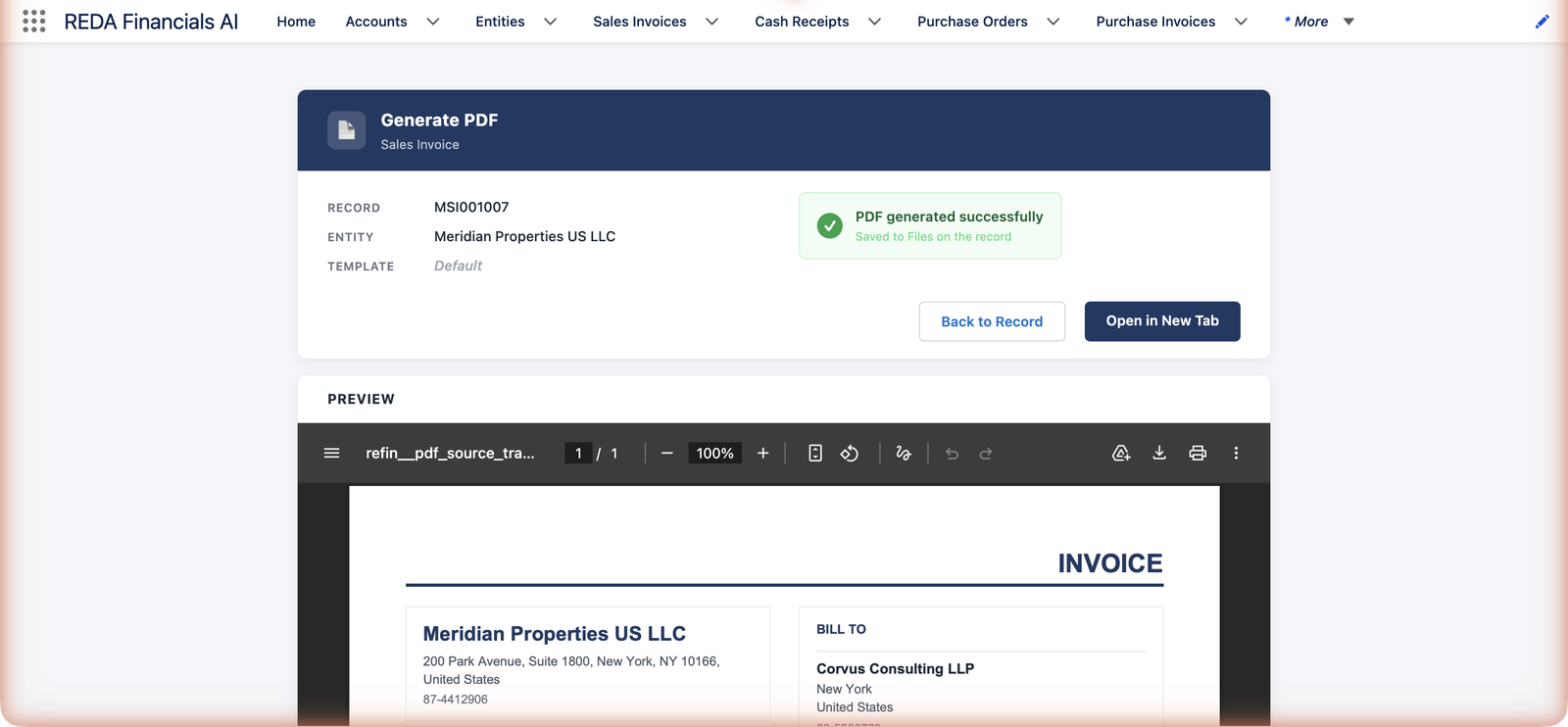
The screen's pickers are worth a word: Template chooses the layout, Entity the branding, and Account / Record confirm whose document this is. On an invoice you'll rarely touch any of them — they're pre-set from the record — but the same screen serves credit memos and receipts, so the pickers keep every case explicit. If generation hits a snag, the screen offers Retry rather than making you start over.
What the record keeps
| On the invoice | What it tells you |
|---|---|
| Generated PDF URL | Where the latest generated document lives — the quick path to the file. |
| Generated At | The timestamp of the last generation — handy when checking whether the PDF predates a correction. |
| Error | If the last generation failed, the reason is recorded here (auto-generation never blocks a post — it fails quietly into this field, with Retry available). |
| PDF Template | Which layout this document uses — one of the few fields editable even while posted, because presentation never changes the numbers. Templates are type-matched: a receipt only accepts Cash Receipt templates ("PDF Template must be of type \"Cash Receipt\"." is the guard on receipts). |
| Files | Every generated version, accumulating — the paper trail of exactly what existed when. |
Generating automatically
Entities can opt into auto-generation at posting — separately for invoices, credit memos, and receipts. Post the document, and the PDF appears on it moments later without anyone clicking anything (generation runs in the background and never blocks the post; any error is noted on the record with a Retry available). Meridian switches this on for its rent entities — thirty tenant invoices post on the 1st, thirty PDFs are waiting by the time coffee's poured.
Storing and sharing
- Every generated PDF lands in the record's Files — the paper trail of exactly what was sent, version by version.
- A public link can be created for sharing ("A public link has been created…") — send it, or attach the file itself through your usual email tools.
- Lifecycle follows the document: unposting revokes the public link (the file stays); voiding deletes the files — a cancelled invoice shouldn't circulate.
- Templates: the invoice's PDF Template can be switched even while posted (it only changes presentation, never numbers). Template design itself is an administrator topic — see PDF Templates.
The PDF follows the document's life
What happens to generated files isn't accidental — each document event has a deliberate PDF consequence:
| When the document… | The PDF… | Why |
|---|---|---|
| Posts (auto-generation on) | Generates in the background moments later | The customer-facing paper should exist as soon as the document is real. |
| Is regenerated | A new version is added; old files remain | You can always prove what was produced at each point in time. |
| Is unposted | The public link is revoked; the file stays on the record | A document under revision shouldn't circulate — but the history is kept. |
| Is voided | The files are deleted | A cancelled invoice must not survive anywhere it could be mistaken for a bill. |
Common mistakes to avoid
| Mistake | Why it hurts | Do this instead |
|---|---|---|
| Sending the PDF before posting | A draft can still change — the customer may hold paper your books never matched | Post first (or let auto-generation produce the file because it posted), then send |
| Editing the entity's letterhead details "just for one invoice" | Entity details feed every document of that entity — one tweak rebrands the fleet | Wrong details are either the entity's (fix once, regenerate) or belong on the invoice itself |
| Sharing an old file after a correction | The customer pays the superseded amount and the difference haunts both statements | Check Generated At against the document's last change; regenerate when in doubt |
| Treating a missing auto-PDF as a failed post | The post succeeded — generation is separate and never blocks it | Read the Error field, fix the cause (usually template setup), click Retry |
| Deleting generated files to "tidy up" | You erase the proof of what was sent, version by version | Leave the trail; storage is cheaper than an argument about what the customer received |
Where to go next
- PDF Templates — branding and layout, once, per entity.
- Posting a Sales Invoice — where auto-generation hooks in.
- Customer Account Ledger — the statement-of-account PDF for a whole customer.
Frequently asked questions
Generate again after reposting to get a current version — generated files accumulate on the record, so the history of what was produced remains. The freshest file reflects the document as it stands.
Generation and storage are built in; sending uses your organization's email tools — attach the file from the record, or share the public link. (E-invoicing jurisdictions have their own transmission flows — see the E-Invoice features where enabled.)
The letterhead block comes from the entity (name, address, tax ID) and the layout from the template. Fix the entity record or the template — never the invoice; regenerate afterwards.
Anyone who can see the record can generate its document — generation changes presentation, not books. Editing which template an entity uses, or its auto-generation settings, is administrator territory.
Yes — generation runs after the post, in the background, and never rolls it back. The failure reason lands in the invoice's Error field; fix the cause (most often a template or entity-branding gap) and use Retry or the Generate PDF button.
By design — voiding deletes the generated files so a cancelled bill can't circulate or be paid by mistake. The void reason and audit history remain on the record; the customer-facing paper does not.
The file lives in the record's Files, visible to your team. The public link ("A public link has been created…") is a shareable URL for people outside Salesforce — and it's the part that gets revoked if the document is unposted, so stale links die before stale documents circulate.
Was this article helpful?