
Posting & Voiding a PI
Draft, Posted, Void — three words that decide whether an invoice is a work-in-progress, a fact in your books, or a cancelled record. This article walks through each transition on a Purchase Invoice: what the system checks, what it writes to your ledger, how to fix mistakes, and what can never be undone.
Access you'll need. Posting and voiding a Purchase Invoice requires the Accounts Payable v2 permission set (AP clerks & managers) or Accounting Admin v2 (system administrators) — the same access that creates them. The Accounting Controller v2, Accounts Receivable v2, and Read Only v2 sets can view an invoice but not post or void it.
Posting: from draft to the books
Posting is deliberately strict, because it changes your financial statements. When you post (the Post button on the form, or changing the Status of a draft), REDA Financials runs its checks and — only if everything passes — writes the accounting entries.
The gate: approval
The invoice's Approval Status must be Approved or Not Required. A pending or rejected invoice will not post, no matter who clicks the button.
The checks
The entity must be active; the invoice date must fall inside the selected accounting period; every line needs an active GL account, a product, and positive quantity and price; and for special types, the type's own rules apply (an Expense invoice needs its payment method and bank account; a Vendor Memo's total must be negative). Each failed check stops the posting with a message naming the problem.
The write
Balanced accounting entries are created — debit the line expense accounts (and tax accounts if tax applies), credit Accounts Payable. You can inspect them immediately under Accounting Transactions in the invoice's related lists. The document locks, and the invoice starts tracking payment, aging and overdue status.
Reopening (unposting): the honest undo
Posted the wrong amount? Wrong GL account? Reopen the invoice to Draft. REDA Financials deletes the accounting entries it created — along with the invoice's tax records and withholding records — and unwinds any payment or memo applications that had settled it. The invoice is a draft again: fix it, and post it fresh. New, correct entries are written.
Two honest consequences to be aware of:
- Any payments that were applied to the invoice become unapplied — re-apply them after re-posting.
- The Audit Trail keeps the whole story: who reopened, what changed, who re-posted.
Voiding: cancelling with a paper trail
Voiding is for invoices that should never have been recorded — a duplicate, a bill that belongs to another company, a vendor error you're rejecting outright. Meridian's example: CityClean's February bill was accidentally entered twice. The duplicate was posted before anyone noticed — so it was voided:
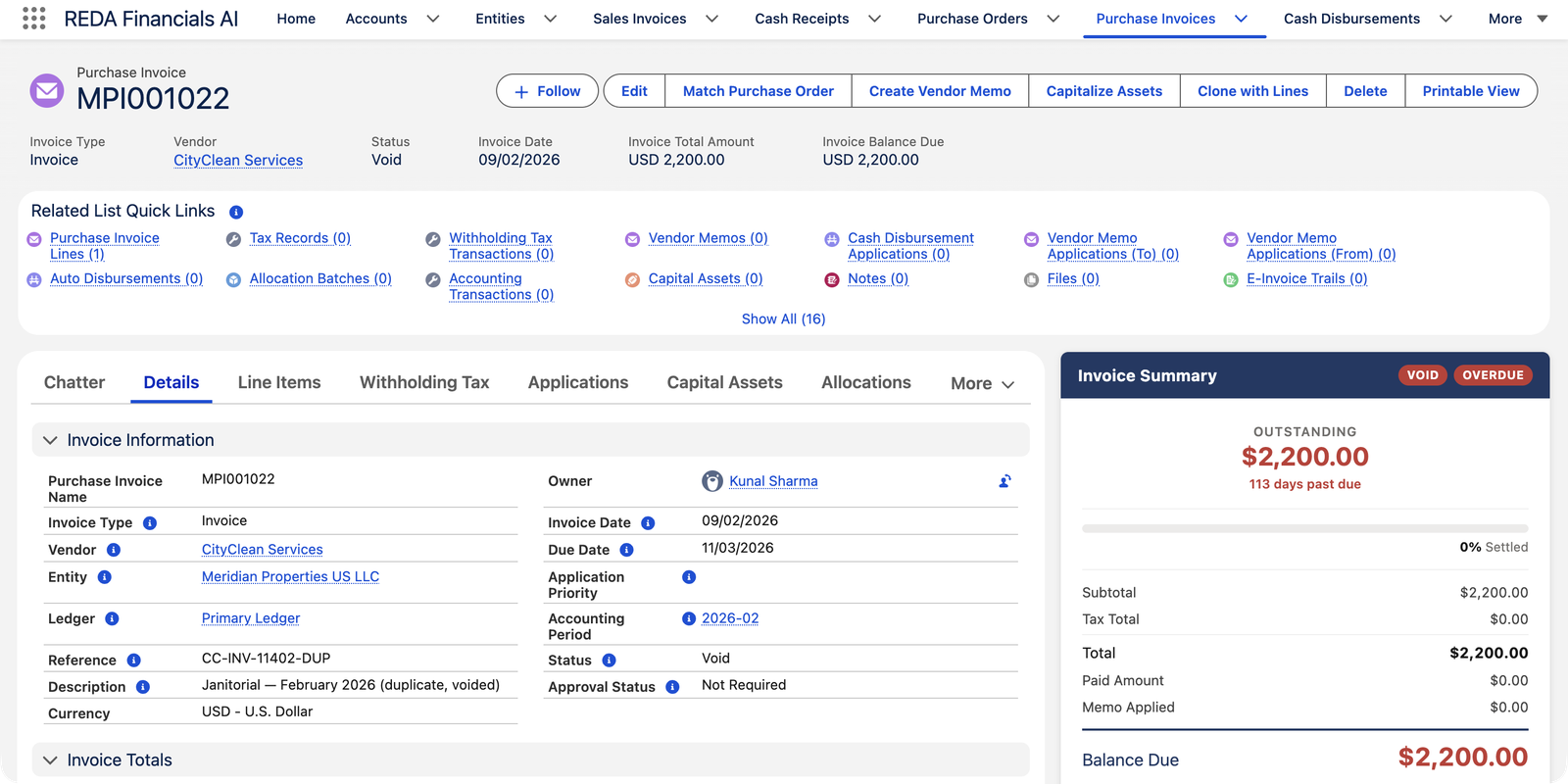
What voiding does:
- Removes all the invoice's accounting entries (and tax/withholding records), exactly like reopening.
- Unwinds any applications — payments or memo credits that had settled this invoice become available again.
- Records your Void Reason (required) and the void date — both become permanent; a voided invoice can never be edited or deleted.
Reopen or void? Choose by intent
| Reopen to Draft | Void | |
|---|---|---|
| Use when | The invoice is real but has a mistake | The invoice should not exist |
| Ledger entries | Removed, then re-created when you re-post | Removed, permanently |
| The document | Editable again | Frozen forever, with reason |
| Ends as | A corrected posted invoice | A cancelled record in the audit trail |
The messages you may meet, verbatim
Every check that can stop a posting explains itself. The exact wording, with the fix beside it:
| The message | What it means |
|---|---|
| "Entity is inactive and cannot receive new transactions. Select an active entity or contact your administrator to reactivate it." | The company on the invoice has been deactivated — pick an active entity, or ask your administrator to reactivate it. |
| "Invoice Date must fall within the selected Accounting Period date range." | Date and period disagree, usually after the date was edited — fix the date or reselect the period. |
| "Due date cannot be before the invoice date. Please review the payment terms and due date." | A bill can't fall due before it exists — correct whichever date is wrong. |
| "GL Account is inactive and cannot receive new postings. Select an active account or reactivate this one." | A line points at a retired ledger account — choose a live one. |
| "Quantity must be greater than zero when provided." | A zero or negative line quantity explains nothing — enter what was actually supplied. |
| "Expense invoices require a Payment Method to create the Cash Disbursement." | The Expense-type rule: posting builds the payment too, so it needs the payment method (and bank account) first. |
| "Voided Purchase Invoices cannot be modified." | The void froze the document permanently — recreate it with Clone with Lines if you need a corrected copy. |
One more worth knowing about: where withholding tax applies, the entity must have a default withholding-tax payable account configured — posting stops with a message naming that setup gap until your administrator adds it in Entity setup.
Common mistakes to avoid
| Mistake | Why it hurts | Do this instead |
|---|---|---|
| Voiding a real bill because one line is wrong | The void is permanent — you end up recreating the whole document for a one-field fix | Reopen to Draft, correct the line, re-post |
| Reopening a paid invoice and forgetting the payment | The unwound application leaves the payment's money sitting unapplied — the vendor looks unpaid while cash says otherwise | After re-posting, go back to the payment and apply it again |
| Expecting a posted invoice to be deletable | It never is — Posted and Void documents stay on file by design | Reopen to fix, or void to cancel; only never-posted drafts delete |
| Voiding to make a disputed bill "disappear" | If the vendor later credits you, there is nothing left to apply the credit against | Leave the bill posted and settle the dispute with a Vendor Memo |
| A vague void reason ("mistake") | The reason is permanent — a vague one answers nobody's questions, ever | Say what happened: "Duplicate of CityClean February bill, entered twice" |
Who can post, reopen and void
Accounts Payable and Accounting Admin perform every transition on this page. Accounting Controller and Read Only can open any invoice and inspect its entries and audit trail, but cannot post, reopen or void — the controller's change scope is at the journal level, not the payables subledger.
Posting or voiding many at once
Month-end batches don't need one-by-one clicking — select records in a list view and use Bulk Status Update, or see Bulk Posting for the full toolkit.
Where to go next
- Understanding Purchase Invoices — the lifecycle in context.
- Creating a Cash Disbursement — paying what you've posted.
- Bulk Posting — batch status changes.
- Accounting Transactions — reading the entries posting creates.
Frequently asked questions
The invoice date must fall within the invoice's accounting period. Usually this means the date was edited after the period was set — reselect the correct period, or fix the date. If the period itself is closed for AP, the message will say so; period closing is controlled by your accounting team.
A void is designed to be permanent — the document itself cannot be edited again. Recreate the invoice (the fastest way is Clone with Lines on the voided record, which copies everything into a fresh draft) and post the new copy.
Because "why was this cancelled?" is the first question any auditor — or colleague, or future you — will ask. The reason is stored permanently on the record and cannot be changed later, which is exactly what makes it trustworthy.
The application is unwound: the payment itself stays posted (the money really left the bank), but it becomes unapplied and its amount returns to the payment's Unapplied Amount. After you fix and re-post the invoice, apply the payment again.
Was this article helpful?