
Expense-Type Purchase Invoices
Not every cost deserves a two-step process. Utilities on auto-debit, card charges, bank fees, subscriptions — the money has already left (or will leave without you lifting a finger), so recording a payable and then paying it later would just be busywork. For these, REDA Financials has the Expense invoice type: one document that records the cost and its payment in a single posting.
Access you'll need. Creating, editing, and posting these requires the Accounts Payable v2 permission set (AP clerks & managers) or Accounting Admin v2 (system administrators). The Accounting Controller v2, Accounts Receivable v2, and Read Only v2 sets can view but not create or post.
How an Expense invoice differs
An Expense-type Purchase Invoice looks and feels like a regular invoice — same form, same lines, same taxes. The difference is what happens when you post:
| Invoice type | Expense type | |
|---|---|---|
| What posting records | The cost and an open payable | The cost and the payment, together |
| Payment step | Separate — a Cash Disbursement later | None — REDA Financials creates and posts the payment for you |
| Extra required fields | — | Payment method and bank account (the auto-payment needs them) |
| Appears in AP aging? | Yes, until paid | No — it is born settled |
| Withholding tax (where enabled) | Withheld when you pay | Withheld immediately at posting — there is no later payment to wait for |
Meridian's electricity bill
MetroPower Utilities collects Meridian Properties US LLC's electricity charges by direct debit — the money leaves the bank on its own. So Meridian records each monthly bill ($3,400) as an Expense invoice: the accountant picks the payment method (ACH) and the operating bank account, posts it, and is done. No separate payment run, nothing hanging in AP aging.
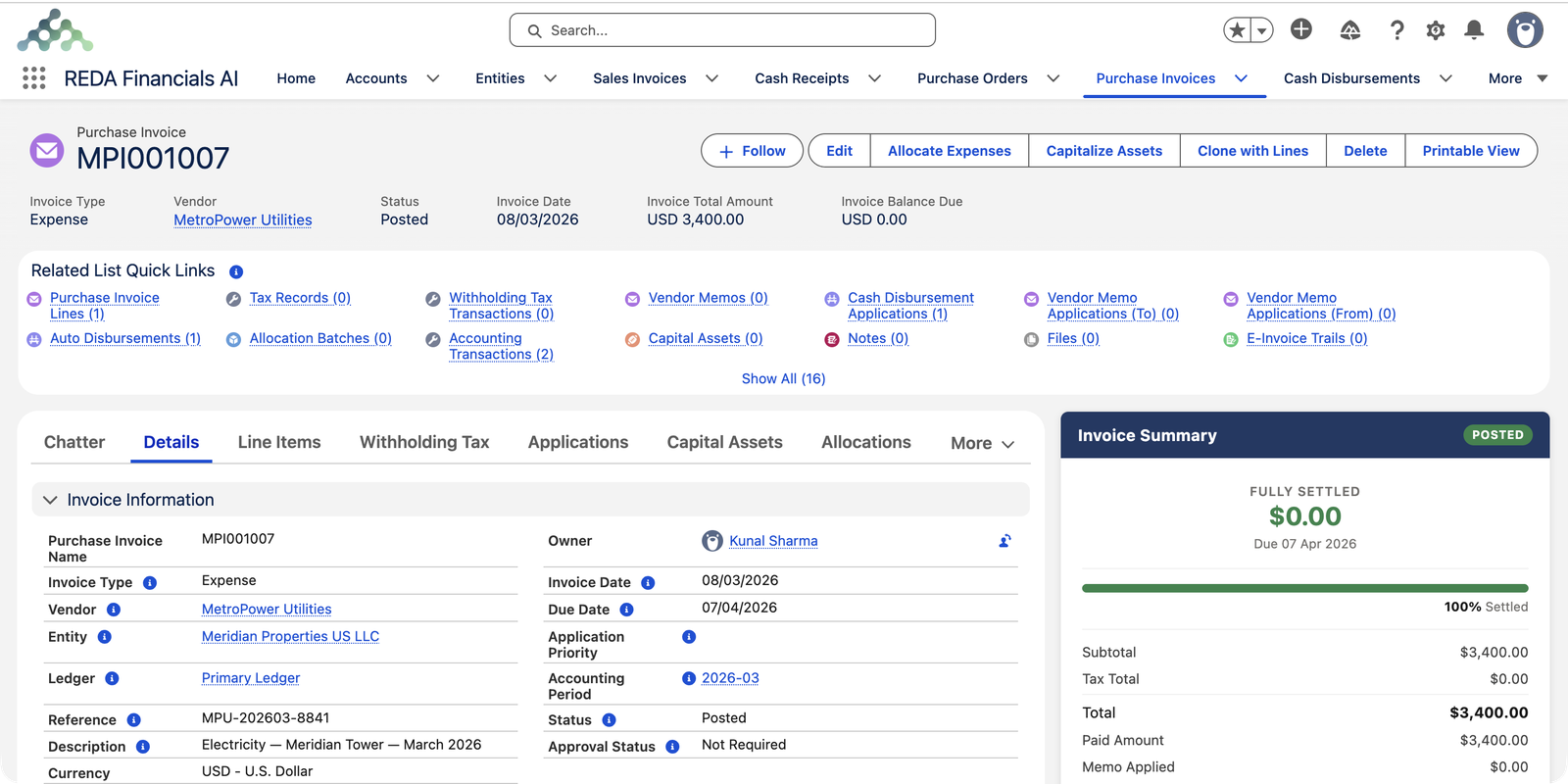
Behind the scenes, posting this one document created two sets of balanced entries:
| Account | Debit | Credit |
|---|---|---|
| The cost (the invoice itself) | ||
| Utilities — Buildings | $3,400.00 | |
| Accounts Payable — Trade | $3,400.00 | |
| The payment (created automatically): money leaves the bank… | ||
| Supplier Prepayments | $3,400.00 | |
| Cash and Cash Equivalents | $3,400.00 | |
| …and its application clears the payable | ||
| Accounts Payable — Trade | $3,400.00 | |
| Supplier Prepayments | $3,400.00 | |
The net result: the cost is recorded, the cash is out, and nothing is left owing — exactly what happened in the real world. (Payments in REDA Financials always pass through a Supplier Prepayments account until they are matched to a bill — for an Expense invoice that matching is instant and automatic. You can see the full story in Understanding Cash Disbursements.)
Creating one
Follow the normal steps in Creating a Purchase Invoice, with two changes:
Set Invoice Type to Expense
Do this first — the form then reveals the payment details section.
Choose the payment method and bank account
Tell REDA Financials how the money leaves (ACH, card, check…) and from which bank account. Both are required — if you try to post without them, the system stops you with: "Expense invoices require a Payment Method to create the Cash Disbursement."
The fields that make it an Expense invoice
Everything else — entity, vendor, dates, reference, lines — works exactly as in Creating a Purchase Invoice. These are the fields that change the behavior:
| Field | Required? | What it does |
|---|---|---|
| Invoice Type | Yes | Set it to Expense first — the form then reveals the payment details section. |
| Payment Method | Yes, for Expense | How the money leaves — ACH, card, check, wire, cash. Without it, posting stops (exact message below). |
| Bank Account | Yes, for Expense | Which bank the money leaves. The auto-created payment takes its cash ledger account from this bank. Leave it blank and REDA Financials fills it from the entity's Default Bank Account – Expenses (or, if that's unset, the plain Default Bank Account) — so an entity that always pays expenses from one bank need not repeat it on every invoice. |
| Due Date | Yes | Still required, and never earlier than the Invoice Date — for an auto-debit, the date on the vendor's bill works. |
The approval gate applies as usual: an Expense invoice posts only when its Approval Status is Approved or Not Required — and since posting creates the payment too, that sign-off effectively covers both.
Choosing between Invoice and Expense
- Use Invoice when payment is a separate, later decision — you want the bill in AP aging, in payment runs, and under cash-flow control.
- Use Expense when payment is already out of your hands — auto-debits, cards, fees — and matching a payment later would add work without adding control.
The messages you might meet
Posting an Expense invoice runs every ordinary invoice check, plus its own. The exact wording, with the fix beside it:
| The message | What it means |
|---|---|
| "Expense invoices require a Payment Method to create the Cash Disbursement." | The Expense-only rule — fill in the payment method (and the bank account) so the system can build the payment. |
| "Entity is inactive and cannot receive new transactions. Select an active entity or contact your administrator to reactivate it." | The company on the invoice has been deactivated — pick an active one or ask your administrator. |
| "Invoice Date must fall within the selected Accounting Period date range." | Date and period disagree, usually after editing the date — fix the date or reselect the period. |
| "Due date cannot be before the invoice date. Please review the payment terms and due date." | A bill can't fall due before it exists — correct whichever date is wrong. |
| "GL Account is inactive and cannot receive new postings. Select an active account or reactivate this one." | A line points at a retired account — choose a live one. |
| "Quantity must be greater than zero when provided." | A line quantity of zero or less explains nothing — enter what was actually supplied. |
Common mistakes to avoid
| Mistake | Why it hurts | Do this instead |
|---|---|---|
| Using Expense for a bill you'll actually pay later | The books show the cash gone the moment you post — but nothing has left the bank, so reconciliation and cash reporting are wrong | Use Invoice; pay it with a Cash Disbursement when the money really moves |
| Picking the wrong bank account | The auto-payment credits that bank's cash account while the real debit hits a different bank — nothing matches at reconciliation | Choose the account the vendor actually debits |
| Recording a PO-related bill as an Expense | PO matching is designed for Invoice-type documents — the order's balances never learn they were billed | Enter it as an Invoice and match it (PO-to-PI Line Matching) |
| Entering the auto-debit twice — once now, again when the statement arrives | The cost doubles and a second phantom payment posts with it | Record it once, with the vendor's bill number in Reference — the reference is your duplicate guard |
Who can create Expense invoices
Accounts Payable and Accounting Admin create, post and void them — the same permission sets that govern every Purchase Invoice. Accounting Controller and Read Only can open the documents and inspect their entries, but change nothing.
Where to go next
- Understanding Purchase Invoices — the three types side by side.
- Creating a Purchase Invoice — the full form walkthrough.
- Understanding Cash Disbursements — what the auto-created payment actually is.
- Understanding Expense Allocation — sharing a posted expense across entities.
Frequently asked questions
On the invoice, open Auto Disbursements in the Related List Quick Links — the automatically created payment is right there, posted, and linked back to its invoice.
Most often the payment details are missing: an Expense invoice needs a payment method and a bank account before it can post, because REDA Financials must create the payment at the same time. The error message on screen says exactly this.
PO matching is designed for Invoice-type documents, where a later payment settles a committed order. If a cost came through a purchase order, record it as an Invoice and pay it through the normal payment flow.
Reopen the document to Draft (this removes its entries, including the auto-payment), change the Invoice Type to Invoice, and post again. It becomes a normal open payable you can pay later.
No. Its Invoice Balance Due is $0.00 from the moment posting completes, so its Aging Bucket reads Paid and it never appears among the open payables. Aging is for money still owed — an Expense invoice is born settled.
The form shows a live preview while you edit, but the stored amounts — line tax, withholding, and their supporting records — are written at posting, like any Purchase Invoice. Where withholding applies, it is withheld immediately at posting, because there is no later payment to wait for.
Was this article helpful?