
Understanding Journal Entries
Most of your accounting writes itself: post an invoice, and REDA Financials creates the ledger entries. But some events don't arrive as documents — a June electricity bill that hasn't shown up by month-end, an owner's capital contribution, a cost recorded to the wrong account. For those, accountants reach for the original tool of the trade: the Journal Entry — a direct, deliberate write to the general ledger, where you say which accounts move and by how much.
Access you'll need. Any REDA Financials permission set can view journal entries; creating, posting, and voiding them requires the Accounting Admin v2 or Accounting Controller v2 permission set. The Accounts Payable v2, Accounts Receivable v2, and Read Only v2 sets can look but not change them.
Anatomy: a header and balanced lines
A journal entry is a header (entity, date, description) plus two or more lines, each hitting one GL account with either a debit or a credit. The iron rule of double-entry bookkeeping applies: total debits must equal total credits — value never appears or vanishes, it only moves between accounts. REDA Financials enforces this absolutely; an unbalanced entry cannot post.
Here's Meridian's June accrual — the utilities bill hadn't arrived by month-end, so the accountant recorded the estimated cost where it belongs (June) with a promise to undo it when the real bill comes:
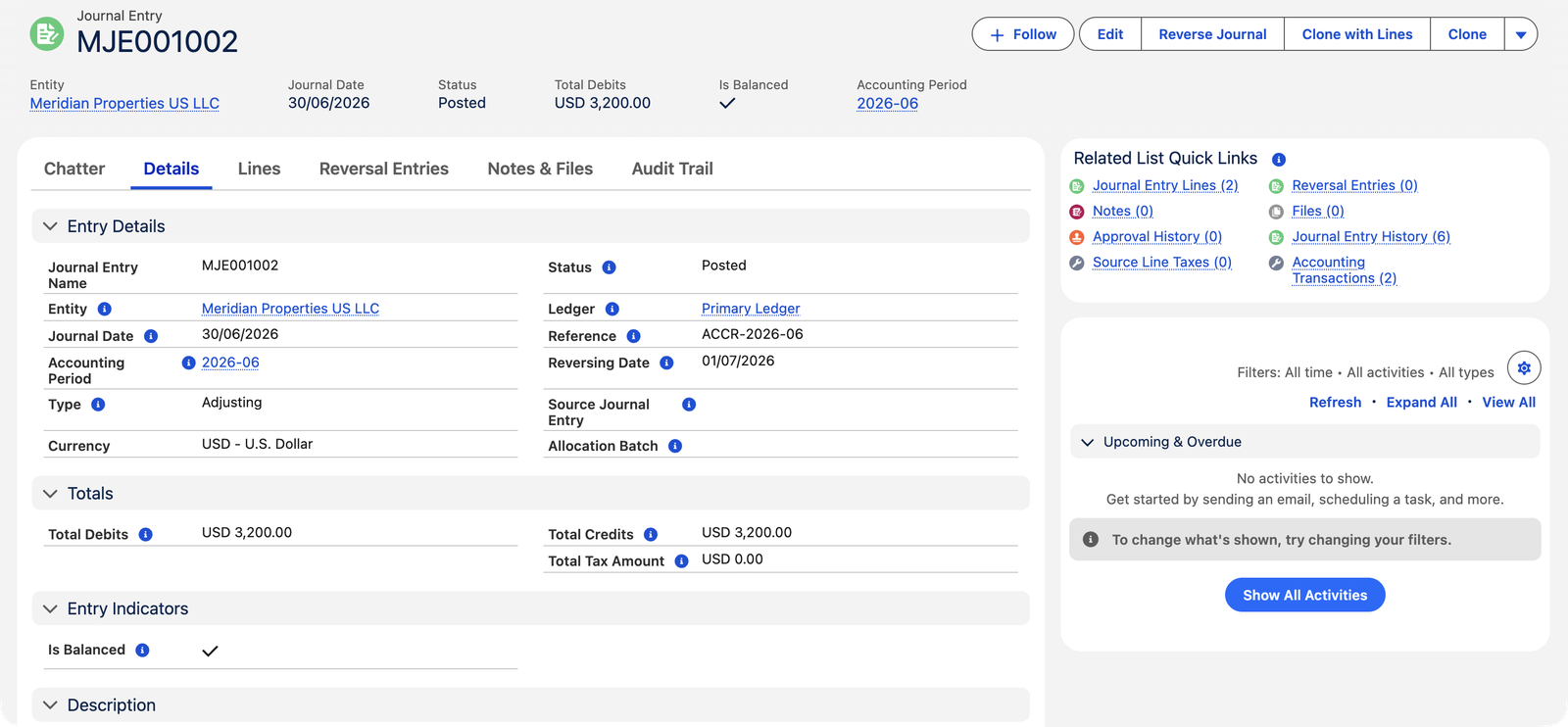
| Account | Debit | Credit |
|---|---|---|
| Utilities — Buildings | $3,200.00 | |
| Accrued Expenses and Other Payables | $3,200.00 |
Read it aloud and it's plain English: June used $3,200 of electricity (expense up), which we owe but haven't been billed for yet (liability up).
The header at a glance
Every field on the journal header earns its place. Three are required when you save — Entity, Journal Date, and Status — and the system quietly fills most of the rest:
| Field | What it does |
|---|---|
| Journal Entry Name | The entry's document number. When the entity has a Journal Entry document sequence, it's auto-assigned at save and locked; without one, you type it, and duplicates per entity are refused. |
| Entity (required) | Whose books the entry writes to. Must be active. Picking it also defaults the Ledger. |
| Journal Date (required) | When the event belongs. Drives the Accounting Period automatically. |
| Status | Draft → Posted → Void — the lifecycle below. |
| Type | The entry's purpose label — see the table in the next section. Optional; defaults to Standard. |
| Accounting Period | Derived from the Journal Date; re-derived if you change the date or blank the field. You can pick one yourself, but it must contain the date and belong to the entity's territory. |
| Ledger | Defaults from the entity's Default Ledger; must be active. |
| Reference / Description | Your cross-reference and testimony — what this entry is and why. |
| Reversing Date | When the system should undo the entry — required for Adjusting entries. See Reversing Journal Entries. |
| Total Debits / Total Credits | Calculated sums of the lines — you never type these. |
| Is Balanced | A calculated checkbox: Total Debits = Total Credits. It sits in the record highlights as an always-on health indicator. |
| Total Tax Amount | Sum of any line-level tax the tax engine computed (most journals: zero). |
| Source Journal Entry | For reversals and clones: the entry this one came from. The mirror view is the Reversal Entries related list on the source. |
Entry types
The Type field labels the entry's purpose — useful for filtering and review:
| Type | Used for |
|---|---|
| Standard | The everyday manual entry — corrections, contributions, transfers. |
| Adjusting | Period-end accruals and adjustments; requires a Reversing Date so the system undoes it next period. |
| Reversing | The system-created undo of an adjusting entry — you don't pick this one yourself. |
| Recurring | Generated from a recurring template. |
| Intercompany | Entries whose lines span more than one entity — see Intercompany Journal Entries. |
| Closing / Expense Allocation / Bank Reconciliation | Created by system processes (year-end close, allocation batches, bank rec adjustments). |
Two types come with real behavior attached; the rest are labels for filtering and review:
- Adjusting makes the Reversing Date mandatory — an adjusting entry is a temporary truth, and the system insists you say when it expires.
- Reversing can't be chosen by hand — it belongs only to entries that carry a Source Journal Entry, i.e. genuine reversals of something.
- Everything else — Standard, Intercompany, Recurring, and the system types — posts identically. The type tells reviewers why the entry exists; the lines tell the ledger what happened.
Lifecycle
- Draft — editable, deletable, no ledger effect. The document number is already assigned from the entity's sequence.
- Posted — one accounting transaction per line hits the ledger; the entry locks. To change it, reopen to Draft (the entries are removed), edit, and post again — the Edit button walks you through exactly that.
- Void — cancelled: entries removed, record locked but kept on file. A voided entry can be reopened as Draft if it turns out you need it after all.
A month of journals at Meridian
Four entries from Meridian's US books show the types working together — one story, told in journals:
| Entry | Type | What it records | Amount | Status |
|---|---|---|---|---|
| MJE001001 | Standard | The owners' opening capital contribution — a classic "no document exists for this" event | $750,000.00 | Posted |
| MJE001002 | Adjusting | The June electricity accrual (the entry above), with Reversing Date 01/07/2026 | $3,200.00 | Posted |
| MJE001003 | Standard | Reclassifying security costs into the repairs account — still being reviewed | $1,150.00 | Draft |
| MJE001004 | Reversing | The undo of MJE001002, dated 02/07/2026 in the new period, linked back via Source Journal Entry | $3,200.00 | Posted |
Notice what the statuses tell you: the two posted entries are in June's and July's ledgers respectively; the draft reclass affects nothing yet. And the reversal pair — MJE001002 and MJE001004 — demonstrates the discipline that makes accruals safe: June carries the estimate, July cancels it before the real bill lands.
The rules that keep a journal clean
These are real messages you may meet, quoted exactly, with the way out alongside. None of them can be bypassed by an import or integration:
| The message | What it means / what to do |
|---|---|
| "Journal Entry cannot be posted because Total Debits do not equal Total Credits. Ensure all lines are saved and the entry balances before posting." | The iron rule. Check the form's Difference indicator; a forgotten unsaved line is the usual culprit. |
| "Journal Date must fall within the selected Accounting Period. Either correct the date or clear the Accounting Period field to let the system derive it automatically." | Date and period disagree — clearing the period is usually the fastest fix. |
| "The selected Accounting Period does not belong to the same territory as the Entity. Clear the period field to let the system derive the correct period automatically from the Journal Date." | A period was hand-picked from the wrong calendar; let the system re-derive it. |
| "Entity is inactive and cannot receive new transactions. Select an active entity or contact your administrator to reactivate it." | Retired companies don't take new bookkeeping. |
| "Ledger is inactive and cannot receive new postings. Select an active ledger or contact your administrator." | The ledger-side twin of the same discipline. |
| "Reversing Date must be after the Journal Date. Typically this is the first day of the following period." | An undo can't precede the thing it undoes. |
| "Cannot modify a posted Journal Entry. Use the Repost action to correct a posted entry." | Posted = locked. In practice: click Edit and the confirmation walks you through reopening to Draft and posting again. |
| "Cannot modify a voided Journal Entry." | Void is locked too — reopen it as Draft first if it turns out you need it. |
| "Cannot delete a posted or voided Journal Entry." | Only drafts delete. Anything that ever touched (or was formally cancelled from) the books stays on file. |
| "This Journal Entry cannot be unposted because it has reconciled lines. Remove the reconciliation first." | Bank-matched journals are protected — deliberately unmatch in the reconciliation before reopening the entry. |
Common mistakes to avoid
| Mistake | Why it hurts | Do this instead |
|---|---|---|
| Booking customer or vendor money as a journal | No aging, no applications, no statement — the subledger goes blind | Cash receipts, payments and invoices for party money; journals for the rest |
| Typing a minus sign to flip a line's direction | The line is refused — every line takes one side, always positive | Move the amount to the other column (Debit ↔ Credit) |
| Manually reversing an entry that already has a Reversing Date | The scheduler will reverse it too — the accrual can end up undone twice | Entries with a Reversing Date belong to the scheduler; reverse manually only entries without one |
| A description that says "adjustment" | A year later, nobody — including you — knows why the ledger moved | Write the testimony: what, which period, why, and the workpaper reference |
| Dating the entry when you typed it, not when the event belongs | The cost lands in the wrong month and both months' reports mislead | Date it in the period being corrected while that period is open; otherwise use the current open period |
Who works with journals
This is the one transaction where the Accounting Controller holds the pen: Controllers and Accounting Admins create, post, and void journal entries. AP, AR and Read Only users can view them — the clerk teams work in their subledgers, and the ledger-level corrections stay with the people who own the books.
Where to go next
- Creating a Journal Entry — the form, the balance bar, the CSV upload.
- JE Lines (Debit & Credit) — the rules each line lives by.
- Posting & Unposting JEs — gates, effects, and reopening.
- Reversing Journal Entries — accruals that clean up after themselves.
Frequently asked questions
Think "where did value go / where did it come from". Debits increase assets and expenses; credits increase liabilities, equity and income. Every entry names both sides: the accrual above says "expense up (debit), owed amount up (credit)". The balance bar in the form catches you long before the theory has to be perfect.
There's no built-in approval gate on journal entries (unlike credit memos). Organizations that want one typically restrict who holds the Controller/Admin permission sets — the posting right is the approval.
Yes — a line with a Product and a Tax Side (Sales or Purchase) runs through the tax engine at posting, splitting the amount into net + tax exactly like an invoice line would. It's an advanced pattern; most journals never touch it.
The Accounting Transactions related list — one row per line, exactly what hit each account. It empties when the entry is reopened or voided.
Only while it's a Draft. Posted and voided entries refuse deletion ("Cannot delete a posted or voided Journal Entry.") — anything that reached the books, or was formally cancelled from them, stays on file for the trail. If a posted entry shouldn't stand, void it.
A live calculation: Total Debits = Total Credits. It's in the record highlights so a glance tells you whether the entry is arithmetically sound — useful on drafts, where an unbalanced state just means "not finished yet". Posting enforces the same rule with a hard stop.
Both remove the entry's ledger rows. Reopen to Draft when the entry is right in spirit but wrong in detail — you'll fix and re-post it. Void when it should never stand — it stays on file, clearly cancelled, and can still be reopened as Draft later if the story changes.
Was this article helpful?