
Recurring Sales Invoices
Corvus Consulting pays Meridian the same rent every month: $8,500 for Suite 1201 plus two parking spaces. Typing that invoice twelve times a year is twelve chances to typo it. A Recurring Template types it instead: define the invoice once, set the rhythm, and REDA Financials generates each month's draft (or posted document) on schedule.
Access you'll need. Creating and editing Recurring Templates requires the Accounting Admin v2 or Accounting Controller v2 permission set. The Accounts Receivable v2, Accounts Payable v2, and Read Only v2 sets can view templates but not change them. The Sales Invoices a template generates are ordinary AR documents that your AR team works with as usual.
Setting one up
Create the template as a Draft
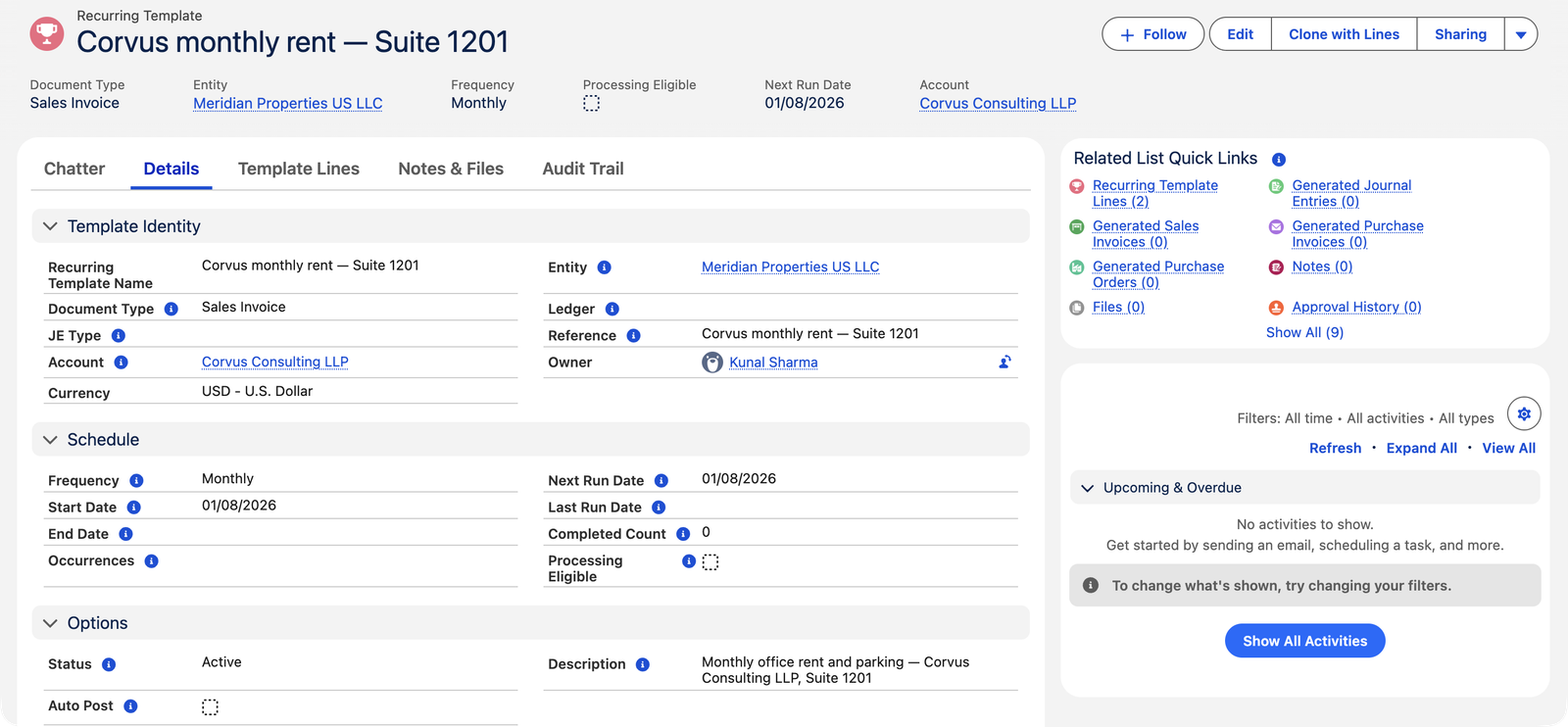
From the Recurring Templates tab, click New. Pick Document Type = Sales Invoice (templates also drive purchase invoices, purchase orders and journal entries), the entity, and the customer. Give it a name a colleague will recognize — "Corvus monthly rent — Suite 1201".
Add the lines
Template lines mirror invoice lines: product, quantity, price, tax profile. Corvus's template carries two — office rent $8,500 and parking $500. A template must have lines before it can go live.
Set the schedule
Frequency (monthly here), Start Date (the first generation day), and how it ends: an End Date, a fixed number of Occurrences, or neither — running until someone stops it. The Next Run Date always shows when the next document is due to appear, and Completed Count tallies the runs so far.
Decide about Auto Post
Off (Meridian's choice): each run creates a Draft invoice for a human to glance at and post. On: documents post themselves — full automation for rock-solid fixed charges. Start with it off until the template has earned trust.
Activate
Flip Status from Draft to Active. (The order matters — a template can only be activated once it has lines.) From now on the scheduler picks it up on each run date.
The template, field by field
| Field | What it does |
|---|---|
| Name | Your label for the pattern — "Corvus monthly rent — Suite 1201" tells a colleague everything. |
| Document Type | Sales Invoice for AR billing (the same object also templates Purchase Invoices, Purchase Orders, and Journal Entries). |
| Sales Invoice Type | Invoice (bill now, collect later) or Receipt (a recurring cash sale that settles itself at posting). Credit Memo is deliberately not offered. |
| Entity / Account | Whose books issue the document, and which single customer receives it — one template serves one customer; a second tenant gets a second template. |
| Frequency | The rhythm — monthly for rent. |
| Start Date | The first generation day; the Next Run Date begins here. |
| End Date / Occurrences | Two ways to say when to stop — a calendar date, or a fixed count of runs. Leave both empty for "until someone stops it." |
| Next Run Date | Always shows when the next document is due — the field to check when you wonder "has July generated yet?" |
| Completed Count | Runs so far; alongside Occurrences it shows how far through a fixed series you are. |
| Status | Draft (being built, or paused) / Active (the scheduler generates from it). |
| Auto Post | Off: each run creates a reviewable draft. On: each run posts itself. |
Invoice or Receipt — which recurring type?
The Sales Invoice Type choice shapes what each run produces. Invoice is the normal case: the tenant is billed, the invoice ages, and the payment arrives separately to be applied. Receipt generates recurring cash sales — each generated document, when posted, creates its own born-posted Cash Receipt and settles itself instantly. That fits arrangements genuinely paid on the spot each cycle; it does not fit ordinary rent, where billing and collection are separate events. And Credit Memo is absent on purpose — credits are corrections of specific errors, and a correction that repeats on a schedule is a policy problem, not a billing pattern (a recurring discount belongs on the recurring invoice as a discounted line).
What each run produces
- A new Sales Invoice with the template's customer, lines, and dimensions; its own number from the entity's sequence; and its date, due date and accounting period derived for that run.
- The invoice links back to the template and appears in the template's Generated Sales Invoices list — an audit trail of every document the template ever made.
- The template's Next Run Date advances by one frequency step; Completed Count increments; the template deactivates itself when its end condition is reached.
A year of Corvus, on autopilot
Here's what Meridian's template quietly does across a renewal year, and where humans touch it:
| When | What happens | Who acts |
|---|---|---|
| 1st of each month | A draft invoice appears: rent $8,500 + parking $500 = $9,000, dated and perioded for that month, numbered from the sequence | Nobody — the scheduler |
| Same morning | The clerk glances at the draft and posts it (Auto Post is off at Meridian) | AR clerk, seconds |
| Mid-month | Corvus pays; the receipt auto-applies to the month's invoice | Nobody, effectively |
| At renewal | Rent steps up: the clerk edits the template's rent line — the next run uses the new price; history is untouched | AR clerk, once a year |
| Anytime | Generated Sales Invoices on the template lists every document it ever made — the full audit trail in one place | Whoever's auditing |
Twelve invoices, one line edit per year, zero re-typing. That's the shape of a good template: the recurring 90% runs itself, and human attention is spent only where something actually changed.
Common mistakes to avoid
| Mistake | Why it hurts | Do this instead |
|---|---|---|
| Editing a generated invoice when the change is permanent | Next month's run regenerates the old values — you'll fix the same thing twelve times | Permanent changes go on the template; the generated draft is only for this-month-only tweaks |
| Turning Auto Post on from day one | A typo in the template posts itself monthly, straight into the books and the customer's inbox | Run the first cycles with drafts; enable Auto Post once the output has earned trust |
| Deleting a finished template | The Generated Sales Invoices list — the history of what it produced — goes with it | Deactivate and keep it; done templates are documentation |
| One template for "all tenants" | A template carries one customer — you can't blast one document to many accounts | One template per tenant; the list view of templates becomes your rent-roll at a glance |
| Assuming a missed run will catch up by itself | If the scheduler wasn't running, nothing generates retroactively without attention | Watch Next Run Date; if it's in the past, check the scheduler (below) and generate the gap deliberately |
Behind the scenes
Generation is executed by the recurring-documents scheduler your administrator configures — cadence, batch size, and a run log live in the Admin Console. If a template's Next Run Date has passed and nothing generated, that scheduler is the first place to look: Recurring Document Batches.
Where to go next
- Cloning a Sales Invoice — for repetition without a schedule.
- Posting a Sales Invoice — what happens to each generated draft.
- Recurring Document Batches — the scheduler that does the generating.
Frequently asked questions
No — recurring Sales Invoice templates offer Invoice and Receipt types only. Credits are corrections, and corrections shouldn't run on a schedule.
Generation simply stops; existing invoices are unaffected. Reactivate later and it resumes from the schedule. Templates aren't deleted when done — their generated-documents list is useful history.
Template the fixed part with Auto Post off, and add/adjust the variable line on each month's generated draft before posting. You keep the automation for the 90% and the human touch for the 10%.
Only if the template's Auto Post is on. Otherwise they wait as drafts — findable on the Sales Invoices list (or the template's generated list) for review and posting, individually or via bulk posting.
Completely — it's an ordinary draft invoice. Add this month's variable charge, tweak a description, adjust the date. Just remember the split: this-month-only changes on the draft, forever changes on the template.
Its own, per run: the invoice date from the run, the due date from the payment terms, and the accounting period derived from the date — exactly as if you'd typed it that day. The template never stamps stale dates forward.
Two clean options: set the template's End Date to the final billing date (it deactivates itself after that run), or flip Status to Draft once the last invoice is out. Either way the generated history stays on the template.
Was this article helpful?