
Enabling Multi-Currency
Switching on multi-currency happens at two levels: Salesforce (the platform REDA runs on) turns on its own currency management, and REDA flips one org-wide setting so it runs its multi-currency logic. Both are quick, but the order matters — and one of them can't be undone. This article walks the sequence, shows exactly where the REDA switch lives, and flags the cautions, so you turn it on confidently and at the right time.
Access you'll need. The REDA-side toggle and each company's currency and FX account require the Accounting Admin v2 or Accounting Controller v2 permission set; enabling Salesforce currency management is a Salesforce administrator action. The Accounts Payable v2, Accounts Receivable v2, and Read Only v2 sets don't configure this.
Decide early — before you post
Because each company's currency locks once it has transactions ("Currency cannot be changed after accounting transactions have been posted for this entity"), the cleanest time to enable multi-currency is during initial setup, before any company goes live. Turning it on later is possible but means carefully configuring currencies on companies that may already be in use. If there's any chance you'll operate in more than one currency, set it up at the start.
One more reason to decide early: while multi-currency is off, REDA enforces the opposite discipline — every entity's Currency Code must equal the org's one currency. Try to save a GBP company in a single-currency org and you'll see: "In single-currency mode, Currency Code must match the org default currency." That guard is your signal that the foreign subsidiary you're setting up needs this article first.
The sequence
Enable currency management in Salesforce
Your Salesforce administrator turns on multi-currency for the org, activates the currencies you trade in, and — important for REDA — enables Advanced Currency Management, the Salesforce feature that keeps dated exchange rates. REDA reads its rates from those standard dated rates and keeps no rate table of its own, so without Advanced Currency Management there is nothing for it to convert with. All of this is done in Salesforce Setup, not in REDA, and it must come first: REDA's currency features depend on the platform feature existing.
Switch on REDA's multi-currency mode
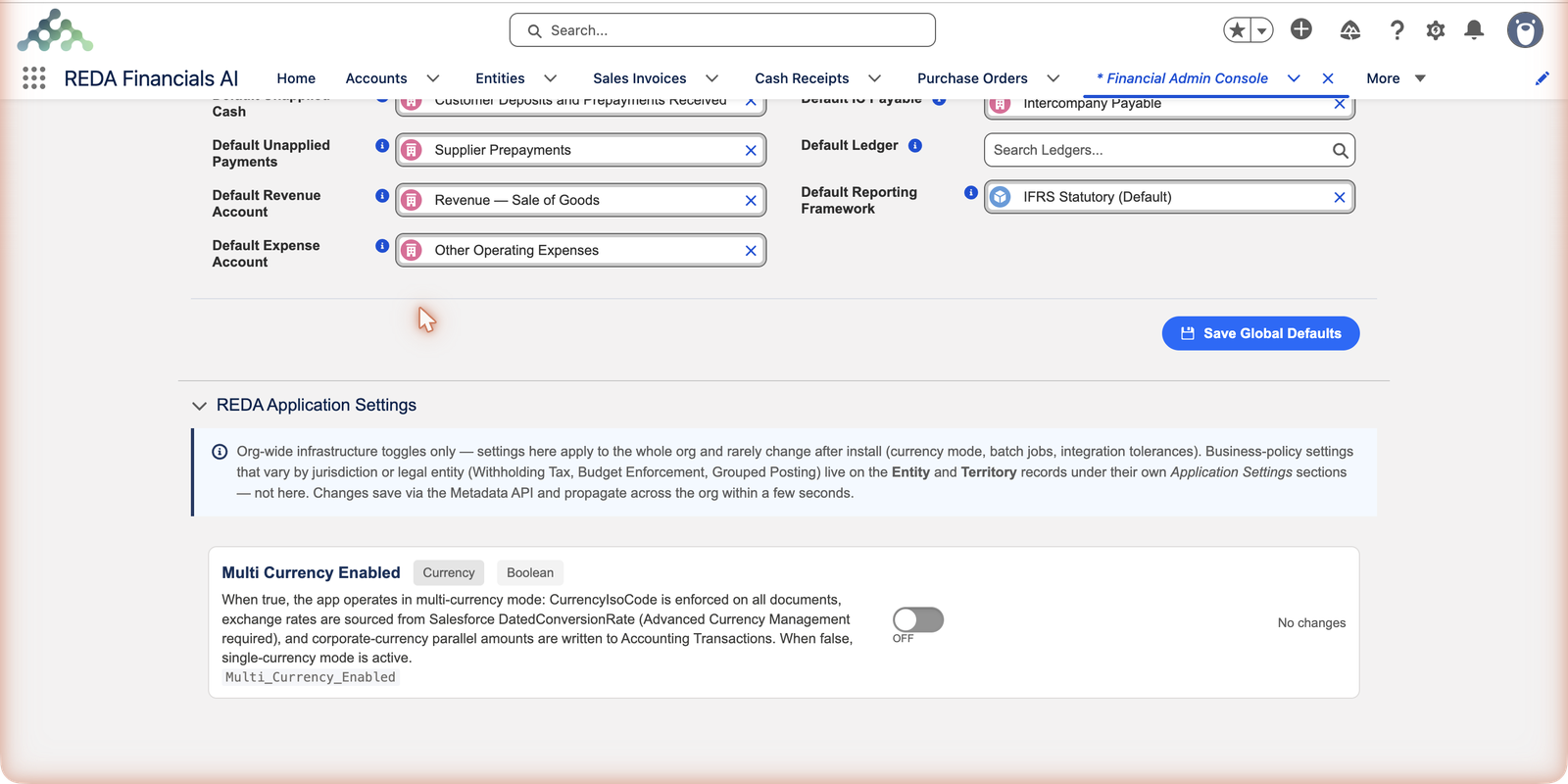
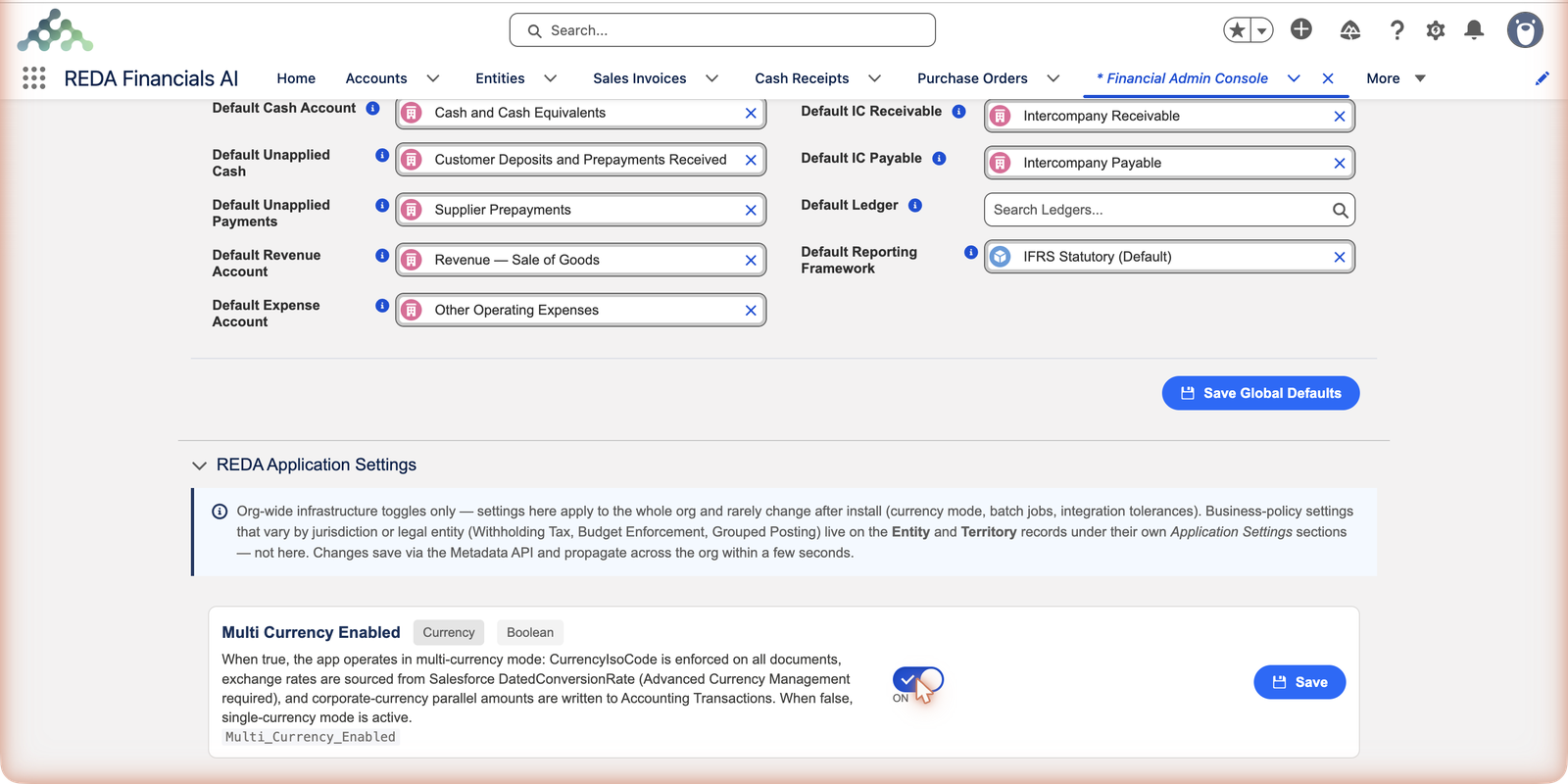
Open the Financial Admin Console tab, go to Financial Setup, and expand the REDA Application Settings section. You'll find one switch that matters here: Multi Currency Enabled. Flip its toggle to ON and click Save. The change saves through Salesforce's configuration machinery, so you'll briefly see "Deploying via Metadata API…" — it propagates across the org within a few seconds. REDA ships with this switch OFF (single-currency mode); nothing about your install changes until you deliberately turn it on. The full story of this settings section is in REDA Setup.
Load exchange rates
Enter the dated conversion rates for the currencies you use — see Exchange Rates. Without a rate in force on a document's date, posting a foreign-currency document stops with "No exchange rate found for … effective on …", so load rates before anyone raises a foreign-currency document.
Set each company's currency and FX account
Give every entity its home (functional) Currency Code and a Default FX Gain/Loss account. The FX account isn't optional: in multi-currency mode REDA refuses to save an entity without one — "Default FX Gain/Loss GL Account is required when Multi-Currency is enabled. Realized and unrealized foreign exchange differences cannot be posted without this account." Set the more specific Default Realized FX and Default Unrealized FX accounts too, ideally.
What changes once it's on
- Each company's Currency Code becomes its home currency — different entities can now keep books in different currencies — and REDA keeps it in step with Salesforce's own currency field behind the scenes (you edit Currency Code; the platform field follows).
- A Currency picker appears on documents, so a company can raise the occasional document in a foreign currency, converted at the dated rate — see Currency on Documents.
- Every posted accounting entry starts carrying amounts at three levels — document, functional and corporate currency — so any report can answer in the right currency. See 3-Tier Currency Architecture.
- Exchange gains and losses are recorded when rates move between invoicing and payment.
- A Default FX Gain/Loss account becomes required on every company — REDA blocks saving one without it, because exchange differences would otherwise have nowhere to post.
How Meridian did it
Meridian Properties Group — the example customer used throughout this Help Center — started with one US company and knew UK, India and Brazil companies were coming. So its administrator enabled Salesforce currency management and Advanced Currency Management in a sandbox, verified a test invoice converted correctly, repeated the change in production, and switched Multi Currency Enabled on (2 July 2026) before creating Meridian Properties UK Ltd (GBP), Meridian Properties India Pvt Ltd (INR) and Meridian Properties Brasil Ltda (BRL). Each new entity was saved with its home currency and an FX Gain/Loss account already in place — so not one document ever posted under the wrong currency regime.
Where to go next
- Understanding Multi-Currency — the concepts before you switch on.
- Exchange Rates — load the rates REDA converts with.
- 3-Tier Currency Architecture — the three currencies you just enabled.
- Currency on Documents — how currency lands on each document.
Frequently asked questions
Not at the Salesforce level — that switch is permanent. That's exactly why you test in a sandbox first and only enable it in production when you're sure you need it. The REDA-side toggle can be switched back off, but don't do that once multi-currency documents exist — the two levels should always agree.
You enable multi-currency following the sequence above, load rates, then create the new subsidiary as an entity with its own home currency. Your existing company keeps its currency unchanged — nothing already posted is touched.
Your Salesforce administrator, in Salesforce Setup. Steps 2–4 are done inside REDA. If you're not sure who that is, your REDA implementation contact can help coordinate it.
Because accounting needs dated rates — a January invoice must convert at January's rate, forever. Basic Salesforce multi-currency keeps only one current rate per currency; Advanced Currency Management keeps a dated history, and that's the table REDA reads. It keeps no separate rate table of its own.
No. This setting saves through Salesforce's configuration deployment machinery rather than like a normal record, so it takes a few seconds ("Deploying via Metadata API…"). The screen refreshes itself once the change lands.
Was this article helpful?