
FX Sync Batch
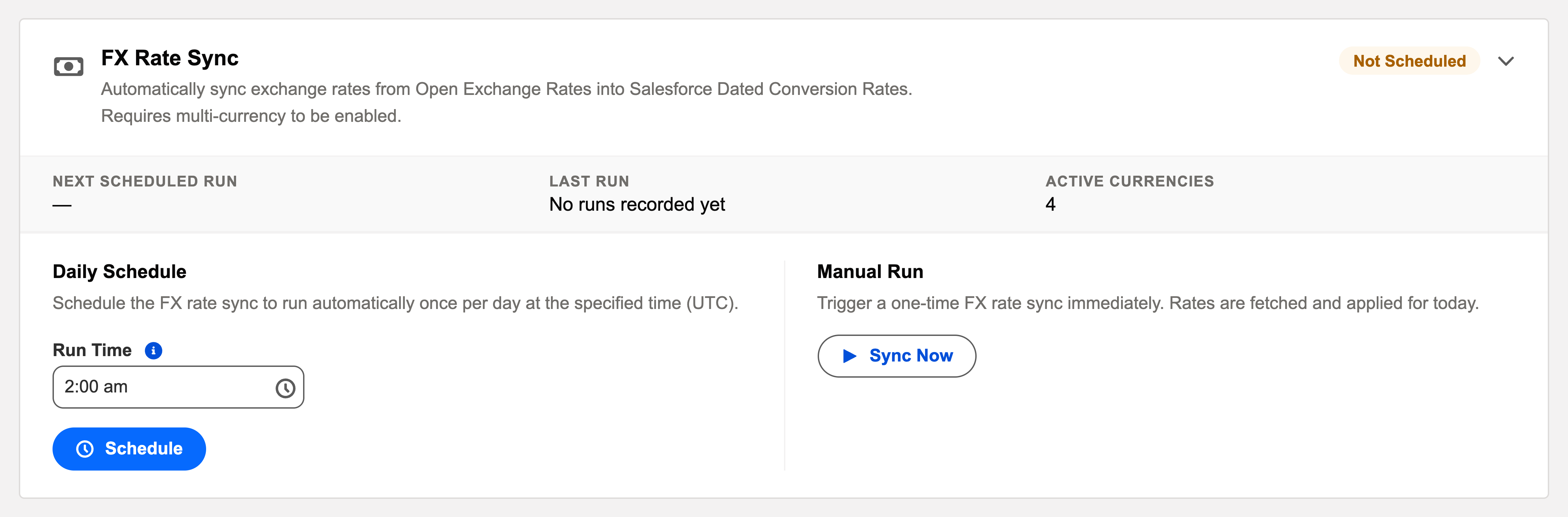
Multi-currency accounting is only as good as its rates. The FX Rate Sync card keeps them fresh: "Automatically sync exchange rates from Open Exchange Rates into Salesforce Dated Conversion Rates. Requires multi-currency to be enabled."
Access you'll need. Scheduling and running batch jobs requires the Accounting Admin v2 permission set. The Accounting Controller v2 and Read Only v2 sets can open the console to view outcomes; the Accounts Payable v2 and Accounts Receivable v2 sets cannot see it, though they use the rates the sync writes.
The essentials
- Source and destination: rates come from the Open Exchange Rates service and land in your org’s dated currency tables — the same dated rates every foreign-currency document, revaluation and report reads.
- Dated, not overwritten: each sync adds the day’s rate with its effective date; historical documents keep converting at their historical rates. That’s the backbone of consistent multi-currency books.
- Multi-currency only: single-currency orgs don’t need it, and the card says so with a banner instead of pretending to work.
What one sync does
Reads your FX rate-sync key
The sync capability comes with your subscription — the engine reads its key from your licence; there is no separate account to create with the rate service.
Fetches the latest rates
From Open Exchange Rates — the day’s market rates for the currencies your org has activated.
Normalises them to your corporate currency
Rates are stored per currency against the corporate currency, which stays at 1. Cross rates are derived by division — trade in five currencies and the sync maintains five rates, not twenty pairs.
Writes a dated rate for today, per active currency
Each rate lands with its effective date. Yesterday’s rate isn’t overwritten — it’s superseded from today forward, and every historical document keeps converting at the rate in force on its date.
Where the synced rates get used
| Moment | Rate used |
|---|---|
| A foreign-currency invoice posts | The dated rate on the invoice date converts it to the entity’s functional currency. |
| The payment settles later at a different rate | The difference posts to Realized FX gain/loss. |
| Period-end revaluation | Open foreign-currency items are revalued at the closing rate → Unrealized FX. |
For Meridian Properties Group — entities keeping books in USD, GBP, INR and BRL — this is the difference between every cross-currency invoice carrying an honest value and a month of quiet misstatements: stale rates mean wrong conversions and misstated FX gain/loss, which is why the sync runs before anything else posts.
Monitoring and troubleshooting
Green means: the card shows Scheduled, the last-run timestamp is from the expected window, and the outcome is informational. Anything else, click View Audit Log — the run’s record lists processed / succeeded / failed with a reason per failure.
| Symptom | Likely cause → action |
|---|---|
| Documents converting at old rates | Check the last successful sync in the log; Sync Now, then re-check the document — rates apply by date. |
| The card shows a multi-currency banner instead of controls | The org isn’t multi-currency — see Enabling Multi-Currency before expecting rates. |
| A night was missed | A gap, not corruption — rates are dated entries, so history is intact. The next sync resumes; Sync Now backfills today’s rate immediately. |
Common mistakes to avoid
| Mistake | Why it hurts | Do this instead |
|---|---|---|
| Scheduling the sync after the document-generating batches | Recurring foreign-currency invoices generate against yesterday’s rate | FX Rate Sync first in the overnight order, everything else after |
| Assuming the sync works out of the box | Without the one-time deployed component, automatic sync stays off — quietly | Complete the setup in Exchange Rates, then verify the first run in the log |
| Expecting the sync to fix historical conversions | Rates are dated — today’s sync writes today’s rate; it never rewrites the past | For a missing historical rate, add the dated rate for that date by hand |
| Running multi-currency books with the card’s banner showing | The banner means multi-currency isn’t enabled — no rates are syncing at all | Enable multi-currency first; the card’s controls appear once the org supports it |
Operating it
Schedule it earliest in the overnight sequence — everything else that posts foreign-currency amounts that day deserves today’s rate. Sync Now covers ad-hoc needs (a missed night, a rate you want refreshed before a big posting). Outcomes in the audit log, as always.
Where to go next
- Exchange Rates — how rates drive documents.
- Understanding Multi-Currency — the three-tier currency model.
- Operations Scheduler Overview — the console.
Frequently asked questions
Because a document should be valued at the rate that applied when it happened. A sale made in January converts at January’s rate, so its recorded value doesn’t drift every time markets move. Each rate has a start date; REDA Financials picks the one in force on the document’s date.
No — one rate per currency against the corporate currency (which stays at 1). Any pair is derived by dividing one rate by the other. Five currencies means five rates, not twenty.
Yes — the sync writes to the same standard dated rate table you can edit manually (a monthly close rate, a contractual rate). The batch just spares you the typing; hand-entered and synced rates coexist by date.
The conversion can’t be done correctly — a foreign-currency document for that date may be valued wrongly or blocked. Keep rates current as part of opening each period; the daily sync makes that automatic going forward.
No — like every scheduled automation, it runs under the platform’s automated process context and occupies none of your purchased seats.
Was this article helpful?