
Cash Flow Statement (IAS 7)
Profit is an opinion; cash is a fact. A company can post handsome net income while its bank account bleeds — rising receivables, big equipment purchases — and only the cash flow statement shows it. REDA Financials builds the statement on the indirect method (the IAS 7 / ASC 230 standard presentation): start from profit, undo the non-cash items, and explain where cash really went.
Access you'll need. Any REDA Financials permission set can open the Financial Center tab and run the cash flow statement; what you see is limited to the records your role can read.
The three stories every cash flow tells
| Section | Question it answers |
|---|---|
| Operating Activities | Does the business generate cash? Net profit, plus non-cash add-backs (depreciation, provisions), plus/minus working-capital changes (receivables up = cash trapped; payables up = cash conserved). |
| Investing Activities | What are we building or selling? Asset purchases out, disposal proceeds in. |
| Financing Activities | How is it funded? Capital and loans in, repayments and dividends out. |
The closing section reconciles to reality: cash accounts at the start, the net change, cash at the end — a figure your bank reconciliations have already proven.
The statement's skeleton
Run without a framework, the statement builds itself from your accounts' Cash Flow Categories into a fixed, readable tree:
| Section | What fills it |
|---|---|
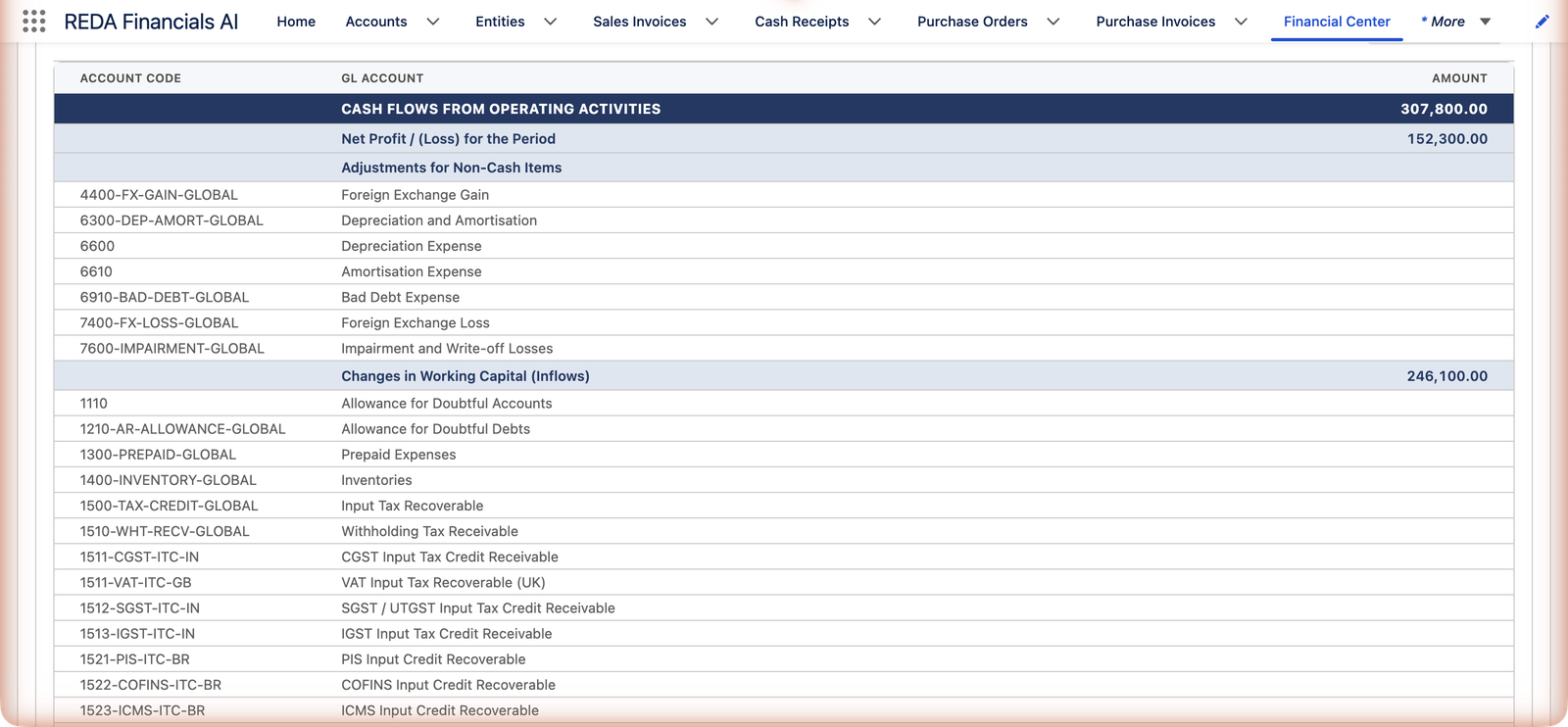
| Cash Flows from Operating Activities | Opens with a computed Net Profit / (Loss) for the Period line — the income statement's Grand Total for the same range — then Adjustments for Non-Cash Items (depreciation-style add-backs), then Changes in Working Capital (Inflows) and Changes in Working Capital (Outflows). |
| Cash Flows from Investing Activities | Investing inflows (disposal proceeds) and outflows (asset purchases). |
| Cash Flows from Financing Activities | Financing inflows (loans drawn, capital) and outflows (repayments, dividends). |
| Cash and Cash Equivalents | The Cash Accounts themselves — the accounts categorized Excluded — shown as an opening-to-closing reconciliation that the three sections above must explain. |
| Grand Total | Operating + Investing + Financing = the period's net cash change. |
The working-capital lines are period deltas, with the sign flipped into cash terms: a receivable balance that grew during the period consumed cash (customers holding your money), so it appears as an outflow; a payable that grew conserved cash and appears as an inflow. Meridian's screenshot reads exactly this way — net profit 152,300, plus non-cash add-backs, plus 246,100 of working-capital inflows, giving operating cash of 307,800.
If you maintain reporting framework groups tagged for the cash flow statement, they replace this default tree entirely — your headings, your order — the same way frameworks restyle the other statements.
The one setup that makes it work: Cash Flow Category
Each GL account carries a Cash Flow Category that tells the statement where it belongs: Operating — Inflow/Outflow/Non-Cash Adjustment, Investing — Inflow/Outflow, Financing — Inflow/Outflow, or Excluded (the cash and bank accounts themselves — they're what's being explained). The classification guidance is textbook: receivables/revenue → operating inflow; payables/expenses → operating outflow; depreciation → non-cash; fixed assets → investing; loans and equity → financing. Meridian's chart shipped mapped; new accounts should get their category at creation (Cash Flow Categories).
| Category | Typical accounts | Where it lands on the statement |
|---|---|---|
| Operating — Inflow | Receivables, revenue accounts | Working-capital inflows under Operating Activities |
| Operating — Outflow | Payables, expense accounts | Working-capital outflows under Operating Activities |
| Operating — Non-Cash Adjustment | Depreciation, provisions, impairments | Adjustments for Non-Cash Items (added back to profit) |
| Investing — Inflow | Asset disposal proceeds | Investing Activities, money in |
| Investing — Outflow | Fixed asset purchases | Investing Activities, money out |
| Financing — Inflow | Loans drawn, share capital | Financing Activities, money in |
| Financing — Outflow | Loan repayments, dividends | Financing Activities, money out |
| Excluded | Cash and bank accounts, intercompany accounts | The closing Cash and Cash Equivalents reconciliation — the thing being explained, not a flow |
Two scoping rules follow from the design: only accounts with a category appear on the statement, and the system's receivables/payables control accounts are kept out of the line listing.
Setting up the run
The filters work as on every statement (full reference): entity rows with their default ledgers, one or more From/To ranges (labels become column headers), optional framework, Hide Zero Balances, and dimension filters that recompute the whole statement for one slice. With exactly two date ranges a Variance column appears — quarter-over-quarter operating cash is one of the most honest trend lines a business has. Multiple entities work too, with the usual currency discipline: mixed currencies switch the run to corporate currency automatically ("Multiple currencies detected — showing in corporate currency"), and the badge above the report names the money ("All amounts in USD").
Common mistakes to avoid
| Mistake | Why it hurts | Do this instead |
|---|---|---|
| Creating a GL account without a Cash Flow Category | The account silently sits out of the statement, and the net change may stop tying to the cash section | Set the category at account creation; make "new accounts categorized?" a month-end checklist line |
| Categorizing a bank account as Operating | Cash accounts are what the statement explains — treating one as a flow double-counts it and breaks the closing reconciliation | Bank and cash accounts are Excluded; so are intercompany accounts |
| Reading working-capital signs backwards | "Receivables up" feels like good news, but on this statement it's an outflow — cash trapped with customers | Read the section as cash movement, not business performance; the P&L carries the performance story |
| Expecting gross customer receipts and vendor payments | The indirect method reports changes, not gross flows — hunting for a specific payment here always fails | Drill a line for its transactions, or read gross flows on the banking side |
| Comparing the cash section against a bank statement from a different date | The statement's cash figures follow your Date To, the bank's follow theirs | Align the dates, then the closing cash line and the reconciled bank balances should agree |
Where to go next
- Cash Flow Categories — the mapping reference.
- Balance Sheet — the positions whose deltas drive working capital.
- Report Filters & Dimensions — periods, entities, frameworks.
Frequently asked questions
Read the working-capital lines: growing receivables (customers slower to pay) or shrinking payables are the usual culprits — real business signals worth acting on (see your AR aging). That divergence is exactly what this statement exists to expose.
It reduced profit but no cash left the building — the cash went out years ago when the asset was bought (an investing outflow then). The indirect method un-counts every such non-cash charge to get from profit to cash.
The statement is indirect-method — the presentation standards accept (and companies overwhelmingly use) it. For gross operating receipts/payments detail, the bank side and the GL drill-downs carry the raw flows.
It marks the cash and bank accounts themselves (and intercompany accounts). They don't appear as flows — they appear in the closing Cash and Cash Equivalents section as the opening-to-closing reconciliation that the Operating, Investing and Financing sections must add up to explain.
It's computed for your exact date range from the revenue and expense activity — the same arithmetic as the income statement's Grand Total. If the two ever disagree, the scopes differ: check entity, ledger, dates and dimension filters.
Account-level amounts drill to their transactions like every statement in the Financial Center — useful when an investing outflow deserves a "which asset was that?" (see Drill-Down).
Was this article helpful?