
Creating Assets from POs
Physical assets arrive on trucks, and trucks are the purchasing department's world — so REDA Financials creates tangible assets exactly where reality does: at the moment goods are received against a purchase order. Meridian's lobby renovation is the running example: one PO, one line of construction work, one line of equipment with Create Asset checked — and four Capital Assets born the day the boxes landed.
Access you'll need. Creating and activating the resulting assets requires the Accounting Admin v2 or Accounting Controller v2 permission set. The Accounts Payable v2, Accounts Receivable v2, and Read Only v2 sets can view assets but not change them. (Flagging the PO line and receiving goods follow your Purchase Order permissions.)
Setting up the PO line
Flag the line: Create Asset + Asset Type
On the purchase order line for the equipment (4 × $5,000), tick Create Asset and pick the Asset Type (Office Equipment — a Tangible type; intangibles like software take the invoice path instead). Lines without the flag stay ordinary costs.
Post the PO, then Receive Goods
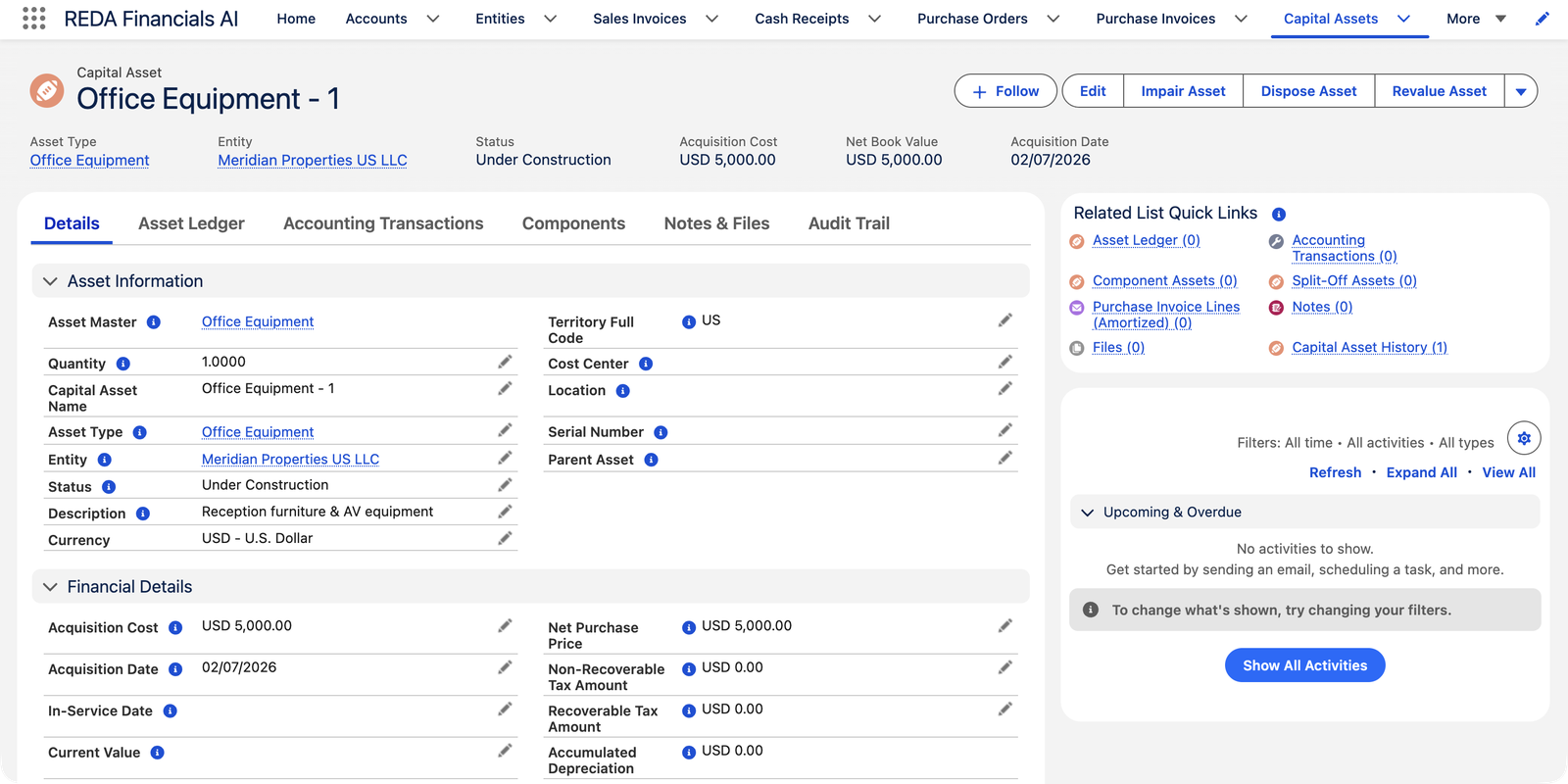
Receiving is the trigger (a posted PO is required). The Receive Goods screen tells you what's coming: "4 Capital Asset(s) will be created with status Under Construction."
What gets created
- One asset per unit for Individual-mode types (Meridian's four units → "Office Equipment - 1" through "- 4"), one asset per receipt with a quantity for Bulk-mode types. Individual mode requires whole-number receipts.
- Status Under Construction — on the register, not yet depreciating.
- A provisional cost from the PO line's net unit price (discounts respected, converted to the entity's currency). Provisional, because the truth arrives later:
Here is each new asset's full birth certificate — every field the receipt fills, and where the value comes from:
| Field | How it's set at receipt |
|---|---|
| Capital Asset Name | Individual mode: the product name plus a sequence — "Office Equipment - 1", "- 2", "- 3"… Bulk mode: one record for the receive event. |
| Status | Under Construction, always — the screen tells you up front: "{n} Capital Asset(s) will be created with status Under Construction.", and confirms with "{n} Capital Asset(s) created." |
| Acquisition Cost (provisional) | The PO line's net unit price (after discounts) × the PO's exchange rate × quantity — expressed in the entity's own currency. For Meridian: $5,000 per unit, no conversion needed. |
| Acquisition Date | The day of the receipt — the day the goods actually landed. |
| Quantity | 1 for each Individual-mode asset; the received quantity for a Bulk-mode lot. |
| Tax amounts | Zero at this stage — tax truth arrives with the vendor invoice (below). |
| Asset Master | Found — or created on the spot — for the entity + product + asset type, so the new units file themselves on the right register page. |
The invoice trues up the cost
When the vendor's invoice is matched to the PO line and posted, REDA Financials replaces the provisional cost with the invoiced reality — the net price actually billed plus any non-recoverable taxes (recoverable input taxes like GST credits never become asset cost; that's the IAS 16 rule handled for you). Partial invoicing finalizes assets in order, first units first; unmatching reverts to the provisional figure. All before activation — the asset's recorded cost is settled by the time its clock starts.
In detail, the finalized figure is built from the matched invoice line:
| Component | What it is |
|---|---|
| Net Purchase Price | The invoice line's amount in the entity's currency, with any recoverable taxes embedded in the price stripped out — those are tax credits you'll claim back, not asset cost. |
| + Non-Recoverable Tax | Taxes added on top that you cannot claim back. These genuinely make the asset more expensive, so they capitalize into its cost. |
| = Acquisition Cost (final) | Meridian's invoice confirmed the PO price exactly — $5,000 per unit, no taxes — which is why its assets' cost didn't move at finalization. |
The rules that keep receiving clean
Each of these is a real message with a reason behind it:
| The message | What it means / what to do |
|---|---|
| "Purchase Order must be in Posted status to receive goods. Draft and Void Purchase Orders cannot be received against." | Receiving creates real register records, so the order behind them must be a committed document — post the PO first. |
| "Asset Type is Individual mode — received quantity must be a whole number for: {line description}." | Individual mode means one asset per physical unit; half a monitor isn't a thing. Receive whole units, or use a Bulk-mode type for genuinely divisible quantities. |
| Too many assets to create — receive in smaller batches | A single receive event caps at 9,500 created assets. Enormous deliveries of Individual-mode units are split across receipts. |
| "Cannot undo the receipt for line "{line}": {n} asset(s) on this line have been activated or depreciated and can no longer be removed. Only assets still Under Construction can be unreceived. Dispose or reverse those assets first." | Un-receiving deletes the assets a receipt created — allowed only while they're still Under Construction. Activated assets are financial facts; retire them through disposal. |
| "This Purchase Order has capitalized Capital Assets (no longer Under Construction). Dispose or reverse those assets before voiding or unposting the order." | The same protection at document level: the PO can't be unwound underneath live assets. |
Changing your mind
- Un-receive (lower the received quantity) removes the newest Under-Construction assets it created.
- But once an asset is activated, it's a recorded financial fact: un-receiving, unposting the PO, or unmatching its invoice line is refused with a pointed message — "…have been activated or depreciated and can no longer be removed… Dispose or reverse those assets first." Corrections to a live asset go through disposal or a prospective adjustment, never a retroactive rewind.
Common mistakes to avoid
| Mistake | Why it hurts | Do this instead |
|---|---|---|
| Activating assets before the vendor invoice is matched | Cost finalization only touches assets still Under Construction — activate early and the provisional PO figure is locked in as the depreciating cost | Wait for the invoice match where you can; if the true cost differs later, handle it as a deliberate prospective adjustment |
| Forgetting the Create Asset flag on the PO line | The receipt books the spend as ordinary cost — no assets, no register entry, and no retroactive flag | Review flagged lines before posting the PO; capitalizing after the fact is a manual, controller-level exercise |
| Receiving fractional quantities on an Individual-mode type | Refused outright — one asset per unit means whole units | Receive whole numbers, or set the type to Bulk if the class is genuinely divisible |
| Expecting software or licenses to arrive via the PO path | Intangible-category types don't create assets at receipt — nothing appears and the spend sits as expense | Intangibles capitalize from the posted purchase invoice — see Asset Capitalization |
| "Fixing" a wrong receipt after activation | Un-receive, PO void, and invoice unmatch are all blocked while activated assets stand on the documents | Dispose or reverse the affected assets first — the messages say exactly this — then correct the paperwork |
Where to go next
- Asset Capitalization — activating what receiving created.
- Receiving PO Lines (Assets) — the receiving screen in full.
- Asset Types & Categories — why the Asset Type on the line matters.
Frequently asked questions
Individual mode: ten assets, created as each delivery is received (6 + 4). Bulk mode: two lot assets with quantities 6 and 4. Either way the Asset Master rolls them up.
The invoice finalization — the vendor billed a different price, or non-recoverable taxes joined the cost, or the exchange rate moved between order and invoice. The invoice-based figure is the correct capitalized cost.
Yes — intangibles capitalize from posted purchase invoices (Asset Capitalization), migrated assets are entered directly with the Is Migrated fields, and nothing stops a Controller creating a Capital Asset record by hand for edge cases (donations, found assets) — with its cost journaled appropriately.
Lowering the received quantity deletes the newest Under Construction assets that receipt created — last in, first out. If removing enough would touch an activated or depreciated asset, the whole un-receive is refused: dispose or reverse those assets first.
It keeps its provisional PO-based cost, which is your best information. Note one knock-on: activation's capitalization reclass only fires for assets with a matched invoice line behind them — a received-but-never-invoiced asset activates and depreciates normally, but no cost reclass posts, so where the cost sits in the GL is yours to settle by journal.
No — "Purchase Order must be in Posted status to receive goods. Draft and Void Purchase Orders cannot be received against." Assets are real register records; the commitment behind them must be real first.
Was this article helpful?