
Creating Products
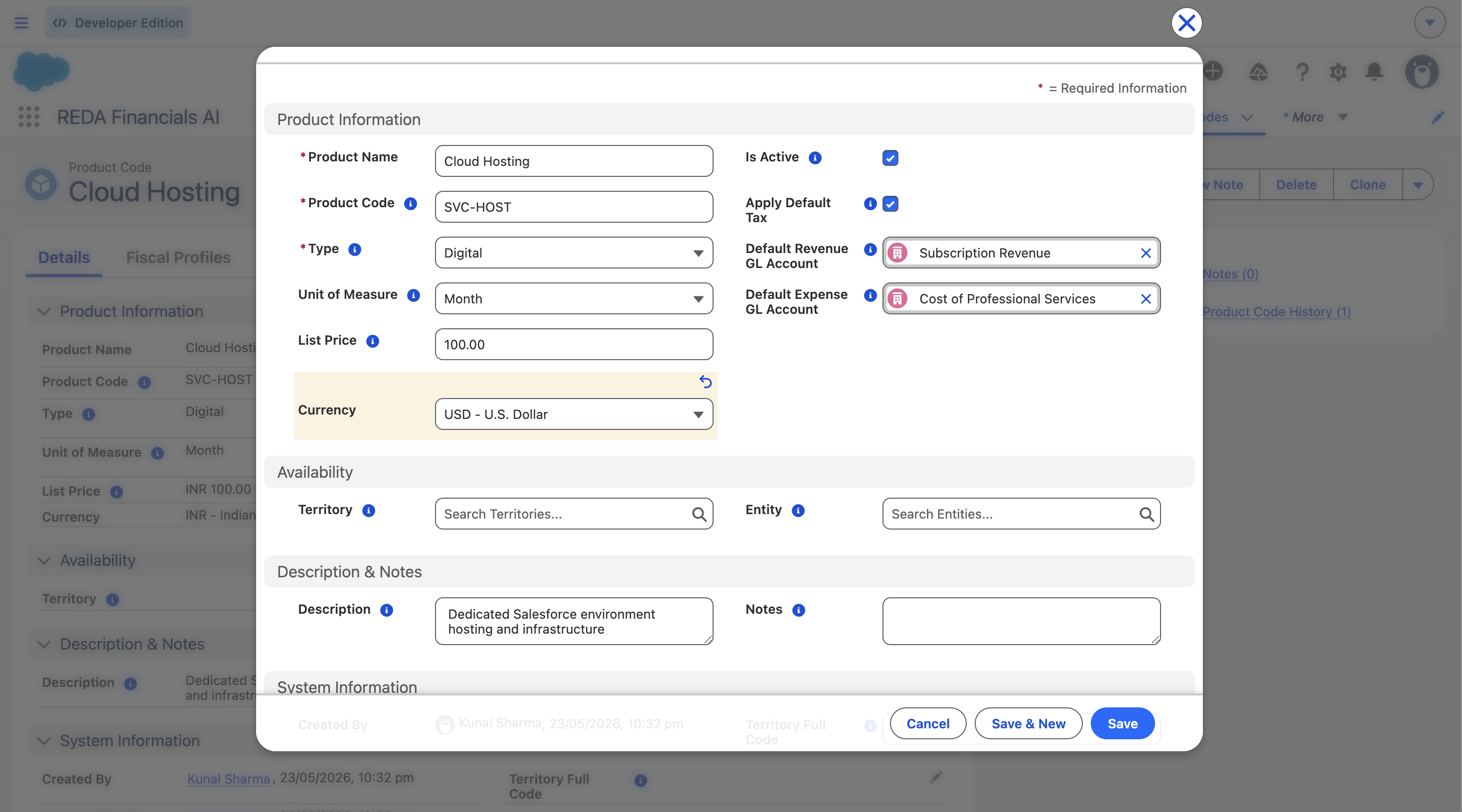
This walkthrough builds two products end to end — Management consulting (a service) and a Laptop (goods) — and explains every field as we go. The goal isn't just to fill the form: it's to understand why each field exists, because each one feeds a downstream document. And products aren't optional in REDA — every document line requires one — so a well-built catalogue is the backbone of clean postings. By the end you'll see both products auto-fill an invoice line with zero manual entry.
Access you'll need. Creating and editing product codes (including their default GL accounts and list price) requires the Accounting Admin v2 or Accounting Controller v2 permission set. The Accounts Payable v2, Accounts Receivable v2, and Read Only v2 sets can view product codes but not change them.
The fields, one by one
Identity
| Field | Required | What to enter & why it matters |
|---|---|---|
| Product Code | Yes | A unique SKU — SVC-CONSULT-01, HW-LAPTOP-01. It's the external identifier used by data imports and integrations, so keep it stable: don't change it once it's on transactions. |
| Product Name | Yes | The human-readable name shown in lookups — "Management Consulting", "Laptop — 14″ Business". |
| Description | No | Pre-fills the line description on invoices/POs. Write it the way you want it to read to a customer; the user can still override per line. |
| Type | Yes | Service for consulting, Goods for the laptop. Drives reporting groupings — and Asset marks capital items that create a Fixed Asset when the purchase order is received. |
| Unit of Measure | No | Hour for consulting, Each for the laptop. Pre-fills the line; 15 options (Each, Hour, Day, Month, Year, Kilogram, Box, Dozen…). Defaults to Each. |
Posting defaults
| Field | What to enter & why it matters |
|---|---|
| Default Revenue GL Account | The account credited when this product is sold. Consulting → 4100 Consulting Revenue; laptop → 4200 Product Revenue. Auto-fills the GL on a Sales Invoice line when no override is set. (Lookup is filtered to active GL accounts.) |
| Default Expense GL Account | The account debited when this product is purchased. Auto-fills the GL on a Purchase Invoice / PO line. Set it if you also buy the item; leave blank for sell-only products. |
| List Price | The standard unit price. Pre-fills the line's unit price (overridable). Must be zero or greater. In a multi-currency org the product carries a currency (defaulted from its Entity's functional currency when one is set) — and a document can only use products in its own currency, so price a product per currency you sell in. |
Tax
| Field | What to enter & why it matters |
|---|---|
| Apply Default Tax | Leave unchecked if you'll classify the product with a Fiscal Profile (recommended, and required for multi-country). Check it only for simple single-country setups where everything is standard-rated and you don't want per-product profiles. Unchecked + no profile = zero tax. |
Asset
| Field | What to enter & why it matters |
|---|---|
| Asset Type | Only for capital items (Type = Asset). Pick the Asset Type that defines depreciation method, life and GL. When a PO line for this product is received, the Fixed Asset inherits this classification. Leave blank for everything that isn't capitalised. Covered in Products & Assets. |
Availability (optional)
| Field | What to enter & why it matters |
|---|---|
| Entity | Set to restrict the product to one entity (an entity's exclusive bundle). Leave blank for cross-entity availability. |
| Territory | Set to restrict to a territory and its sub-territories — a LATAM-tagged product is available to all LATAM entities. Hierarchy-aware. Leave blank for global availability. |
| Territory Full Code | System-managed — stamped automatically from the Territory so administrators can build sharing rules on it. Don't edit it. |
Lifecycle
| Field | What to enter & why it matters |
|---|---|
| Is Active | On by default. Uncheck to retire a product — it disappears from lookups on new documents but stays on historical ones. De-activate, don't delete, to preserve the audit trail. |
| Notes | Internal only — never printed. Accounting guidance, special handling, compliance notes. |
Our two products, filled in
| Field | Management consulting | Laptop |
|---|---|---|
| Product Code | SVC-CONSULT-01 | HW-LAPTOP-01 |
| Type | Service | Goods |
| Unit of Measure | Hour | Each |
| Default Revenue GL | 4100 Consulting Revenue | 4200 Product Revenue |
| Default Expense GL | — (sell only) | 5200 Cost of Hardware |
| List Price | 150.00 / hour | 1,200.00 / each |
| Apply Default Tax | off (use profile) | off (use profile) |
| Is Active | ✔ | ✔ |
What the system checks
Two validation rules protect product data integrity:
- List Price ≥ 0 — a negative list price is rejected.
- Lookups must be active — Entity, Territory, Default Revenue GL and Default Expense GL must all reference active records. Replace any inactive reference before saving.
The payoff — drop it on a line
Open a Sales Invoice and add a line. Pick Management consulting, set quantity to 10 (hours). The line fills itself:
| Line field | Value | Source |
|---|---|---|
| Description | "Management consulting" | product Description |
| Unit Price | 150.00 | List Price |
| Quantity | 10 | you |
| GL Account | 4100 Consulting Revenue | Default Revenue GL |
| Line total | 1,500.00 | qty × price |
| Tax | 20% VAT = 300.00 | GB-STD-20 Fiscal Profile |
You typed a quantity. Everything else — account, price, description, tax — came from the product.
On a Purchase Invoice the same laptop would instead pull its Expense GL
(5200), because the line takes whichever side the document needs.
Where to go next
- Product Catalogue Overview — how products fit together.
- Product Fiscal Profiles — set tax and accounting per product.
- Products & Assets — link products to assets.
- Sales Invoice Lines — put a product on an invoice.
Frequently asked questions
No. Set the Revenue GL for things you sell, the Expense GL for things you buy, both for items you do both with. The line uses whichever matches the document.
Avoid it once the product is on transactions — the code is the integration/import key. Other fields (price, description, GLs) can be changed freely; changes only affect new lines.
The line GL is just a default copied from the product; you can override it on the line. To fix it for all future lines, change the product's Default Revenue/Expense GL.
Uncheck Is Active. It vanishes from lookups on new documents but stays intact on historical transactions. Don't delete it.
Was this article helpful?