
Understanding Purchase Invoices
A Purchase Invoice is the record of money your company owes to a supplier — a vendor's bill entered into REDA Financials. It is the heart of your Accounts Payable (AP) process: every vendor bill, every direct expense, and every credit a vendor gives you is captured as a Purchase Invoice. This article explains what a Purchase Invoice is, the three types you will work with, how one moves through its life from draft to paid, and how it keeps your books accurate along the way.
Access you'll need. Any REDA Financials permission set can view Purchase Invoices. Creating, editing, and posting them requires the Accounts Payable v2 permission set (AP clerks & managers) or Accounting Admin v2 (system administrators); Accounting Controller v2, Accounts Receivable v2, and Read Only v2 are view-only for invoices.
What a Purchase Invoice records
Every Purchase Invoice in REDA Financials answers five questions:
- Who do we owe? — the Vendor (the supplier's account).
- Which of our companies owes it? — the Entity. If your organization runs several legal companies in REDA Financials, each invoice belongs to exactly one of them. At Meridian Properties Group, for example, a janitorial bill for the New York tower belongs to Meridian Properties US LLC.
- What was it for? — the invoice lines, each pointing to a product or service and the expense account it should be recorded against.
- When? — the Invoice Date (the date on the vendor's bill) and the Due Date (when payment is expected — suggested automatically from the vendor's payment terms).
- How much? — the totals: subtotal, tax, any withholding tax, and the final Invoice Total Amount.
The three invoice types
When you create a Purchase Invoice, the first choice you make is the Invoice Type. It tells REDA Financials what kind of document this is and changes how the system behaves:
| Invoice Type | Use it for | What makes it different |
|---|---|---|
| Invoice | Regular vendor bills — goods or services you will pay for later. Can be matched against a Purchase Order. | Creates an open payable that you settle later with a payment. Appears in AP aging until paid. |
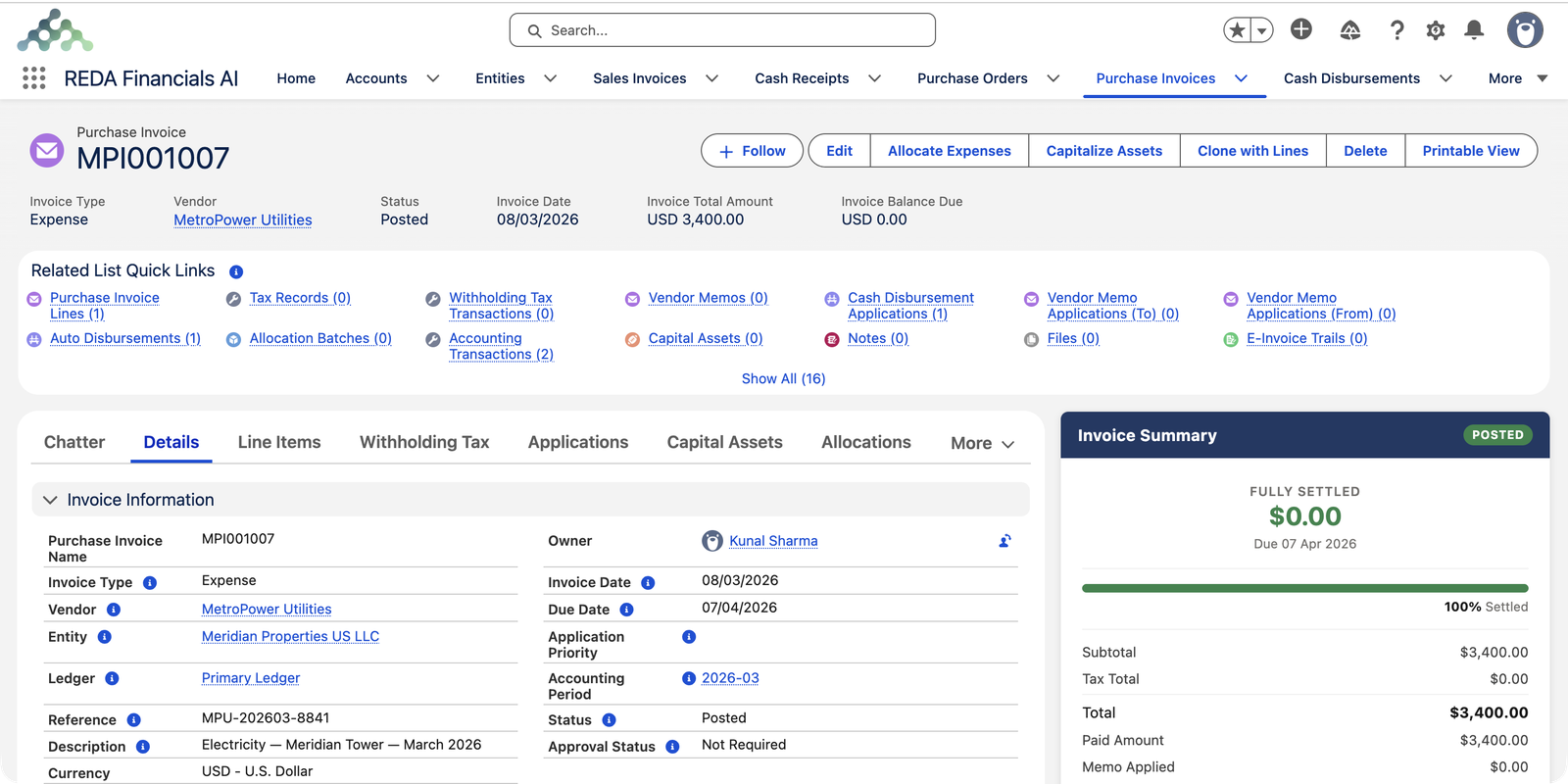
| Expense | Costs that are paid immediately or where no separate payment step is needed — utilities on auto-debit, card charges, small direct costs. | When you post it, REDA Financials records the expense and creates the payment for you in the same step. You must choose a payment method and bank account before posting, because the system generates the matching payment automatically. |
| Vendor Memo | A credit note received from a vendor — for returned goods, overcharges, or negotiated rebates. | Its total is negative: it reduces what you owe. A memo is never refunded in cash; you apply it against the vendor's other invoices until it is used up. |
A worked example from Meridian Properties US LLC, which manages a commercial tower in New York:
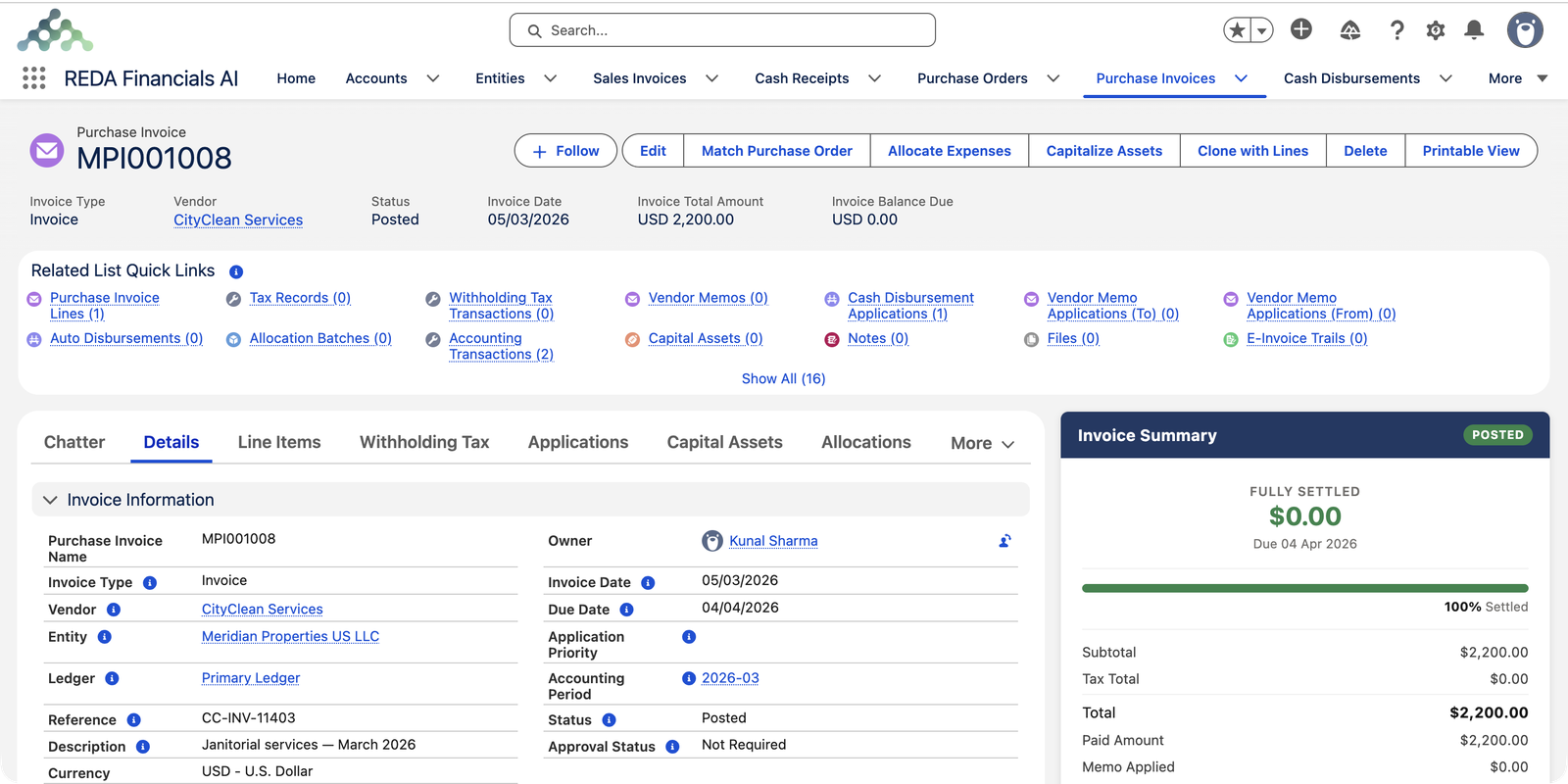
- The monthly janitorial bill from CityClean Services ($2,200) is entered as an Invoice — it is paid by check a few weeks later.
- The monthly electricity bill from MetroPower Utilities ($3,400) is on auto-debit, so it is entered as an Expense — posting it records the cost and the bank payment together.
- When Summit HVAC Inc overcharged $300 on a maintenance bill, they issued a credit note — entered as a Vendor Memo of −$300 and applied against their open invoice.
The invoice life cycle: Draft → Posted → Void
Every Purchase Invoice carries a Status that controls what you can do with it:
| Status | What it means | What you can do |
|---|---|---|
| Draft | A work in progress. Nothing has been recorded in your books yet. | Edit anything, add or remove lines, delete the invoice entirely. |
| Posted | The invoice is final and recorded in the general ledger. The amount you owe now appears in your financial statements. | Pay it, apply memos to it, generate a PDF. The document itself is locked — to change it, reopen it to Draft first. |
| Void | Cancelled. All of its accounting entries have been removed, but the document is kept for the audit trail. | View it. A void reason is always recorded, and a voided invoice cannot be edited or deleted. |
What happens when you post
Posting is the moment bookkeeping happens. When you change an invoice from Draft to Posted, REDA Financials automatically creates balanced accounting entries in your general ledger. For the CityClean janitorial bill above, posting records:
| Account | Debit | Credit |
|---|---|---|
| Other Operating Expenses (from the invoice line) | $2,200.00 | |
| Accounts Payable — Trade (what you now owe) | $2,200.00 |
Two things are worth noticing:
- The expense side comes from each invoice line's GL Account — so one invoice can spread costs across several accounts (say, building repairs on one line and materials on another).
- The liability side goes to your entity's Accounts Payable account automatically. You never book AP by hand. (An invoice can override the AP account for special cases using its AP Account field.)
You can inspect the exact entries any invoice created by opening its Accounting Transactions from the Related List Quick Links. If taxes apply to the lines, the tax amounts post to their own tax accounts as well — see PI Tax & Tax Profiles.
The approval gate
Separate from Status, each invoice has an Approval Status — Not Required, Pending, Approved, or Rejected. An invoice can only be posted when its approval status is Approved or Not Required. This lets your organization require sign-off on bills before they reach the books, without blocking day-to-day data entry.
How an invoice tracks its own payment
Once posted, a Purchase Invoice keeps score of everything that settles it:
- Invoice Balance Due — what is still unpaid, after every payment and memo credit is counted.
- Applications tab — shows each payment and each Vendor Memo applied to this invoice, with dates and amounts.
- Aging Bucket — the invoice classifies itself automatically as Paid, Current, 1-30, 31-60, 61-90 or 90+ days past due, and flags itself as overdue when the due date passes. These fields drive your AP aging reports in real time.
- Invoice Summary panel — the card on the right of the record page shows the settled percentage, amount paid, memo credits applied, and the outstanding balance at a glance.
At Meridian, the lobby-renovation bill from Apex Construction Co ($48,000) was part-paid with a $24,000 wire transfer — so its record shows an Invoice Balance Due of $24,000, a 50% settled progress bar, and the wire listed under Applications.
How an invoice meets the budget
A Purchase Invoice can be tied to a Budget — exactly as a Purchase Order can. The Budget field on the invoice points at one of your posted budgets (only posted budgets are eligible), and it decides which budget line the invoice's cost is measured against. There are two ways an invoice arrives at its budget, and both keep the numbers honest:
- A bill matched to a Purchase Order inherits the order's budget and its budget line. When the order posted, its value was set aside as a commitment; when the matched bill posts, that commitment converts into actual spending — the same money, counted once. It does not consume the budget a second time.
- A direct-expense bill — one with no order behind it — carries its own Budget. Each line finds its budget line by its expense account and dimensions (its Cost Center and any other tags your administrator tracks), and posting books the actual straight to that line.
So budget control flows from the order to the bill: the commitment rolls up when the order posts, the actual rolls up when the invoice posts, and each lands on the correct budget line. At Meridian, the Sterling Facility Services facade-clean order committed its budget when it was raised; each visit's matched bill then turned that commitment into real spending as it was invoiced. A direct utility bill with no order — Meridian's MetroPower electricity — instead matches its own budget line and books the actual itself.
While the invoice is a Draft, this stays flexible: change a line's expense account or a dimension and the invoice re-finds the right budget line; change the header Budget and its lines re-resolve against the new one. Once you post, the Budget locks — the actual is already rolled up — so to change it you reopen the invoice to Draft (or void it) first. The mechanics of the check itself live in PO Budget Analysis.
Finding your way around the record page
Open any Purchase Invoice and you'll find its full story organized into tabs:
| Tab | What you'll find there |
|---|---|
| Details | All header fields — vendor, entity, dates, accounting period, totals, status. |
| Line Items | Every line on the invoice with its product, GL account, quantity, price, discount and tax. |
| Withholding Tax | Any tax your company must withhold from the vendor's payment — only relevant where withholding applies. See WHT on Purchase Invoices. |
| Applications | Payments and vendor memos applied against this invoice. |
| Capital Assets | Assets created or capitalized from this invoice's lines. See Asset Capitalization. |
| Allocations | Expense allocations, if this invoice's cost is shared across entities. See Understanding Expense Allocation. |
| Audit Trail | Who changed what, and when — a complete history for compliance. |
The action buttons at the top adapt to the invoice's type and status — for example, Match Purchase Order appears on Invoice-type documents, and Allocate Expenses becomes available once the invoice is posted.
Automatic numbering
Invoice names like MPI001008 are assigned automatically from your entity's Document Sequences — each entity numbers its own purchase invoices independently, with a prefix and running number your administrator configures. The vendor's own invoice number belongs in the Reference field, so you can always find a bill by either number.
Who can work with Purchase Invoices
Access is controlled by the permission sets your administrator assigns:
- Accounts Payable and Accounting Admin can create, post, and void purchase invoices.
- Accounting Controller and Read Only can view them but change nothing — the controller reviews the subledgers and works at the journal level.
- Accounts Receivable users work on the customer side and do not manage AP documents.
See Permission Set Assignment for the full picture.
Where to go next
- Creating a Purchase Invoice — the step-by-step walkthrough.
- PI Tax & Tax Profiles — how line amounts and taxes are calculated.
- Posting & Voiding a PI — the lifecycle in depth.
- Understanding Cash Disbursements — how invoices get paid.
- Understanding Vendor Memos — handling credits from vendors.
- PO-to-PI Line Matching — three-way matching against purchase orders.
Frequently asked questions
Timing of payment. An Invoice creates an open payable you settle later with a separate payment. An Expense records the cost and its payment in one step — when you post it, REDA Financials automatically creates the matching bank payment, which is why an Expense invoice asks for a payment method and bank account before it will post.
Posted invoices are locked because their amounts are already in your general ledger and financial statements. To change one, reopen it to Draft first (the system removes its accounting entries), make your edits, and post again — fresh entries are created automatically. Nothing is lost: the Audit Trail records every step.
All of its accounting entries are removed from the ledger, any payment or memo applications are unwound, and the document is preserved with your void reason and void date. Voided invoices cannot be edited or deleted — they remain as a permanent audit record.
The most common reason: a Vendor Memo's total must be negative, because it reduces what you owe. On each memo line, tick the Credit Line checkbox — quantity and unit price stay positive, and the checkbox flips the line to a credit. If the total is still positive, the system will not post the memo.
Every invoice belongs to an accounting period (a month in your fiscal calendar), which REDA Financials picks automatically from the Invoice Date. If you change the period manually, the invoice date must fall inside that period's start and end dates — otherwise your monthly reports would show the cost in the wrong month.
Only while it is a Draft. Once an invoice has been posted (even if later voided), deletion is blocked to protect your audit trail. Use Void for invoices that should never have been recorded.
Was this article helpful?