
Asset Types & Categories
Every laptop Meridian ever buys should depreciate the same way — same method, same life, same accounts. Nobody should re-decide that per purchase. An Asset Type is where the decision is made once: the depreciation defaults and GL accounts for a whole class of assets. Create a handful of types up front, and every asset thereafter inherits good behavior.
Access you'll need. Setting up asset categories requires the Accounting Admin v2 or Accounting Controller v2 permission set. The Accounts Payable v2, Accounts Receivable v2, and Read Only v2 sets can view them but not change them.
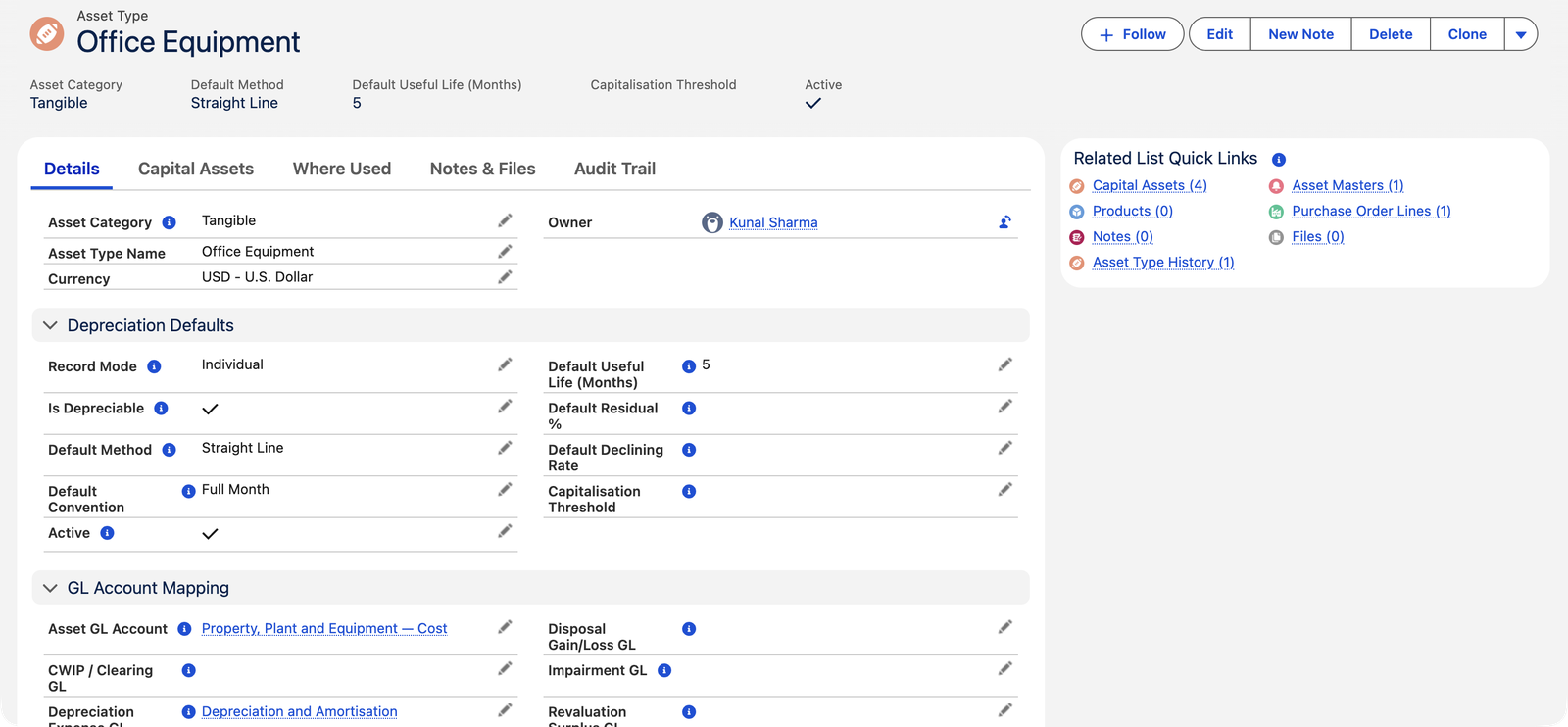
The defining choices
| Field | The decision |
|---|---|
| Asset Category | Tangible (buildings, vehicles, equipment — created from PO receipts) or Intangible (software, licenses, patents — capitalized from purchase invoices). The category steers which creation path the type participates in, and whether charges are called depreciation or amortization. |
| Record Mode | Individual: one Capital Asset per physical unit (four monitors = four assets, each disposable on its own). Bulk: one asset per receipt with a quantity (a hundred chairs as one lot). Individual mode insists on whole-number quantities. |
| Is Depreciable | Uncheck for the classic exception: land. Non-depreciable assets get no schedule at activation. |
Depreciation defaults
Default Method (Straight Line for most types), Default Useful Life — in months (60 for office equipment, 468 for Meridian's buildings), Default Convention (first-month proration policy), Default Residual % (salvage value as a percentage of cost) and Default Declining Rate (for reducing-balance methods). These are defaults, applied at activation to whatever the individual asset left blank — any asset can override any of them before it activates.
Every field, at a glance
| Field | What it decides |
|---|---|
| Asset Type Name | The label everyone picks from — "Office Equipment", "Buildings", "Software". |
| Asset Category (required) | Tangible (the default) or Intangible. In the field's own words: "Tangible: physical assets (buildings, vehicles, equipment) — capitalized via PO receipt. Intangible: non-physical (software, licenses, patents) — capitalized via the PI Amortize action." |
| Record Mode | Individual (the default) — one Capital Asset per physical unit, whole-number quantities of 1. Bulk — one asset per receive event, decimal quantity allowed. |
| Is Depreciable | Checked for almost everything; unchecked for land and other non-wasting assets — no schedule generates at activation. |
| Is Active | Whether the type is available for new assets. Deactivation is blocked while any non-disposed asset uses the type. |
| Capitalisation Threshold | Your policy's price floor for capitalizing (note the British spelling on the field). The system checks it's zero or positive — but does not itself refuse to create assets below it; enforcement is your purchasing process. |
| Default Method | The depreciation method new assets inherit — defaults to Straight Line. See Depreciation Rules & Methods. |
| Default Useful Life (Months) | How long the class serves, in months. Must be greater than zero. |
| Default Convention | The first-month proration policy — defaults to Pro-rata (Daily). See Depreciation Conventions. |
| Default Residual % | Expected salvage value as a percentage of cost. At activation, an asset with a blank (or zero) Residual Value gets Acquisition Cost × this percentage. |
| Default Declining Rate | The annual rate reducing-balance methods use — only relevant for Declining Balance and Written Down Value (Block) types. |
When the defaults actually land
The type's defaults are copied onto an asset once — at activation — and only into fields the asset left blank: Method, Useful Life, Convention, Declining Rate, and Residual Value (computed from the percentage when the asset's residual is blank or zero). That's why Meridian's accountant activated Office Equipment - 1 without touching a single depreciation field and still got a clean straight-line, 60-month schedule: the type filled everything. Fill a field on the asset before activating and your value wins; change a default afterwards and existing assets keep what they were activated with.
The GL account set
Each lifecycle event posts through the type's accounts:
- Asset GL Account — the balance-sheet home of capitalized cost.
- Accumulated Depreciation GL — the contra account that grows with every charge.
- Depreciation Expense GL — the P&L side of the monthly charge.
- Disposal Gain/Loss GL — where the difference lands when the asset leaves.
- Impairment GL / Revaluation Surplus GL — the write-down P&L account and the equity account for upward revaluations.
Which lifecycle event touches which account
The reward for a complete GL set is that every event in every asset's life posts itself, always to the same accounts. This is the full map:
| Lifecycle event | Debit | Credit |
|---|---|---|
| Capitalization (activation) | Asset GL Account | The account(s) the purchase originally hit |
| Monthly depreciation / amortization | Depreciation Expense GL | Accumulated Depreciation GL |
| Impairment | Impairment GL Account | Accumulated Depreciation GL |
| Revaluation — upward | Asset GL Account | Impairment GL Account (reversing prior losses first), then Revaluation Surplus GL |
| Revaluation — downward | Revaluation Surplus GL (up to any prior surplus), then Impairment GL Account | Asset GL Account |
| Disposal | Accumulated Depreciation GL + Disposal Gain/Loss GL | Asset GL Account |
The rules that keep types clean
| The message | What it means / what to do |
|---|---|
| "Cannot deactivate an Asset Type with active fixed assets." | Any non-disposed asset — Under Construction, Active, Impaired, even Fully Depreciated — keeps its type alive. Dispose the assets first, or leave the type active and simply stop assigning it. |
| "Default Useful Life must be greater than zero." | A life of zero months would mean a schedule with nothing to spread — give the class its honest life in months. |
| "Capitalization Threshold must be zero or positive." | The threshold documents a policy floor; a negative floor is meaningless. (Remember: the system records the threshold but doesn't enforce expensing below it — your team's process does.) |
Common mistakes to avoid
| Mistake | Why it hurts | Do this instead |
|---|---|---|
| Leaving the Disposal, Impairment, or Revaluation Surplus GLs blank "until we need them" | A disposal is refused mid-action; an impairment can change the asset's status without posting the write-down — a silent gap in the books | Fill the complete GL set the day the type is created |
| Expecting the Capitalisation Threshold to auto-expense small purchases | It doesn't — assets below the floor are still created if the PO line is flagged, and your policy quietly leaks | Treat the threshold as documentation; enforce it where the flagging happens (purchasing / receiving review) |
| Choosing Bulk mode for units you may retire one at a time | Bulk lots dispose whole — there is no splitting a lot later | When in doubt, Individual mode; reserve Bulk for genuinely pooled populations |
| Editing a default and expecting live assets to follow | Nothing happens to them — defaults copy once, at activation | Adjust the individual assets deliberately (prospectively), then let the new default serve future assets |
| Creating near-duplicate types | Register reports fragment; the same laptop depreciates two ways depending on who filed it | One type per genuinely distinct treatment — if two types would carry identical settings, merge the idea before creating them |
Where to go next
- Asset Masters (Templates) — the register layer above assets.
- Depreciation Rules & Methods — what those defaults mean.
- Creating Assets from POs — where the type first bites.
Frequently asked questions
As many as you have genuinely different depreciation treatments — typically five to ten (buildings, improvements, equipment, vehicles, computers, software…). If two types would carry identical settings, they're one type.
No. Defaults are copied to an asset once, at activation. Existing assets keep their settings — which is what accounting requires; changing a live asset's life is a deliberate per-asset decision, applied prospectively.
Will you ever need to dispose of, impair, or track one unit separately? Individual. Is the population homogeneous and managed as a pool (chairs, small tools)? Bulk. When in doubt, Individual — you can't split a bulk lot later.
Yes — every one of them. Fill Method, Useful Life, Convention, Declining Rate or Residual Value on the asset before activating, and your values stand; only blanks are filled from the type. That's the design: the type is the class policy, the asset carries the exceptions.
It's on the form but unused by the current posting flow — a purchase's cost stays in the account it originally hit until activation reclasses it to the Asset GL Account. Leave it blank; nothing depends on it today.
"Cannot deactivate an Asset Type with active fixed assets." — and "active" here means any non-disposed asset, including Fully Depreciated ones still on the register. The type carries the GL accounts those assets will need at disposal, so it must stay alive as long as they do.
Was this article helpful?