
PDF Template Configuration
A PDF Template is the styling contract for one document type: its colors, fonts, page setup, standing text, and which sections appear. Configure it once per entity (or per region) and every generated document honors it — no per-document formatting, ever. Here's Meridian's invoice template and every dial on it.
Access you'll need. Setting up templates requires the Accounting Admin v2 or Accounting Controller v2 permission set. The Accounts Payable v2, Accounts Receivable v2, and Read Only v2 sets can view templates but not change them.
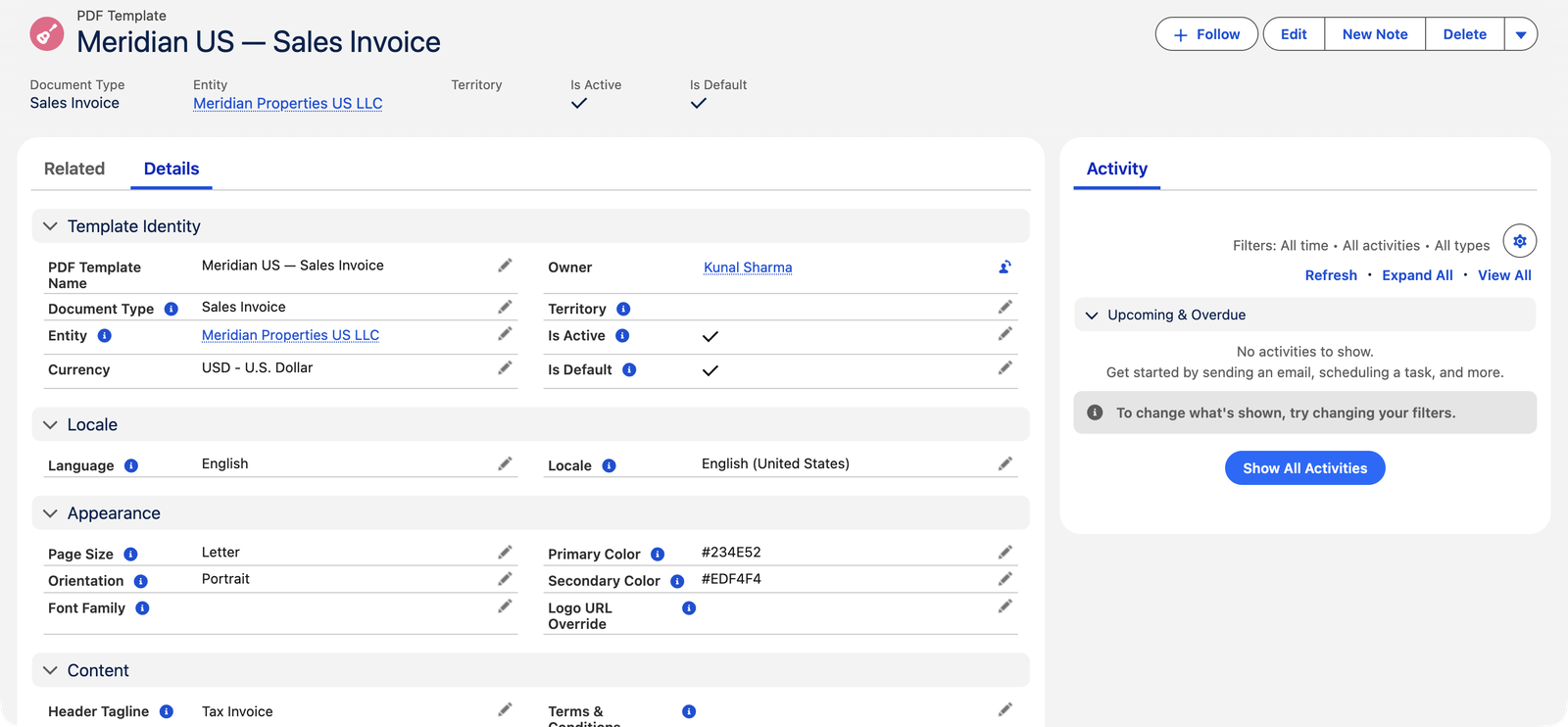
Identity: type and scope
- Document Type (one of six): Sales Invoice, Credit Memo, Cash Receipt, Cash Disbursement, Purchase Order, Statement. One template governs one type — credit memos deliberately get their own, so a "CREDIT NOTE" tagline never leaks onto invoices.
- Scope — Entity or Territory, exactly one: "Set exactly one of Entity or Territory: Entity for an entity-specific template, Territory for a regional fallback template. Leave the other blank." Entity templates dress one company; territory templates catch every entity in a region that lacks its own. How they compete is the next article: Template Hierarchy.
- Is Active / Is Default: inactive templates are ignored; Default breaks ties when several templates match.
- Language / Locale: tag templates by audience language and regional formats — generation picks the template matching the customer's language settings, which is how one entity serves French and English tenants distinct paper.
The identity fields at a glance:
| Field | Required? | What it does |
|---|---|---|
| PDF Template Name | Yes | How the template appears in lists and on the generation screen's Template row — name it so a colleague knows its job (Meridian US — Sales Invoice). |
| Document Type | Yes | Which of the six document kinds this template dresses. The list is fixed — Sales Invoice, Credit Memo, Cash Receipt, Cash Disbursement, Purchase Order, Statement — and one template governs exactly one of them. |
| Entity / Territory | Exactly one | Who the template serves: one company, or every entity in a region as a fallback. Filling both (or neither) is refused at save. |
| Is Active | Starts checked | Unchecked templates are skipped everywhere — even a document that names one directly falls through to the entity or territory template instead. |
| Is Default | No | The tiebreaker when several templates match. Nothing stops you marking two as Default — the older one wins — so keep exactly one per entity and type. |
| Language / Locale | No | Audience tags. Locale also drives date formats on the paper, and an Arabic locale (ar_AE or ar_SA) flips the whole document right-to-left. Those two are the only right-to-left options the picklist offers. |
Appearance
| Dial | Effect |
|---|---|
| Primary Color | Headings, borders, the line-table header (hex, e.g. Meridian's #234E52) |
| Secondary Color | Shaded panels and the totals block |
| Font Family | A web-safe stack (Helvetica, Arial…) — PDF rendering doesn't load custom web fonts |
| Page Size / Orientation | Letter, A4, or Legal · Portrait or Landscape (landscape suits documents with many extra detail fields) |
| Logo URL Override | A template-specific logo; blank means the entity's logo (see Entity Branding) |
Every dial has a sensible built-in value, so a half-filled template still prints cleanly: leave the colors blank and the document wears REDA's navy (#1f3863) with a light shaded panel; leave the font blank and it uses Helvetica/Arial; page setup defaults to Letter, portrait. Enter colors as a hex code — # followed by six characters, like Meridian's #234E52.
Standing content
- Header Tagline — the subtitle under your company name ("Tax Invoice" where jurisdictions require the words).
- Payment Details — the how-to-pay panel; important enough for its own article: Payment Details on PDFs.
- Terms & Conditions — rich text printed after the totals; omitted entirely when blank.
- Footer Text — repeated at the bottom of every page (registered address, company number); page numbers print automatically.
Both rich-text blocks are roomy — Payment Details holds up to 8,000 characters and Terms & Conditions up to 32,000 — enough for full remittance instructions and real contract boilerplate, not just a line or two.
Meridian's template on real paper
What the configuration in the screenshot above produces: when Meridian generates invoice MSI001021 — NovaTech's $9,800 invoice — the PDF opens with the entity's letterhead, the words Tax Invoice beneath the company name (the Header Tagline), and INVOICE as the document title. The headings, borders, and the line-table header row take the Primary Color #234E52; the totals block sits on the Secondary Color #EDF4F4; page size is Letter, portrait. Change any dial and the next generation of MSI001021 — a new version of the same MSI001021.pdf file — wears the change; the numbers on the invoice never move. That division is the whole idea: the template owns how paper looks, never what it says the customer owes.
Show/hide toggles
A row of checkboxes controls sections: Show Tagline · Bill To · Ship To · Tax Column · Discount Row · Tax Breakdown · Payment Details · Terms · Notes · Tax Identifiers — unchecking hides that element. Most stay on; the ones organizations actually vary are Tax Breakdown (off for simple domestic receipts) and Tax Identifiers (off where registration numbers don't belong on the paper).
Three more checkboxes exist on the record and are easy to misread, because they don't apply to the document you are probably looking at:
| Checkbox | Where it actually applies |
|---|---|
| Show Footer Band | Statement templates only. The invoice, memo, receipt, disbursement and order renderer never reads it — their footer comes from Footer Text. |
| Show Generated Stamp | Statement templates only, where it prints the generated-on stamp. |
| Show GL Column | Nothing, today. On transactional documents the GL account already prints in front of each line's description, and unchecking this does not remove it. Treat the box as having no effect until a release says otherwise. |
The messages you may meet
Templates and the documents that use them are guarded by a few exact-worded rules:
| The message | What it means / what to do |
|---|---|
| "Set exactly one of Entity or Territory: Entity for an entity-specific template, Territory for a regional fallback template. Leave the other blank." | You filled both scope fields, or neither. Decide who this template serves and clear the other field. |
| "Selected template must match Document Type "Sales Invoice" and be active." | Shown when picking a per-document override on an invoice: only active, invoice-type templates qualify. Cash disbursements and purchase orders enforce the same pattern with their own type named. |
| "PDF Template must be of type "Cash Receipt"." | The receipt's version of the same guard — a receipt can only carry a receipt-type template, however the record is created or updated. |
Common mistakes to avoid
| Mistake | Why it hurts | Do this instead |
|---|---|---|
| Expecting one template to dress every document type | A template governs exactly one type — your receipts and purchase orders quietly fall back to the built-in default while you think they're branded | Create one template per document type you actually issue (Meridian: Sales Invoice, Credit Memo, Cash Receipt to start) |
| Marking several templates as Is Default for the same entity and type | Nothing enforces uniqueness — the oldest one silently wins, and nobody remembers why | Keep exactly one Default per entity/type; use Language/Locale tags, not extra Defaults, for variants |
| Deactivating a template to "pause" branded output | Generation doesn't stop — it falls through to the territory template or the built-in default, so paper changes appearance without warning | Edit the active template instead; deactivate only when a replacement is in place |
| Putting this month's promotion or notice in Terms & Conditions | Standing text prints on every document from this template until someone remembers to remove it | Keep standing blocks standing; document-specific wording belongs on the document itself |
| Redesigning without regenerating a proof | The first person to see a broken layout is a customer | Tweak → regenerate one posted document → eyeball the preview → then let auto-generation carry it |
Who configures templates
Accounting Admin and Accounting Controller create and edit templates; everyone else reads. Note this is friendlier to controllers than transaction objects — presentation is a books-owner concern.
Where to go next
- Template Hierarchy — which template wins when several could apply.
- Payment Details on PDFs — the panel that gets you paid.
- Entity-Specific Branding — the letterhead layer beneath templates.
Frequently asked questions
No — with no template, generation still produces a clean, complete document using your entity's branding and sensible defaults (navy accents, Letter portrait). Templates add brand colors, taglines, payment instructions, and terms.
Yes — each document has a PDF Template field for exactly that override, changeable even after posting (it alters presentation, never numbers). It accepts only active templates of the matching document type.
Yes. Set the template's Locale to ar_AE or ar_SA and the document renders right-to-left automatically; the same locale drives date formats throughout. The locale is resolved template → customer Account → running user, so an Account carrying an Arabic locale gets right-to-left paper even from a template that names none. On invoices, memos, receipts, disbursements and orders, direction comes from the locale, and Arabic is the only right-to-left locale the picklists offer. Statements are the exception: that renderer takes direction from the language instead and switches for Arabic, Hebrew, Persian or Urdu — so a Hebrew statement is right-to-left even though no Hebrew locale exists to pick.
Start with one per document type you send, on the entity that sends it — for most, that's Sales Invoice plus Credit Memo, adding Cash Receipt, Cash Disbursement, Purchase Order, and Statement as those documents start leaving the building. Regional groups add territory-scoped fallbacks; language variants add Language/Locale-tagged copies.
No — the Document Type list is fixed, because each value is wired to a real layout in the rendering engine. Received documents (purchase invoices, vendor memos) are deliberately absent: REDA Financials prints the paper you issue, not the paper you receive.
It dresses the Statement of Account — the PDF exported from the Account Ledger screen. A Statement template gives that export your colors, footer, and terms; without one, the statement uses entity branding and the built-in defaults, like any other document.
Nothing, until each is regenerated — files already produced are historical records. The next generation of any document using the template picks up the change; regenerating adds a new version of the same file, preserving what was sent before.
Was this article helpful?