
Understanding Purchase Orders
A Purchase Order (PO) is your company's formal promise to buy: we order these items, at these prices, from this vendor. It comes before any bill or payment — and that's exactly its power. The PO commits budget before money is spent, gives receiving a checklist for what should arrive, and gives Accounts Payable a benchmark to check every vendor bill against. This article explains the PO life cycle in REDA Financials and how orders connect to budgets, goods, assets and invoices.
Access you'll need. Any REDA Financials permission set can view purchase orders; creating, editing, and posting them requires the Accounts Payable v2 permission set (AP clerks & managers) or Accounting Admin v2 (system administrators). The Accounting Controller v2, Accounts Receivable v2, and Read Only v2 sets can view but not change them.
A worked example: the lobby renovation
Meridian Properties US LLC renovated the lobby of its New York tower. The property team raised one PO to Apex Construction Co with two lines: construction works ($48,000) and four pieces of reception equipment ($5,000 each). Total commitment: $68,000.
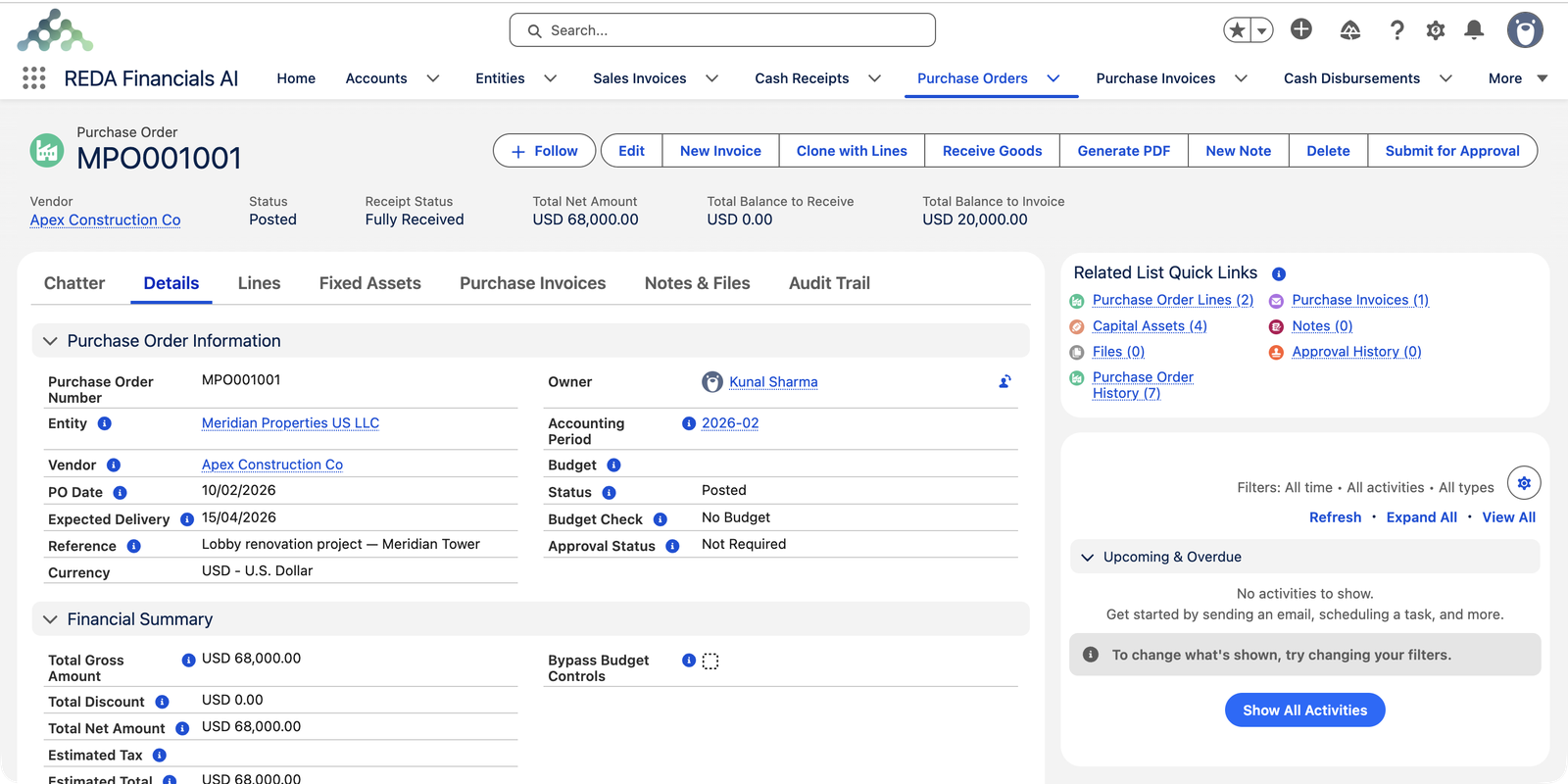
The PO life cycle
| Stage | What happens |
|---|---|
| 1. Draft | You build the order: vendor, expected delivery, lines with quantities and prices. Everything is editable; nothing is committed. |
| 2. Posted | The order is issued. Lines lock (no more edits without reopening), budget is committed (if the PO is linked to one), and the PO can be sent to the vendor as a PDF. Approval works like invoices: posting requires Approval Status Approved or Not Required — the Submit for Approval button starts your organization's sign-off. |
| 3. Receiving | Goods or services arrive — maybe all at once, maybe in parts. Each receipt updates the Receipt Status: Not Received → Partially Received → Fully Received. |
| 4. Invoicing | Vendor bills arrive and are matched to PO lines — never for more than what was received and not yet billed. |
| 5. Void (if needed) | Cancelling a posted PO releases its budget commitment and records a void reason permanently. |
The running totals that tell the story
A posted PO tracks itself with three numbers you can read at a glance in the highlights:
- Total Net Amount — the commitment: everything ordered, after discounts. ($68,000 here.)
- Total Balance to Receive — what hasn't arrived yet. ($0.00 — Apex delivered everything.)
- Total Balance to Invoice — what's arrived but hasn't been billed. ($20,000 — Apex has only invoiced the construction so far.)
When both balances reach zero, the PO's story is complete: everything ordered arrived, and everything that arrived was billed.
Budget control: spending is checked before it happens
Link a PO to a Budget and REDA Financials enforces it at posting time. Each PO line consumes available budget on its matching budget line; if a line would push spending over what's available, posting is blocked — the Budget Check field tells you where you stand (the example above shows No Budget because this PO wasn't budget-linked). Administrators can override a block for exceptional cases with Bypass Budget Controls.
The clever part is what happens later: when a matched invoice posts, the committed amount converts into actual spending — the budget's available balance doesn't double-count. The full mechanics, including the analysis pop-up, are in PO Budget Analysis.
Receiving — and where assets come from
Click Receive Goods on a posted PO and record how much of each line arrived. Two things happen:
- The line's received quantity and the PO's Receipt Status update — partial deliveries are perfectly normal.
- Lines flagged Create Asset generate Capital Asset records automatically — one per unit received — in Under Construction status. That's how Meridian's four reception-equipment assets came to exist (visible under the PO's Fixed Assets tab), ready to be capitalized once the final bill posts.
Full walkthrough: Receiving PO Lines (Assets).
Invoice matching: the three-way match
When Apex Construction's $48,000 bill arrived, Meridian's AP accountant matched it to the PO's construction line. REDA Financials checks every match:
- Quantity: you can't invoice more than has been received and not yet billed. A bill for goods that never arrived is stopped cold.
- Price: the invoice line's unit price must match the PO line's.
- Tolerance: your entity can allow a small over-invoice percentage (the PO Over-Invoice Tolerance %) for rounding and freight realities — anything beyond it is blocked.
Start from either side: the PO's New Invoice button creates a pre-filled bill (see Creating PI from a PO), or match an existing bill with its Match Purchase Order action (see PO-to-PI Line Matching).
One thing a PO does not do
Where to go next
- Creating a Purchase Order — build the lobby-renovation PO step by step.
- PO Lines & Products — quantities, prices, GL coding and the Create Asset flag.
- Receiving PO Lines (Assets) — record deliveries, create assets.
- PO Budget Analysis — the budget check in depth.
- Creating PI from a PO — turn the order into a bill in one click.
Frequently asked questions
A posted PO is an issued commitment — the vendor may already be acting on it, and budget has been committed against it. To change the order, reopen it to Draft, edit, and post again (approval may be required again, per your organization's rules).
You're billing for more than has been received and not yet invoiced on that line. Check two things: has receiving actually been recorded (Receive Goods)? And has part of this line already been billed on an earlier invoice? The PO's Balance to Invoice shows exactly what's still billable.
No — the Budget link is optional (the example PO shows Budget Check: No Budget). But when a budget is linked, its controls apply automatically, and your budget reports gain committed-versus-actual visibility. Many organizations require budgets on capital projects and leave routine operational POs unlinked.
The Receive Goods window won't let you record more than was ordered — it stops with a message naming the line where received exceeds ordered. Resolve genuine over-deliveries with the vendor first (return the excess, or amend the order to match reality), then record the receipt. Invoice matching protects payment the same way: bills are checked against received-not-billed quantities and your entity's tolerance.
Yes — New Invoice on the PO creates a Purchase Invoice pre-filled with the vendor and the billable lines, already matched. You review, adjust to what the vendor actually billed, and post. See Creating PI from a PO.
Was this article helpful?