
Creating PI from a PO
When the vendor's bill matches an order you already raised, don't retype it — generate it. The New Invoice button on a posted Purchase Order builds the bill from the order itself: vendor, reference, lines, prices, and the match, all pre-filled. You review against the paper bill and post.
Access you'll need. Creating, editing, and posting these requires the Accounts Payable v2 permission set (AP clerks & managers) or Accounting Admin v2 (system administrators). The Accounting Controller v2, Accounts Receivable v2, and Read Only v2 sets can view but not create or post.
The flow
On the posted PO, click New Invoice
The familiar invoice form opens — already filled from the order:
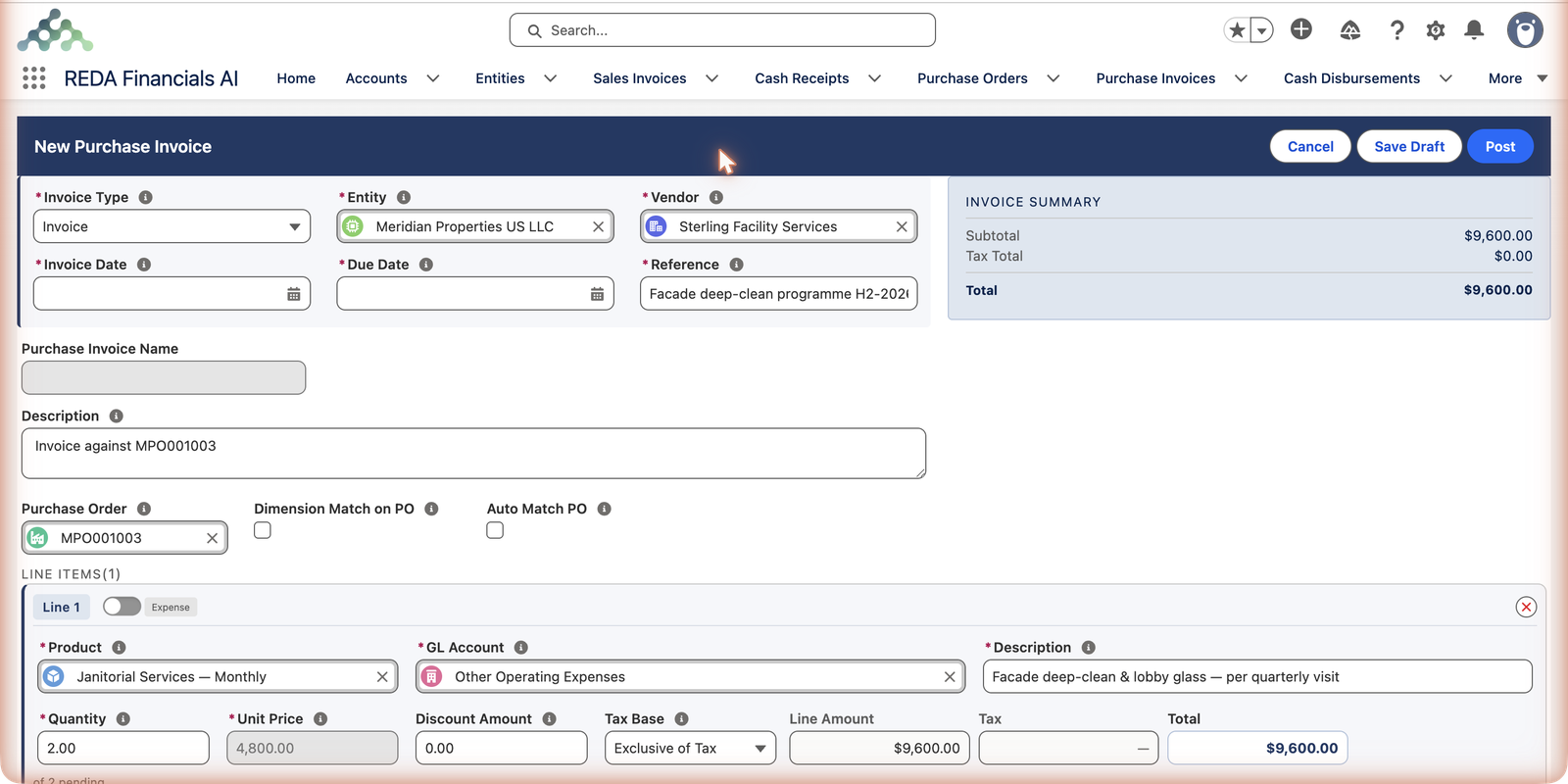
Trim to what the vendor actually billed
Vendors rarely bill an order all at once. Adjust each line's Quantity to match the bill in your hand — matching allows at most what's been received and not yet invoiced. Sterling completed one visit of two, so its first bill is quantity 1 ($4,800), not 2. Remove lines the bill doesn't include at all.
Enter the bill's dates and reference details, then post
Set the vendor's invoice date, confirm the due date, and replace the pre-filled Reference with the vendor's own invoice number if it differs. Post — the bill books like any invoice, and the order's Balance to Invoice falls by what you billed.
What the generator fills in — and what it leaves to you
| Field | Where it comes from | Your job |
|---|---|---|
| Entity / Vendor | The order — same company, same supplier, always | Nothing; these cannot sensibly differ from the order |
| Purchase Order | Set to the order you started from — this link is the match | Leave it alone |
| Reference / Description | Copied from the order | Replace the Reference with the vendor's own invoice number |
| Lines | Every billable order line: product, GL account, description, quantity | Trim quantities to the paper bill; remove lines it doesn't include |
| Unit Price | The order's agreed price — greyed out | Nothing; a different billed price is a dispute or an order amendment, not an edit here |
| Invoice Date / Due Date | Blank — only the paper bill knows them | Enter both; the invoice date drives the accounting period, and the due date can never be before it |
The checks that still run
Generating the bill doesn't relax anything — the same three-way match rules apply when it posts:
- Quantity ceiling — each line can bill at most what's been received and not yet invoiced on its order line. Exceed it and posting stops with: "Invoice quantity exceeds the remaining quantity on the Purchase Order Line."
- Price agreement — the locked unit price keeps the bill at the order's price; your entity's PO Over-Invoice Tolerance % absorbs only minor overruns.
- Same currency — order and bill must agree.
- Budget follows — the generated bill inherits the order's Budget, and each matched line its order line's budget line, so posting converts budget committed to actual without double-counting.
Common mistakes to avoid
| Mistake | Why it hurts | Do this instead |
|---|---|---|
| Posting the pre-filled quantities without reading the paper bill | You book the whole order when the vendor billed one visit — the payable overstates and the next real bill blocks | Trim every line to what the bill in your hand actually says |
| Keeping the copied Reference | The invoice carries the order's name instead of the vendor's invoice number — duplicate checking and vendor queries both suffer | Replace it with the number printed on the vendor's bill |
| Generating the bill before receiving is recorded | The post blocks on the quantity ceiling and the bill sits in limbo | Record the delivery on the order first, then generate |
| Adding order-related costs as unmatched extra lines | They skip every matching check and the order's balances never close honestly | Keep only true incidentals (like freight) unmatched; everything ordered stays matched |
Who can generate bills from orders
Accounts Payable and Accounting Admin — the permission sets that create Purchase Invoices generally. Accounting Controller and Read Only can view both documents and the link between them, but cannot create or post.
Which route when?
| Route | Best for |
|---|---|
| New Invoice (this article) | You start from the order — cleanest when bills follow orders faithfully. |
| Match Purchase Order on an existing bill | The bill was entered first (or arrived by OCR) and needs connecting. |
| Auto Match PO checkbox | High volume; the system finds and matches the order itself. |
Where to go next
- PO-to-PI Line Matching — the rules behind the match.
- Receiving PO Lines (Assets) — the prerequisite step.
- Posting & Voiding a PI — after the bill exists.
Frequently asked questions
Because it's the agreed order price — that's the whole point of matching. If the vendor genuinely billed a different price, either dispute the bill or consciously amend the order (reopen, change, re-approve, re-post) before billing.
The generator offers the order's billable quantities; you trim to the bill. If posting then complains the quantity exceeds what's remaining, check that receiving is up to date — you can only bill what's been received.
Yes — generated invoices are editable, and an added line simply isn't matched to any order line. Order-related costs stay matched; incidentals ride along unmatched on the same bill.
That's the normal pattern — click New Invoice again for each partial bill. Every generated invoice takes another slice of the order's billable balance, and the PO's Total Invoiced and Balance to Invoice keep the running score. Sterling's two-visit programme becomes two invoices of $4,800.
Its Total Invoiced rises and Balance to Invoice falls by the billed amount, the invoice appears in the order's related lists, and any budget commitment behind the matched lines converts to actual spending.
Yes — it is an ordinary Purchase Invoice once created, so the same gate applies: it posts only when its Approval Status is Approved or Not Required. Being born from an approved order doesn't exempt the bill itself.
Was this article helpful?