
Understanding Expense Allocation
One company pays the bill; several companies enjoyed the benefit. The head office signs the insurance policy that covers every subsidiary, one entity hosts the software subscription everyone uses, one property company pays the group audit fee. Expense Allocation is how REDA Financials redistributes such a cost from the entity that paid it to the entities that consumed it — with clean intercompany bookkeeping generated for you.
Access you'll need. Allocating requires the Accounts Payable v2 permission set (AP clerks & managers) or Accounting Admin v2 (system administrators) — the same people who post the invoices. The Accounting Controller v2, Accounts Receivable v2, and Read Only v2 sets can view but not allocate.
The pieces
| Piece | Role |
|---|---|
| Allocation Batch | The allocation document itself — created from the invoice, holding the run’s date and lines. Lives its own Draft → Posted → Void life. |
| Allocation lines | Each line says: this entity receives this percentage — optionally into a specific account, optionally including its share of tax. |
| Expense Allocation List | A reusable template of the split (entities + percentages) — define "Head-office costs: 60/25/15" once, apply it forever. See Configuring Allocation Rules. |
| The generated journal entry | What posting the batch creates: the accounting that moves the cost. One JE, system-generated, linked back to the batch. |
The allocation screen
On any posted Purchase Invoice, click Allocate Expenses:
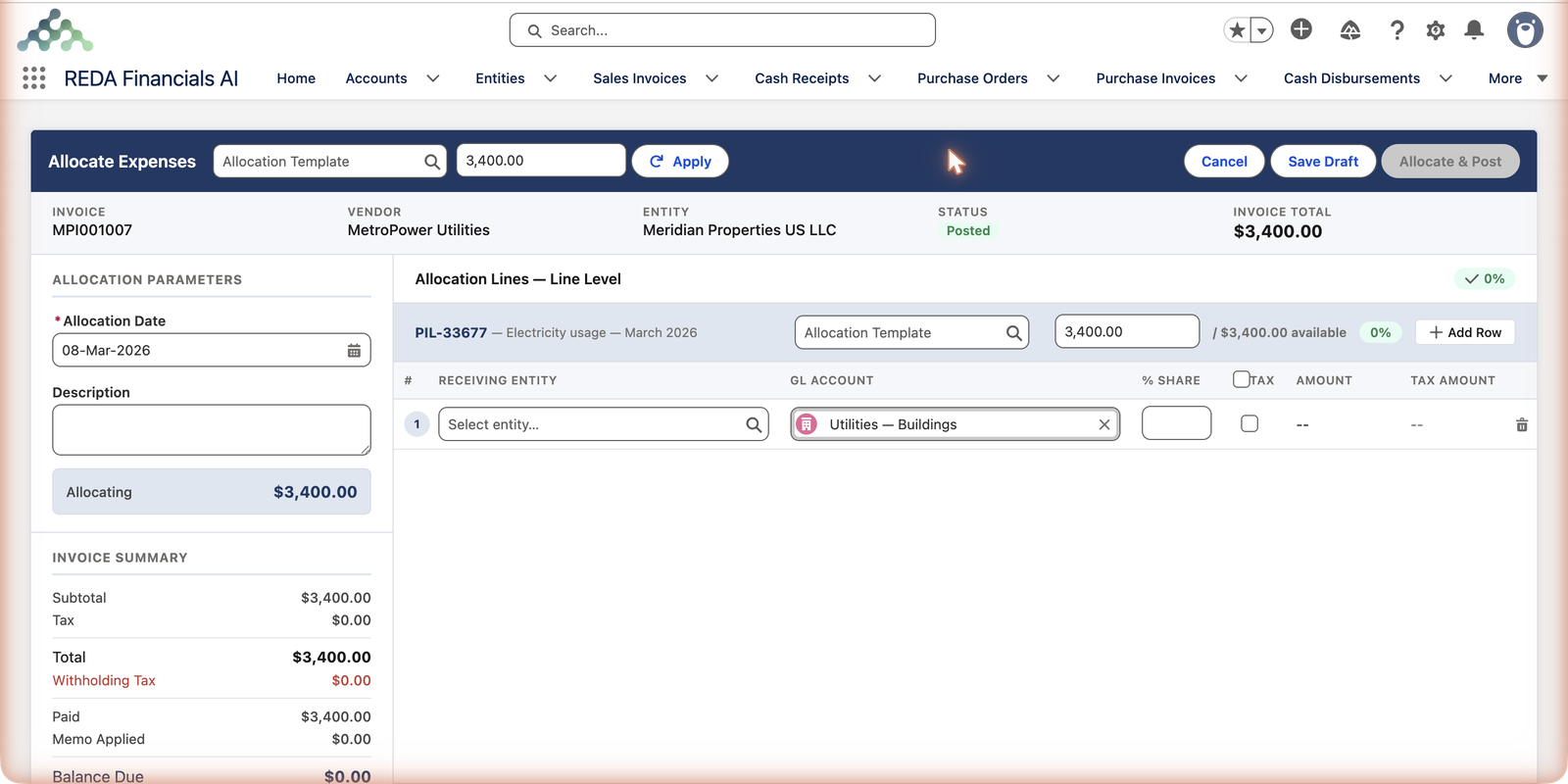
Work at whichever level fits the invoice: header level splits the whole invoice by one set of percentages (they must total exactly 100%); line level gives each invoice line its own split (up to 100% per line — you can deliberately re-home only part of a cost). Percentages, or fixed amounts — the grid accepts both.
The screen, piece by piece
| Control | Required? | What it does |
|---|---|---|
| Allocation Template + Apply | No | Pick a saved Expense Allocation List and Apply — the rows fill with its entities and percentages, ready to adjust |
| Allocation Date | Yes | The accounting date of the reallocation — which period the generated journal entry lands in |
| Description | No | The run's human explanation — "March group insurance split" earns its keep at audit time |
| Receiving Entity (per row) | Yes | Which company takes this share of the cost |
| GL Account (per row) | Pre-filled | Where the share lands in the receiver's books — defaults to the original cost's account; override only when the receiver classifies the cost differently |
| % Share / Amount (per row) | Yes (one of them) | How much moves — type a percentage or a fixed amount; the other calculates |
| Tax checkbox (per row) | No | Whether this entity's share includes its proportion of the line's tax |
| Save Draft / Allocate & Post | — | Draft parks the batch with no accounting effect; Allocate & Post creates the batch and its journal entry in one go |
The rules the screen enforces
| The rule | What it means |
|---|---|
| The invoice must be Posted | Allocation redistributes cost that exists in the ledger — trying earlier gets the exact message "The Purchase Invoice must be Posted before the allocation batch can be posted." |
| Header-level splits total exactly 100% | The whole invoice must be fully spoken for in one set of percentages. |
| Line-level splits stay within 100% per line | Each line's shares can't exceed the line — but they may deliberately total less, leaving the rest home. |
| No over-allocation, ever | Across multiple batches, an invoice line can never give away more than its remaining capacity — the screen shows the available amount and blocks excess. |
What posting the batch does
Suppose Meridian’s US entity paid a $3,400 group insurance bill, and 30% belongs to its UK sister company. Posting that allocation generates one journal entry that does two jobs:
| Account (Entity) | Debit | Credit |
|---|---|---|
| Move the cost… | ||
| Insurance Expense (UK entity) | $1,020 | |
| Insurance Expense (US entity — cost comes back out) | $1,020 | |
| …and record who owes whom | ||
| Intercompany Receivable (US entity) | $1,020 | |
| Intercompany Payable (UK entity) | $1,020 | |
- Each entity’s income statement now shows its true share of the cost.
- The intercompany pair (using each entity’s configured IC accounts) keeps both balance sheets honest — the UK company owes the US company $1,020, visibly.
- The journal entry is marked system-generated, typed Expense Allocation, and linked to the batch — full traceability from invoice → batch → JE → ledger entries.
Corrections
Reopen a posted batch to Draft and its journal entry is removed automatically — adjust the split and post again. Void it (reason required) and the JE is removed permanently, with the batch kept for the audit trail. The original invoice is never touched by any of this.
Common mistakes to avoid
| Mistake | Why it hurts | Do this instead |
|---|---|---|
| Allocating from a draft invoice | There's no cost in the ledger yet to move — the screen refuses | Post the invoice first; allocate second |
| Expecting the receiving entity's AP to change | Allocation moves cost, not the vendor debt — misreading this confuses cash planning | Remember: the paying entity still pays the vendor; the sister owes the paying entity |
| Re-keying the same split every month by hand | Typos change ratios silently; month three won't match month one | Save the split as an Expense Allocation List and Apply it — or automate with auto-allocation |
| Routinely overriding the GL account on rows | The cost lands in different accounts per entity, and consolidated reporting stops lining up | Leave the account pre-filled (same as the original cost) unless the receiver genuinely classifies it differently |
| Fixing a wrong split with a second, opposite batch | Two batches and two JEs now explain one number | Reopen the batch — its JE is removed automatically — fix, and repost |
Where to go next
- Configuring Allocation Rules — build the reusable split templates.
- Running Auto-Allocation — allocate on schedule, hands-free.
- Cross-Entity AP Settlement — when one entity pays another’s bill.
Frequently asked questions
Allocation redistributes cost that exists in the ledger — a draft invoice hasn’t created any yet. Post first; allocate second. (Trying earlier gets you: "The Purchase Invoice must be Posted before the allocation batch can be posted.")
Not through this mechanism — allocation moves cost and records the intercompany balance. Settling that balance in cash (if your group does) is a separate, deliberate step; many groups net intercompany balances periodically instead.
Tick Tax on a row to share that line’s tax proportionally. Whether you should depends on recoverability rules in your jurisdictions — recoverable input tax often stays with the registered entity that can claim it. Ask your tax advisor; the checkbox makes either treatment easy.
You can run multiple batches against one invoice — but never beyond its remaining capacity; the screen shows the available amount per line and blocks over-allocation.
Allocation answers "whose cost is this?" — it moves expense between income statements after one entity was billed. Cross-entity settlement answers "whose cash paid?" — one entity's payment settles another entity's bill. Both write intercompany balances; they solve different problems and often both apply to the same group.
The invoice's Allocations tab lists its batches; each batch links to its generated journal entry (typed Expense Allocation, marked system-generated); and the JE's own entries show every ledger line. Invoice → batch → JE → ledger, fully traceable in either direction.
Was this article helpful?