
PO-to-PI Line Matching
Matching is how REDA Financials makes sure you only pay for what you ordered and received. Every vendor bill that relates to a Purchase Order gets connected to it line by line — and the system checks quantities and prices at every step. This is the classic three-way match (order ↔ receipt ↔ invoice), automated.
Access you'll need. Creating, editing, matching, and posting these requires the Accounts Payable v2 permission set (AP clerks & managers) or Accounting Admin v2 (system administrators). The Accounting Controller v2, Accounts Receivable v2, and Read Only v2 sets can view but not create or post.
What the match protects you from
- Billing for goods that never arrived — an invoice line can never exceed what has been received on the matched PO line.
- Double billing — quantities already invoiced are subtracted; the same delivery can't be billed twice.
- Price creep — the invoice line's unit price must match the PO line's agreed price.
- Silent overcharges — anything beyond your entity's allowed tolerance (the PO Over-Invoice Tolerance %) is blocked, not just flagged.
The lobby renovation, continued
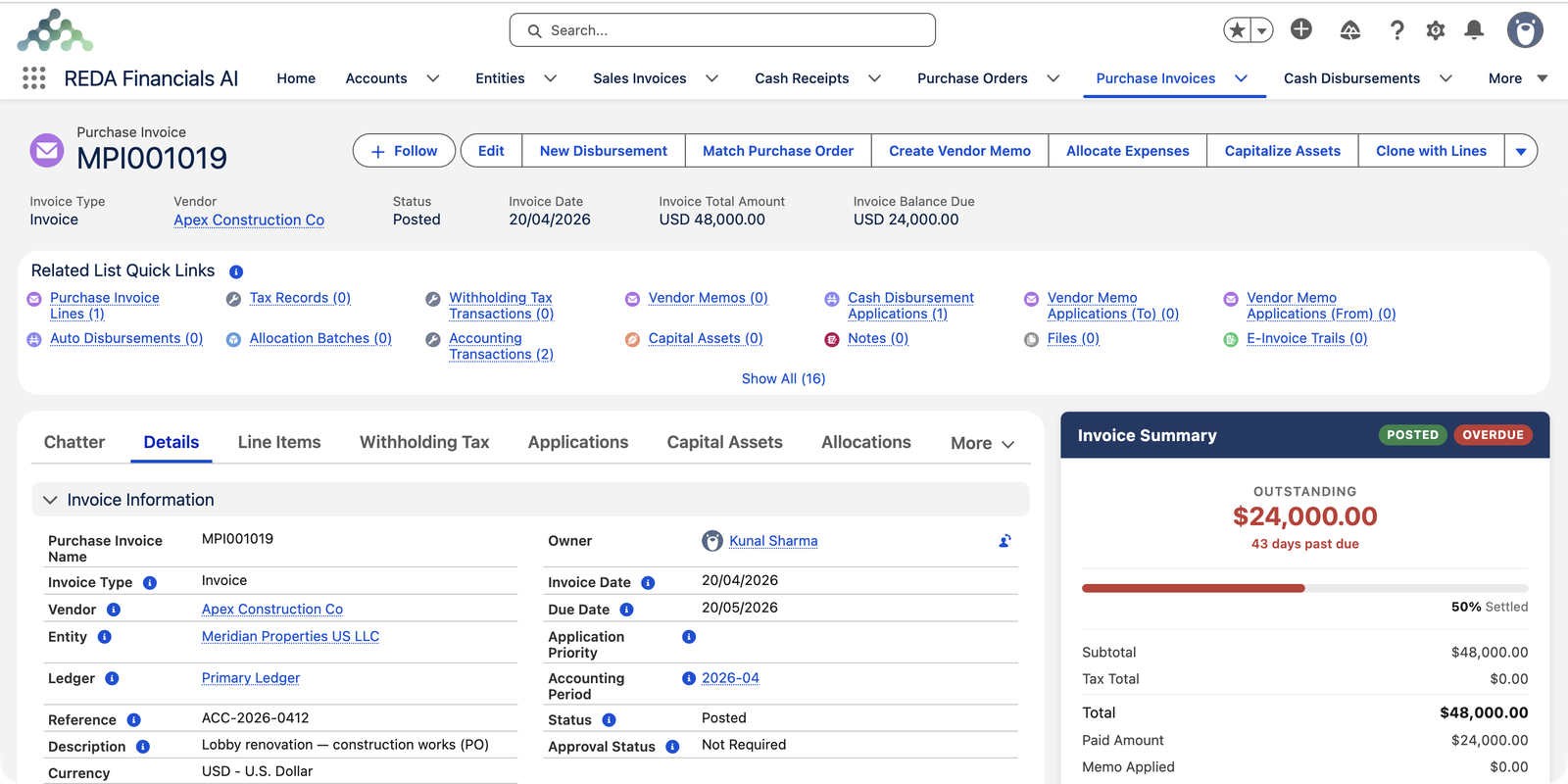
Meridian's PO to Apex Construction Co committed $68,000 across two lines (construction $48,000; equipment $20,000). After the work was delivered and received, Apex sent its first bill — for the construction only. Meridian entered it as invoice ACC-2026-0412 and matched its line to the PO's construction line:
Three ways to match
| Route | How it works | Best when |
|---|---|---|
| Start from the PO | Click New Invoice on the posted PO. REDA Financials creates a bill pre-filled with the vendor and every billable line, already matched. You adjust to what the vendor actually billed and post. | The bill mirrors the order — the common case. See Creating PI from a PO. |
| Match an existing invoice | On the invoice, click Match Purchase Order. Pick the PO, then connect each invoice line to the right PO line and confirm quantities. | The bill was entered first (or arrived via OCR) and needs connecting afterwards. |
| Let the system match | Tick Auto Match PO on the invoice. REDA Financials finds the vendor's open POs and connects lines by product and unit price. If the invoice already names a PO, only that one is used. The checkbox clears itself when matching finishes. | High volumes, consistent products and pricing. |
The rules, precisely
Whichever route you take, the same checks run when lines connect and when the invoice posts:
Quantity ceiling
For each PO line: invoiceable = received − already invoiced. Bill more and you'll see: "Invoice quantity exceeds the remaining quantity on the Purchase Order Line." If the quantity looks wrong, check that receiving was recorded — an unreceived line has an invoiceable quantity of zero.
Price agreement
The invoice line's unit price must equal the PO line's. A vendor billing $130 against a $125 order line doesn't match — you either correct the bill, or consciously change the order (reopen, amend, re-approve).
Same currency
Order and bill must be in the same currency — no silent conversion.
Tolerance for reality
Your entity's PO Over-Invoice Tolerance % allows small overruns (rounding, minor freight) without a fight. Anything above it is blocked.
Budget follows the match
A matched invoice line inherits the PO line's budget link automatically — so when the bill posts, budget committed converts to actual without double-counting. (Dimension checks can also be enforced on the match — the Dimension Match on PO option — if your organization tracks costs that way.)
Watching the match from both sides
- On the PO: Total Invoiced Amount and Total Balance to Invoice update with every match; the Purchase Invoices tab lists every connected bill.
- On the invoice: the matched PO appears on the header, and each line shows the PO line it settles.
The lobby renovation shows the running score — a $68,000 order, billed in slices:
| Moment | Total Invoiced Amount | Total Balance to Invoice |
|---|---|---|
| PO posted — $68,000 ordered, nothing billed yet | $0.00 | $68,000.00 |
| Construction bill MPI001019 ($48,000) matched and posted | $48,000.00 | $20,000.00 |
| Waiting on the equipment bill | $48,000.00 | $20,000.00 |
The messages you may meet
| The message | What it means |
|---|---|
| "Invoice quantity exceeds the remaining quantity on the Purchase Order Line." | You're billing more than has been received and not yet invoiced on that line — record the delivery (Receive Goods on the PO), or check whether an earlier invoice already took part of it. |
| "Cannot modify lines on a non-Draft Purchase Order." | You tried to change a posted order's lines — usually to make a price agree. Reopen the order to Draft, amend, and post again. |
Common mistakes to avoid
| Mistake | Why it hurts | Do this instead |
|---|---|---|
| Entering the bill before the delivery is recorded | The match blocks on quantity; the bill sits in limbo while the vendor waits | Record Receive Goods first, then match |
| Relying on the tolerance to absorb a real price increase | The overrun repeats on every bill, and blocks once it outgrows the tolerance | Amend the order once, properly: reopen, change, re-approve, re-post |
| Adding order-related costs as unmatched extra lines | Unmatched lines skip every check, and the PO's balances never close honestly | Match everything that belongs to the order; keep only true incidentals (like freight) unmatched |
| Connecting a bill line to the wrong PO line | The wrong line's billable quantity is consumed — the right line blocks later | Read line descriptions as you connect each pair; confirm quantities line by line |
Where to go next
- Creating PI from a PO — the one-click route.
- Understanding Purchase Orders — receiving, budget commitment, the full PO story.
- Receiving PO Lines (Assets) — why receiving must come first.
- Posting & Voiding a PI — what happens after the match.
Frequently asked questions
Arrived ≠ received. Matching checks the recorded receipt — open the PO and confirm Receive Goods was completed for that line. If receiving is up to date, check whether an earlier invoice already billed part of the line: the ceiling is received minus already invoiced.
Don't force it through the match. Either have the vendor bill at the agreed PO price, or consciously amend the order: reopen the PO to Draft, update the price (re-approval may apply), post, then match. The audit trail then shows a deliberate change, not a silent overpayment.
Matching works line by line, and an invoice names one Purchase Order on its header. If a vendor sends one bill spanning several orders, the cleanest handling is one invoice per PO — ask the vendor to split, or enter it that way yourself.
Matching only applies when a PO exists. Bills without an order — utilities, subscriptions, ad-hoc services — are entered as ordinary invoices (or Expense invoices) with no matching step. Whether POs are required for certain purchases is your organization's policy, not the system's.
On the entity — the PO Over-Invoice Tolerance % — so it applies consistently to every order that entity raises. Your administrator sets it; a match that exceeds it is blocked, not just flagged.
The matched quantities return to the PO's billable balance, and any budget actual flows back to committed — the order is ready to be billed correctly again. See Posting & Voiding a PI.
Optionally. With the Dimension Match on PO option enabled, the invoice line's dimensions must agree with the matched PO line's — useful when budgets are tracked by department or property. Without it, only quantity, price and currency are enforced.
Was this article helpful?